emsg:was terminated by signal 25

Oracle applications suffer from the above error quite many times (depending upon how frequently the reports.log file reaches 2.0GB) and many important programs like “AutoInvoice Master” and associated ones will tend to complete with error status. This is due to the size limitation set on “reports.log” file by Oracle application architecture.

Please follow the below to address this situation effectively

Applies
to:

Oracle Application Object Library – Version: 12.0.0 to
12.0.6

This problem can occur on any platform.


Symptoms

Problem Statement:

When attempting to run a concurrent program which is
accessing file “reports.log” in directory
$INST_TOP/logs/appl/conc/log then following error occurs:


Error:

emsg:was terminated by signal 25


Step
to Reproduce:

Run a concurrent program which is accessing file
“reports.log” in directory $INST_TOP/logs/appl/conc/log for its
execution.


Cause

File size of “reports.log” has reached its maximum
limit at operating system which is 2GB. If
$INST_TOP/logs/appl/conc/log/reports.log will be huge — 2GB in size, then
reports can not append anything else to it and hence concurrent program
accessing reports.log for its execution will errored out.


Solution

To implement the solution, please execute the following
steps:

1. Stop the concurrent manager.


2. Rename/Truncate existing “reports.log” in directory
$INST_TOP/logs/appl/conc/log/reports.log and create a empty
“reports.log”.


3. Start the concurrent manager.


4. Retest the issue.


5. Migrate the solution as appropriate to other
environments.


Note : Truncation of
file “reports.log” is a regular maintenance work for application
DBA’s. Make sure that reports log file size should not increase its maximum
limit of 2 GB. There is no purge concurrent program to truncate file
“reports.log”. This maintenance needs to be done manually and regularly
depending on number of concurrent program which uses “reports.log”.
You can safely truncate “reports.log”.

for Windows7bugs

Admin


Java security warning “This application requires an older version…”

Try the below to get rid of annoying Java security warnings (As we don’t know what would happen if you would uninstall the older versions which are used by 3rd party applications like Oracle e-business suite,  recommended application installed instead)

This tip was collected from this link

1. Close all browsers;
2. Make sure you are running latest version of Java
(check this via Java Control Panel in Windows Control Panel, or, more simply,
just download latest version from Java.com) (as of today’s date, the latest
version is 1.6.0_13);
3. Open Java Control Panel (via Windows Control
Panel);
4. Go to “Java” tab;
5. Click on “View” in “Java Applet Runtime
Settings” of that tab;
6. Uncheck “Enabled” for every version of Java listed
EXCEPT for the latest version;
7. Click “OK”, etc., and thus close Java
Control Panel;
8. Restart browser(s);
9. Done.

We hope this information is useful for few others out there!

for Windows7bugs

Admin

Oracle Developer 10g 10.1.2.0.2 Crash on Windows 7 while opening forms modules!

We are using Oracle developer 10g, details:

Forms [32 Bit] Version 10.1.2.0.2 (Production)
Oracle Database 10g Enterprise Edition Release 10.2.0.3.0 – 64bit Production
With the Partitioning, OLAP and Data Mining options
Oracle Toolkit Version 10.1.2.0.2 (Production)
PL/SQL Version 10.1.0.4.2 (Production)
Oracle Procedure Builder V10.1.2.0.2 – Production
PL/SQL Editor (c) WinMain Software (www.winmain.com), v1.0 (Production)
Oracle Query Builder 10.1.2.0.2 – Production
Oracle Virtual Graphics System Version 10.1.2.0.2 (Production)
Oracle Tools GUI Utilities Version 10.1.2.0.2 (Production)
Oracle Multimedia Version 10.1.2.0.2 (Production)
Oracle Tools Integration Version 10.1.2.0.2 (Production)
Oracle Tools Common Area Version 10.1.2.0.2
Oracle CORE 10.1.0.4.0 Production

and recently noticed additional crashing behavior on Windows 7 (64Bit) without any apparent reasons. Based on one of our previous posts, after dwelling into possible reasons figured out the following!

Few of the database level procedures were modified with more parameters(IN and OUT) which was causing the developer suite to crash down.

So, prior you make changes to database level procedures or functions, MAKE SURE YOU DO CHANGE THE PROCEDURE/FUNCTION CALLS FROM YOUR FORM MODULES with all new IN and OUT parameters, then proceed with compiling your Procedures and Functions @ database level. If anybody is aware of another method to deal with this situation, please pass the information through comments.

for Windows7bugs,

Admin

Public API driven POS system for Oracle EBS R12 (12.0.4 specific)

Hello guys (and gals)

We are in the process of developing a totally public APIs driven
POS system integration for Oracle EBS R12 (12.0.4 specific) to meet our present
business requirement. We were supported by multiple entities like
forums.oracle.com and ittoolbox.com and we feel it is our commitment towards
the communities to share the knowledge we gathered through last few months.

We tested many APIs, mostly by altering those ones obtained
through multiple blogs, tested them countless times & made them work
through mainly custom forms (developed using Oracle developer 10g) & few
reports. To start with we will be posting the logic, corrected APIs (according
to our specific instance), database level procedures, functions and packages.

So stay tuned, within next few weeks time, we will be releasing
the above mentioned few (other than the original forms and reports) through
most possible means.

for windows7bugs

Admin

Oracle EBS R12 how to call standard API/packages from custom form or reports

Okay guys and gals

We had a requirement to use certain Oracle standard API/packages from custom developer forms. After loads of struggle and asking various Oracle related forums, we hardly had a chance to get any satisfactory answers to our query “how to call oracle standard API or packages through custom forms or reports”

Finally with the help of a long term friend cum technical support person Mr. Anil Menon, we were able to successfully call the standard API or package call with our custom (test) form.

For the example we used “apps.INV_QUANTITY_TREE_PUB.QUERY_QUANTITIES” procedure which indirectly refers fnd_api.g_false and apps.inv_quantity_tree_pub.g_transaction_mode parameters/constants defined in the package definitions.

Actual call to the API through a PL/SQL environment (Toad/Oracle PL/SQL) code is as following

SET SERVEROUTPUT ON;
DECLARE
v_api_return_status VARCHAR2 (1);
v_qty_oh NUMBER;
v_qty_res_oh NUMBER;
v_qty_res NUMBER;
v_qty_sug NUMBER;
v_qty_att NUMBER;
v_qty_atr NUMBER;
v_msg_count NUMBER;
v_msg_data VARCHAR2(1000);
v_inventory_item_id VARCHAR2(250);
v_organization_id VARCHAR2(10);
BEGIN

v_inventory_item_id := 24445;
v_organization_id := 901;

inv_quantity_tree_grp.clear_quantity_cache;
DBMS_OUTPUT.put_line ('Transaction Mode');
DBMS_OUTPUT.put_line ('Onhand For the Item :'|| v_inventory_item_id );
DBMS_OUTPUT.put_line ('Organization :'|| v_organization_id);
apps.INV_QUANTITY_TREE_PUB.QUERY_QUANTITIES
(p_api_version_number => 1.0,
p_init_msg_lst => apps.fnd_api.g_false,
x_return_status => v_api_return_status,
x_msg_count => v_msg_count,
x_msg_data => v_msg_data,
p_organization_id => v_organization_id,
p_inventory_item_id => v_inventory_item_id,
p_tree_mode => apps.inv_quantity_tree_pub.g_transaction_mode,
p_onhand_source => 3,
p_is_revision_control => FALSE,
p_is_lot_control => FALSE,
p_is_serial_control => FALSE,
p_revision => NULL,
p_lot_number => NULL,
p_subinventory_code => 'ABC-01', --NULL for whole org
p_locator_id => NULL,
x_qoh => v_qty_oh,
x_rqoh => v_qty_res_oh,
x_qr => v_qty_res,
x_qs => v_qty_sug,
x_att => v_qty_att,
x_atr => v_qty_atr);
DBMS_OUTPUT.put_line ('on hand Quantity :'|| v_qty_oh);
DBMS_OUTPUT.put_line ('Reservable quantity on hand :'|| v_qty_res_oh);
DBMS_OUTPUT.put_line ('Quantity reserved :'|| v_qty_res);
DBMS_OUTPUT.put_line ('Quantity suggested :'|| v_qty_sug);
DBMS_OUTPUT.put_line ('Quantity Available To Transact :'|| v_qty_att);
DBMS_OUTPUT.put_line ('Quantity Available To Reserve :'|| v_qty_atr);
END;

This PL/SQL procedure will successfully print the results during a PL/SQL session through Toad or Oracle PL/SQL session. However, if you would try to invoke the same code through a PL/SQL procedure from a developer form development instance, the errors will start from the call to “fnd_api.g_false” stating “Implementation restriction: ‘APPS.FND_API.G_FALSE’ cannot directly access remote package variable or cursor. Under the package specification you will find G_FALSE constant has the the value ‘F’ and apps.inv_quantity_tree_pub.g_transaction_mode has a value ‘2’ pre-defined.

Umm, not a straight forward method to dwell the packages, find the constant values and modifying the PL/SQL script. For a small API call like above one, a programmer could use this approach as a work around, however, while dealing with APIs which take 10s of parameters, it could be really tiring.

Here is the workaround we used

Created a custom database level package


CREATE OR REPLACE PACKAGE XX_CHK_QTY IS
PROCEDURE retrive_quantity(item_id NUMBER, org_id NUMBER, subinv VARCHAR2, oqtt OUT NUMBER, oqtr OUT NUMBER);
END;

and created corresponding package body as following


CREATE OR REPLACE PACKAGE BODY XX_CHK_QTY AS
PROCEDURE retrive_quantity(item_id NUMBER, org_id NUMBER, subinv VARCHAR2, oqtt OUT NUMBER, oqtr OUT NUMBER) IS
v_api_return_status  VARCHAR2 (1);
v_qty_oh             NUMBER;
v_qty_res_oh         NUMBER;
v_qty_res            NUMBER;
v_qty_sug            NUMBER;
v_qty_att            NUMBER;
v_qty_atr            NUMBER;
v_msg_count          NUMBER;
v_msg_data           VARCHAR2(1000);
--v_inventory_item_id  VARCHAR2(250);
--v_organization_id    VARCHAR2(10) ;
BEGIN
inv_quantity_tree_grp.clear_quantity_cache;
apps.INV_QUANTITY_TREE_PUB.QUERY_QUANTITIES
(p_api_version_number  => 1.0,
p_init_msg_lst        => apps.fnd_api.g_false,
--p_init_msg_lst        => 'F',
x_return_status       => v_api_return_status,
x_msg_count           => v_msg_count,
x_msg_data            => v_msg_data,
p_organization_id     => org_id, --v_organization_id,
p_inventory_item_id   => item_id, --v_inventory_item_id,
p_tree_mode           => apps.inv_quantity_tree_pub.g_transaction_mode,
--p_tree_mode           => 2,
p_onhand_source       => 3,
p_is_revision_control => FALSE,
p_is_lot_control      => FALSE,
p_is_serial_control   => FALSE,
p_revision            => NULL,
p_lot_number          => NULL,
p_subinventory_code   => subinv,
p_locator_id          => NULL,
x_qoh                 => v_qty_oh,
x_rqoh                => v_qty_res_oh,
x_qr                  => v_qty_res,
x_qs                  => v_qty_sug,
x_att                 => v_qty_att,
x_atr                 => v_qty_atr);
oqtt := v_qty_att;
oqtr := v_qty_atr;
END;
END XX_CHK_QTY;


As you could see we are using 2 numbers of OUT variables to store the output data, which will be referred in the forms at later stages.

Our sample form has a control block and 3 items

:ITEM_ID, :QTY_AVL_TRANSACT,:QTY_AVL_RESERVE and under the WVI(WHEN-VALIDATE-ITEM) scope for the block item :ITEM_ID  we wanted to populate total quantity available to transact and total quantity available to reserve into block items :QTY_AVL_TRANSACT,:QTY_AVL_RESERVE

Following is how we call the custom procedure through WVI trigger:

Declare
oqtt number := 0;
oqtr number := 0;
Begin
apps.XX_CHK_QTY.retrive_quantity(:CTRL.ITEM_ID,901,’ABC-01′,oqtt,oqtr);
:CTRL.QTY_AVL_TRANSACT := oqtt;
:CTRL.QTY_AVL_RESERVE := oqtr;
End;

and bingo! as the procedure was called from a database package, there were no compilation errors pointing towards referring remote variables or cursors and once executed all intended results were fetched to corresponding block items.

As we are also learning how to use Oracle APIs within custom forms/reports, we hope this guideline would be useful for those few who are trying to find a way to start calling Oracle’s standard API/packages from such environments.

for Windows7bugs

Admin

Oracle WHEN-VALIDATE-ITEM trigger go_item, go_block navigation using WHEN-TIMER-EXPIRED trigger

Update

You can streamline the entire experience with following simplified WHEN-TIMER-EXPIRED code

Begin

if GET_APPLICATION_PROPERTY(T IMER_NAME) = 'MY_TIMER' then
GO_BLOCK('YOUR_BLOCK_NAME'); Execute_Query(NO_VALIDATE); 
end if;

and change your WHEN-VALIDATE-ITEM trigger coding as following

DECLARE 
t_id TIMER; 
Begin
/* Do all your validations here, raise form failure trigger etc until the entered data is satisfying the requirements*/ 
t_id := CREATE_TIMER('MY_TIMER',1,NO_REPEAT); 
End;

This will create & expire the timer as soon as the validations completed and WHEN-TIMER-EXPIRED trigger @ form level will check the expired timer name and process the instructions..

 Note: Infrastructure (Windows 7 64bit professional, Oracle developer 6i 32bit (6.0.8.27.0), Database 11g Enterprise

Source/Cause for this thread: click here

If you are Oracle developer, the most perplexing requirement would be populating a dataset within a second block once after an item validated using restricted trigger ‘WHEN-VALIDATE-ITEM’. By default ‘WHEN-VALIDATE-ITEM’ doesn’t allow calling restricted procedure calls like ‘GO_ITEM’, ‘GO_BLOCK’ and many others.

However, there are certain workarounds. A developer may use WHEN-TIMER-EXPIRED trigger to navigate away from the items which was just validated using ‘WHEN-VALIDATE-ITEM’ trigger.

Alter your WHEN-VALIDATE-ITEM as following:

DECLARE
t_id TIMER;
Begin
/* Do all your validations here, raise form failure trigger etc until the entered data is satisfying the requirements*/
t_id := CREATE_TIMER('QRY_BLOCK',1,REPEAT);
End;

Add the following to your WHEN-TIMER-EXPIRED trigger @ form level.

Declare
t_id TIMER;
Begin
t_id := find_timer('QRY_BLOCK');
IF NOT ID_NULL(t_id) then
GO_BLOCK('YOUR_BLOCK_NAME');
Execute_Query(NO_VALIDATE); -- Example
DELETE_TIMER('QRY_BLOCK'); -- Deleting the timer as we don't require it any further until the item fires WHEN-VALIDATE-ITEM trigger once again.
END IF;/* Check whether the timer is still alive
for testing purpose only
*/
t_id := find_timer('QRY_BLOCK');
IF ID_NULL(t_id) then
message('TIMER ALREADY DELETED');
end if;
End;


Hope this example is useful for budding Oracle developers.

For Windows7bugs,

Admin

Actual scripting by OTN Guru Craig is as following and he suggests the code runs perfectly under certified environments.

” The best place would be the Item When-Validate-Item (WVI) trigger but you will need to create a timer in your WVI code in or der to execute the Restricted Built-in since the WVI trigger only allows SQL and Unrestricted built-ins. You will also need to create a Form level When-Timer-Expired (WTE) trigger.”

For example:

/* Add this code to your WVI trigger */
DECLARE
t_id    TIMER;
BEGIN
/* Perform your validate here */
t_id := Create_Timer('QRY_BLOCK',1,NO_REPEAT);
END;

/* Sample code for your WTE trigger */

DECLARE
t_id    TIMER;
BEGIN
t_id := Find_Timer('QRY_BLOCK');
IF NOT ID_NULL(t_id) THEN
-- Timer Found
GO_BLOCK('YOUR_BLOCK_NAME');
Execute_Query;
END IF;
END;

Testing Oracle 10g developer forms locally (On Windows 7)

Okay guys, another post after another break :) This time we are going to figure out how to test your Oracle 10g developer forms locally. Until recent comments we were not knowing that fellow folks were having issues running developer 10g forms locally on Windows 7 machines. Okay here we go
Step 1
Install the latest java run time from here and make sure you are installing 32bit. Usually java 32bit gets installed under this path “C:\Program Files (x86)\Java\jre6”
Following is test environment

OS: Windows 7 64bit Professional Editions, 3GB Mem
10g Developer: Forms [32 Bit] Version 10.1.2.0.2 (Production)
Database: Oracle Database 10g Enterprise Edition Release 10.2.0.3.0 - Production

Usually when you try to run a form locally for the first time after starting the OC4J instance, an older version of java initiator is installed in your system. I don’t quite remember whether the installation offers any kind of customization so that the end user could change the path or other options. I won’t recommend one either!
If you have done a standard installation, the java initiator should get installed on this path “C:\Program Files (x86)\Oracle\JInitiator 1.3.1.22”.

Step 2

In order to let Developer 10g forms run locally you need to change the jvm.dll file found under “C:\Program Files (x86)\Oracle\JInitiator 1.3.1.22\bin\hotspot” with a most recent one. As we installed the latest java run time 32bit in “Step 1”, browse to the following folder “C:\Program Files (x86)\Java\jre6\bin\client” copy the jvm.dll which is above 2MB in size, and go back to folder “C:\Program Files (x86)\Oracle\JInitiator 1.3.1.22\bin\hotspot”

Now paste the new jvm.dll file inside this folder and try to run the forms again! It should work now!

Simple batch file for Oracle database backup

Hi guys
We are too busy now days. Issues @work keeping us working around the clock and giving us hardly any time to update this blog. Quite recently, we decided to expand this forum with more Oracle technology related posts, as we realize, we get maximum traffic towards the posts related to Oracle.

To begin with, we are providing a simple script for exporting the entire database using “system” user today for Microsoft Windows based implementation. This batch file exports a .dmp file to a user specified directory.

FOR /F "tokens=2-4 delims=/ " %%a IN ('date/t') DO exp system/password@connectionstring full = y file=d:\backup\exp_%%b%%a%%c.dmp

Save this script inside a .bat or .cmd file (eg: myorabackupdaily.bat or myorabackupdaily.cmd). An Administrator can easily create a scheduled job to insure that the batch file runs everyday at a particular time. Preferably during nights while transactions are none or less. Particularly, there is no need to shutdown the database in order to facilitate the export.

Once exported to .dmp file, it should bear a nomenclature as following:
exp_22012011.dmp

exp -> Export
22012011-> Date stamp

hope this article/ batch file is useful for few out there.

For Windows7bugs,

Admin

Oralce apps reports, instance producing gibberish character mapping

We are @ the final stage of implementing Oracle e-business suit 12 and recently came across a peculiar font mapping problem with custom developed reports. We use both Developer 6i reports developer as well as 10g reports developer.
Once the reports are tested and uploaded to the apps instance, the outputs were always producing gibrish (PDF outputs especially). However after few days of experimenting, finally we found a work around (hopefully)!

Following are the tips:

Design your report, test it.
Do not change the default font until your report is ready to upload to the instance.

Now decide the actual font you need to use with your final report.
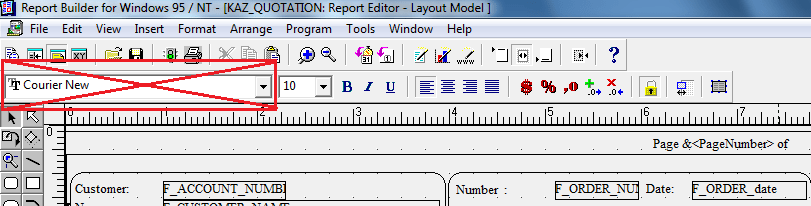
And never select the font from the font list drop down, check the image:

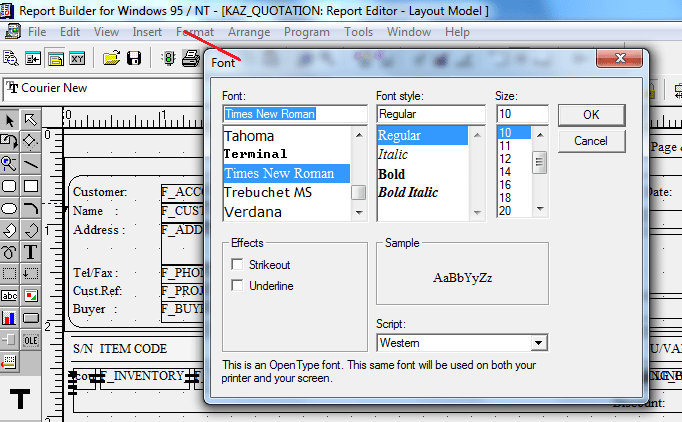
Instead click on format menu item, select “font” and choose your font. Generally we use Courier New or Times New Roman (Western) for our reports and this method has solved our months long troubles with the reports. Please check the attached image:

When you need to change the font sizing and weight for individual items, follow the same method and once you are satisfied with the layout upload to the apps instance.
We hope this work around is helpful for few out there.

Windows7bugs team