Update: We just noticed, [default] section change what we mentioned with this post works with almost all 1.6.0.xx JRE versions. Firefox 10.0.2(<== WTF it is btw) doesn’t load java plug-in, while Google Chrome works excellent with this workaround method.
An excellent article explaining more about setting up local testing could be found here
As a leaner/student one has to configure Developer suite 10g to run forms and reports locally prior porting the locally developed applications to Oracle application Server (OAS)
In addition to providing workaround solutions for installing Oracle Developer Suite 10g on Windows 7 machines, we are providing additional information how to test the forms modules locally with this post. Prior copying the below instructions please make sure
- · You already installed Developer 10g (Tested version Forms [32 Bit] Version 10.1.2.0.2 (Production))
- · Java Run Time
- ·

- · TNS Entries properly configured and connections tested.
Unfortunately, Windows 7 doesn’t work with Jinitiator and there are multiple solutions provided to “get jinitiator” work with Windows 7. However this post is solely dealing with JRE instead of jinitiator to test the forms locally.
Hence, you need to change few parameters with formsweb.cgf file (open with notepad, notepad++ or alternative text editor). Location of this file is usually Driverletter:\ DevSuiteHome_1\forms\server (incase if you selected default location for installing the product)
Now locate the following string “[default]”
And you should find the following entries
#[default]
# System parameter: default base HTML file
baseHTML=base.htm
# System parameter: base HTML file for use with JInitiator client
baseHTMLjinitiator=basejini.htm
# System parameter: base HTML file for use with Sun’s Java Plug-In
baseHTMLjpi=basejpi.htm
# System parameter: delimiter for parameters in the base HTML files
HTMLdelimiter=%
# System parameter: working directory for Forms runtime processes
# WorkingDirectory defaults to <oracle_home>/forms if unset.
workingDirectory=
# System parameter: file setting environment variables for the Forms runtime processes
envFile=default.env
We need to edit [default] area first, as following
#[default]
# System parameter: default base HTML file
#baseHTML=base.htm
# System parameter: base HTML file for use with JInitiator client
#baseHTMLjinitiator=basejini.htm
# System parameter: base HTML file for use with Sun’s Java Plug-In
#baseHTMLjpi=basejpi.htm
# System parameter: delimiter for parameters in the base HTML files
#HTMLdelimiter=%
# System parameter: working directory for Forms runtime processes
# WorkingDirectory defaults to <oracle_home>/forms if unset.
#workingDirectory=
# System parameter: file setting environment variables for the Forms runtime processes
#envFile=default.env
Thus commenting all parameters
Now replace the [default] segment with following entries. As you already have JRE installed, just change few values according to the java –version command returned values
[default]
jpi_download_page=http://www.oracle.com/technetwork/java/javase/downloads/index.html
jpi_classid=clsid:CAFEEFAC-0016-0000-0027-ABCDEFFEDCBA
jpi_codebase=http://java.sun.com/update/1.6.0/jinstall-6-windows-i586.cab#Version=1,6,0,27
jpi_mimetype=application/x-java-applet
#;jpi-version=1.6.0_27 so that firefox would load JRE!
baseHTMLjinitiator=basejpi.htm
HTMLdelimiter=%
#Please note the / (forward slash) used with workingDirectory parameter. If you have more #than one directory with .fmx files, add them separated by ‘;’
workingDirectory=E:/10gTESTForms; D:/OrderManagement
envFile=default.env
Now start “Start OC4J Instance” from

During the first initialization it make take few minutes until the OC4J instance get setup on your computer. Please accept all firewall prompts and if required allow the instance to connect to local networks
If you are not behind ISA firewall or not using personal firewalls, you can try to run the form modules from the forms designer console or by entering the url into INTERNET EXPLORER as following
http://localhost:8889/forms/frmservlet?config=scott
8889 is the default listening port for OAS component on client machine (unless changed manually during installation or other methods)
Config=scott explanation
You can create multiple configuration set for your test applications with formsweb.cfg file, which will eliminate the need to expose userid, password or connection string details to end user, an example as following
#Custom config for SCOTT application
[scott]
separateFrame=false
lookandfeel=oracle
userid=scott/tiger@test
form=10g_test
By calling the application as below
http://localhost:8889/forms/frmservlet?config=scott
checks for following details within [scott] configuration set
user id, password, connection string, look and feel, determines whether the forms session should load the java console in a separate windows etc.
Further you can tell whether you want to use generic, oracle, … (themes)
Which should be something like
http://localhost:8889/forms/frmservlet?form=10g_test&userid=scott/tiger@test&….
Successful JRE load
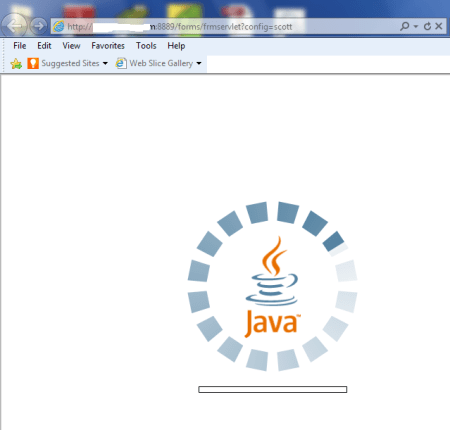
 Our formsweb.cfg file looks like following:
# $Id: formsweb.cfg 15-apr-2005.13:17:30 pkuhn Exp $
# formsweb.cfg defines parameter values used by the FormsServlet (frmservlet)
# This section defines the Default settings. Any of them may be overridden in the
# following Named Configuration sections. If they are not overridden, then the
# values here will be used.
# The default settings comprise two types of parameters: System parameters,
# which cannot be overridden in the URL, and User Parameters, which can.
# Parameters which are not marked as System parameters are User parameters.
# SYSTEM PARAMETERS
# —————–
# These have fixed names and give information required by the Forms
# Servlet in order to function. They cannot be specified in the URL query
# string. But they can be overridden in a named configuration (see below).
# Some parameters specify file names: if the full path is not given,
# they are assumed to be in the same directory as this file. If a path
# is given, then it should be a physical path, not a URL.
# USER PARAMETERS
# —————
# These match variables (e.g. %form%) in the baseHTML file. Their values
# may be overridden by specifying them in the URL query string
# (e.g. “http://myhost.mydomain.com/forms/frmservlet?form=myform&width=700″)
# or by overriding them in a specific, named configuration (see below)
#[default]
# System parameter: default base HTML file
#baseHTML=base.htm
# System parameter: base HTML file for use with JInitiator client
#baseHTMLjinitiator=basejini.htm
# System parameter: base HTML file for use with Sun’s Java Plug-In
#baseHTMLjpi=basejpi.htm
# System parameter: delimiter for parameters in the base HTML files
#HTMLdelimiter=%
# System parameter: working directory for Forms runtime processes
# WorkingDirectory defaults to <oracle_home>/forms if unset.
#workingDirectory=E:/ERP-Inhouse Developments/SCM
# System parameter: file setting environment variables for the Forms runtime processes
#envFile=default.env
[default]
jpi_download_page=http://www.oracle.com/technetwork/java/javase/downloads/index.html
jpi_classid=clsid:CAFEEFAC-0016-0000-0027-ABCDEFFEDCBA
jpi_codebase=http://java.sun.com/update/1.6.0/jinstall-6-windows-i586.cab#Version=1,6,0,27
jpi_mimetype=application/x-java-applet;jpi-version=1.6.0_27
baseHTMLjinitiator=basejpi.htm
HTMLdelimiter=%
workingDirectory=E:/ERP-Inhouse Developments/SCM
envFile=default.env
# Forms runtime argument: whether to escape certain special characters
# in values extracted from the URL for other runtime arguments
escapeparams=true
# Forms runtime argument: which form module to run
form=test.fmx
# Forms runtime argument: database connection details
userid=
# Forms runtime argument: whether to run in debug mode
debug=no
# Forms runtime argument: host for debugging
host=
# Forms runtime argument: port for debugging
port=
# Other Forms runtime arguments: grouped together as one parameter.
# These settings support running and debugging a form from the Builder:
otherparams=buffer_records=%buffer% debug_messages=%debug_messages% array=%array% obr=%obr% query_only=%query_only% quiet=%quiet% render=%render% record=
%record% tracegroup=%tracegroup% log=%log% term=%term%
# Sub argument for otherparams
buffer=no
# Sub argument for otherparams
debug_messages=no
# Sub argument for otherparams
array=no
# Sub argument for otherparams
obr=no
# Sub argument for otherparams
query_only=no
# Sub argument for otherparams
quiet=yes
# Sub argument for otherparams
render=no
# Sub argument for otherparams
record=
# Sub argument for otherparams
tracegroup=
# Sub argument for otherparams
log=
# Sub argument for otherparams
term=
# HTML page title
pageTitle=Oracle Application Server Forms Services
# HTML attributes for the BODY tag
HTMLbodyAttrs=
# HTML to add before the form
HTMLbeforeForm=
# HTML to add after the form
HTMLafterForm=
# Forms applet parameter: URL path to Forms ListenerServlet
serverURL=/forms/lservlet
# Forms applet parameter
codebase=/forms/java
# Forms applet parameter
imageBase=DocumentBase
# Forms applet parameter
width=750
# Forms applet parameter
height=600
# Forms applet parameter
#separateFrame=false
separateFrame=true
# Forms applet parameter
splashScreen=
# Forms applet parameter
background=
# Forms applet parameter
lookAndFeel=Oracle
# Forms applet parameter
colorScheme=teal
# Forms applet parameter
logo=
# Forms applet parameter
restrictedURLparams=HTMLbodyAttrs,HTMLbeforeForm,pageTitle,HTMLafterForm,log,allow_debug,allowNewConnections
# Forms applet parameter
formsMessageListener=
# Forms applet parameter
recordFileName=
# Forms applet parameter
serverApp=default
# Forms applet archive setting for JInitiator
archive_jini=frmall_jinit.jar
# Forms applet archive setting for other clients (Sun Java Plugin, Appletviewer, etc)
archive=frmall.jar
# Number of times client should retry if a network failure occurs. You should
# only change this after reading the documentation.
networkRetries=0
# EM config parameter
# Set this to “1” to enable Enterprise Manager to track Forms processes
em_mode=0
# Single Sign-On OID configuration parameter
oid_formsid=%OID_FORMSID%
# Single Sign-On OID configuration parameter
oracle_home=E:\DevSuiteHome_1
# Single Sign-On OID configuration parameter
formsid_group_dn=%GROUP_DN%
# Single Sign-On OID configuration parameter: indicates whether we allow
# dynamic resource creation if the resource is not yet created in the OID.
ssoDynamicResourceCreate=true
# Single Sign-On parameter: URL to redirect to if ssoDynamicResourceCreate=false
ssoErrorUrl=
# Single Sign-On parameter: Cancel URL for the dynamic resource creation DAS page.
ssoCancelUrl=
# Single Sign-On parameter: indicates whether the url is protected in which
# case mod_osso will be given control for authentication or continue in
# the FormsServlet if not. It is false by default. Set it to true in an
# application-specific section to enable Single Sign-On for that application.
ssoMode=false
# The parameter allow_debug determines whether debugging is permitted.
# Administrators should set allow_debug to “true” if servlet
# debugging is required, or to provide access to the Forms Trace Xlate utility.
# Otherwise these activities will not be allowed (for security reasons).
allow_debug=false
# Parameter which determines whether new Forms sessions are allowed.
# This is also read by the Forms EM Overview page to show the
# current Forms status.
allowNewConnections=true
# EndUserMonitoring
# EndUserMonitoringEnabled parameter
# Indicates whether EUM/Chronos integration is enabled
EndUserMonitoringEnabled=
# EndUserMonitoringURL
# indicates where to record EUM/Chronos data
EndUserMonitoringURL=
# Example Named Configuration Section
# Example 1: configuration to run forms in a separate browser window with
# “generic” look and feel (include “config=sepwin” in the URL)
# You may define your own specific, named configurations (sets of parameters)
# by adding special sections as illustrated in the following examples.
# Note that you need only specify the parameters you want to change. The
# default values (defined above) will be used for all other parameters.
# Use of a specific configuration can be requested by including the text
# “config=<your_config_name>” in the query string of the URL used to run
# a form. For example, to use the sepwin configuration, your could issue
# a URL like “http://myhost.mydomain.com/forms/frmservlet?config=sepwin”.
[sepwin]
separateFrame=True
lookandfeel=Generic
#Custom config for SCOTT application
[scott]
separateFrame=false
lookandfeel=oracle
userid=scott/tiger@test
form=10g_test
# Example Named Configuration Section
# Example 2: configuration forcing use of the Java Plugin in all cases (even if
# the client browser is on Windows)
[jpi]
baseHTMLJInitiator=basejpi.htm
# Example Named Configuration Section
# Example 3: configuration running the Forms ListenerServlet in debug mode
# (debug messages will be written to the servlet engine’s log file).
[debug]
serverURL=/forms/lservlet/debug
# Sample configuration for deploying WebUtil. Note that WebUtil is shipped with
# DS but not AS and is also available for download from OTN.
[webutil]
WebUtilArchive=frmwebutil.jar,jacob.jar
WebUtilLogging=off
WebUtilLoggingDetail=normal
WebUtilErrorMode=Alert
WebUtilDispatchMonitorInterval=5
WebUtilTrustInternal=true
WebUtilMaxTransferSize=16384
baseHTMLjinitiator=webutiljini.htm
baseHTMLjpi=webutiljpi.htm
archive_jini=frmall_jinit.jar
archive=frmall.jar
lookAndFeel=oracle
We truly hope this post helps the beginners, intermediates to test 10g forms locally using Java Run Time instead of Jinitiator!
Regards,
Admin
(We thank forums.oracle.com & hundreds of Oracle enthusiastic developers who spent time to figure out a “how to” for this particular scenario)








 )