Windows 7 64bit, Classic ASP, Visual Studio connection to Oracle Database

References

26.12.2013 Update

We realized, over a 64bit OS you may need to change the default application pool to accommodate 32bit applications. Please refer to this post

https://help.webcontrolcenter.com/KB/a1114/how-to-enable-32-bit-application-pool-iis-7-dedicatedvps.aspx


http://www.connectionstrings.com/

http://stackoverflow.com/questions/234657/binding-asp-net-gridview-to-an-oracle-sys-refcursor

So, you are still using classic ASP or develop 32bit .NET applications using Visual Studio and Oracle databases on a Windows 7 64bit box and completely lost as connection cannot be established?

Here are few workaround solutions

Install the latest Oracle clients (both 64bit and 32bit)

If you installed Oracle client in the following folders (example)

D:\app\yourusername\product

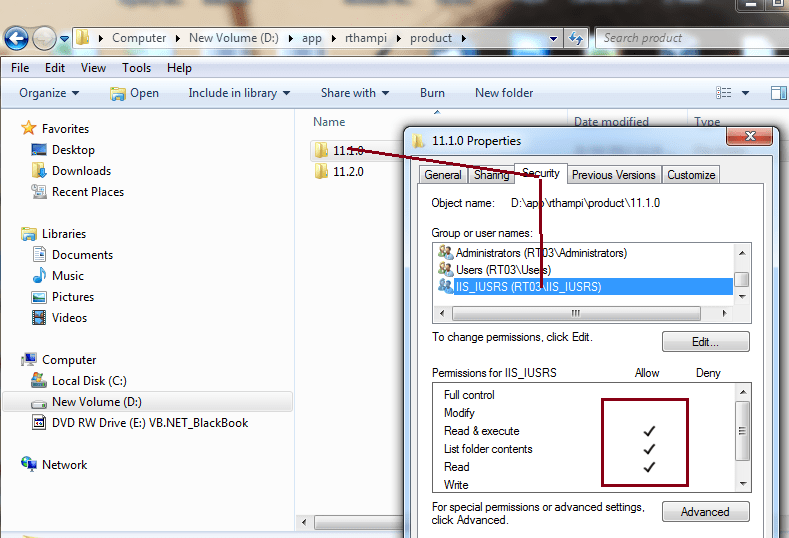
right click on the folder, under security tab check whether authenticated users have read privileges.

If not, provide the basic privileges (Read & Execute, list folder contents, Read) Refer the image

image

Now add the user “IIS_ISURS” user and provide the same rights mentioned above

RESTART your Windows 7 “64bit” box now!

You can establish the connection from classic ASP like following

<%
    Dim adoCon                'Holds Connection
    Dim rsViewRecords        'Holds Recordset

    Set adoCon = Server.CreateObject("ADODB.Connection")
    if Err.Number <> 0 then 
        Response.Clear() 
        response.Write "<hr>ORASESSION Error<br>" & err.number & "  --  " & err.Description & "<hr>"
        response.End
    end if 

    adoCon.Open "provider=oraoledb.oracle;data source=test;user id=apps;password=apps;plsqlrset=true"

    Set rsViewRecords = Server.CreateObject("ADODB.Recordset")

    %>


Regards,

Admin

Windows 7 64Bit, Oracle Database access from Classic ASP

Step 1: Install Oracle Client 64bit, the latest version (Solution intended for those who are already on 10g or above)

Step 2: If your connection call is not something like following, change it to

<% 
Dim adoCon                'Holds Connection
Dim rsViewRecords         'Holds Record Set

' Initiate connection

Set adoCon = Server.CreateObject("ADODB.Connection")

' Checking whether an exception raised during the Server Create Object call

if Err.Number <> 0 then 
Response.Clear() 
response.Write "<hr>ORASESSION Error<br>" & err.number & "  --  " & err.Description & "<hr>"
response.End
else
response.Write "Session created"
end if 

adoCon.Open "provider=oraoledb.oracle;data source=orcl;user id=scott;password=tiger;plsqlrset=true"
Set rsViewRecords = Server.CreateObject("ADODB.Recordset")

' Your other stuff goes here

    %>


That’s all guys

regards,

Admin

Oracle send mail using UTL_SMTP (to multiple parties Cc)

declare
v_From      VARCHAR2(80) := 'abc@xyz.com';
v_Recipient VARCHAR2(80) := 'xyz@xyz.com';
v_Subject   VARCHAR2(80) := 'Checking Cc';
v_Mail_Host VARCHAR2(50) := 'mail.xyz.com';
v_Mail_Conn utl_smtp.Connection;

name_array   DBMS_SQL.varchar2_table;

crlf        VARCHAR2(2)  := chr(13)||chr(10);
CC_parties varchar2(2000);

begin

--populate from table-Cc parties
name_array(1) :=  'def@xyz.com';
name_array(2) :=  'jkl@xyz.com';
name_array(3) :=  'elg@xyz.com';

v_Mail_Conn := utl_smtp.Open_Connection(v_Mail_Host, 25);
utl_smtp.Helo(v_Mail_Conn, v_Mail_Host);
utl_smtp.Mail(v_Mail_Conn, v_From);


utl_smtp.Rcpt(v_Mail_Conn, v_Recipient);
FOR i IN name_array.FIRST .. name_array.LAST
LOOP
CC_parties := CC_parties||';'|| name_array(i);
utl_smtp.Rcpt(v_Mail_Conn, name_array(i));
END LOOP;

utl_smtp.Data(v_Mail_Conn,
'Date: '   || to_char(sysdate, 'Dy, DD Mon YYYY hh24:mi:ss') || crlf ||
'From: '   || v_From || crlf ||
'Subject: '|| v_Subject || crlf ||
'To: '     || v_Recipient || crlf ||
'Cc: '     || CC_parties|| crlf ||
'Content-Type: text/html;' ||crlf ||
'New Mail from Procedure');
utl_smtp.Quit(v_mail_conn);
end;

Recvd_Mail

(Edited Image)

Hope you enjoy this.

Regards,

Admin

Install Oracle Developer Suite 6i (Patch 18) on Windows 8

A lot of happy news for Oracle enthusiasts! You can even install Oracle Developer Suite 6i following the same trick we provided for Windows 7. Please refer the attached images

http://simpleoracle.com/2010/03/01/installing-oracle-developer-forms-reports-6i-on-windows-7-64bit/

Forms Installation

image

image

Reports Installation

image

image

Patch 18 Installation

image

Trying to execute a form without .dll patching

image

Nothing happens!

trying the same form after replacing the .dll files with “patched” ones

image

that’s it.

Enjoy guys!

Regards,

Admin

Oracle E-Business Suite 12.1.3 Templates, Deploying over VirtualBox using Oracle VM Server & VM Manager


When we decided to launch this blog, we made a promise to ourselves that we will never cut and copy something from a webpage or blog unless we try it out and make sure that, whatever we post here will be 100% tried out solution.

So guys, here we are once again, proving many geeks wrong and virtualizing the virtualization and bringing up Oracle 12.1.3 Vision instance, using Oracle VirtualBox!

Everything

We will publish a whitepaper towards setting up the entire exercises involved in setting up the entire stuff in coming days, sure guys it is bit too much and we need time to put everything in proper places! So stay tuned

follow @w7bugs on twitter. We will post the developments with the documentation(s)

Regards,

Admin

Oracle VM Templates, Are you sure you want to try them?


I have a application DBA friend who is good, knows his stuff and agreed to setup my home desktop machine with Oracle E-Business Suite R12 12.0.4 for certain kind of researches, even though I have access to three test instances at work!

After spending almost three years developing Oracle E-Business custom applications and reports, I just finished a full functional training on module Supply Chain Management from Oracle university, and I came across “Oracle VM Templates”, great, my life was just beautiful until

To run a vision instance all you need is 4GB of spare memory, 500GB storage, VirtualBox and Oracle Enterprise linux. Almost everything here other than the hardware part is free(?) to certain extends, I should had gone for it, instead I opted Oracle VM templates

Now, I needed to download around 37Gb (I already have Oracle supplied DVDs for R12 12.0.3, both 32/64bit) of template files, which come in .zip format. I need Linux environment to join them, OH YES, Oracle documentation for the same is great, provided you are BLIND

Now to use the downloaded templates (which are bundles of application and database tier, pre-configured and expected to run over virtual machines) I need Oracle VM server and Oracle VM Manager which runs only from linux environment (heh, did I say Oracle Linux Only?)

So in total I need 2 numbers of servers, ie, I run two virtual machines using VirtualBox, 1st one is used for a bare metal installation of Oracle VM server, Second is for Oracle Enterprise Linux, on top of which I  install Oracle VM Manager)

Ah, forgot to mention, I need two NICs to balance the network load, ie, my hopes to try out the VM templates from company provided hi-end laptop has just started fading….not entirely yet, though

So the story is becoming interesting, ain’t it? We will expand the story as much possible in coming days, until then, please share our joy, we just got our first hundred thousand hits…


for Windows7bugs

Admin

Oracle Descriptive flexfields, hands-on training


(This document was prepared from a blog/website entry and unfortunately the actual link was not copied while we made a local document, if you are the original author of this article, please contact us and we will add the document credits to you)


A training article on Descriptive flexfields, also refered as DFF

First some basic Question and answers, and then we will do screenshots detailing how flexfields are configured.
Question: What does DFF mean?
Answer: DFF is a mechanism that lets us create new fields in screens that are delivered by Oracle.
Question: Oh good, but can these new fields be added without modifying/customization of the screen?.
Answer: Yes, certainly. Only some setup is needed, but no programmatic change is needed to setup DFF.
Question: Why the word Descriptive in Name DFF?
Answer: I think Oracle used this terminology because by means of setup…you are describing the structure of these new fields. Or may be Oracle simply used a silly word to distinguish DFF from KFF(discussed in latter training lesson).
Question: Are these DFF’s flexible?
Answer: A little flexible, for example, depending upon the value in a field, we can make either Field1 or Field2 to appear in DFF.
Question: So we create new fields in existing screen, but why the need of doing so?
Answer: Oracle delivers a standard set of fields for each screen, but different customers have different needs, hence Oracle lets us create new fields to the screen.
Question: Are these new fields that get created as a result of DFF free text?
I mean, can end user enter any junk into the new fields that are added via DFF?
Answer: If you attach a value set to the field(at time of setup of dff), then field will no longer be free text. The entered value in the field will be validated, also a list of valid values will be provided in LOV.
Question : Will the values that get entered by the user in dff fields be updated to database?
Answer: Indeed, this happens because for each field that you create using DFF will be mapped to a column in Oracle Applications.
Question: Can I create a DFF on any database column?
Answer: Not really. Oracle delivers a predefined list of columns for each table that are meant for DFF usage. Only those columns can be mapped to DFF segments. These columns are named similar to ATTRIBUTE1, ATTRIBUTE2, ATTRIBUTE3 ETC. Usually Oracle provides upto 15 columns, but this number can vary.
Question: Can I add hundreds of fields to a given screen?
Answer: This depends on the number of attribute columns in the table that screen uses. Also, those columns must be flagged as DFF enabled in DFF Registration screen. Don’t need to worry much about this because all the ATTRIBUTE columns are by default flagged for their DFF usage.
Question: Hmmm, I can see that DFFs are related to table and columns…
Answer: Yes correct. Each DFF is mapped to one table. And also each segment(or call it field) is mapped to one of the attribute columns in that table.
Question: I want these fields to appear in screen only when certain conditions are met. Is it possible?
Answer: Yes, we have something known as Context Sensitive Descriptive Flexfields.
In Order to do this, we will follow the below steps(screenshots will follow) :-
1. Navigate to the DFF Registration screen in Oracle Apps and query on Table AP_BANK_BRANCES. Now click on Reference Field
2. Navigate to DFF Segments screen and query on the Title of the “Bank Branch” and Unfreeze the Flexfield and add segments as to Section “GLOBAL Data Elements” as shown in screenshots.

Here are the screenshots……The descriptions are embedded within the screenshots.
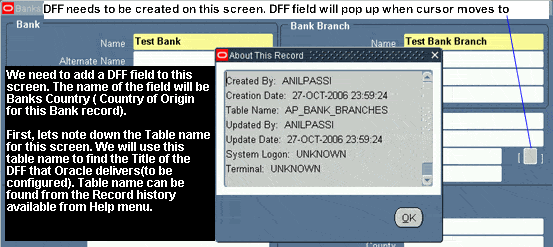
We are in “Bank Branches screen” below, that is available in Payables responsibility. We need to add a new field as below.
clip_image001
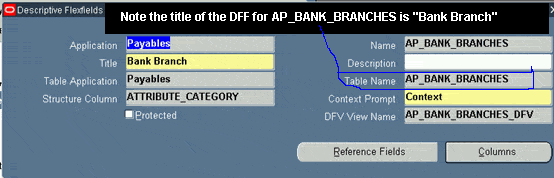
Once having noted down the table, we try to find the Title of the DFF for that Table. We go to Flexfield/Register
clip_image002
Here we pick the Title of the respective DFF
clip_image003
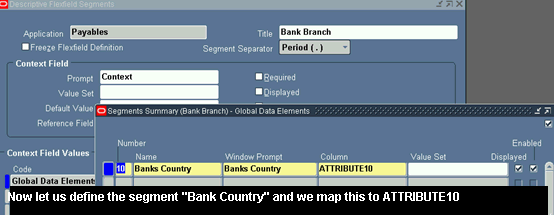
Query on that DFF Title from Descriptive Flexfield Segment Screen
clip_image004
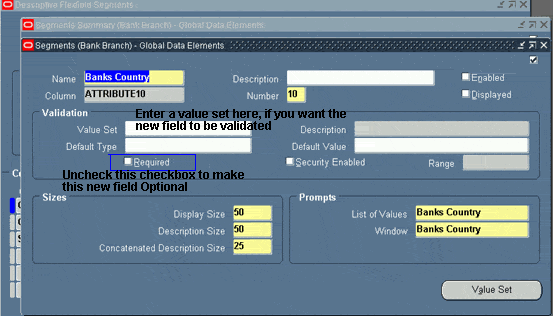
Add a new segment under “Global Data Elements”
clip_image005
The options for making mandatory or enabling validations for the new field.
clip_image006

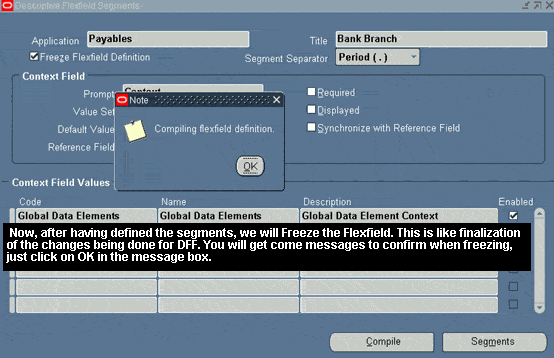
Once you finalize the changes, you will be prompted to Freeze the DFF definition. Click on OK
clip_image007
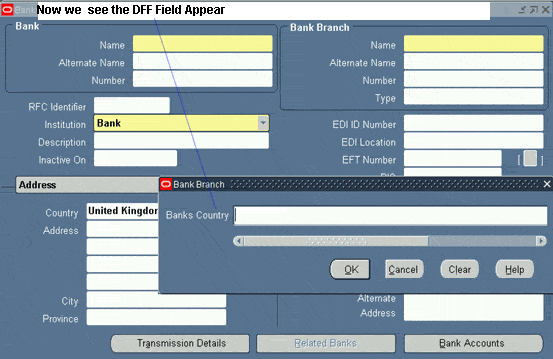
Now, we see the fruits of our configuration
clip_image008

for Windows7bugs

Admin

Oracle Application “Position Hierarchy SQL Query”


If you are asked to make a report for listing the elements with a named Position Hierarchy, it could quite difficult because of the complexity with the way Oracle is maintaining the position hierarchies. please find below a practical solution to this requirement

Step 1

Create a view

Create view XXPOSHIERARCHY_V
AS
SELECT pps.NAME, LPAD (' ', 5 * LEVEL) || has.NAME hierarchy, has.position_id,LEVEL rep_level,
hap.NAME parent_name, pse.parent_position_id, has.NAME child_name,
pse.subordinate_position_id
FROM (SELECT NAME, position_id
FROM hr_all_positions_f_tl
WHERE LANGUAGE = USERENV ('LANG')) hap,
(SELECT NAME, position_id
FROM hr_all_positions_f_tl
WHERE LANGUAGE = USERENV ('LANG')) has,
per_pos_structure_elements pse,
per_pos_structure_versions pve,
per_position_structures pps
WHERE pse.business_group_id = 81 --Replace with your own business group id
AND pve.position_structure_id = pps.position_structure_id
AND pse.POS_STRUCTURE_VERSION_ID = pve.POS_STRUCTURE_VERSION_ID
AND sysdate between pve.date_from and NVL(pve.date_to, sysdate)
AND hap.position_id = pse.parent_position_id
AND has.position_id = pse.subordinate_position_id
start with pse.parent_position_id = 
(SELECT parent_position_id FROM per_pos_structure_elements a
WHERE A.POS_STRUCTURE_VERSION_ID = pse.pos_structure_version_id
AND a.POS_STRUCTURE_ELEMENT_ID = (SELECT MIN (POS_STRUCTURE_ELEMENT_ID)
FROM per_pos_structure_elements b WHERE b.POS_STRUCTURE_VERSION_ID = A.POS_STRUCTURE_VERSION_ID))
CONNECT BY PRIOR pse.subordinate_position_id = pse.parent_position_id
AND PRIOR pse.pos_structure_version_id = pse.pos_structure_version_id
AND PRIOR pse.business_group_id = pse.business_group_id;

Now from the view above, you can easily populate the reporting structure using the following query (including the positions, employee names etc)

Select 0 rnum, opv.parent_name position_effective, 0 rep_level, paaf.person_id, papf.full_name,
opv.parent_position_id, opv.name hierarchy_name
from XXPOSHIERARCHY_V opv, per_all_assignments_f paaf,
per_all_people_f  papf
where NAME LIKE 'XYZ PR%'
and paaf.position_id = opv.parent_position_id
and papf.person_id = paaf.person_id
and sysdate between paaf.effective_start_date and nvl(paaf.effective_end_date, sysdate)
and sysdate between papf.effective_start_date and nvl(papf.effective_end_date, sysdate)
and rep_level = 1
UNION ALL
Select ROWNUM rnum, opv.hierarchy, opv.rep_level, paaf.person_id, papf.full_name,
opv.parent_position_id, opv.name
from XXPOSHIERARCHY_V opv, per_all_assignments_f paaf,
per_all_people_f  papf
where NAME LIKE 'XYZ PR%'
and paaf.position_id = opv.position_id
and papf.person_id = paaf.person_id
and sysdate between paaf.effective_start_date and nvl(paaf.effective_end_date, sysdate)
and sysdate between papf.effective_start_date and nvl(papf.effective_end_date, sysdate)
order by 1;

Adding rownum along with the query will provide you the flexibility to maintain the rpad -ed position names intact while retrieving a particular position hierarchy details.

In order to make the entire reporting dynamic we have created a PL/SQL sequence, populating all hierarchies into a local table. Please find the logic below

CREATE TABLE XXHIERELEMENTS
(
  RNUM                NUMBER,
  POSITION_EFFECTIVE  VARCHAR2(4000 BYTE),
  REP_LEVEL           NUMBER,
  PERSON_ID           NUMBER(10),
  FULL_NAME           VARCHAR2(240 BYTE),
  PARENT_POSITION_ID  NUMBER(15),
  HIERARCHY_NAME      VARCHAR2(30 BYTE)
)

and by executing the below PL/SQL sequence populate the table one time prior the report ran (please do not forget to truncate the table prior each report run!)


SET SERVEROUTPUT ON;

DECLARE
   CURSOR c1
   IS
        SELECT DISTINCT name hierarchy_name
          FROM XXPOSHIERARCHY_V  ORDER BY 1;
BEGIN
   FOR i IN C1
   LOOP
      DBMS_OUTPUT.PUT_LINE (i.hierarchy_name);

      INSERT INTO XXHIERELEMENTS
         SELECT 0 rnum,
                opv.parent_name position_effective,
                0 rep_level,
                paaf.person_id,
                papf.full_name,
                opv.parent_position_id,
                opv.name hierarchy_name
           FROM XXPOSHIERARCHY_V opv,
                per_all_assignments_f paaf,
                per_all_people_f papf
          WHERE     NAME = i.hierarchy_name
                AND paaf.position_id = opv.parent_position_id
                AND papf.person_id = paaf.person_id
                AND SYSDATE BETWEEN paaf.effective_start_date
                                AND NVL (paaf.effective_end_date, SYSDATE)
                AND SYSDATE BETWEEN papf.effective_start_date
                                AND NVL (papf.effective_end_date, SYSDATE)
                AND rep_level = 1
         UNION ALL
         SELECT ROWNUM rnum,
                opv.hierarchy,
                opv.rep_level,
                paaf.person_id,
                papf.full_name,
                opv.parent_position_id,
                opv.name
           FROM XXPOSHIERARCHY_V opv,
                per_all_assignments_f paaf,
                per_all_people_f papf
          WHERE     NAME = i.hierarchy_name
                AND paaf.position_id = opv.position_id
                AND papf.person_id = paaf.person_id
                AND SYSDATE BETWEEN paaf.effective_start_date
                                AND NVL (paaf.effective_end_date, SYSDATE)
                AND SYSDATE BETWEEN papf.effective_start_date
                                AND NVL (papf.effective_end_date, SYSDATE);
   END LOOP;

   COMMIT;
END;

We hope this thread is useful for you

For Windows7bugs,

Admin