Guys n Gals
Finally we decided to have a twitter account & here it is http://www.twitter.com/w7bugs
regards,
windows7bugs team

Guys n Gals
Finally we decided to have a twitter account & here it is http://www.twitter.com/w7bugs
regards,
windows7bugs team
Sorry guys! we were silent for a long time. Our team was too busty or enjoying annual breaks.
We noticed recent comments complaining about failing to install oracle database and developer suits.
Please please, read the enitre post thoroughly, then try to install the product as suggested with the post.
No Oracle proudcts were certified for Windows 7 when we posted the work arounds. These are just work arounds and you would hit the “jackpot” only if you would follow the post as it is!
According to Microsoft the KB977863 deals with the following:
Issues that this cumulative update package fixes
The February 2010 Cumulative Update for Windows Media Center for Windows 7 resolves the following issues:
Improves the overall experience for systems that are configured by using digital cable card tuners.
Resolves backward compatibility issues for some legacy Windows Media Center extensibility applications.
Resolves an issue with how recorded TV shows are managed when switching to a user locale that is based on the Hijri calendar.
Improves the overall experience when you use Integrated Services Digital Broadcasting (ISDB) tuners. ISDB is a Japanese standard for digital television and digital radio.
However if you a domain user, domain consist of ISA, this update can screwup your happiness for a long while! Uninstall it, you don’t need it. Uninstall and try to install it once again, Microsoft will state you don’t require this update any further and you will not be annoyed by seeing the yellow triangle overlayed over the network connection stating “no internect access”
Applies to Windows domains with ISA proxy server.
Was it easy ever to get your favorite(?) nokia applications connect to respective servers behind ISA? We think not at all! We were behind ISA from last many years and until recent days we were almost unable to get Nokia software through ISA.
While Nokia Ovi suit still being the shittiest application behind ISA, you can easily get other products contact the servers by following these:
Enable WPAD (please refer the posts referring to “Windows 7, Additional log on information may be required”)
Install ISA 2004/2006 Firewall client.
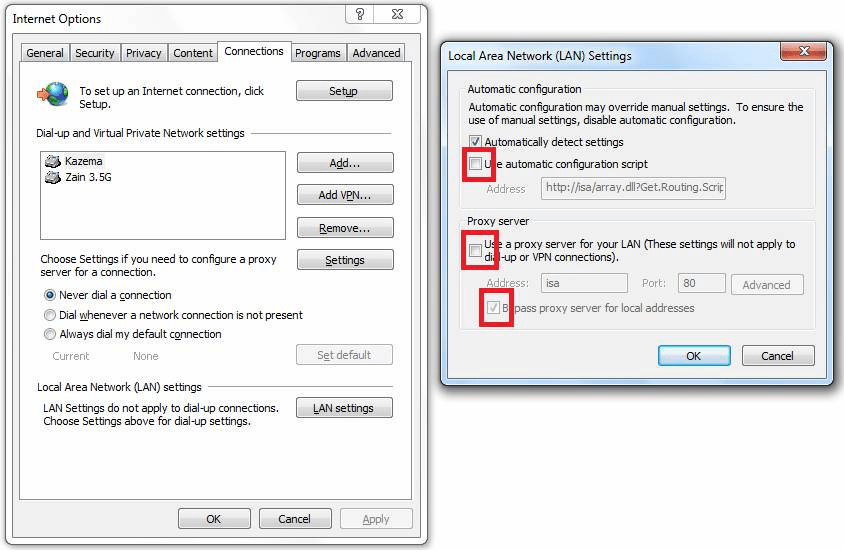
Go to Internet Explorer options, LAN settings and make the changes as you could see them with the attached image. Please make sure other than “Automatically detect settings” NONE of the other checkboxes should be checked!
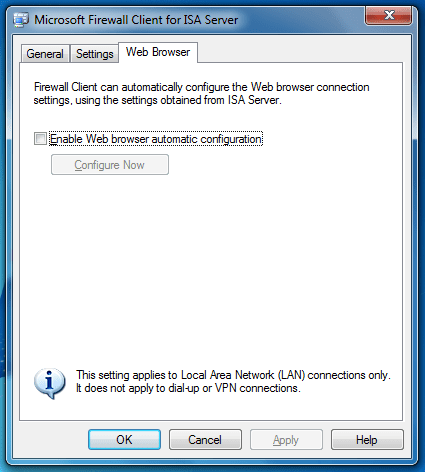
Go to ISA Firewall client->Web browser and uncheck “Enable Web browser automatic configuration” so that ISA firewall client will not automatically configure the IE settings (polls once in few hours). Please refer the attached image.
Try to start Nokia map update or Map loader application and ISA would happily allow the connections. Please make sure you have download permissions with ISA Server, else you will not able to.
We hope this helps ‘few’ frustrated souls out there…
Windows7bugs team.
We are a group of IT guys, who were asked to install and test Windows 7, the latest Microsoft client OS prior mass deployment over our network. Though our intentions are not to judge Windows 7, we may regularly post the issues and workarounds we faced/deployed to deal with this relatively new operating system. You are invited to post your concerns, tips and tricks to enhance the experiences with Windows 7