Oracle E-Business Suite R12.0 | Automating clone process

Hi guys

Only applies to 10g database. 11g has different approach and I am trying to make another post for it.

A clone is the exact replica of a production instance, against what you do all tests, custom development and patch deployments to insure that your attempts are NOT going to break the PRODUCTION instance once such are moved over to.

How often consultants & users may request for a fresh clone (with latest data) depends upon many factors. During the implementation time, a DBA could be bombarded with requests for cloning almost once in couple of days. Although I am “not a dba”, I have been doing cloning to learn & understand the technology from last couple of years time & trust me, it is NOT at all fun. Especially once after you are familiar with the tasks.

Throughout last few months I was trying to “fully automate” the entire cloning process and made significant advancements with the process. I will share my experiences with you today

Scenario:

We have a cron job initiated by “root” user, starting by 2:30 PM every Friday, that shuts down the application and database after running pre-cloning. The same script makes tar balls for both the database and application nodes in separate files and then copies the tar balls to our TEST instance server.

Logically once the tar balls are copied to TARGET (TEST) server, following activities are expected from the DBA

  1. Stop the application & database instances those are online in the TEST server
  2. Extract the tar balls copied from PRODUCTION instance to relevant folders
  3. Clone database tier, followed by application tier
  4. Tune the database with TEST server specific SGA/job queue processes etc parameters

What if I am too lazy & a scripting junkey who wants to automate the entire activities using shell scripts? The following demonstrates such an attempt

Why not a cron job? ;)

The first step will be, creating auto response files for both database and application nodes. I have already detailed a how to here

ebsclone.sh | This shell script calls a number of other shell scripts to facilitate the entire cloning process

Please note, my Oracle database user is “oraprod” and application manager is “applprod”. If you are planning to copy the below script(s), make sure you change the physical paths, user details according to your specific environment.

Both the database and application manager user accounts are enhanced with .bash_profile values. Hence most of my scripts will not populate the environment variables prior executing other scripts.

I am using “expect”, that YOU must install, if not already installed in order to automate the cloning process. If you are using Oracle linux, you can install expect by issuing the following command:

[code language=”bash” gutter=”false”]
yum install expect -y
[/code]

[code language=”bash” gutter=”false”]
#!/bin/bash
# As a precaution to make sure the port pool is available during automated
# Cloning, we will kill all orphaned processes those were not closed during
# DB, APPS stop

# Kill all processes for both oraprod & applprod users
echo "Killing all processes for Oracle user"
pkill -u oraprod
echo "Killing all processes for Application user"
pkill -u applprod
echo "All processes for both Oracle and Application users were killed"

sleep 30

echo "$(date)"

#Remove the existing physical folder for database files
cd /u01
find oraprod -delete
echo "finished deleting Oracle top at $(date)"
#Extract files for database top from the cold backup archive
echo "Extract database backup file at $(date)"
time tar -zxf /u02/backup/PROD_DAILY_BACKUP_db.tar.gz
echo "Finished extracting database backup file at $(date)"

#Remove the existing physical folder for application files

cd /u03
find applprod -delete
echo "finished deleting Application top at $(date)"

#Extract files for application top from the cold backup archive
echo "Extract application backup file at $(date)"
time tar -zxf /u02/backup/PROD_DAILY_BACKUP_apps.tar.gz u06/applprod/PROD/apps
echo "Finished extracting application backup file at $(date)"

#Move the files around based on your configuration files (db.xml & apps.xml)

mv /u01/u05/oraprod /u01
mv /u03/u06/applprod /u03

#Change the ownership of the folders, so that corresponding users could read & execute files

chown -R oraprod:oinstall /u01/oraprod
chown -R applprod:oinstall /u03/applprod

########################################
#Start the cloning
########################################

echo "Database cloning phase starts now, $(date)"

#su – oraprod -c "perl /u01/oraprod/PROD/db/tech_st/10.2.0/appsutil/clone/bin/adcfgclone.pl dbTier /u01/clonescripts/db.xml"

/root/scripts/dbclone.sh

sleep 30

echo "Application cloning phase starts now, $(date)"

# su – applprod -c "perl /u03/applprod/PROD/apps/apps_st/comn/clone/bin/adcfgclone.pl appsTier /u01/clonescripts/apps.xml"

/root/scripts/appsclone.sh

echo "EBS Cloning completed, $(date)"
######################################
#Optional steps for changing database SGA parameters,
#startup configuration files to spfile etc
######################################
echo "Changing database parameters, $(date)"

/root/scripts/dbfix.sh

echo "Done! Application online with changed database parameters, $(date)"

[/code]

Now I will copy the code for each script called within the ebsclone.sh script
dbclone.sh | script enabled with expect which will not ask for the apps password

[code language=”bash” gutter=”false”]
#!/usr/bin/expect -f
set force_conservative 0 ;

# set to 1 to force conservative mode even if
# script wasn’t run conservatively originally

if {$force_conservative} {
set send_slow {1 .1}
proc send {ignore arg} {
sleep .1
exp_send -s — $arg
}
}

set timeout -1

spawn su – oraprod -c "perl /u01/oraprod/PROD/db/tech_st/10.2.0/appsutil/clone/bin/adcfgclone.pl dbTier /u01/clonescripts/db.xml"

match_max 100000

expect -exact "\r
Enter the APPS password : "
send — "apps\r"

expect eof

[/code]

appsclone.sh | script enabled with expect which will not ask for the apps password

[code language=”bash” gutter=”false”]
#!/usr/bin/expect -f
set force_conservative 0 ;

# set to 1 to force conservative mode even if
# script wasn’t run conservatively originally

if {$force_conservative} {
set send_slow {1 .1}
proc send {ignore arg} {
sleep .1
exp_send -s — $arg
}
}

set timeout -1

spawn su – applprod -c "perl /u03/applprod/PROD/apps/apps_st/comn/clone/bin/adcfgclone.pl appsTier /u01/clonescripts/apps.xml"

match_max 100000

expect -exact "\r
Enter the APPS password : "
send — "apps\r"

expect eof

[/code]

dbfix.sh | Changing database parameters like SGA, job queue processes etc

[code language=”bash” gutter=”false”]
#!/bin/bash
su – applprod -c "/u03/applprod/PROD/inst/apps/PRODBAK_erp-prodbak/admin/scripts/adstpall.sh apps/apps"
su – oraprod -c /root/scripts/dbalter.sh
su – applprod -c "/u03/applprod/PROD/inst/apps/PRODBAK_erp-prodbak/admin/scripts/adstrtal.sh apps/apps"

[/code]

Finally dbalter.sh | All database alter commands are included within this file

[code language=”bash” gutter=”false”]
#!/bin/bash
export ORACLE_HOME=/u01/oraprod/PROD/db/tech_st/10.2.0
export ORACLE_SID=PRODBAK

#http://www.cyberciti.biz/faq/unix-linux-test-existence-of-file-in-bash/
#Check whether spfile already exist
file="/u01/oraprod/PROD/db/tech_st/10.2.0/dbs/spfilePRODBAK.ora"
if [ -f "$file" ]
then
echo "$file found. Aborting database configuration now"
exit;
else
echo "$file not found."
fi

sqlplus "/ as sysdba" <<EOF
create spfile from pfile;
shutdown immediate;
startup;
alter system set sga_max_size=8G scope=spfile;
alter system set sga_target=8G scope=spfile;
alter system set job_queue_processes=10 scope=both;
shutdown immediate;
! cp /u01/oraprod/PROD/db/tech_st/10.2.0/dbs/initPRODBAK.ora /u01/oraprod/PROD/db/tech_st/10.2.0/dbs/initPRODBAK.ora.original
! >/u01/oraprod/PROD/db/tech_st/10.2.0/dbs/initPRODBAK.ora
! echo "spfile=/u01/oraprod/PROD/db/tech_st/10.2.0/dbs/spfilePRODBAK.ora" >>/u01/oraprod/PROD/db/tech_st/10.2.0/dbs/initPRODBAK.ora
startup;
exit;
EOF

[/code]

The above five scripts should do what they are meant to. Just copy the files to same folder
Change the execute mode of ebsclone.sh

[code language=”bash” gutter=”false”]
chmod +x ebsclone.sh
[/code]

and execute the ebsclone.sh as “root” (attempts made with other users will fail the cloning)

[code language=”bash” gutter=”false”]
#./ebsclone.sh
[/code]

Prior attempting, please make sure all the above scripts are modified with absolute paths, referring to your existing partitions & other

Download the scripts here

References:

Sample expect script

https://community.oracle.com/thread/2558592?start=0&tstart=0

Linux: Find whether a file already exist

http://www.cyberciti.biz/faq/unix-linux-test-existence-of-file-in-bash/

Happy cloning!
Virtualize your desktop/laptop computer

Hello guys

This is my first post for the year 2016. Actually I have more drafts than posts this time with me and I truly hope that I will able to finish all of them in few weeks time. I’m sure you are interested about Oracle 12c products on Windows platform. Stay tuned, am on it

Coming back to the topic, I have a decent desktop computer that could be called a “half server” with the following configurations

  1. i7 processor 2nd generation
  2. 16GB DDR3 memory
  3. Around 4.5-5 terabyte of storage
  4. windows 10 64Bit Professional

I came across VMWare always 8 years back, liked it, and used it until they started charging for everything. Then Oracle VirtualBox (Earlier JAVA VirtualBox) started giving tough fight and it has become quite famous among developer communities where NOT many were truly able to afford VMWare’s paid software.

VMWare is altogether a different standard made for sophisticated environments, hence we will never compare both the products here. Our intention is to point you towards the advantages of using Virtual Machines that could less clutter your rig, give you better exposure to different technologies and a bit of networking etc

So our product of interest for this post is Oracle VirtualBox and we will see how we can utilize our existing desktops/laptops to run multiple virtual machines at the same time and thus utilize the available hardware to the maximum extends

So prior attempting to virtualize your existing computer, you need to know what kind of hardware you have and whether your computer meets minimum requirements to support virtualization.

So today is 3rd January 2016 & if your computer is 4 years old or less,  99.9% chances that your rig sure supports virtualization. Most of BIOS comes with the virtualization enabled by default.

Yet we should make sure that our computers support virtualization. Read the instructions provided here to find out whether your current processor supports virtualization OR

Just install Oracle VirtualBox and try to create a VM. You will immediately come to realize whether your rig really supports virtualization ;)

Well, that’s the brute force way of doing stuffs, adapt the one that defines you. If you are using Windows 10, I’ve noticed that many default installations enable Hyper-V by default. You need to disable it from add remove windows features console, so that you can create 64Bit VMs using Oracle VirtualBox. This post explains how to enable it, just do the opposite to disable it

Before anything else, you need to identify your processor, it’s capabilities. A nice comparison is available here for i3, i5 & i7 processors and definitely, the author favors i7 processors. Please spend few minutes to read about the differences between these three different processors.

A ripoff from http://www.pcadvisor.co.uk

What the difference between Core i3, i5, i7: Hyper-Threading

A thread in computing terms is a sequence of programmed instructions that the CPU has to process. If a CPU has one core, it can process only one thread at once, so can only do one thing at once (as before, it’s actually more complex than this, but the aim here is to keep it simple and understandable).

Hence, a dual-core CPU can process two threads at once, a quad-core four threads at once. That’s twice or four times the work in the same amount of time.

Hyper-Threading is a clever way to let a single core handle multiple threads.

A Core i3 with Hyper-Threading can process two threads per core which means a total of four threads can run simultaneously. The current Core i5 range doesn’t have Hyper-Threading so can also only process four cores. i7 processors do have it, so can process eight threads at once. Combine that with 8MB of cache and Turbo Boost Technology, and you can see why it’s good to choose a Core i7 over an i5 or i3.

Now, you should know how much physical memory you have. More, the merrier. Starting with Windows 7, computers started shipping with a minimum of 4GB as a standard. So, 4GB is enough for your OS and proposed virtualization? It’s going to be a tight fit. I will suggest an additional 4GB minimum, making the total physical memory 8GB so that you won’t have to sacrifice performance.

Finally the storage. Most of the branded PCs and laptops are coming with 500GB HDD as standard & extending the storage of a laptop is complex than of a desktop computer. For the later, all you need is another HDD which you can plug to one of the available SATA ports and configure. With a laptop, you may need to replace the HDD with a higher capacity one or use an external HDD for your additional storage requirements.

My current Virtualizations are mostly for Oracle technologies. I am a forms and reports developer, doing a certain level of .NET development & manage Oracle EBS R12 instances (“NOT a DBA”). Further I try almost all the database, weblogic versions & currently learning ASMM & RMAN. I have never attempted other areas of Oracle technologies, so my VMs run

  1. Oracle EBS R12 cloned instances
  2. Oracle database(s)
  3. Oracle weblogic server(s) with forms and reports (supported)

My EBS R12 VM has the following configuations

8GB memory out of 16GB physical, 4 processor out of 8 logical processors & almost 850GB of storage out of 4.5 terabyte total storage. Our instance has 400GB database size, 175GB application instance & the VM responds to requests instantaneously once after scheduled jobs are completed after a restart of the application. Usually I find the application responding better after 3 hours of settling down & the performance is assured throughout days and weeks until a restart.

My Weblogic, database VMs have the following configurations

4GB memory out of 16GB physical, 4 processor out of 8 logical processors & almost 250 GB of storage out of 4.5 terabyte total storage. I have my weblogic VM running 11gR2 64bit database as well. I get instant responses from both the Weblogic server and Oracle database 11gR2 from a client system, whenever accessed

Recommendations

Even though you can run multiple VMs at the same time, I would suggest, based on your hardware, limit them. Example

When I run my EBS R12 VM (8GB memory, 4 processors) my HOST computer is left with only 8GB free memory and 4 logical processors. If I start a Windows XP VM (2GB memory, 2 processors) to check the application performance, I feel my rig start slowing down and couple of times my computer shutdown with a high thermal point.

So make sure that you do tweaking to your VMs in order to make sure that your HOST doesn’t breakdown due to overload.

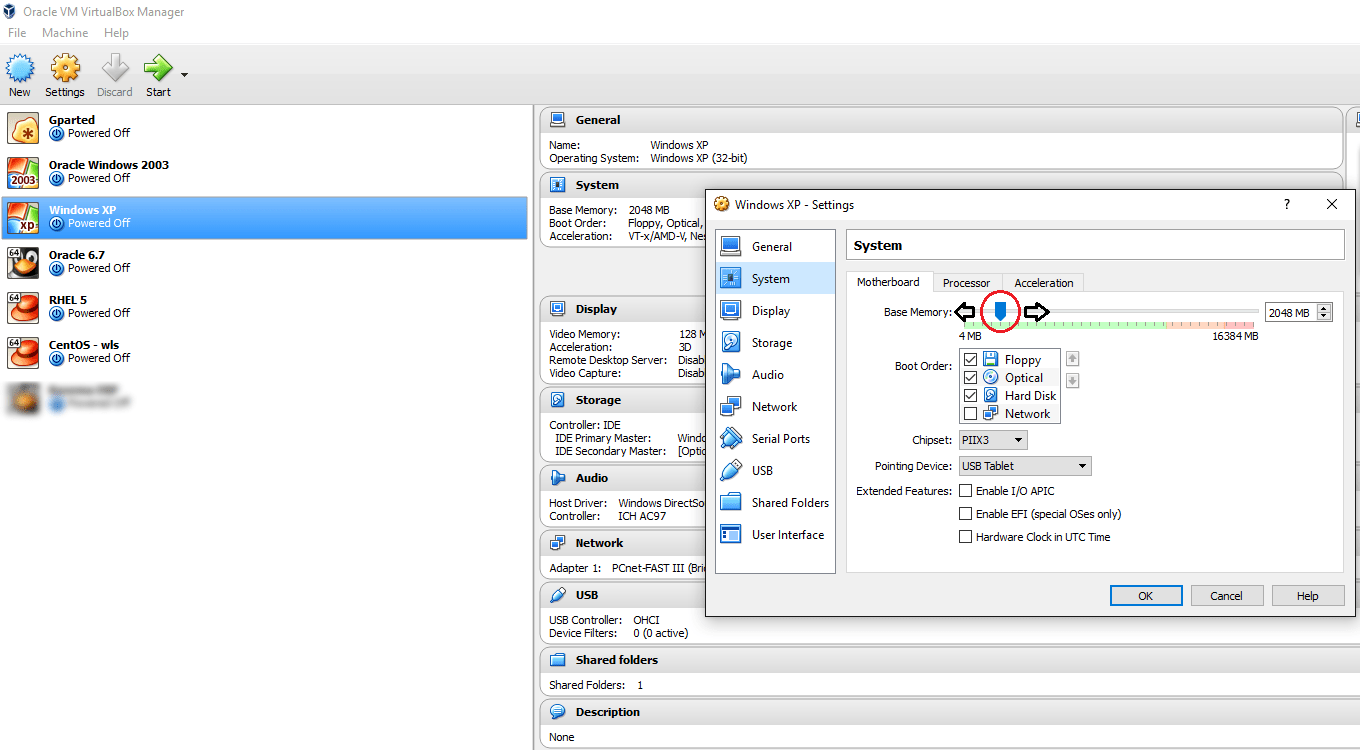
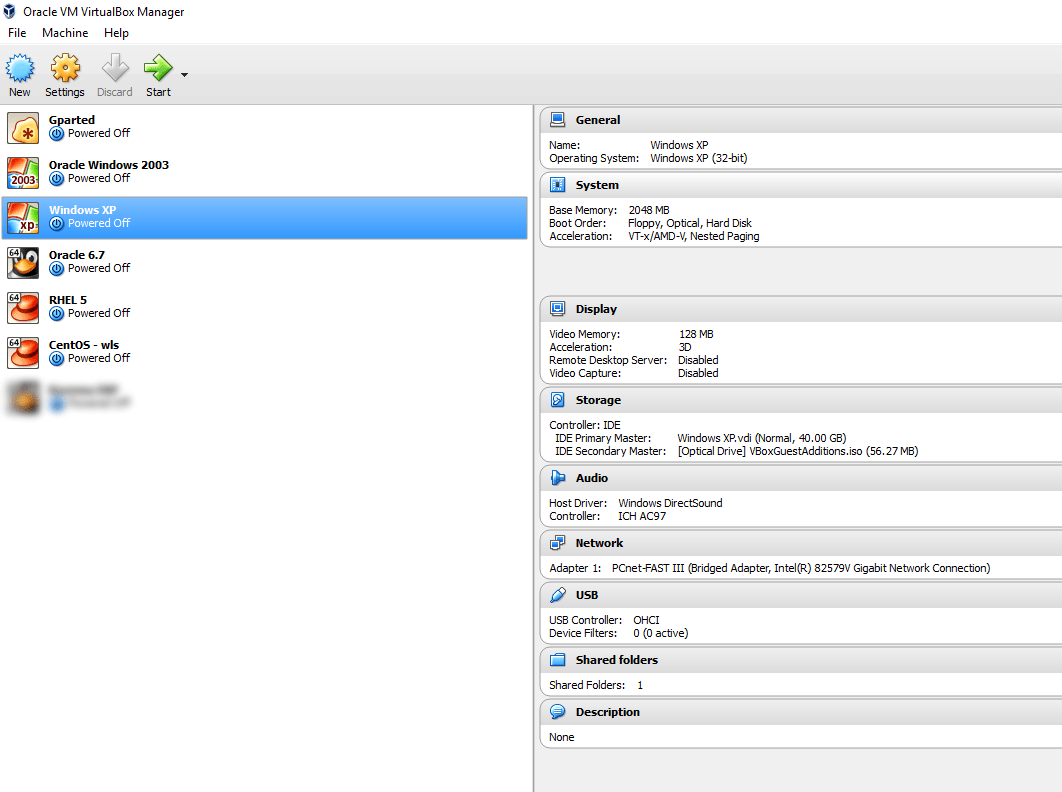
I always make sure that my HOST always has half of the hardware resources reserved for it, ie, 8GB memory, 4 processors regardless how many VMs I run at the same time! This is by using the VirtualBox console to alter the parameters of VMs before they are started

1

All the settings for the VMs could be altered using the settings, like increasing or decreasing the memory, processors, adding and removing storage devices etc.

2

Below you watch how fast my VM running EBS r12 responds to requests from another VM running Windows XP

Advantages of using Virtualization

The most important advantage for me is: I’ve a less cluttered HOST, said, I am NOT installing all the technologies to one OS, breaking it with conflicting versions of services and libraries and processing load.

Other advantages

  1. I can backup (copy) my entire “machine” and restore it during a total mess up or loss of data, rather than rebuilding the entire computer
  2. I get a sand-boxed environment & without fearing my attempts will break my main OS, continue the experiments
  3. I can make a VM, for example, running Oracle Enterprise Linux, copy and keep the OS installed disk somewhere and copy it to new VMs whenever required! Say, you install the OS only once and whenever you need to create a new VM with same OS, just duplicate the disk that has the OS! (Make sure you make a backup of the OS disk prior installing and configuring additional software into it)

Finally my suggestions for you, in case if you are considering to build your 1st VM using Oracle VirtualBox

  1. Majority of the Oracle geeks prefer Linux against Windows for database, weblogic deployments. So if you are NOT familiar with Linux, I suggest you start learning, regardless whether you FEEL very comfortable with it or NOT. You may be joining a firm that has reservations towards Windows OS running Oracle products, especially Oracle DBAs who have valid points like block corruptions, difficulties to recover from a crash are complex in the case of Windows OS.
  2. Install OS in a separate disk. 40GB dynamic size should be more than enough for any recent Linux distros. Avoid Linux 7 if you are truly new to Linux. Oracle Linux 6.7 should be your friend.
  3. Install 64Bit OS, so that you can take the advantage of your 64Bit processor and physical memory
  4. Install Oracle supported Linux distros (RHEL, OEL & certain versions of Debian. CentOS is not at all supported)
  5. Install the complete desktop, you are hardly going to complete the installations on pure CLI mode.
  6. Add SCSI interface to your VM and for Oracle database etc, use SCSI disks. I had a huge argument with VirtualBox guys about the performance difference between SATA VDI disks and SCSI VDI disks. I found the SCSI VDI disks performing better, however I was dismissed saying as far both the types are created on the same HDD, it must be more psychological :O
  7. Use 1TB 7200 RPM disks in the place of 2TB 5400 RPM disks. Later ones are best for data storage, when the previous ones give you better I/O. Create fixed size VDI for databases & applications, that means you will NOT able to increase the size of the disk once after created, however, it gives you faster I/O and better performance.
  8. Update your OS. As soon as the VM is built, update your OS prior installing database, weblogic etc. RHEL will NOT allow you to update the packages without subscription, hence Oracle Enterprise Linux should be your best choice of Linux distro. Please note, you shouldn’t use Oracle Linux in a production environment without acquiring sufficient licenses. Whatever I suggest here are limited for study/evaluation purposes and I don’t encourage any kind of illegal usage of software!
  9. Use Oracle’s pre-install packages to install database, EBS etc prerequisites rather than trying to download individual components from different download sites.
  10. Use shared folders between HOST and Guest (VM) so that you don’t have to sacrifice storage. Not just that, when you want to keep the backup of some files from the VM, the shared folders will make it as easy as possible
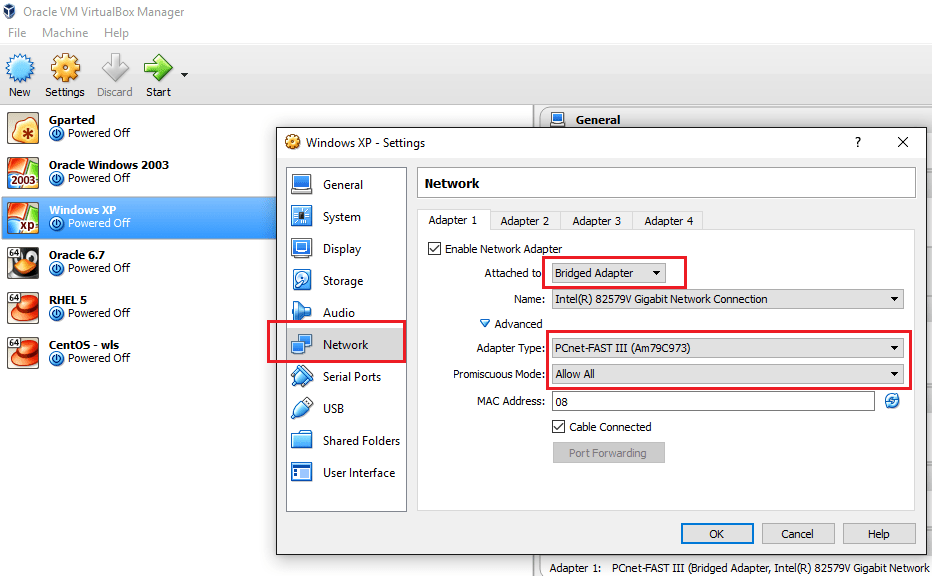
  11. Use bridged network, with Promiscuous Mode “Allow All” so that you can communicate with the VM from network
  12. 3
  13. Disable IPV6, firewall, SELinux on your Linux VM
  14. If you creating a Windows VM, I’m sure you better know how to configure your guest so that you can access it from a network.

Finally recommendations for a DESKTOP computer to try virtualization

  1. i7 processor + good quality heat sink. Your HOST and VMs are going to create loads of heat!
  2. 16GB Memory (DDR4 is the new standard, do not ignore it)
  3. 1×2 TB HDD

Few years back, such a configuration looked impossible for me, well, I saved bit by bit and made my dream computer. I’m sure you can also do it :) & trust me, a good computer opens a new world for you.

All the best and wish you all a very successful year ahead!

for Windows7bugs

rajesh


Oracle Application TCA | Supplier API | Sample

Hi guys

I’m posting a sample script for creating suppliers, sites and contacts. I’ve referred multiple sample scripts and believe the below code block is a fine tuned one, however standing refinement at all levels. Please note, I haven’t added the API block for creating banks for suppliers. Will, and update the scripts as I make advancements.

[code language=”sql” gutter=”false”]
/* Formatted on 10/5/2015 11:12:16 AM (QP5 v5.163.1008.3004) */
SET DEFINE OFF;
SET SERVEROUTPUT ON;

DECLARE
–For supplier parameters

p_api_version NUMBER;
p_init_msg_list VARCHAR2 (200);
p_commit VARCHAR2 (200);
p_validation_level NUMBER;
x_return_status VARCHAR2 (200);
x_msg_count NUMBER;
x_msg_data VARCHAR2 (200);
p_vendor_rec apps.ap_vendor_pub_pkg.r_vendor_rec_type;
x_vendor_id NUMBER;
x_party_id NUMBER;
V_MSG_INDEX_OUT NUMBER;

–Site parameters

l_vendor_site_rec ap_vendor_pub_pkg.r_vendor_site_rec_type;
lc_return_status VARCHAR2 (10);
ln_msg_count NUMBER;
lc_msg_data VARCHAR2 (1000);
ln_vendor_site_id NUMBER;
ln_party_site_id NUMBER;
ln_location_id NUMBER;

–Contact parameters

p_vendor_contact_rec apps.ap_vendor_pub_pkg.r_vendor_contact_rec_type;
x_vendor_contact_id NUMBER;
x_per_party_id NUMBER;
x_rel_party_id NUMBER;
x_rel_id NUMBER;
x_org_contact_id NUMBER;
x_party_site_id NUMBER;

–General exception

local_exception EXCEPTION;
local_failed_at VARCHAR2 (10);

p_vendor_number VARCHAR2(30) := NULL;

BEGIN
–Please note: This API was tested against Release 12 (12.0.6)
–You are warned against undesired results, if tried against unsupported application releases

–Initialize application
–"Master Data" responsibility details
mo_global.init (‘SQLAP’);
fnd_global.apps_initialize (user_id => 1353,
resp_id => 50997,
resp_appl_id => 200);
fnd_global.set_nls_context (‘AMERICAN’);

mo_global.set_policy_context (‘S’, 101);

p_api_version := 1.0;
p_init_msg_list := FND_API.G_TRUE;
p_commit := FND_API.G_TRUE;
p_validation_level := FND_API.G_VALID_LEVEL_FULL;
x_return_status := NULL;
x_msg_count := NULL;
x_msg_data := NULL;
p_vendor_rec.vendor_name := ‘WINDOWS7BUGS BLOG’;
p_vendor_rec.vendor_type_lookup_code := ‘VENDOR’; –Vendor type supplier
p_vendor_rec.SUMMARY_FLAG := ‘N’;
p_vendor_rec.ENABLED_FLAG := ‘Y’;
— p_vendor_rec.women_owned_flag := ‘N’;
— p_vendor_rec.small_business_flag := ‘Y’;

— Supplier MUST have a global level payment method
— So that individual companies can defer the default payment method while sites are created
— I have tried the following @ site levels, didn’t work until at supplier level assigned. You may post corrections with
— Comments section

p_vendor_rec.ext_payee_rec.Exclusive_Pay_Flag:=’N’;
p_vendor_rec.ext_payee_rec.default_pmt_method := ‘CHECK’;

— if the Payable System setup is set automatic numbering for the suppliers (table ->AP_PRODUCT_SETUP Column -> SUPPLIER_NUMBERING_METHOD = ‘AUTOMATIC’)
— You can get the next number from column NEXT_AUTO_SUPPLIER_NUM
— if you are following manual numbering (Alpha Numeric )
— p_vendor_rec.segment1 :=’865′; –(insert non duplicate number, in case if the supplier numbers are not fetched from a sequence, check your setups)

— We do have an automatic numbering for suppliers, hence the below block is used
— If your setups are not as explained above
— Comment from BEING until p_vendor_rec.segment1 := p_vendor_number;

BEGIN
Select NEXT_AUTO_SUPPLIER_NUM into p_vendor_number from AP_PRODUCT_SETUP
where SUPPLIER_NUMBERING_METHOD= ‘AUTOMATIC’;
EXCEPTION
WHEN NO_DATA_FOUND then
local_failed_at := ‘NUMBER’;
RAISE local_exception;
END;

p_vendor_rec.segment1 := p_vendor_number;

x_vendor_id := NULL;
x_party_id := NULL;
apps.ap_vendor_pub_pkg.create_vendor (p_api_version,
p_init_msg_list,
p_commit,
p_validation_level,
x_return_status,
x_msg_count,
x_msg_data,
p_vendor_rec,
x_vendor_id,
x_party_id);
DBMS_OUTPUT.put_line (‘X_RETURN_STATUS = ‘ || x_return_status);
DBMS_OUTPUT.put_line (‘X_MSG_COUNT = ‘ || TO_CHAR (x_msg_count));
DBMS_OUTPUT.put_line (‘X_MSG_DATA = ‘ || x_msg_data);
DBMS_OUTPUT.put_line (‘Supplier Number = ‘ || p_vendor_number);
DBMS_OUTPUT.put_line (‘X_VENDOR_ID = ‘ || TO_CHAR (x_vendor_id));
DBMS_OUTPUT.put_line (‘X_PARTY_ID = ‘ || TO_CHAR (x_party_id));
DBMS_OUTPUT.put_line (”);

IF x_return_status <> ‘S’
THEN
IF x_msg_count > 0
THEN
FOR v_index IN 1 .. x_msg_count
LOOP
fnd_msg_pub.get (p_msg_index => v_index,
p_encoded => ‘F’,
p_data => x_msg_data,
p_msg_index_out => v_msg_index_out);
x_msg_data := SUBSTR (x_msg_data, 1, 200);
DBMS_OUTPUT.put_line (x_msg_data);
END LOOP;
END IF;

local_failed_at := ‘SUPPLIER’;
RAISE local_exception;
END IF;

–Create Site
l_vendor_site_rec.vendor_id := x_vendor_id; — 1117549;
l_vendor_site_rec.vendor_site_code := ‘Kuwait’;
l_vendor_site_rec.address_line1 := ‘Office Address line 1’;
l_vendor_site_rec.city := ‘Kuwait’;
l_vendor_site_rec.country := ‘KW’;
l_vendor_site_rec.org_id := 101;

l_vendor_site_rec.ext_payee_rec.default_pmt_method := ‘CHECK’;

— ————–
— Optional
— ————–
l_vendor_site_rec.purchasing_site_flag := ‘Y’;
l_vendor_site_rec.pay_site_flag := ‘Y’;
l_vendor_site_rec.rfq_only_site_flag := ‘N’;

pos_vendor_pub_pkg.create_vendor_site (
— ——————————
— Input data elements
— ——————————
p_vendor_site_rec => l_vendor_site_rec,
— ———————————
— Output data elements
— ———————————
x_return_status => lc_return_status,
x_msg_count => ln_msg_count,
x_msg_data => lc_msg_data,
x_vendor_site_id => ln_vendor_site_id,
x_party_site_id => ln_party_site_id,
x_location_id => ln_location_id);

IF (lc_return_status <> ‘S’)
THEN
IF ln_msg_count > 1
THEN
FOR i IN 1 .. ln_msg_count
LOOP
DBMS_OUTPUT.put_line (
SUBSTR (FND_MSG_PUB.Get (p_encoded => FND_API.G_FALSE), 1, 255));
END LOOP;
END IF;

local_failed_at := ‘SITE’;
RAISE local_exception;
ELSE
DBMS_OUTPUT.put_line (‘Vendor Site Id: ‘ || ln_vendor_site_id);
DBMS_OUTPUT.put_line (‘Party Site Id: ‘ || ln_party_site_id);
DBMS_OUTPUT.put_line (‘Location Id: ‘ || ln_location_id);
END IF;

–Create Contact

p_api_version := 1.0;
p_init_msg_list := ‘T’;
p_commit := ‘T’;
p_validation_level := FND_API.G_VALID_LEVEL_FULL;
x_return_status := NULL;
x_msg_count := NULL;
x_msg_data := NULL;

— p_vendor_contact_rec.vendor_contact_id := po_vendor_contacts_s.NEXTVAL;
— DBMS_OUTPUT.put_line (‘po_vendor_contacts_s.NEXTVAL = ‘ || po_vendor_contacts_s.NEXTVAL);

— P_VENDOR_CONTACT_REC.vendor_site_id := ln_vendor_site_id; –OPTIONAL If you want to attach the contact to a particular site
P_VENDOR_CONTACT_REC.PERSON_FIRST_NAME := ‘windows7bugs’;
P_VENDOR_CONTACT_REC.PERSON_LAST_NAME := ‘blog’; — Mandatory
P_VENDOR_CONTACT_REC.PHONE := ‘22445566’;
P_VENDOR_CONTACT_REC.EMAIL_ADDRESS := ‘admin@nocom.com.kw’;
P_VENDOR_CONTACT_REC.URL := ‘http://windows7bugs.wordpress.com&#8217;;
P_VENDOR_CONTACT_REC.org_id := 101; — Security Organization Id
p_vendor_contact_rec.party_site_id := ln_party_site_id;
— p_vendor_contact_rec.org_party_site_id := 2273595; –optional, system autofills the column with party_site_id used
p_vendor_contact_rec.VENDOR_ID := x_vendor_id;
p_vendor_contact_rec.prefix := ‘MR.’;
x_vendor_contact_id := NULL;
x_per_party_id := NULL;
x_rel_party_id := NULL;
x_rel_id := NULL;
x_org_contact_id := NULL;
x_party_site_id := NULL;
apps.ap_vendor_pub_pkg.create_vendor_contact (p_api_version,
p_init_msg_list,
p_commit,
p_validation_level,
x_return_status,
x_msg_count,
x_msg_data,
p_vendor_contact_rec,
x_vendor_contact_id,
x_per_party_id,
x_rel_party_id,
x_rel_id,
x_org_contact_id,
x_party_site_id);

IF x_return_status <> ‘S’
THEN
IF x_msg_count > 0
THEN
FOR v_index IN 1 .. x_msg_count
LOOP
fnd_msg_pub.get (p_msg_index => v_index,
p_encoded => ‘F’,
p_data => x_msg_data,
p_msg_index_out => v_msg_index_out);
x_msg_data := SUBSTR (x_msg_data, 1, 200);
DBMS_OUTPUT.put_line (x_msg_data);
END LOOP;
END IF;

local_failed_at := ‘CONTACT’;
RAISE local_exception;
ELSE
DBMS_OUTPUT.put_line (‘X_RETURN_STATUS = ‘ || x_return_status);
DBMS_OUTPUT.put_line (‘X_MSG_COUNT = ‘ || TO_CHAR (x_msg_count));
DBMS_OUTPUT.put_line (‘X_MSG_DATA = ‘ || x_msg_data);
DBMS_OUTPUT.put_line (
‘X_VENDOR_CONTACT_ID = ‘ || TO_CHAR (x_vendor_contact_id));
DBMS_OUTPUT.put_line (‘X_PER_PARTY_ID = ‘ || TO_CHAR (x_per_party_id));
DBMS_OUTPUT.put_line (‘X_REL_PARTY_ID = ‘ || TO_CHAR (x_rel_party_id));
DBMS_OUTPUT.put_line (‘X_REL_ID = ‘ || TO_CHAR (x_rel_id));
DBMS_OUTPUT.put_line (
‘X_ORG_CONTACT_ID = ‘ || TO_CHAR (x_org_contact_id));
DBMS_OUTPUT.put_line (
‘X_PARTY_SITE_ID = ‘ || TO_CHAR (x_party_site_id));
DBMS_OUTPUT.put_line (”);
END IF;

COMMIT;

EXCEPTION
WHEN local_exception
THEN
IF local_failed_at = ‘SUPPLIER’
THEN
DBMS_OUTPUT.put_line (‘API failed at Supplier Creation’);
ELSIF local_failed_at = ‘SITE’
THEN
DBMS_OUTPUT.put_line (‘API failed at Site Creation’);
ELSIF local_failed_at = ‘CONTACT’
THEN
DBMS_OUTPUT.put_line (‘API failed at Contact Creation’);
ELSIF local_failed_at = ‘NUMBER’
THEN
DBMS_OUTPUT.put_line (‘API failed at getting Supplier Number’);
END IF;

ROLLBACK;
WHEN OTHERS
THEN
DBMS_OUTPUT.PUT_LINE (SQLERRM);
ROLLBACK;
END;
[/code]

You can download the .sql file from here

Please post your comments, if you come across issues.

regards,

Windows 10 | Install Oracle Products

I’m sure you guys didn’t hear much from us for a long time. Actually we were been too busy testing Windows 10 to make sure that we can safely migrate our existing domain joined computers. Almost everything works as they were working on Windows 8.x and we confirm the following to you:

  1. You can install Oracle developer Suite 10g in Windows 10 Professional edition, following the same hacks provided as provided with the following post https://simpleoracle.com/2010/02/18/install-oracle-10g-onward-database-developer-on-windows-7/
  2. You can install Toad 10.x without any issues over Windows 10 without any specific hacks
  3. You can install 11g client 32Bit without any issues, by ignoring the only one warning at the installation startup
  4. You can get over with the Oracle VirtualBox NIC related issues by installing the test build 5.0 (download from VirtualBox test builds)


We are yet to test the developer suite 6i, once completed we will update this thread.

So, we hope you would be more than happy to know that, almost all legacy Oracle products are installable over Microsoft’s latest OS!!


regards,

for Windows7bugs

rajesh

Oracle EBS R12, Install/Clone on Oracle/Red Hat Linux 7.x

Hi guys

Last reviewed on: 10th January 2022

Made changes to the body for Oracle Linux 7.9

References: http://www.slideshare.net/tianpan/oracle-ebs-r1213installationlinux64bitpantian

(and dozens of EBS R12 related blogs and oracle community posts)

As far I could recollect, Oracle EBS R12.0.x & R12 12.1.x are not certified yet for Linux 7.x, let it be Red Hat Linux or Oracle enterprise Linux. Does the certification path really make guys like us trying to clone, install EBS R12 over yet to be certified platforms? Well, my case, I always did attempt & succeeded to a certain levels. Starting with Oracle 10g over Windows 7, 8 etc.

This time, my attempt was to clone our existing EBS R12 12.0.6 instance from Red Hat linux Enterprise 5 64Bit to Oracle Enterprise linux 7 64Bit.

I can’t say whether it is a rightful thing for you or for your environment. For me it was a fun project, that I achieved to a maximum satisfactory level.

Environment: Source System

Red Hat Linux 5.11 64Bit, 48GB physical memory, HBA interfaced external storage, single node EBS R12 12.0.6 with Oracle database 10.2.0.3 database

Environment: Target System

1. Oracle VirtualBox VM with 4 processors, 10GB memory, Oracle Enterprise Linux 7.9 with GUI on demand

VDI fixed size of 1.3T holding both application tier & database tier files copied from source system

2. A Desktop machine with i7 Processor, 4.5 TB Storage, 16GB physical RAM for real hardware performance testing

How to?

Definitely, this is not for a production instance, not for a production instance, not for a production instance & REMEMBER, even if you have valid Oracle support, Oracle will NOT support YOU as the platform is NOT certified for 12.0.x or 12.1.x

Oracle Enterprise Linux 7.x is not certified for EBS R12.0.x , hence I was unable to find the pre-requisites install for EBS R12 for the OS. The hacks started from this point onward

Update(10th January 2022): Oracle Linux 7.9 has the “Add-on” repository that allows you to install the pre-requisites package, however meant for later certified versions of Oracle EBS. Hence, stick to Oracle Linux 6 public yum repository based package installation as mentioned below.

(Please make sure that you fully updated your OEL 7.x box prior the attempts listed below)

As root switch the directory to

cd /etc/yum.repos.d

Go to

http://public-yum.oracle.com/ and install the ol6 repo following instructions provided. The instruction might get in to folds, just follow the below.

cd /etc/yum.repos.d/
wget http://yum.oracle.com/public-yum-ol6.repo

Please note public yum repositories will be soon removed, if you are reading this post much later, make sure that you will find relevant sources to install the pre-requisites.

Open the ol6 repo file using gedit/vim and enable the add-on repo. Make sure the OEL7 repo doesn’t have the add-ons enabled. If you miss this, you might end up rebuilding the Linux Server (That’s what I did!)

install pre-requisites for EBS R12 by issuing the following command

yum install oracle-ebs-server-R12-preinstall -y

Once the installation completed, you will notice that you have two new users created

oracle

applmgr

If your cloned instance was having different user names for both application and database, create same usernames and add them to relevant groups

for example applprod to oinstall group and oraprod to dba, oinstall groups (mandatory)

Special note: If you are attempting these hacks for Production instances, sorry buddy, YOU will never be supported by Oracle as they have recently confirmed to me through a private message that they don’t have any plans to certify 12.0.x versions on OEL 6 or 7

Prior you attempt to clone or install the 12.0.6 instance on OEL 6, 7 make sure that you have taken care of few things prior the attempt. There are few OS level files formatting mandatory for Oracle applications, those caused me almost 3 weeks of reading various blog posts, and NOT a single solution to address a weird error associated with “Error: Missing ormi[s]://<host>:<port>” error while shutting down the application services using adstpall.sh script file! And the reason was default formatting of /etc/hosts file by OEL 7 installation!

Few errors you should see when the /etc/hosts file is NOT formatted as per Oracle’s installation notes…

Executing service control script:
 …../admin/scripts/adoacorectl.sh stop
 Timeout specified in context file: 100 second(s) 

script returned:

  ERROR : Timed out( 100000 ): Interrupted Exception
  You are running adoacorectl.sh version 120.13 

So the /etc/hosts file must be formatted like below with your OEL/RHEL 6.x & 7.x installations

127.0.0.1 localhost.localdomain localhost 
::1 localhost6.localdomain6 localhost6 
192.168.10.15 erp-prodbak.xyz.com erp-prodbak #Your box 
192.168.10.16 erp-prod.xyz.com erp-prod #Your production server, if at all required 

Rest of the network related mandatory elements specified in the reference documents could be ignored, or you may format them as well. If you are going to touch your /etc/resolv.conf file at all, make sure that after changing the content of the resolv.conf, you make it read-only by issuing the following command

chattr +i resolv.conf 

else after a reboot, this file be rewritten by the networking admin services

Now let us refer to the /etc/sysctl.conf & /etc/security/limits.conf files, which are setting system level parameters for the application. While I noticed that the previously configured parameters were causing performance degradation once after the clone, I just copied these elements from a 12.1.3 vision instance and replaced to find that, my cloned instance started flying, giving me much better performance than our Production instance that has the latest hardware and 48GB physical memory!

Once again, thoroughly check the below parameters, if something looks not appropriate for your environment, refrain from updating

as a precaution, do a backup for both the above mentioned files

cp /etc/sysctl.conf /etc/sysctl.conf.original 
cp /etc/security/limits.conf /etc/security/limits.conf.original 

Now using your favorite editor, replace the content of you sysctl.conf file with following

# Kernel sysctl configuration file for Red Hat Linux
#
# For binary values, 0 is disabled, 1 is enabled.  See sysctl(8) and
# sysctl.conf(5) for more details.
#
# Use '/sbin/sysctl -a' to list all possible parameters.

# Controls IP packet forwarding
net.ipv4.ip_forward = 0

# Controls source route verification
net.ipv4.conf.default.rp_filter = 1

# Do not accept source routing
net.ipv4.conf.default.accept_source_route = 0

# Controls the System Request debugging functionality of the kernel
kernel.sysrq = 0

# Controls whether core dumps will append the PID to the core filename.
# Useful for debugging multi-threaded applications.
kernel.core_uses_pid = 1

# Controls the use of TCP syncookies
net.ipv4.tcp_syncookies = 1

# Controls the default maxmimum size of a mesage queue
kernel.msgmnb = 65536

# Controls the maximum size of a message, in bytes
kernel.msgmax = 65536

# Controls the maximum shared segment size, in bytes

# Controls the maximum number of shared memory segments, in pages
kernel.shmall = 4294967296

# oracle-ebs-server-R12-preinstall setting for fs.file-max is 6815744
fs.file-max = 6815744

# oracle-ebs-server-R12-preinstall setting for kernel.sem is '256 32000 100 142'
kernel.sem = 256 32000 100 142

# oracle-ebs-server-R12-preinstall setting for kernel.shmmni is 4096
kernel.shmmni = 4096

# oracle-ebs-server-R12-preinstall setting for kernel.shmall is 1073741824 on x86_64
# oracle-ebs-server-R12-preinstall setting for kernel.shmall is 2097152 on i386

# oracle-ebs-server-R12-preinstall setting for kernel.shmmax is 4398046511104 on x86_64
# oracle-ebs-server-R12-preinstall setting for kernel.shmmax is 4294967295 on i386
kernel.shmmax = 4398046511104

# oracle-ebs-server-R12-preinstall setting for kernel.msgmni is 2878
kernel.msgmni = 2878

# oracle-ebs-server-R12-preinstall setting for net.core.rmem_default is 262144
net.core.rmem_default = 262144

# oracle-ebs-server-R12-preinstall setting for net.core.rmem_max is 4194304
net.core.rmem_max = 4194304

# oracle-ebs-server-R12-preinstall setting for net.core.wmem_default is 262144
net.core.wmem_default = 262144

# oracle-ebs-server-R12-preinstall setting for net.core.wmem_max is 1048576
net.core.wmem_max = 1048576

# oracle-ebs-server-R12-preinstall setting for fs.aio-max-nr is 1048576
fs.aio-max-nr = 1048576

# oracle-ebs-server-R12-preinstall setting for net.ipv4.ip_local_port_range is 9000 65500
net.ipv4.ip_local_port_range = 9000 65500

Save the file and issue the following command

sysctl -p

Now, change the limits.conf file with following content

# /etc/security/limits.conf
#
#Each line describes a limit for a user in the form:
#
#            
#
#Where:
# can be:
#        - a user name
#        - a group name, with @group syntax
#        - the wildcard *, for default entry
#        - the wildcard %, can be also used with %group syntax,
#                 for maxlogin limit
#
# can have the two values:
#        - "soft" for enforcing the soft limits
#        - "hard" for enforcing hard limits
#
# can be one of the following:
#        - core - limits the core file size (KB)
#        - data - max data size (KB)
#        - fsize - maximum filesize (KB)
#        - memlock - max locked-in-memory address space (KB)
#        - nofile - max number of open file descriptors
#        - rss - max resident set size (KB)
#        - stack - max stack size (KB)
#        - cpu - max CPU time (MIN)
#        - nproc - max number of processes
#        - as - address space limit (KB)
#        - maxlogins - max number of logins for this user
#        - maxsyslogins - max number of logins on the system
#        - priority - the priority to run user process with
#        - locks - max number of file locks the user can hold
#        - sigpending - max number of pending signals
#        - msgqueue - max memory used by POSIX message queues (bytes)
#        - nice - max nice priority allowed to raise to values: [-20, 19]
#        - rtprio - max realtime priority
#
#                 
#

#*               soft    core            0
#*               hard    rss             10000
#@student        hard    nproc           20
#@faculty        soft    nproc           20
#@faculty        hard    nproc           50
#ftp             hard    nproc           0
#@student        -       maxlogins       4

# * hard nofile 65535
# * soft nofile 4096
# * hard nproc 16384
# * soft nproc 2047


# oracle-ebs-server-R12-preinstall setting for nofile soft limit is 4096
oratest   soft   nofile    4096
appltest   soft   nofile    4096

# oracle-ebs-server-R12-preinstall setting for nofile hard limit is 65536
oratest   hard   nofile    65536
appltest   hard   nofile    65536

# oracle-ebs-server-R12-preinstall setting for nproc soft limit is 16384
# refer orabug15971421 for more info.
oratest   soft   nproc    16384
appltest   soft   nproc    16384

# oracle-ebs-server-R12-preinstall setting for nproc hard limit is 16384
oratest   hard   nproc    16384
appltest   hard   nproc    16384

# oracle-ebs-server-R12-preinstall setting for stack soft limit is 10240KB
oratest   soft   stack    10240
appltest   soft   stack    10240

# oracle-ebs-server-R12-preinstall setting for stack hard limit is 32768KB
oratest   hard   stack    32768
appltest   hard   stack    32768


# End of file

Install unzip version 5 from https://oss.oracle.com/el4/unzip/unzip.html

(This is mandatory as 12.0.x doesn’t support unzip versions above 5, and your cloning will fail with error notifying unzip is not supported)

Source the libdb.so.2 library file to /usr/lib from your source system, as the libgdbm.so.4.0.0 soft link hack will not work. If the libdb.so.2 is already a soft link in your source system, move the source file “libgdbm.so.2.0.0” from source to target box and create the soft link.

Now go ahead and enjoy the cloning/installation of your R12 12.0.x, or R12.1.x releases over OEL/RHEL 7.x (CENTOS is GNU release of RHEL, so you may experiment with that distro as well, nothing guaranteed though)

Please be warned, I have read many places that, few modules do not work on Linux 6,7 releases. Hence, the entire exercises you painfully executed may turn futile at later stages, and once again, if you have a live Oracle support, do not attempt such with your Production instance!

Enjoy guys :)

for Windows7bugs

rajesh

Oracle 10g | Get Windows User Details from Active Directory

Hello guys! 9th December 2014 : Minor update The following exercise will not materialize if you have a middleware sever, as the client information will not be available for your forms. Missed us? :) Recently we were challenged with a very interesting task, and that was to send emails to the requester of a particular activity once after the completion. Usually, we can look into the HR/Payroll enrollments and get the email address for the user without much troubles. Our case was different, our HR/Payroll records are not always up to date and we were forced to capture the Windows login name and get the email addresses straight away from the AD database! As usual, after hours of googling and trying out few scripts, We came up with a tailored script that fetches us the full Name and email address against value derived from

[code language=”sql”]
Select sys_context(‘userenv’,’os_user’) from dual;
[/code]

query Here, we are sharing the scripts with you Complete credits go to the following few & many others http://www.dba-oracle.com/t_packages_dbms_ldap.htm http://oracle-base.com/articles/9i/ldap-from-plsql-9i.php (Our script is a complete rip-off from oracle-base.com article)

[sourcecode language=”sql” gutter=”false” wraplines=”true”]
/* Formatted on 12/9/2014 2:56:10 PM (QP5 v5.163.1008.3004) */
SET SERVEROUTPUT ON SIZE UNLIMITED;
 
DECLARE
   /*This block commented never worked for us
      — Adjust as necessary.
      —   l_ldap_host    VARCHAR2(256) := ‘server01.tshcomputing.com’;
      —  l_ldap_port    VARCHAR2(256) := ‘389’;
      —  l_ldap_user    VARCHAR2(256) := ‘cn=orcladmin’;
      —  l_ldap_passwd  VARCHAR2(256) := ‘password’;
      —  l_ldap_base    VARCHAR2(256) := ‘cn=Users,dc=tshcomputing,dc=com’;
   */
 
 
   –Active Directory Component Windows 2008 R2
 
   l_ldap_host     VARCHAR2 (256)
                      := ‘fully qualitifed name of your domain controller’; –eg (abc-efg@xyz.com)
   l_ldap_port     VARCHAR2 (256) := ‘389’;
   l_ldap_user     VARCHAR2 (256) := ‘fully qualified user name’; –eg: paul@xyz.com (make sure paul is a member of Administrators group)
   l_ldap_passwd   VARCHAR2 (256) := ‘password’; — clear text password for user paul@kazema.com
   l_ldap_base     VARCHAR2 (256) := ‘DC=xyz,DC=com’;
   — l_ldap_base     VARCHAR2 (256) := ‘OU=GEN Managers,DC=xyz,DC=com’; –Restrict the query to a particular OU within AD
   –AD 2008 R2


   l_retval        PLS_INTEGER;
 
   l_session       DBMS_LDAP.session;
   l_attrs         DBMS_LDAP.string_collection;
   l_message       DBMS_LDAP.MESSAGE;
   l_entry         DBMS_LDAP.MESSAGE;
   l_attr_name     VARCHAR2 (256);
   l_ber_element   DBMS_LDAP.ber_element;
   l_vals          DBMS_LDAP.string_collection;
BEGIN
   — Choose to raise exceptions.
   DBMS_LDAP.USE_EXCEPTION := TRUE;
 
   — Connect to the LDAP server.
   l_session := DBMS_LDAP.init (hostname => l_ldap_host, portnum => l_ldap_port);
 
   l_retval :=
      DBMS_LDAP.simple_bind_s (ld       => l_session,
                               dn       => l_ldap_user,
                               passwd   => l_ldap_passwd);
 
 
   — l_attrs(1) := ‘*’; — Get all attributes(Complete AD details will be read, use carefully)
 
   l_attrs (1) := ‘mail’;
   l_attrs (2) := ‘displayName’;
 
   –Common Attributes you can pass to the AD query
   —  l_attrs(1)  := ‘sAMAccountName’;
   —   l_attrs(2)  := ’employeeNumber’;
   —    l_attrs(3)  := ‘displayName’;
   —    l_attrs(4)  := ‘description’;
   —    l_attrs(5)  := ‘telephoneNumber’;
   —    l_attrs(6)  := ‘facsimileTelephoneNumber’;
   —   l_attrs(7)  := ‘department’;
   —   l_attrs(8)  := ‘company’;
   —    l_attrs(9)  := ’employeeID’;
   —   l_attrs(10) := ‘streetAddress’;
   —   l_attrs(11) := ‘mail’;
   —   l_attrs(12) := ‘c’;
   —  l_attrs(13) := ‘l’;
   —   l_attrs(14) := ‘postalCode’;
 
 
   — retrieve all attributes
   l_retval :=
      DBMS_LDAP.search_s (ld         => l_session,
                          base       => l_ldap_base,
                          scope      => DBMS_LDAP.SCOPE_SUBTREE,
                          —          filter   => ‘objectclass=*’, –All the objects will be read
                          filter     => ‘sAMAccountName=paul’, –Record for User with windows login account as &quot;Paul&quot; will be fetched
                          attrs      => l_attrs,
                          attronly   => 0,
                          res        => l_message);
 
   IF DBMS_LDAP.count_entries (ld => l_session, msg => l_message) > 0
   THEN
      — Get all the entries returned by our search.
      l_entry := DBMS_LDAP.first_entry (ld => l_session, msg => l_message);
 
     <<entry_loop>>
      WHILE l_entry IS NOT NULL
      LOOP
         — Get all the attributes for this entry.
         DBMS_OUTPUT.PUT_LINE (‘—————————————‘);
         l_attr_name :=
            DBMS_LDAP.first_attribute (ld          => l_session,
                                       ldapentry   => l_entry,
                                       ber_elem    => l_ber_element);
 
        <<attributes_loop>>
         WHILE l_attr_name IS NOT NULL
         LOOP
            — Get all the values for this attribute.
            l_vals :=
               DBMS_LDAP.get_values (ld          => l_session,
                                     ldapentry   => l_entry,
                                     attr        => l_attr_name);
 
           <<values_loop>>
            FOR i IN l_vals.FIRST .. l_vals.LAST
            LOOP
               DBMS_OUTPUT.PUT_LINE (
                     ‘ATTIBUTE_NAME: ‘
                  || l_attr_name
                  || ‘ = ‘
                  || SUBSTR (l_vals (i), 1, 200));
            END LOOP values_loop;
 
            l_attr_name :=
               DBMS_LDAP.next_attribute (ld          => l_session,
                                         ldapentry   => l_entry,
                                         ber_elem    => l_ber_element);
         END LOOP attibutes_loop;
 
         l_entry := DBMS_LDAP.next_entry (ld => l_session, msg => l_entry);
      END LOOP entry_loop;
   END IF;
 
   — Disconnect from the LDAP server.
   l_retval := DBMS_LDAP.unbind_s (ld => l_session);
   DBMS_OUTPUT.PUT_LINE (‘L_RETVAL: ‘ || l_retval);
END;
/
[/sourcecode]

Try it & let us know the experiences! regards,

Oracle Payroll | R12 | Simple view for employee paid salaries

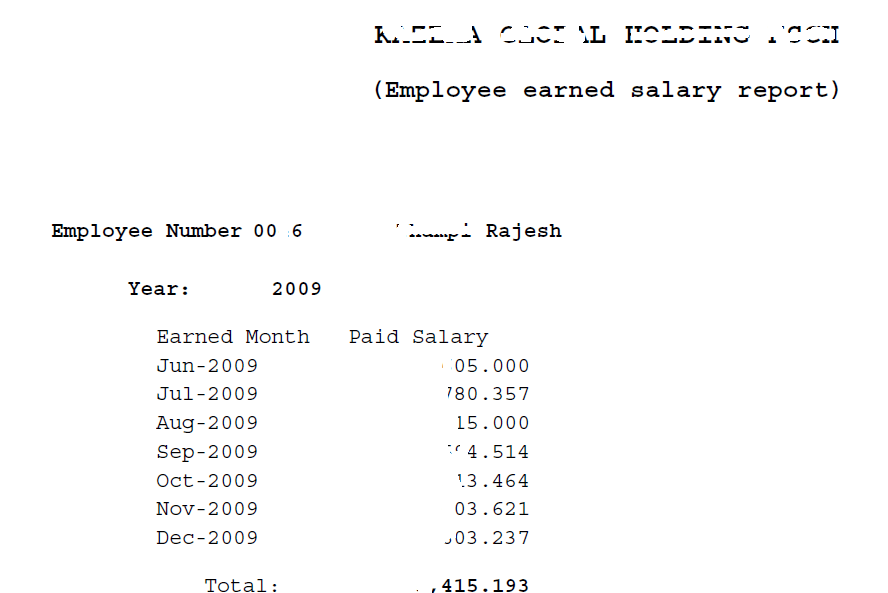
Recently I were requested to build a report by the HR/Payroll team, running which they can generate the salary paid details for employees. Ie, a tabular listing with paid month, and total salary earned, grouped by year factor

0046

I found the request being one of the toughest, as my exposure to Payroll module and base tables was limited almost none, other than knowing the person and assignment tables and views!

Gradually I started going through the custom reports developed by our implementer and restructured few of their custom functions into a best possible view what meets our current requirements. As we are not using customized packages for the salary calculations, you should able to alter the below SQL and create your own with almost no efforts. We hope you will enjoy the solution!

Script for view

CREATE OR REPLACE VIEW XXEMPLOYEE_SALARIES_MONTHLY
AS
SELECT pap.person_id, pap.employee_number,to_char(ppa.date_earned,'Mon-YYYY') earned_month,
TO_NUMBER(to_char(ppa.date_earned,'MM')) MONTH_NUMBER,
TO_NUMBER(to_char(ppa.date_earned,'YYYY')) YEAR_FACTOR,
sum(to_number(prrv.result_value)) PAID_AMOUNT
FROM PAY_ELEMENT_TYPES_F petf
,PAY_INPUT_VALUES_F pivf
,PAY_PAYROLL_ACTIONS ppa
,PAY_ASSIGNMENT_ACTIONS paa
,PAY_RUN_RESULTS prr
,PAY_RUN_RESULT_VALUES prrv
,PER_ALL_ASSIGNMENTS_F paaf
,PER_ALL_PEOPLE_F pap
,PAY_ELEMENT_CLASSIFICATIONS pec
WHERE 1=1
AND pec.classification_id = petf.classification_id
and prrv.input_value_id = pivf.input_value_id
AND CLASSIFICATION_NAME IN ('Earnings','Supplemental Earnings')–Add in more based on your setup
and pivf.name in ('Pay Value')
AND petf.element_type_id = prr.element_type_id
AND paa.assignment_action_id = prr.assignment_action_id
AND prr.run_result_id = prrv.run_result_id
AND petf.business_group_id = 81
AND ppa.business_group_id = pap.business_group_id
AND ppa.payroll_action_id = paa.payroll_action_id
AND SYSDATE BETWEEN TRUNC(petf.effective_start_date) AND TRUNC(petf.effective_end_date)
AND last_day(ppa.date_earned) BETWEEN TRUNC(pap.effective_start_date) AND TRUNC(pap.effective_end_date)
AND last_day(ppa.date_earned) BETWEEN TRUNC(paaf.effective_start_date) AND TRUNC(paaf.effective_end_date)
AND paaf.assignment_id = paa.assignment_id
AND paaf.person_id = pap.person_id
–and prrv.result_value > '0'
AND paaf.business_group_id = pap.business_group_id
AND pap.business_group_id = 81–double check
GROUP BY pap.person_id,pap.employee_number, to_char(ppa.date_earned,'Mon-YYYY'),to_char(ppa.date_earned,'MM'),to_char(ppa.date_earned,'YYYY')
UNION ALL
SELECT pap.person_id, pap.employee_number,to_char(ppa.date_earned,'Mon-YYYY') earned_month,
TO_NUMBER(to_char(ppa.date_earned,'MM')) MONTH_NUMBER,
TO_NUMBER(to_char(ppa.date_earned,'YYYY')) YEAR_FACTOR,
nvl(sum(to_number(prrv.result_value)),0)*-1 PAID_AMOUNT
FROM PAY_ELEMENT_TYPES_F petf
,PAY_INPUT_VALUES_F pivf
,PAY_PAYROLL_ACTIONS ppa
,PAY_ASSIGNMENT_ACTIONS paa
,PAY_RUN_RESULTS prr
,PAY_RUN_RESULT_VALUES prrv
,PER_ALL_ASSIGNMENTS_F paaf
,PER_ALL_PEOPLE_F pap
,PAY_ELEMENT_CLASSIFICATIONS pec
WHERE 1=1
AND pec.classification_id = petf.classification_id
and prrv.input_value_id = pivf.input_value_id
AND CLASSIFICATION_NAME IN ('Voluntary Deductions','Involuntary Deductions','Social Insurance')–Add in more based on your setup
and pivf.name in ('Pay Value')
AND petf.element_type_id = prr.element_type_id
AND paa.assignment_action_id = prr.assignment_action_id
AND prr.run_result_id = prrv.run_result_id
AND ppa.business_group_id = pap.business_group_id
AND ppa.payroll_action_id = paa.payroll_action_id
AND SYSDATE BETWEEN TRUNC(petf.effective_start_date) AND TRUNC(petf.effective_end_date)
AND last_day(ppa.date_earned) BETWEEN TRUNC(pap.effective_start_date) AND TRUNC(pap.effective_end_date)
AND last_day(ppa.date_earned) BETWEEN TRUNC(paaf.effective_start_date) AND TRUNC(paaf.effective_end_date)
AND paaf.assignment_id = paa.assignment_id
AND paaf.person_id = pap.person_id
— and prrv.result_value > '0.00'
AND paaf.business_group_id = pap.business_group_id
AND pap.business_group_id = 81–double check
GROUP BY pap.person_id,pap.employee_number, to_char(ppa.date_earned,'Mon-YYYY'),to_char(ppa.date_earned,'MM'),to_char(ppa.date_earned,'YYYY')
order by 2,5,4;

Sample Query

SELECT PERSON_ID, EMPLOYEE_NUMBER,earned_month,year_factor,
SUM(PAID_AMOUNT) PAID_SALARY
FROM XXEMPLOYEE_SALARIES_MONTHLY
WHERE
1=1
AND EMPLOYEE_NUMBER =:P_EMPLOYEE_NUMBER
AND YEAR_FACTOR BETWEEN NVL(:P_START_YEAR,YEAR_FACTOR) AND NVL(:P_END_YEAR,YEAR_FACTOR)
GROUP BY PERSON_ID,EMPLOYEE_NUMBER,earned_month,YEAR_FACTOR, MONTH_NUMBER
ORDER BY YEAR_FACTOR, MONTH_NUMBER

Enjoy another quality post from us guys :)

for Windows7bugs

rajesh

Oracle – a simple function to format numbers for display

We have requirements to produce Payment Requests through Oracle E-Business suite custom interface, where the users are allowed to select different currencies based on the payment.

Different currencies means different precisions, US $ 2, Indian Rupees 2, while Kuwait, Bahrain have 3 precisions to maintain…

So the amounts displayed on reports needed to be formatted properly and we were doing some hardcoded formatting like

Now we have more currencies to deal with, hence came up with following simple function, which accepts the amount, precisions as inputs and returns a VARCHAR2 string as formatted number!

Function

CREATE OR REPLACE FUNCTION xx_format_number (P_AMOUNT IN NUMBER,
P_DEC_PREC IN NUMBER)
RETURN VARCHAR2
IS
frm_1 VARCHAR2 (30) := 'fm999999999990.';
new_num VARCHAR2 (30);
BEGIN
SELECT TO_CHAR (P_AMOUNT,
RPAD (frm_1, 15 + P_DEC_PREC, '90000000000000000'))
INTO new_num
FROM DUAL;

RETURN (new_num);

END;

You can check the function like following

SET SERVEROUTPUT ON;

DECLARE
l_new_num VARCHAR2 (30);
BEGIN

l_new_num := xx_format_number(.009,3);

DBMS_OUTPUT.PUT_LINE (l_new_num);
END;

Check it out, and let us know whether it worked for you!

for Windows7bugs

admin

Oracle Applications R12, Re-assign PR/PO stuck in the workflow (awaiting approval)


Handling Purchase Orders stuck in the work flow.

Logon to the instance as “SYSADMIN”

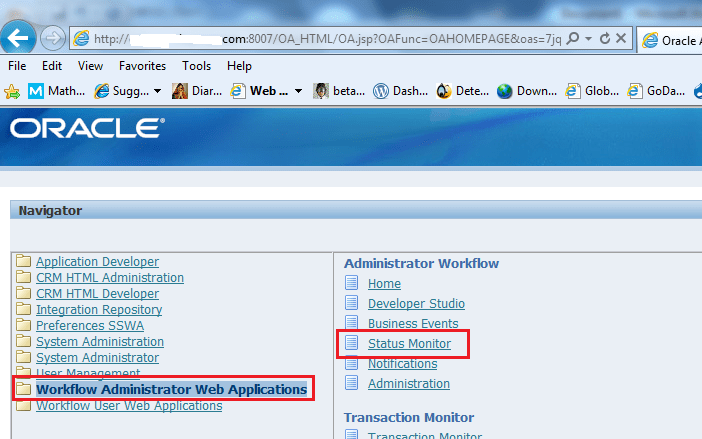
1

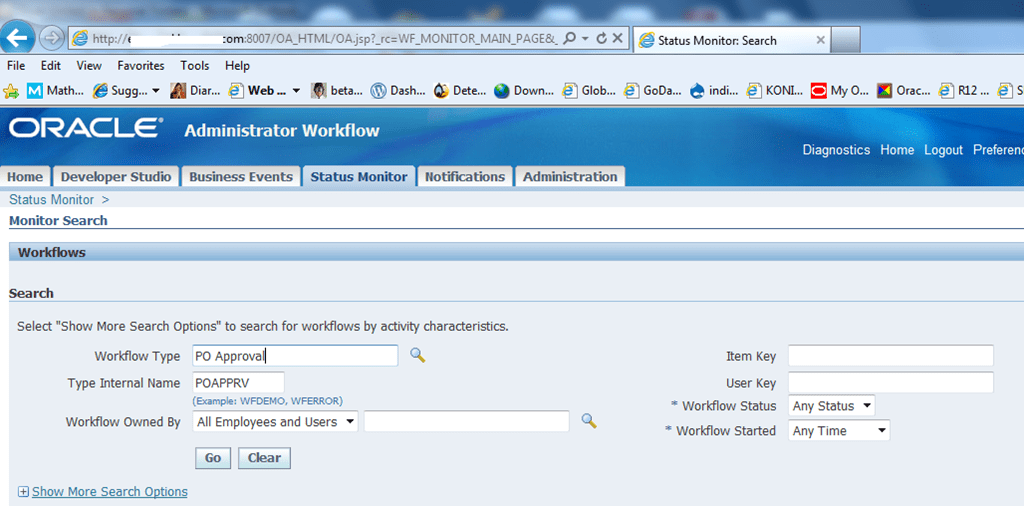
Select “Workflow Administrator Web Applications” and Select the function “Status Monitor”. This opens a jsp page show below.

2

For the purchase orders stuck in the flow, please locate “PO Approval” workflow using search function. This windows provides multiple choices to limit the amount of data retrieved. Apply it whenever it is possible to reduce the time collecting and producing data.

Image: Finding the correct workflow (for Purchase requests stuck in the workflow)

3

For Purchase Requests stuck in the work flow, please use the following query

select requisition_header_id, segment1, wf_item_type, wf_item_key, authorization_status, org_id from po_requisition_headers_all where segment1 = ‘1980’ and org_id = 105;

for Purchase order change the table name to PO_HEADERS_ALL

to find the wf_item_key which is referred as “item key” with the JSP form.

4

Once the desired information derived

Click on “Activity History” button

5

Now you may use “Reassign” function (Shown within green rectangle) to reassign the Purchase Request for approval by next immediate subordinate.

You may use the “Rewind” button to rewind the workflow to an earlier stage as well

Hope you enjoyed another quality solution from us

for Windows7bugs

rajesh

Install Oracle Workflow Builder on Windows 7/8 64Bit

Download the installer package ( http://www.oracle.com/technetwork/database/options/winclient-101059.html)

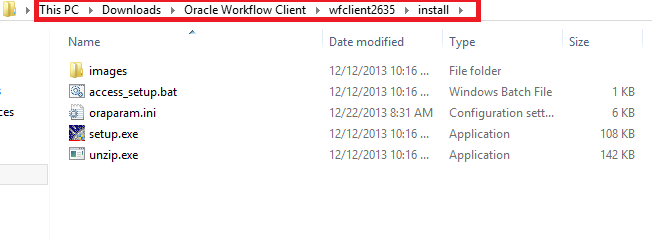
Unzip it

Go to the install folder

image

Change the compatibility mode

image

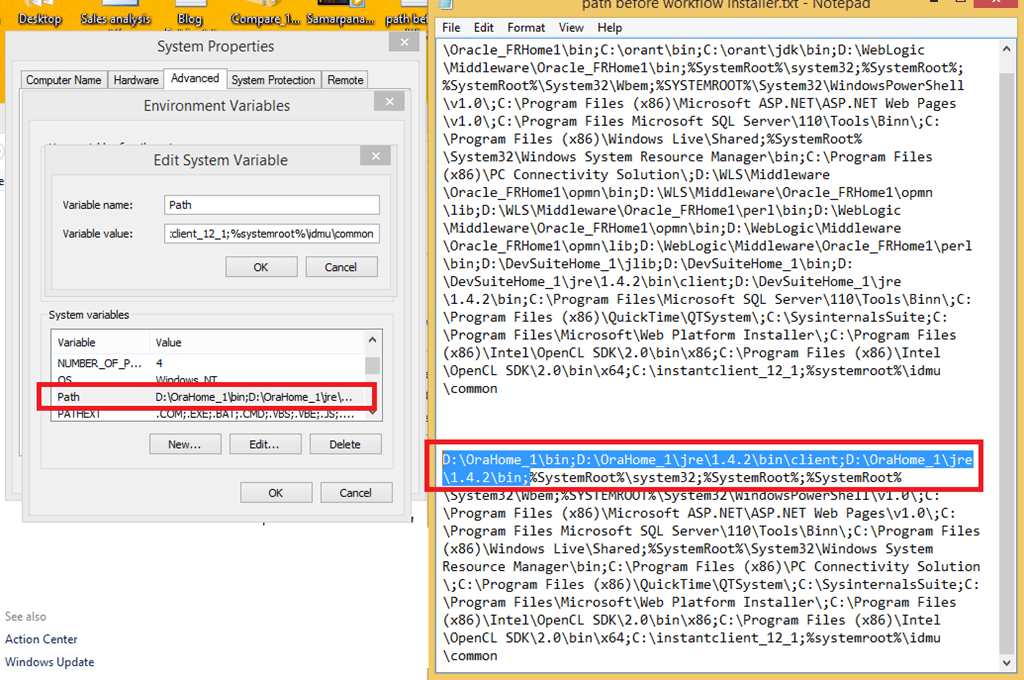
Backup your OS path string under Advance settings and “SAVE” the information in a text file.

Remove all entries other than what referring to the %systemroot% and bring the string length less than 1000 characters.

Now go ahead with installing the wokflow builder

image

Follow the prompts until the installation completes successfully.

image

Run the “Oracle Workflow Builder” as Administrator. You may create a shortcut on the desktop and change the properties to run as administrator permenently. Without administrator rights, this legacy software will fail to read the registry values, thus end up producing the error mentioned with this thread

https://community.oracle.com/thread/2343986

image

image

Observe the additional entries added with the PATH environment string.

Amend your backed up PATH string with the new entries and replace the PATH string.

image

Hope you enjoyed yet another post from us!

for Windows7bugs

Admin