Linux shell script file for Start/Stop Weblogic Services


This time we are sharing a shell script for starting/stopping Weblogic services. This shell script can

  1. Start Weblogic Admin Server (after starting Node Manager)
  2. Once the Admin server started, you can start the forms and reports services using the Admin Console
  3. Unless conflicts, you should able to access the Oracle enterprise manager console as well

Copy the content below in plain text file first, change the extension to .sh and set the execute permissions


[sourcecode language=”bash” gutter=”false” wraplines=”true”]
#!/bin/sh

if [ -z "$1" ]; then
echo "You must supply either start or stop command while calling this script! correct usage: weblogic_start_stop.sh start|stop"
exit
fi

bold=`tput bold`
normal=`tput sgr0`

case "$1" in
‘start’)
echo "Starting Management Node & Weblogic Server 10.3.6"

echo "Starting NodeManager"

nohup $WLS_HOME/server/bin/startNodeManager.sh > /dev/null 2>&1 &

sleep 10

output=`ps -ef | grep -i nodemanager.javahome | grep -v grep | awk {‘print $2’} | head -1`

set $output

pid=$1

echo "Weblogic NodeManager Service was started with process id : ${bold}$pid${normal}"

echo "Starting WebLogic Domain"

nohup $MW_HOME/user_projects/domains/ClassicDomain/bin/startWebLogic.sh > /dev/null 2>&1 &

# Sleep until exiting
sleep 60
echo "All done, exiting"
exit
esac

################################Stopping the services##################################

case "$1" in
‘stop’)
echo "Stopping Weblogic Server & Node Manager"

nohup $MW_HOME/user_projects/domains/ClassicDomain/bin/stopWebLogic.sh > /dev/null 2>&1 &

sleep 30

# echo "Killing Nodemanager process now"

output=`ps -ef | grep -i nodemanager.javahome | grep -v grep | awk {‘print $2’} | head -1`
set $output
pid=$1
echo "Killing Weblogic NodeManager Service Process : ${bold}$pid${normal}"

kill -9 `ps -ef | grep -i nodemanager.javahome | grep -v grep | awk {‘print $2’} | head -1`

echo "All done, exiting"
exit
esac

[/sourcecode]


If you have queries, please ask them using comments section.

for Windows7bugs

rajesh

Oracle Reports Developer 10g starts, remains minimized


(Not tested on Windows XP)

We came across a small annoyance with Oracle product Reports developer 10g. We are yet to pin point the exact reasons, however, if you are experiencing the same issue which is as elaborated below:

Start Reports Developer 10g

Flash Screen appears

image

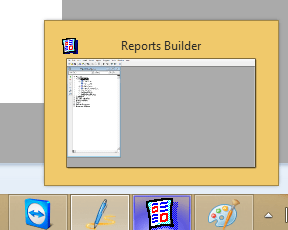
Then gets automatically minimized to the taskbar (Windows 7/8/8.1), and pointing the mouse shows the preview, as in below image.

image

However, clicking the preview window doesn’t bring up the Reports Builder 10g to maximized mode and remains unresponsive

What has changed from the last time the software was used?

We uninstalled and re-installed Weblogic Server 10.3.6 & Forms & Reports 11g R2, which has added multiple entries into the PATH environment variable. Order of path variable and pointers towards the java libraries are very sensitive for multiple Oracle products. May this could be a problem? Not sure!


Solution:

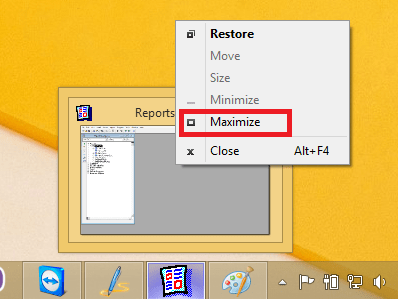
Right click the Preview window

image

and select “Maximize”

image

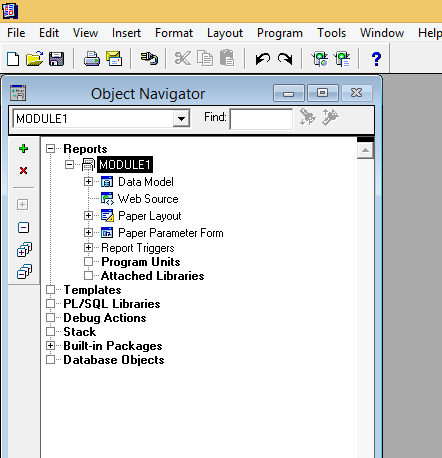
Once maximized, exit the reports developer. Restart to confirm the builder starts in Maximized mode next time.

We hope it helps few out there :)

for Windows7bugs

rajesh

Oracle Applications R12 | Using JRE 7 for application access

Update 18th April 2015: You can use java version “1.8.0_45” (JRE 8 update 45) Using the same hacks mentioned below!

You may have to restart your BOX once after Java Runtime 7 update 51 or later installed. Once the box restarted, JRE should start loading properly with Internet Explorer 11

UPDATE: If your E-Business Suite environment is not updated to Java 7, please do not update your JRE above 51! We tried the latest JRE7 update 55 and found that the applet was not at all loading. Were forced to rollback to the earlier version

Stuck with JRE 6 update 45 and sites like keepvid.com does not work properly without JRE 7?

Well there is a work around, as mentioned with the Oracle blog

Which works extremely beautiful with both Internet Explorer 10/11 & Google Chrome once after JRE is upgraded to version 7

Update: if you are using multiple Oracle products, system level variable setting for  JAVA_TOOL_OPTIONS could problematic. You can override this issue by changing the run time parameters for JRE like following

Control panel->Java(32-bit)->Click on Java tab->Click View-> Add the following to appropriate Product “Runtime Parameters” column (by pasting, or typing in)

-Djava.vendor="Sun Microsystems Inc."
jre

So what you are waiting for?

Common “errors” and solutions

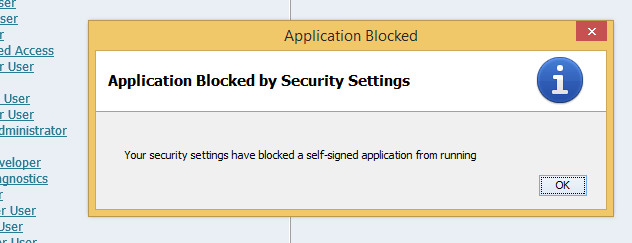
1. The first error you may receive once after the JRR upgrade should be

“Application Blocked by Security Settings”

image

Solution

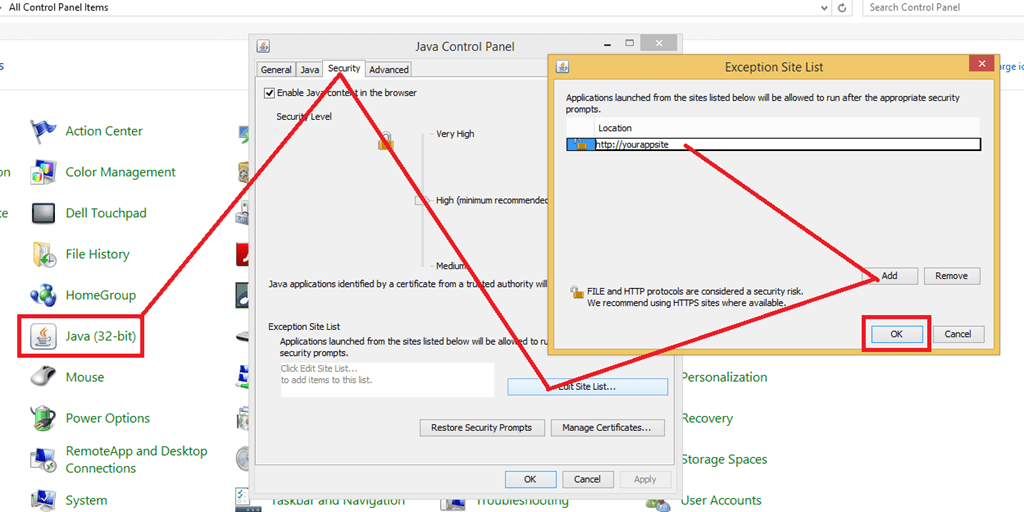
Go to control panel->Open up Java(32)->Security Tab

image

Adding the specific site should override the above Application Blocked lockout

2. Java Security Warning Dialogue windows where you must exclusively accept the security warning twice

“I accept the risk and want to run this application”

image

Which is going to be a permanent element with JRE 7 update 10 and later, according to multiple sites for the applications which are not signed. This warning will be issued each and every time (Not for the same session) and until now no hacks are available to suppress it from appearing. If you want to use JRE 7, just live with it.

The same warning will be displayed twice, and you MUST accept the warning both the times in order to let the java to load your forms based application(s)

For Windows7bugs

rajesh

Oracle E-Business Suite R12 | Google Chrome Browser access


So still stuck with no apparent methods to start using Google Chrome for Oracle applications Release 12? Well there is a “possibility”

There is a free extension available with Google Chrome repositories called

Oracle EBS R12&11i Enablement for Chrome 0.1.3

image

You can download the same for your computer from here (Search in the extensions page with a string like “Oracle R12” as the link location may change later)

Once the extension is installed, close Chrome and restart and try to access the Application instance.

image


That’s it folks

for Windows7bugs

rajesh

Oracle Weblogic Server 10.3.6, Configure Reports 11g(11.1.2) 64Bit


Howdy guys? We were busy upgrading uninstalling Weblogic 10.3.6, Forms & Reports 11g R1 and installing 64bit software throughout last few days.

For the installation part, you are not going to get better write up than one available here

However the installation procedure described there is limited to installing the Weblogic Server. You may refer to our earlier post for a “know how to” install and configure Forms & Reports 11g (both R1 & R2)

We tried the following combinations

Weblogic 10.3.6 64Bit with Forms & Reports 11g R1 32Bit. The results were quite disappointing. Installation and configurations went all fine, however once after a restart, we were not able to start the OPMN, thus all the services depending upon OPMN were failing. Even the uninstallation process was terminating without giving any prompts, forcing us to physically remove dozens of entries from registry and other places

Then we opted for a full 64Bit installation, which went smooth and after a restart everything was in place! intact

Setting up the forms using Oracle Enterprise Manager (R2 sets it up properly, against R1)

Just logon to Oracle EM, go to forms node and make changes and just apply. Many changes may not even require a server restart.

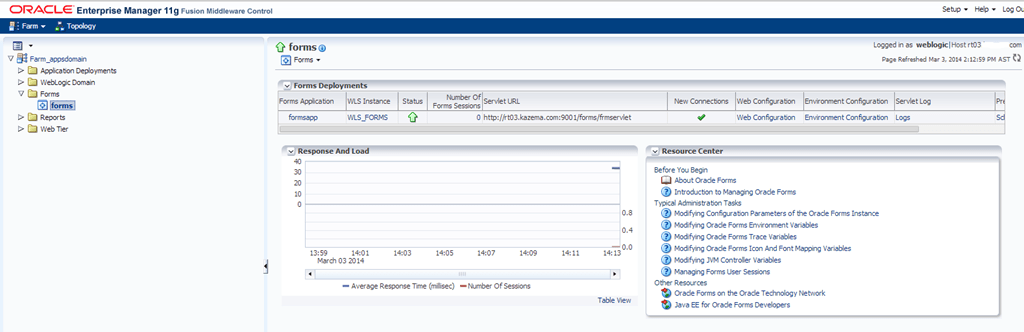
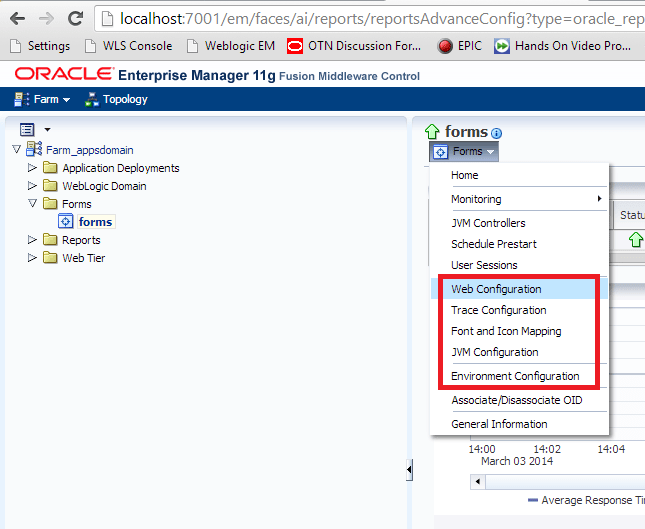
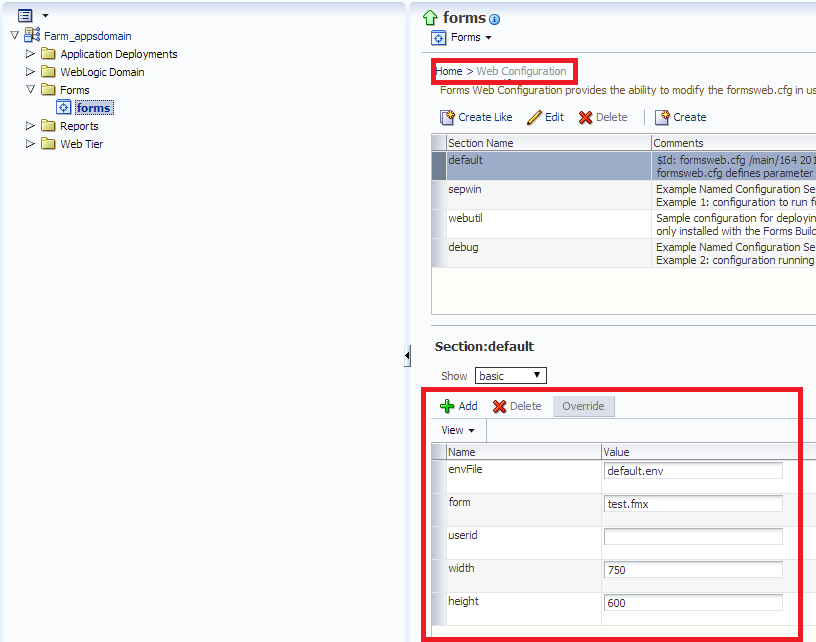
Few examples here

Forms node

image

Configuration Options

image

Web Configuration for “default”

image

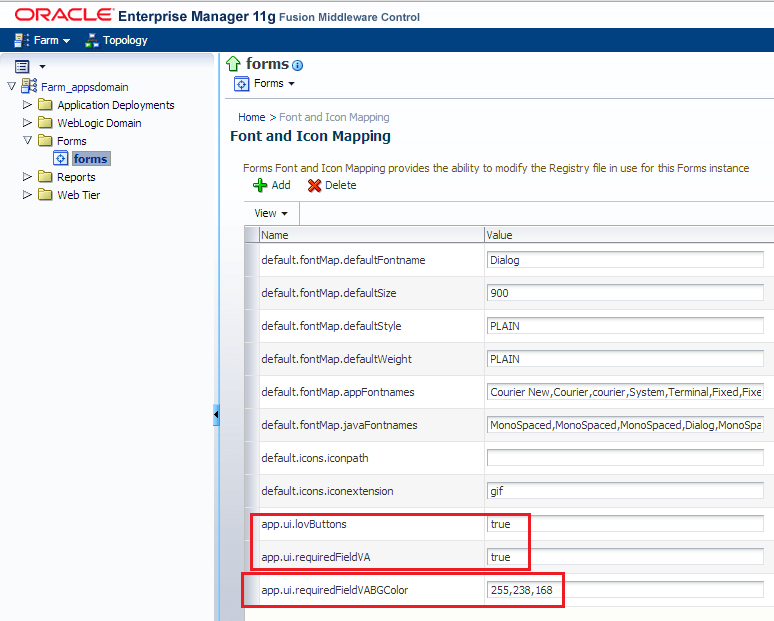
Setting up LOV buttons, required field highlighting

image

Calling forms based applications once after the above are set is quite easy. Just point your browser to

http://hostname:8888/forms/frmservlet?form=login.fmx&userid=apps/apps@orcl

or

http://hostname:9001/forms/frmservlet?form=login.fmx&userid=apps/apps@orcl

However, calling a report may not be that easy. The report server(s) are pretty much sensitive to your network settings. For example, we are using one Windows 8.1 64Bit machine for the entire testing and on which we have multiple oracle products installed

To make the scenarios once again complex, we have both class C and Public IPs set as static addresses for testing multiple products at the same time and VirtualBox’s own network interface (disable it!)

We will try to analyze the most common errors one may come across while trying to run reports

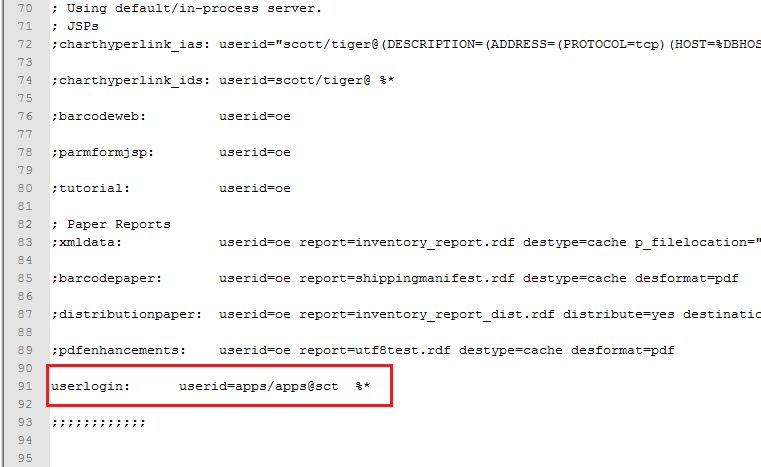
REP-52005: The specified key <keyname: in our case the key userlogin> does not exist in key map file.

Web.Show_Document(‘/reports/rwservlet?userlogin&server=rep_wls_reports_rt03_prod_instance&desformat=PDF&destype=cache&report=’||:CTRL.REPORT_NAME||’&paramform=Yes’,’_new’);

Solution: http://docs.oracle.com/cd/E23943_01/bi.1111/b32121/pbr_run013.htm

Browse and locate file “cgicmd.dat”. You must take a backup and add the keyname and value by the bottom of the .dat file.

Eg: Physical path(Change according to your installation)

D:\Weblogic\Middleware\user_projects\domains\appsdomain\config\fmwconfig\servers\WLS_REPORTS\applications\reports_11.1.2\configuration

image

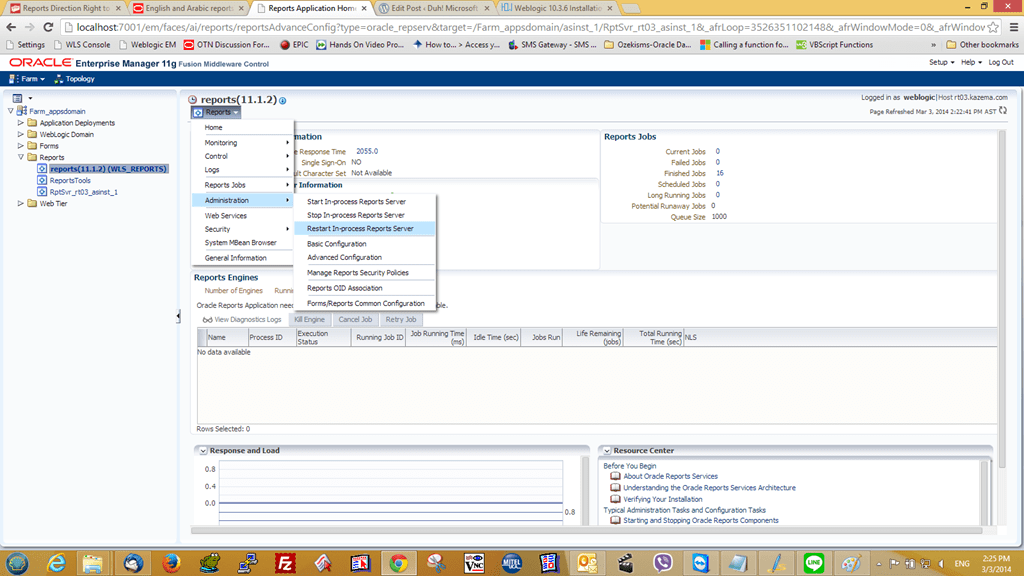
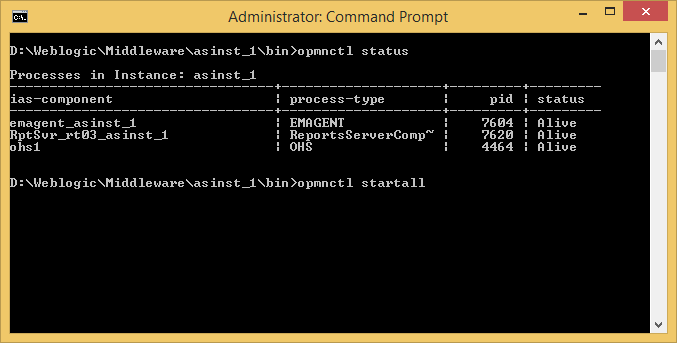
Save & restart the report server. Make sure you check the OPMN status as well. If required, restart OPMN by issuing opmnctl stopall & opmnctl startall from the application instance bin directory

opmn

The “opmnctl status” will provide you the status of element and make sure “RptSvr_<hostname>_asinst_1 is “Alive”

Go to Weblogic Server console and restart the WLS_REPORTS. Test your report once again.

REP-51002: Bind to Reports Server <servername> failed

This error could be genuinely difficult to address, as the log files will show the report server(s) and up and running, however keeping on failing to bind while trying to print reports.

Reason#1: Binding fails to resolve the hostname where the report server is installed. Mostly happens while the host has more than one static IP assigned

Solution:Edit C:\Windows\System32\Drivers\etc\hosts file and add an entry like following

Your.static.ip.address fqdn hostname

192.168.0.10      myhost.mydomain.com myhost

112.11.10.23      myhost.mydomain.com myhost

Reason #2: Windows firewall is blocking UDP against port 14021.

Solution: Create an exception with the firewall, or disable the firewall completely and try the reports once again. Please note, a restart of the box is always recommended

REP-52266: The in-process Reports Server <server_name> failed to start.oracle…

Solution: This is mostly due to the host resolve issues. Once you resolved the issues as mentioned just above, the in-process server must be running fine after a restart.

Make sure the in-process Report server is up and running.

Update: There are couple of topics discussing about in-process report server, which should give you more details about how the server gets activated and when

https://community.oracle.com/message/9244290

http://docs.oracle.com/cd/E12839_01/bi.1111/b32121/pbr_strt006.htm

(We will do more tests and confirm the reasoning with our next update)


In-process reports server caters your web.show_document calls without a server parameter call. Let us check, how reports are called from a forms module, attached with a button click

Web.Show_Document(‘/reports/rwservlet?userlogin&server=rep_wls_reports_rt03_prod_instance&desformat=PDF&destype=cache&report=’||:CTRL.REPORT_NAME||’&paramform=Yes’,’_new’);

The first method, we are specifically passing the report instance name, while the below example

Web.Show_Document(‘/reports/rwservlet?userlogin&desformat=PDF&destype=cache&report=’||:CTRL.REPORT_NAME||’&paramform=Yes’,’_new’);

just tries to call the available report instance to cater the report. If you want to know how many reports instances are up and running in your server, you can use the EM or rwdiag.bat –findAll command


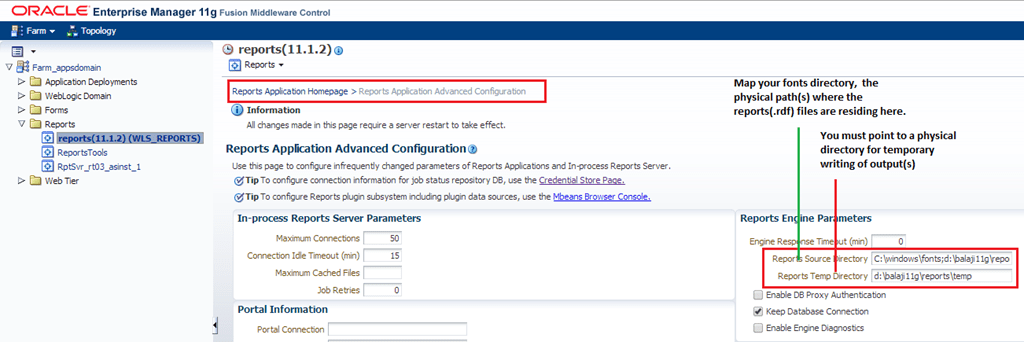
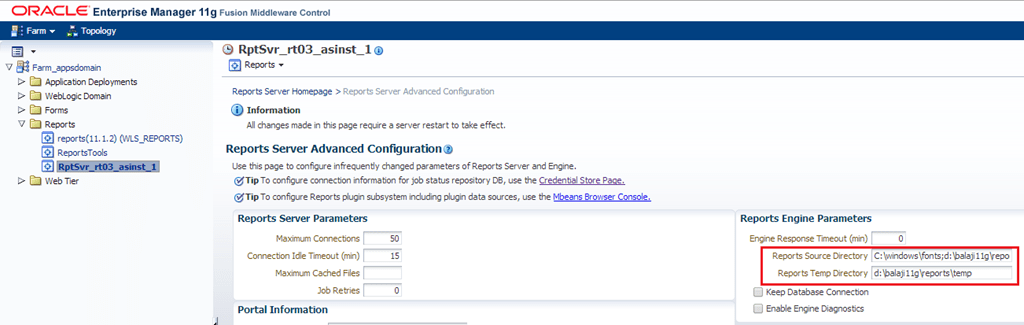
Common configurations for Reports 11g(11.1.2)

image


image


image

Leave alone the below

image

Additional settings (if required)

image

image

We are hoping to detail this post in near future. Too much typing for a day! Please note, these testing and solutions provided here are coming from novice like you guys, hence if you find anything which is not technically correct, please do let us know through comments section.

for Windows7bugs

admin

Install Weblogic 10.3.6 64Bit using JDK 7, Configure Forms & Reports 11gR2 on Windows 8 64Bit


A wonderful article about setting up Weblogic Server 10.3.6 64Bit using JDK 7 is available here(Install Weblogic Server 10.3.6 64bit)

Once you installed the product, installing forms and reports 11g should be as easy as installing any software bundle on Windows platform.

However, one of the nasty errors we came across multiple times were related to JAVA

While the forms & reports 11gR2 reaches 19% installation, it stops and java errors are thrown in the log file, without giving any prompts over the GUI. If the installation stops @ 19% for a long time, cancel the installation and restart. That deals with the java error

Once you completed the forms and reports installation, you can invoke the configuration as described with our earlier post

http://simpleoracle.com/2013/04/06/install-configure-oracle-weblogic-server-10-3-6-forms-reports-11g-on-windows8windows-2008-r2/

and you should be online within 20-25 minutes!

Try and post us your experiences

for Windows7bugs

rajesh

Uninstall Weblogic Server 10.3.6 & Forms, reports 11g


Quite a times, uninstalling Oracle products from a development machine could be quite troublesome, many times with errors difficult to understand. One of the most common errors

One of the most common errors as below

Thread: https://community.oracle.com/thread/2578042?start=0&tstart=0
—————————

Oracle Universal Installer

—————————

The Java RunTime Environment was not found at C:\DOCUME~1\v859971\LOCALS~1\Temp\OraInstall2013-09-05_01-10-08PM\jre\bin\javaw.exe. Hence, the Oracle Universal Installer cannot be run.

Please visit http://www.javasoft.com and install JRE version 1.3.1 or higher and try again.

A Discussion about the same here:

http://stackoverflow.com/questions/17282283/oracle-setup-exe-space-sensitivity-when-specifying-jre-absolute-path

Here is a quick workaround to address such situations

Copy the latest jre installation to a path without spaces

image

to, eg: C:\jre6

Switch to the folder where you have the “setup.exe”

C:\WINDOWS\system32>d:

D:\>cd D:\WebLogic\Middleware\oracle_common\oui\bin

Check what are the switches supported by the “setup.exe”

D:\WebLogic\Middleware\oracle_common\oui\bin>setup.exe -jreLoc C:\jre6 –help

Now, start uninstall process by starting the “setup.exe” with required switches

D:\WebLogic\Middleware\oracle_common\oui\bin>setup.exe -jreLoc C:\jre6 –deinstall

The setup GUI should start without throwing further errors now!

Once the components are uninstalled, you can uninstall weblogic server from “Oracle Weblogic” context menu, and the operation(s) should be smooth!


for Windows7bugs

rajesh

Oracle – a simple function to format numbers for display

We have requirements to produce Payment Requests through Oracle E-Business suite custom interface, where the users are allowed to select different currencies based on the payment.

Different currencies means different precisions, US $ 2, Indian Rupees 2, while Kuwait, Bahrain have 3 precisions to maintain…

So the amounts displayed on reports needed to be formatted properly and we were doing some hardcoded formatting like

Now we have more currencies to deal with, hence came up with following simple function, which accepts the amount, precisions as inputs and returns a VARCHAR2 string as formatted number!

Function

CREATE OR REPLACE FUNCTION xx_format_number (P_AMOUNT IN NUMBER,
P_DEC_PREC IN NUMBER)
RETURN VARCHAR2
IS
frm_1 VARCHAR2 (30) := 'fm999999999990.';
new_num VARCHAR2 (30);
BEGIN
SELECT TO_CHAR (P_AMOUNT,
RPAD (frm_1, 15 + P_DEC_PREC, '90000000000000000'))
INTO new_num
FROM DUAL;

RETURN (new_num);

END;

You can check the function like following

SET SERVEROUTPUT ON;

DECLARE
l_new_num VARCHAR2 (30);
BEGIN

l_new_num := xx_format_number(.009,3);

DBMS_OUTPUT.PUT_LINE (l_new_num);
END;

Check it out, and let us know whether it worked for you!

for Windows7bugs

admin
Oracle Applications R12, Re-assign PR/PO stuck in the workflow (awaiting approval)


Handling Purchase Orders stuck in the work flow.

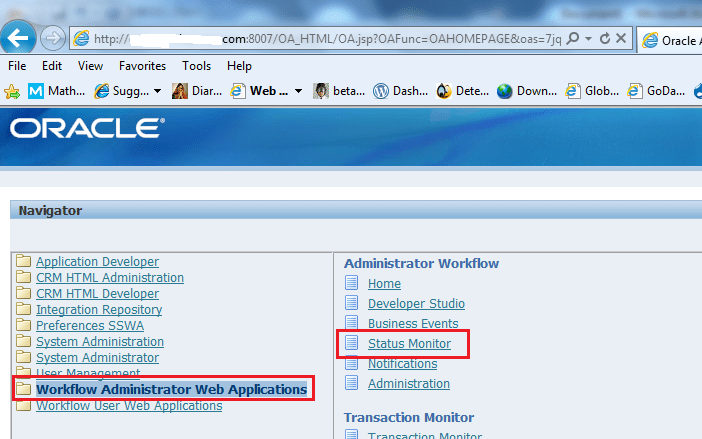
Logon to the instance as “SYSADMIN”

1

Select “Workflow Administrator Web Applications” and Select the function “Status Monitor”. This opens a jsp page show below.

2

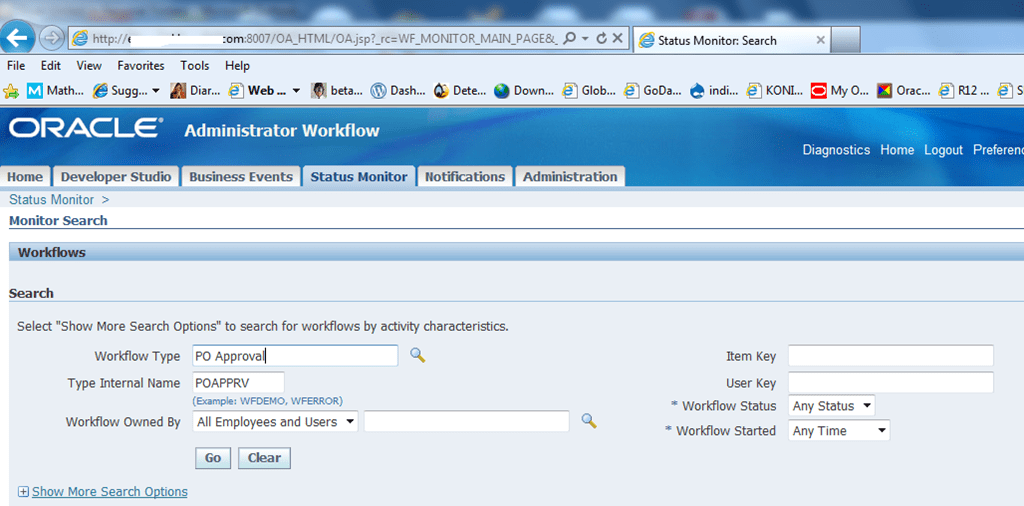
For the purchase orders stuck in the flow, please locate “PO Approval” workflow using search function. This windows provides multiple choices to limit the amount of data retrieved. Apply it whenever it is possible to reduce the time collecting and producing data.

Image: Finding the correct workflow (for Purchase requests stuck in the workflow)

3

For Purchase Requests stuck in the work flow, please use the following query

select requisition_header_id, segment1, wf_item_type, wf_item_key, authorization_status, org_id from po_requisition_headers_all where segment1 = ‘1980’ and org_id = 105;

for Purchase order change the table name to PO_HEADERS_ALL

to find the wf_item_key which is referred as “item key” with the JSP form.

4

Once the desired information derived

Click on “Activity History” button

5

Now you may use “Reassign” function (Shown within green rectangle) to reassign the Purchase Request for approval by next immediate subordinate.

You may use the “Rewind” button to rewind the workflow to an earlier stage as well

Hope you enjoyed another quality solution from us

for Windows7bugs

rajesh

Oracle forms developer 10g, setting up initial values issues–a workaround

Update: 04.Feb.2014

Iudith from ittoolbox suggests, instead of WHEN-NEW-FORM-INSTANCE, PRE-FORM should be used for populating values to PARAMETER elements, thus when the focus is set, the initial values will be set for the columns.

The post will be open for more comments. Cheers!

rajesh

The main advantage of an initial value for a text column is the form status remains NEW, instead of CHANGED & entering the query mode by pressing the F11 key is initiated without throwing errors even if you have mandatory (Required:Yes) property set for one more more columns within the same block.

(Strictly limiting the solution towards custom development for Oracle E-Business Suite, using TEMPLATE.FMB & forms developer 10g)

When a custom module is loaded, 10g run time doesn’t populate values assigned to GLOBAL/PARAMETER variables for the first record. Iudith explains this is default nature of forms load. However, the consequent records are getting the initial values from the GLOBAL/PARAMETER elements.

This time we are providing a workaround solution towards this dreaded situation, which should make a developer’s life bit easier.


Do not assign “First Navigation Block”, instead keep it as <Null>

image

Open “WHEN-NEW-FORM-INSTANCE” and programmatically send the focus to your first block (in which text columns are assigned with GLOBAL/PARAMETER values as initial values)

image

Somehow, this method populates the initial values for text columns when the forms is initiated. We believe, such a navigation to the block enforces a WHEN-NEW-RECORD-INSTANCE indirectly and populates all the referred elements.

If you have a better explanation, please forward the same to us.

Hoping to hear from Oracle forms developer guys, we remain

for Windows7bugs

Rajesh