Our Oracle application R12 (12.0.6) instance has JDK 6 environment & We don’t have any plans to migrate to any recent versions of Oracle Application those are supported by later Java environments.
Almost all users those use Oracle applications are using JRE for many other engineering programs (Calculations programs by Vendors) & frequent updates of the JRE happens automatically at the user ends. We have a significant crowd that is still using JRE 1.6_20 as base JRE, who seldom have the following issue(s) discussed below.
Over Windows 10, Internet Explorer 11 fails to load HTML pages properly & many times after the logon to the application, the HTML menu page is loaded in the explorer, leaving a 4-5 white space lines. Refer the image below
Basically this issue is observed with boxes those have latest JRE (x86) installed and used with parameter -Djava.vendor=”Sun Microsystems Inc.”
Oracle blogs strictly says, Compatibility view for Oracle applications R12 shouldn’t be enabled for Internet Explorer 11. I have tried enabling the Compatibility view for the Oracle applications, without any positive changes.
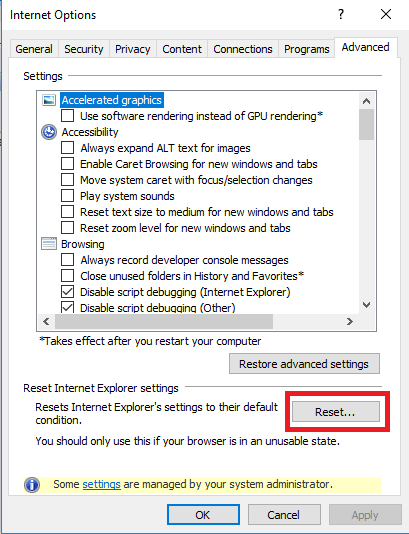
As a last resort, I reset the Internet Explorer 11
and after restarting the computer, Oracle Application HTML pages started loading correctly, without leaving white spaces between the IE Window and application top frame.
One of the annoyances suffered by business is the alerts and concurrent programs those start sending highly confusing messages to users immediately after a cloning completion. Application tier cloning finishes by trying to start all related services after a successful cloning. Hence the best method to stop the concurrent manager/alerts from firing up is NOT to let the cloning process start application tier level services, so that you can disable alerts/concurrent programs those are NOT required by the cloned instance.
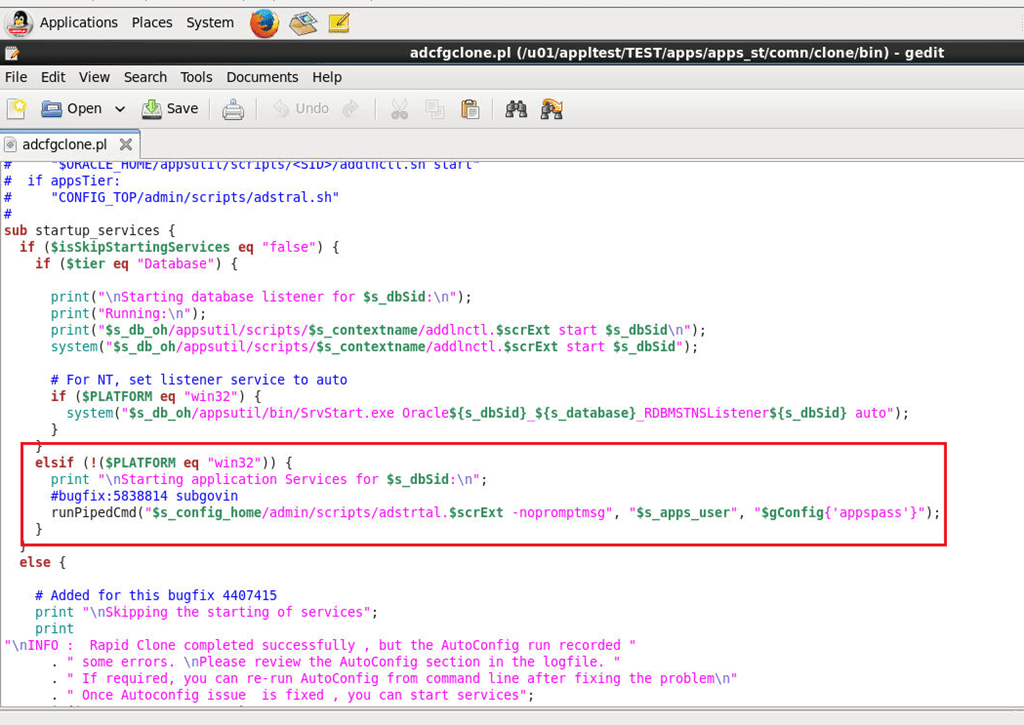
First step is to alter the $COMMON_TOP/clone/bin/adcfgclone.pl (perl script, please refer the image)
Change the portion in the highlighted block as shown below. This will stop the clone script from kick starting the application services after a successful clone.
[code language=”perl” gutter=”false”]
elsif (!($PLATFORM eq "win32")) {
print "\n Not Starting application Services for $s_dbSid:\n";
#bugfix:5838814 subgovin
#runPipedCmd("$s_config_home/admin/scripts/adstrtal.$scrExt -nopromptmsg", "$s_apps_user", "$gConfig{‘appspass’}");
}
[/code]
Now, you may proceed to disable all or selected alerts/concurrent programs using backend before starting the Application services.
Please note, this workaround is ONLY tested on 12.0.x releases of Oracle Applications. Please adjust to your environments.
Backup. The most essential, however many times highly ignored element of the digital world even today as many small scale industries find the investments made to this particular mechanism hardly comes in effect, unless a disaster arises. My personal experiences with convincing the management to go for sophisticated backup solutions were always the toughest, until we had a HUGE disaster.
As a thumb rule, the first thing I always did for an Oracle database was to setup a dump export every night (if the database is truly small in size), after the normal working hours, in addition to RMAN backups. These export files are kept in a different partition & regularly monitored and purged by the beginning of a new month, keeping the last day backup for the previous month, which is deleted by the beginning of a new year.
Keeping the backup in the same hardware could prove fatal when the hardware fails, and almost all the servers are configured to use RAID, using different levels. In such scenarios even if the drives are intact, retrieving the data from raided volumes will be a professional job, costing investment and time.
For small databases, like the one I have mentioned with my previous post we can design multiple options like mapping a network folder & copying the files automatically once after a new dump file is created as the part of a backup script.
I have devised two methods for my party, and they were
FTP the compressed latest dump file to another machine hosting FTP server
Using google drive (Free 15GB), upload the latest compressed dump file
The first method was already explained here so I will go to 2nd method in which Google drive sync is used to insure that the party has a valid backup stored somewhere in the cloud
Database dump export size: 300MB approximately
Zipped dump file size: 50MB approximately
Install google drive on your Windows 2008 x, Windows 2012 server machine. You may need to install corresponding Visual C++ Redistributable packages in order to come across python related errors. Please read more here for solutions.
Once the google drive starts working fine, you can use the following script, which will create a dump file first, then create a zip file against the latest dump file created and then copy the zip file to google drive for cloud synching.
Please note, I have moved the google drive folder from the default location to somewhere else, like E:\Google_Drive to make sure that my batch file has shortest path entry for the copying. If you plan the same, you can change the default location for google drive by exiting the application first, then pointing google drive to your folder of choice when google drive complains about missing default location
Windows batch file for Creating, zipping & copying the files to Google Drive
[code language=”text” gutter=”false”]
@echo off
FOR /F "tokens=2-4 delims=/ " %%a IN (‘date/t’) DO exp system/password@connectionstring full = y file=d:\Orabackup\exp_%%b%%a%%c.dmp
SETLOCAL
::Get the latest dump file name, generated using exp command
::Switch to the folder where the dump (.dmp) files are stored
CD D:\Orabackup\
:: D:\Orabackup is the folder where everyday dump files are stored.
for /f "tokens=*" %%a in (‘dir *.dmp /o:-d /b’) do set NEWEST=%%a&& goto :next
:next
REM echo The most recently created file is %NEWEST%
::http://stackoverflow.com/questions/15567809/batch-extract-path-and-filename-from-a-variable
FOR %%i IN ("%NEWEST%") DO (
REM ECHO filedrive=%%~di
REM ECHO filepath=%%~pi
SET ZIPNAME=%%~ni
REM ECHO fileextension=%%~xi
)
SET ZIPNAME=%ZIPNAME%.zip
::You can use built-in zip or 7-Zip to create archives
zip %ZIPNAME% %NEWEST%
::E:\Google_Drive is the folder used by the google drive in my setup
COPY %ZIPNAME% E:\Google_Drive
del %ZIPNAME%
::Exit
[/code]
While this method looks pretty awesome for small size databases, please be noted that, may not be at all feasible for larger ones. I will OPT this method for a backup dump file that could be compressed to a size of 400-500MB maximum, including the possibilities of corrupt compressed files.
Whatever, as far the party has a reliable internet connection with decent bandwidth, based on the size of compressed file, will always have access to a recent backup dump file, stored free in the cloud!
Not many DBAs prefer Windows for their Oracle databases. Linux is most preferred by most of them & most of the DBAs I know setup the bash profile under Oracle user to setup the environment during each logon to the server.
Our legacy business application database runs on Windows 2003 & trust me, we never had a single database crash (Other than the physical hardware failure that forced us to recover the database once). Depending upon how huge the database and application, the choices for hosting the Oracle database differ from one business to other.
We decided to upgrade our Oracle 10g 10.1.x.x 32Bit database to 11g R2 & as usual I have replicated the environment using my home semi-server class desktop, before the Production environment at work.
Installed 10g 32Bit, created the database using dump export file (The total size of the database is less than 7GB, hence I avoided the hectic RMAN backup and restore part)
Configured RMAN against the new database & made full backup for archive logs and database.
Installed 11g 11.2.0.4 64Bit database (Software Only installation)
Created a new Windows Service using oradim
Restored the database from RMAN backups & upgraded the database to 11g
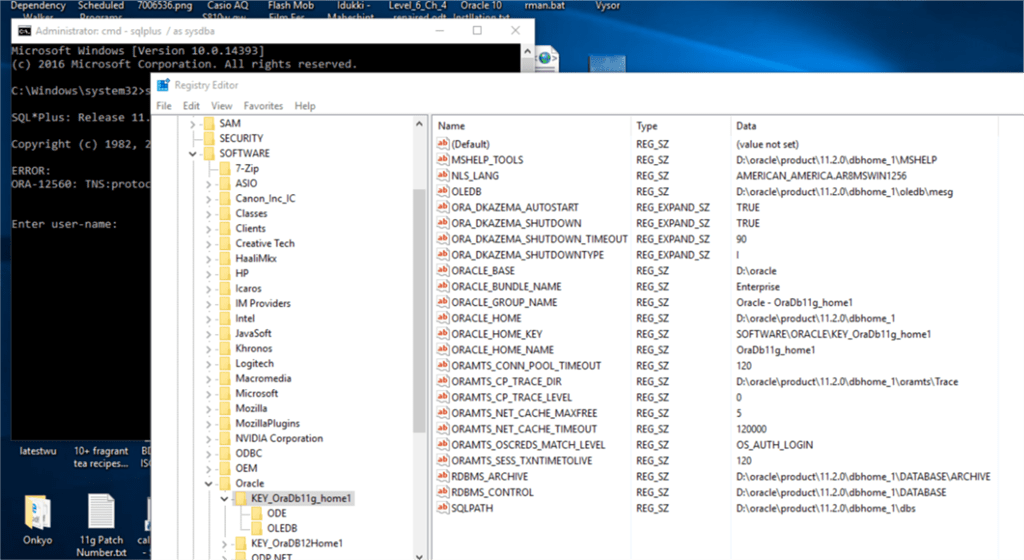
So far so good. I had to restart the computer & after rechecking the database was up and running, tried to access the instance using sqlplus & was presented with
ORA-12560: TNS:protocol adapter error
I setup ORACLE_SID=SID at the CMD window & sqlplus was happy after that.
Usually, Windows doesn’t need environment variables set exclusively for the database as Windows registry takes care of it. This is very efficient when the box has only one database running. If you have more than one database or multiple Oracle homes, the scenario changes.
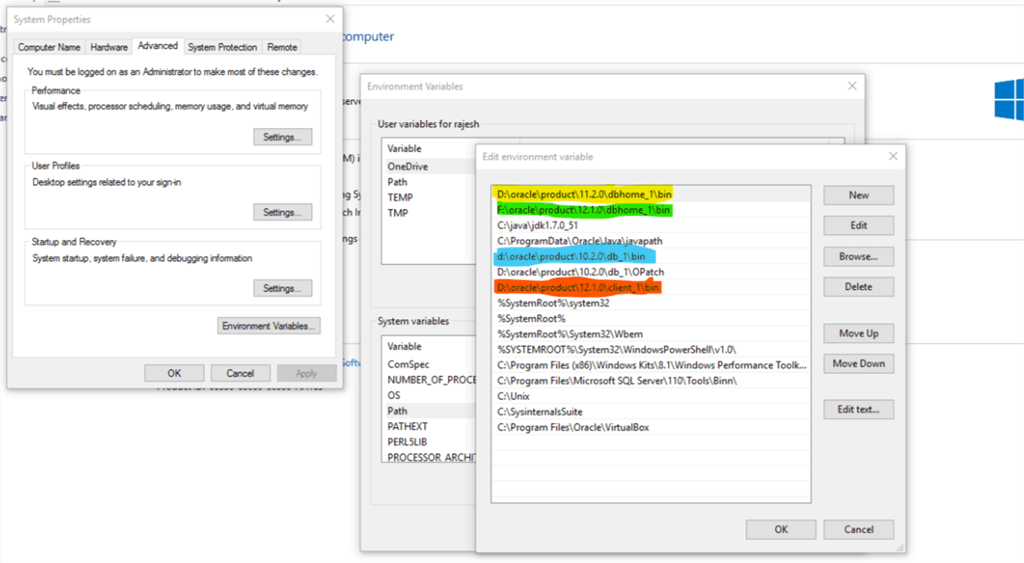
In addition to, Oracle always looks for the executable based on the PATH information it reads. For example my box has 10g,11g,12c database software installed without any databases created during the installation time.
Let us consider the scenario like I didn’t re-order the PATH entries after the latest installation of 12c & try to open SQL or RMAN. The call will find the executable from 12c path entry BIN as default, and a beginner could have enough confusions due to it.
In my case, I needed my 10g instance first, hence I moved the 10g folder as the 1st entry for Oracle products, and once I finished with 10g moved 11g home folder to the 1st position.
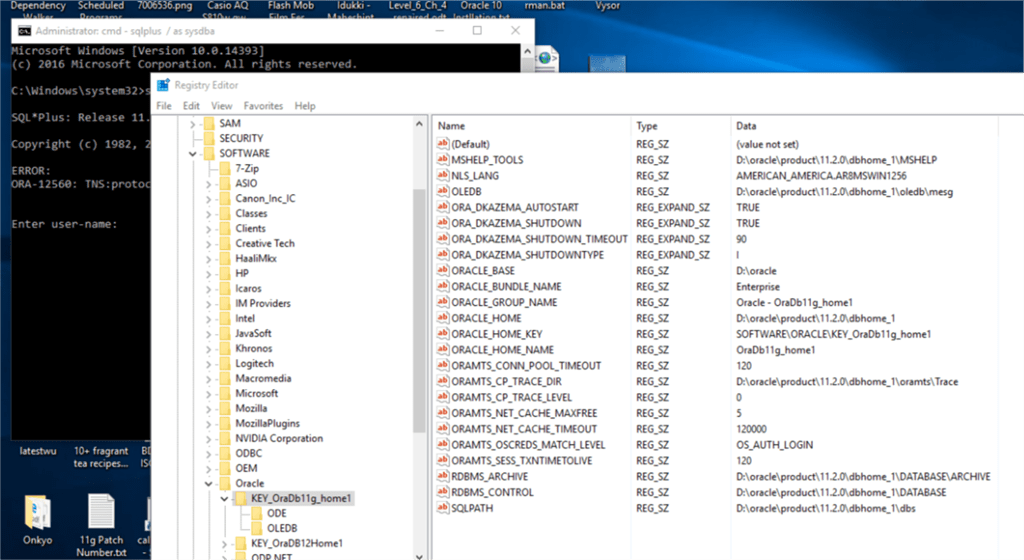
Anyway, after confirming the path settings, my immediate attention was towards registry, as Oracle services completely depend upon the registry values for each service registered.
To my utter surprise, found the 11g Service entry didn’t have ORACLE_SID string created during the instance creation using ORADIM.exe
Oracle 11g 11.2.0.4 has a huge bug list and interim patches those should be applied before moving to Production instance. I really don’t know whether the missing ORACLE_SID string entry was due to one of such bugs.
So I stopped the Oracle service, added ORACLE_SID string entry with the value for my database
Restarted the service & sqlplus connected to the instance happily without setting up the environment variable like set ORACLE_SID=SIDNAME
While the easiest solution is to setup both ORACLE_HOME, ORACLE_SID when someone wants to use the sqlplus or RMAN exclusively as a part of the database access, the above method is a definite way to deal with “ORA-12560: TNS:protocol adapter error”
I’ve given upon 10.2.0.4 last year, until I revived one of my Windows 10 VMs recently. As I had a legal copy of the OS, I did a OS upgrade to latest build 1709, did all the patching and was eager to do a 10g to 11g R2 (11.2.0.4) upgrade for learning purposes. Luckily I found the Oracle 10g installed in this particular VM and without checking the version of the database, tried to start the instance, facing the dreaded error “ORA-12546”
As I had much more experience with setting up instances gathered during last few months when I was doing hacked migrations & other activities, I decided to give it another try to resolve the “ORA-12546: TNS: permission denied” error, and I must say I succeeded to start the instance.
So here comes the minor tweaks those fixed the TNS errors
(All these exercises were performed on Windows environment, should be same on UNIX environments as well. I am using GUI tools for the fixes)
My issues with the TNS errors were much simpler to address, as I had IP address instead of hostname, which was not being resolved. Check the images below, if you are on Windows try to adjust the values and restart the Windows listener service
If you have multiple Oracle products installed and environment variables are not set for ORACLE_SID, ORACLE_HOME, TNS_ADMIN etc, switch to command prompt & source the ORACLE_SID. Then try to connect to database
D:\oracle\product\10.2.0\db_1\bin>sqlplus / as sysdba
SQL*Plus: Release 10.2.0.4.0 – Production on Mon Mar 12 11:47:48 2018
Copyright (c) 1982, 2007, Oracle. All Rights Reserved.
Connected to:
Oracle Database 10g Enterprise Edition Release 10.2.0.4.0 – Production
With the Partitioning, OLAP, Data Mining and Real Application Testing options
SQL>
[/code]
Although my case was primarily related to HOSTNAME entry, I rectified more issues after a restart. As usual I started the Windows service for Oracle database, started listener service & as my Windows service for database doesn’t start the instance automatically, switched command prompt and after sourcing ORACLE_SID tried to startup the database, ending up with the same TNS error:
D:\oracle\product\10.2.0\db_1\bin>sqlplus / as sysdba
SQL*Plus: Release 10.2.0.4.0 – Production on Mon Mar 12 12:59:33 2018
Copyright (c) 1982, 2007, Oracle. All Rights Reserved.
ERROR:
ORA-12546: TNS:permission denied
[/code]
Painfully I realized the truth that, there are NO straight forward solution to this error for the version in concern which is 10.2.0.4!
As I managed to start the instance successfully prior a restart, I tried to recollect the sequence of starting and stopping the Windows services. So, I got back to services panel and stopped the Oracle service, followed by restating the listener service. After waiting couple of minutes, started the Oracle service once again & tried to connect to the idle instance using sqlplus / as sysdba & this time I was able to connect to the idle instance without facing the TNS error.
I wanted to confirm that restarting the Windows services address this dreaded situation, hence again restarted the Virtual Machine & did the following
Started the listener service & through network resource monitor insure that the port 1521 is listening
Started Windows service for oracle database
Switched to command prompt & tried to connect to the idle instance
D:\oracle\product\10.2.0\db_1\bin>sqlplus / as sysdba
SQL*Plus: Release 10.2.0.4.0 – Production on Mon Mar 12 13:34:56 2018
Copyright (c) 1982, 2007, Oracle. All Rights Reserved.
ERROR:
ORA-12546: TNS:permission denied
Enter user-name:
ERROR:
ORA-12546: TNS:permission denied
Enter user-name:
ERROR:
ORA-12546: TNS:permission denied
SP2-0157: unable to CONNECT to ORACLE after 3 attempts, exiting SQL*Plus
[/code]
Stopped the Windows Service for Oracle database, waited couple of minutes and again tried to connect to the instance in the same CMD session
[code language=”sql” gutter=”false”]
D:\oracle\product\10.2.0\db_1\bin>sqlplus / as sysdba
SQL*Plus: Release 10.2.0.4.0 – Production on Mon Mar 12 13:35:21 2018
Copyright (c) 1982, 2007, Oracle. All Rights Reserved.
Connected to an idle instance.
SQL>
[/code]
That’s all.
Hope this helps few out there, at the same time throwing a question “Whether it is really worth for a production instance when 10.2.0.5 addresses such complications?”
rajesh
Update: 16th Feb 2017
Sorry folks, I’ve given upon 10.2.0.4 & moved to 10.2.0.5 patch upgrade that resolves the intermittent service startup issues of Oracle on Windows OS (Uncertified OS like Windows 10/2008R2)
I’m sure, if at all needed an upgrade, your DBA will choose a later version of Oracle database, when a client server architecture may not be flexible with Oracle 12c. Please make sure you try the upgrade using a virtual machine, spend some time analyzing logs and if you feel, it is worth taking a risk for the production, do the production patching using 10.2.0.5 patch. You may have to drop and recreate the Enterprise Manager repository (if you are using it at all)
Update: 14th Feb 2017
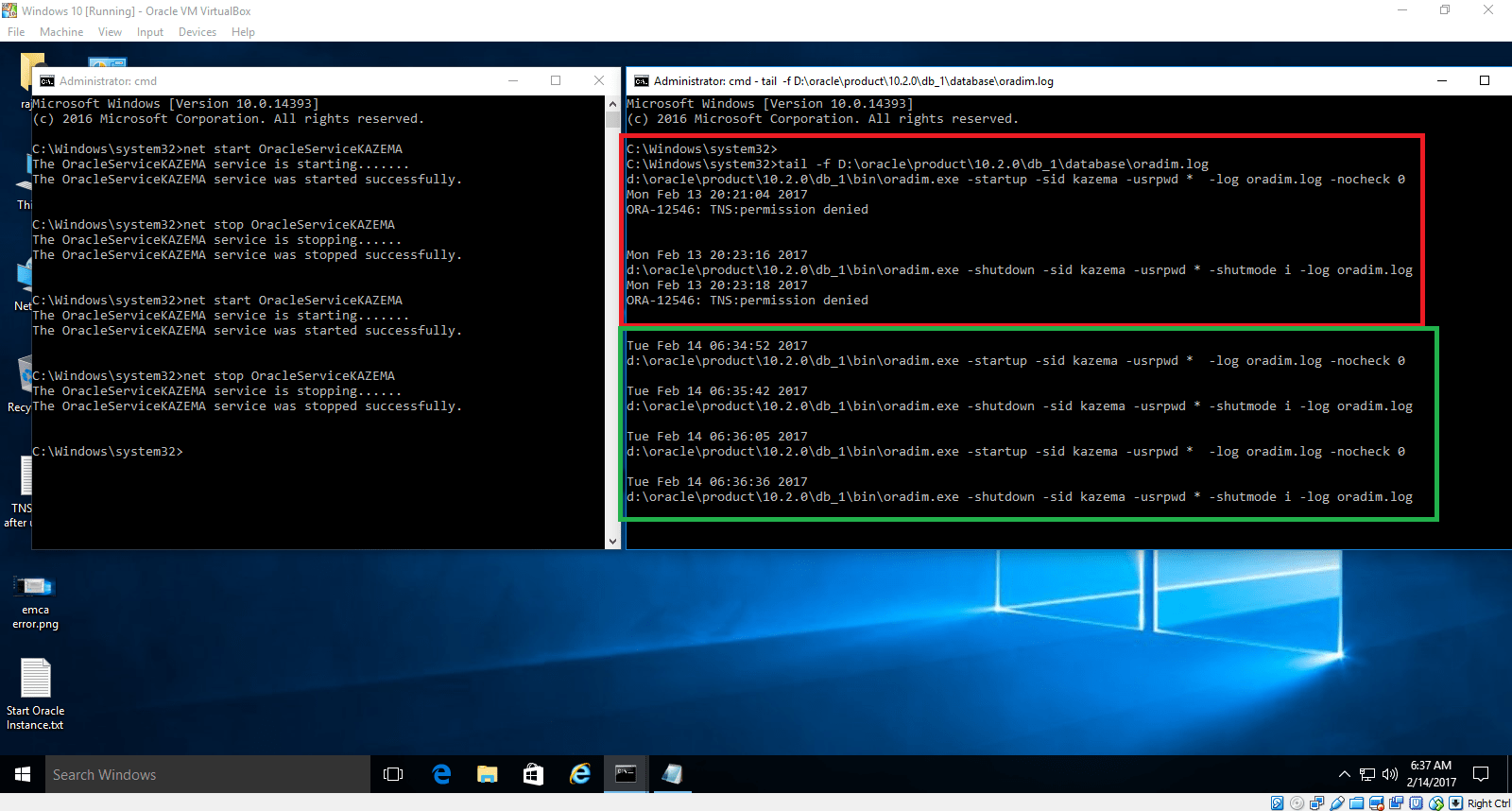
A right day to present something that’s kinda disappointing? :P Well, Even though I managed to get stuffs running, after a reboot over night, realized that the “net start Oracle serviceName” in consequent attempts brings back the dreaded “ORA-12546: TNS: permission denied” error message logged in oradim.log
the only one logic I could reach to this intermittent issues with starting service is, read & execute permissions on Oracle executables are not being triggered always. Finish!
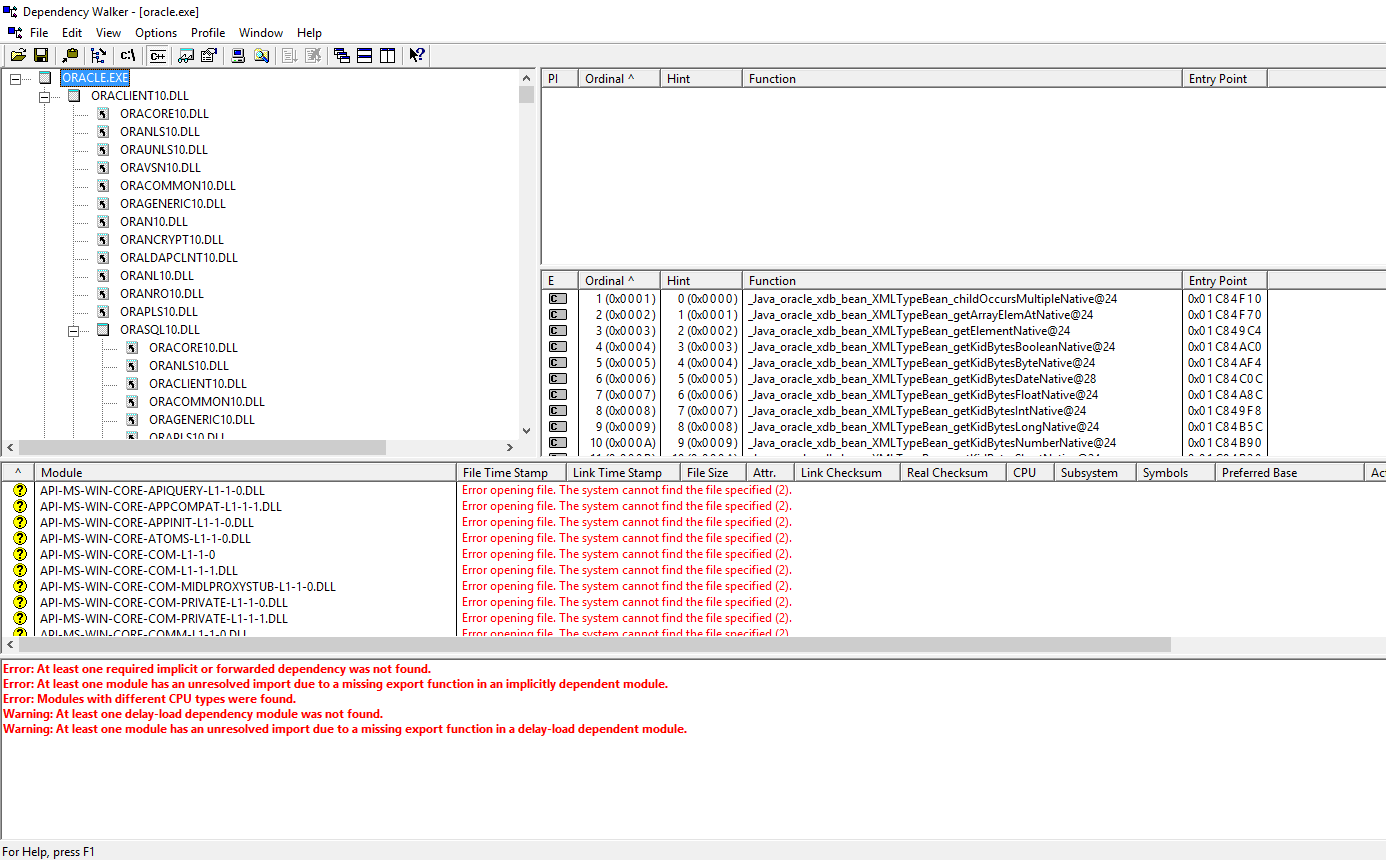
My further digging using “Dependency walker” for both Oracle.exe & TNSLSNR.exe has exposed that both the executable were making reference to Microsoft APIs those are depreciated!
Finally: I’m doing a hack install of 10.2.0.3 on Windows 10. Updating the instance using 10.2.0.4 patch & expecting a smooth sail. I’m totally wrong, I can test it, hope it works (not always) & I shouldn’t ever attempt the same in a Production environment.
Positive thing: Once the bin folder has correct permissions & setting up the Oracle services to start automatically, the service starts without any issues and shuts down gracefully when Windows is shut down.
Hi guys
I’m in the midst of compiling a huge post about RMAN backup & restore for NOT DBAs & at the same time trying to fix “ORA-12546: TNS: permission denied” errors I was getting from my 10.2.0.3 upgraded to 10.2.0.4 (32Bit) on a Windows 10 virtual machine using Oracle VirtulBox (My RMAN backup was restored from 10.2.0.3 Production to this upgraded instance)
My scenario:
Windows Service for Oracle Service is set as manual. After a reboot, I try to start the service manually. Sometimes it starts, some other time I have start/stop/start/stop a number of times until the database gets started. I asked google to give me tip & found a post answered by Tom (AskTom) bombarded with questions about “ORA-12546: TNS: permission denied” after machine restarts & there were no real solutions. Few of them even claimed that they managed to start the Oracle service by turning off the firewall(?)
Basically the 2nd page is purely for Linux, and if you are familiar with file permissions, easy to translate for Windows
I browsed the bin folder & realized that, even though the SERVER\Administrator account has full access to the oracle.exe executable, somehow my user “rajesh” who is the default administrator was not inheriting the execute right on the same.
So
I gave myself full rights on the executable and tried to restart the service & without making any complaints the Oracle database Service started and the database was opened. I was having a look at both alert log and oradim log files to insure that “ORA-12546: TNS: permission denied” not being appearing once again.
Then I gave my user account rajesh full rights on the bin folder (Over reaction) to make sure that I am not going to get hammered with the dreaded, without much explanations available “ORA-12546: TNS: permission denied” error once again.
I think during the upgrade process much of the file permissions were changed as part of the patching process & eventually the permissions were not reset to the actuals. This issue could happen with any Oracle upgrade processes. So if you are that another unlucky one, please give the above hack a try.
applprod@erp-prodbak.my.home:/u01/applprod/PROD/apps/apps_st/appl/au/12.0.0/forms/US>frmcmp_batch module=$AU_TOP/forms/US/XXITMDTLS.fmb userid=apps/apps output_file=$ONT_TOP/forms/US/XXITMDTLS.fmx Module_Type=FORM compile_all=Special frmcmp_batch: error while loading shared libraries: libig.so.0: cannot open shared object file: No such file or directory applprod@erp-prodbak.my.home:/u01/applprod/PROD/apps/apps_st/appl/au/12.0.0/forms/US>
Recently I cloned our Production instance to check the feasibility of OEL 6.7 & as usual securely copied most of the bash profile for the Oracle and Application manager users from the production server.
I came across the “cannot open shared object file: No such file or directory” error while trying to compile an old form module & hadn’t have a clue for how to deal with this error, that happened to me first time in last 8 years with Oracle applications.
I crosschecked the folder permissions against production instance and everything was fine. All I could remember which could have gone wrong was narrowed down to the bash profile for the application user and after validating I realized that I was sourcing a wrong environment file!
Instead of sourcing the “/apps/apps_st/appl/APPSPRODBAK_hostname.env” file, I was sourcing “/apps/apps_st/appl/PRODBAK_hostname.env”. I realized it while trying to echo the $ORACLE_HOME variable as application manager user.
So, if you come across “error while loading shared libraries” error while trying to compile, before start dismantling your instance, try to see whether you have sourced the environment variables correctly.
I think it was 2001-2002 our company decided to migrate to Developer 6i based build from Developer 2000 (4.5). We had loads of fun setting up the Arabic part for the forms runtime. I remember setting up the NLS_LANG string as ‘ARMSAWIN1256’ instead of ‘AR8MSWIN1256’ and wasting hours trying to figure out what went wrong.
If not often, I receive requests once in a while, asking about setting up the Arabic (Right to left languages) environment for client server architecture. Today I am “Showing” you a how to, rather than typing the entire stuff here :)
This Video demonstrates the following few
Creating a database using AR8MSWIN1256 character set
Setting up the languages and Unicode parameters to show correct languages
Even though my blog has reached 600k+ visits, I am one of those “lucky” tech bloggers who is hardly reached through emails for some specific tips and helps.
One of the recent were about migrating from Developer 6i developed web deployment to Windows 2008 R2, and the asker decided to approach me through email after reading my post about installing Developer 6i suite on Windows 7 and later OS
There were many emails until I realized they have a web deployment! Using Developer 6i & I was truly impressed. Developer 6i setup was one of the toughest, when I tried it by 2004-2005 period and I truly given up once after a number of failures to setup it properly and “googling” wasn’t as efficient as today when a single search fetches you hundreds of blog posts those explain such setups minutely so that a beginner can, without sweating much could, almost setup anything!
The hacks I posted with my blog towards installing Developer 6i on Windows 7/later and Windows Servers did have it’s own drawbacks. Many of the Oracle products like Oracle graphs doesn’t work with the .dll hacks & we experienced unexpected crashes and I have made sure that I did warn the enthusiasts about them with my blog. Did it stop people from taking risks? I don’t think so
Our legacy Oracle database server hardware was 14 years old when we decided to finally decommission it. Many places around the world businesses never listen to the Administrators complaining about the age of hardware and how difficult it is to maintain obsolete hardware and software. Oracle database(proprietary) must be one of the widely used database without proper licensing and I hardly believe many small organizations will ever pay the unbelievable prices Oracle tries to extract from customers when they want to do proper licensing. Many of those environments may have new admins and the entire development teams dispersed or the software company that has developed the software diversified and started selling fish. Anyway, my asker’s situation was not far different. His hardware was obsolete and the company has brought him a new hardware with 4GB memory and he was desperately looking for a method to migrate from his Windows 2003 server to Windows 2008 R2 server
Can you/should you take risks by trying to migrate to a newer OS because there are “few hacks” available over internet?
I work as information technology manager and I will not let it happen, knowing and after having bad experiences. Instead I will try to find better solutions, like converting your Windows 2003 physical machine into a Virtual Machine and going online from a newer hardware and OS
Mr. Asker’s scenario
Windows 2003 Server with Developer 6i Web deployment and Oracle database 10g and his hardware has just 2GB memory!
His requirement
Want to start using the new hardware and Windows 2008 R2. Can’t take risks
My suggestion to him
Use VMWare’s P2V converter, Convert the legacy server into a VM
From the new hardware, run the VM
While I am NOT at all happy with the 4GB physical memory, I will suggest anyone who wants to go with such an approach to upgrade their hardware to have minimum 8GB so that the Windows 2008 R2 can reserve 4GB for itself, 3GB maximum for the 32Bit Windows 2003 Server and tweaking the Oracle database SGA to 40% of from the 3GB reserved for the VM!
Let us consider the few advantages of converting legacy hardware to virtual machines quickly
One can always take a full backup of the VM, based on mission criticality, in addition to the database backups. Such backups will help the administrators to restore the whole “machine”, if something goes drastically wrong
No headaches to figure out how the deployment was made, especially when there are hardly any documentations available explaining the setups
My asker got so excited that he stopped answering my consequent mails checking about progresses. That’s the downside of free consultancy in most of the cases. Oh well, that was not my first experience anyway. This year itself I helped someone to setup a 12c environment and when he was online, he told me how he had tears in his eyes and later he stopped answering my calls
I hope I made some sense with this post and if you are someone who is frantically looking for a way to “Migrate” without risking much, give it a try. Have comments or need more clarifications? Use the comments area to let me know about them.
While you are working in a very complex environments, it may become mandatory as a domain admin to disable the “Admin Share” from your specific computer (How to disable Admin Share) in order to protect some contents from other “Admins”. Well, it happens :)
While disabling the “Admin Shares” gives you a kind of invisibility, it has major disadvantages also. One of them being, asset collection software failing to read information about your computer in the network. This list could be long like the one provided by this Microsoft article. Though the article was specifically written for Windows XP, most of listed issues are applicable to all later versions of client OS (Haven’t tried with Server OS yet)
&
Oracle 12c installation will fail, and provide you very confusing error messages about unable to read temp location and more. If you come across such an error, do not wait, read our previous article about disabling Admin Share on Windows 7, browse to the registry “HKEY_LOCAL_MACHINE\System\CurrentControlSet\Services\LanmanServer\Parameters” & check the value for key “AutoShareWks” Type: DWORD entry and confirm it is not set as “0”. If yes, change the value to “1”, reboot your box and the installation must go ahead without giving errors associated with reading details about “TEMP” space.
Please note, this is just one of the issues & you may be subjected to other issues while installing the Oracle software, especially on a uncertified platform like Windows 10.
Google drive have security requirements changed & you have to log on to your google account to download the file attached with the post. I’ve edited the code sections, so that you can copy the scripts from the post without downloading.
Hi guys
Recently we changed our age old SAGEM finger print machines with cheaper and affordable VIRDI devices & bit the bullet when it was about configuring UNIS Remote Manager software to our Oracle ERP database server.
Virdi openly states they prefer MSACCESS database and other databases (SQL and Oracle)are “supported”, you read it, supported by the CUSTOMER
The FAQ available with Virdi website must be the work of a GENIUS, I have never seen such a structured FAQ with any other products & a wonderful close button that is a page big itself!
Oracle database setup is done for Virdi UNIS Remote Manager 3.2.3.6
Make sure your UNIS software matches the above version or later.
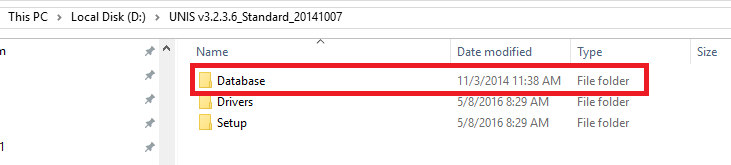
Default installation source includes a folder called “Database”
and within the “Database” folder you will find Oracle, SQL Server folders
Inside the Oracle folder you should see another folder “SQL Script”, within which you will find the SQL file for creating Oracle database elements for the UNIS software. Virdi wants a DBA to carefully analyze the script, execute sets one after another…
I’ve split the SQL into two portions which you can download from here. Please execute the scripts like following
(Please note the attached SQL script for creating the user is not updated, if you are going to use the downloaded scripts, please update the script using the one provided below)
As System or a user with DBA
“UNIS_User.sql”
create tablespace unis_db
datafile 'unis_db.dbf'
size 10M
autoextend on;

create user unisuser
identified by unisamho
default tablespace unis_db
temporary tablespace temp;

GRANT connect, resource to unisuser;
Please remove DBA privileges once after the initial data migration etc are over! (Useful when you are migrating from SQL to Oracle to carry out different DBA activities ;) )
Once the unisuser account created. Run the
“UNIS_Tables.sql” as unisuser
CREATE TABLE iUserFinger(
    L_UID int NOT NULL,
    L_IsWideChar int NULL,
    B_TextFIR blob NULL
);

ALTER TABLE iUserFinger ADD PRIMARY KEY ( L_UID    ) ;

CREATE TABLE tClientLog(
    C_EventTime char(14) NULL,
    L_LogonID int NULL,
    L_Type int NULL,
    L_Result int NULL
);

CREATE TABLE tTerminalLog(
    C_EventTime char(14) NULL,
    L_TID int NULL,
    L_Type int NULL
) ;
/*
CREATE TABLE tEnter(
    C_Date char(8) NOT NULL,
    C_Time char(6) NOT NULL,
    L_TID int NOT NULL,
    L_UID int NOT NULL,
    C_Name varchar(30) NULL,
    C_Unique varchar(20) NULL,
    C_Office varchar(30) NULL,
    C_Post varchar(30) NULL,
    C_Card varchar(24) NULL,
    L_UserType int NULL,
    L_Mode int NULL,
    L_MatchingType int NULL,
    L_Result int NULL,
    L_IsPicture int NULL
);
*/

CREATE TABLE UNISUSER.TENTER
(
  C_Date          CHAR(8 BYTE)                NOT NULL,
  C_Time          CHAR(6 BYTE)                NOT NULL,
  L_TID             INTEGER                     NOT NULL,
  L_UID             INTEGER                     NOT NULL,
  C_Name          VARCHAR2(30 BYTE),
 C_Unique        VARCHAR2(20 BYTE),
  C_Office        VARCHAR2(30 BYTE),
  C_Post          VARCHAR2(30 BYTE),
  C_Card          VARCHAR2(24 BYTE),
  L_UserType      INTEGER,
  L_Mode          INTEGER,
  L_MatchingType  INTEGER,
  L_Result        INTEGER,
  L_IsPicture     INTEGER,
  L_Device        INTEGER,
  L_OverCount     INTEGER,
  C_Property      VARCHAR2(8 BYTE),
  L_JobCode       INTEGER,
  L_Etc           INTEGER,
  L_Trans         INTEGER,
  L_NvrChannel1   INTEGER,
  L_NvrChannel2   INTEGER,
  L_NvrChannel3   INTEGER,
  L_NvrChannel4   INTEGER
);

ALTER TABLE tEnter ADD PRIMARY KEY
    (
        C_Date,
        C_Time,
        L_TID,
        L_UID
    )  ;


CREATE TABLE tAuditTerminal(
    C_EventTime char(14) NOT NULL,
    L_TID int NOT NULL,
    L_AdminID int NOT NULL,
    C_AdminName varchar(30) NULL,
    L_Type int NOT NULL,
    L_UserID int NOT NULL,
    C_UserName varchar(30) NULL
) ;


ALTER TABLE tAuditTerminal ADD PRIMARY KEY
    (
        C_EventTime,
        L_TID,
        L_AdminID,
        L_Type,
        L_UserID
    )  ;


CREATE TABLE tAuditServer(
    C_EventTime char(14) NOT NULL,
    L_LogonID int NOT NULL,
    L_Section int NULL,
    C_Target varchar(30) NULL,
    L_Process int NULL,
    L_Detail int NULL
) ;

CREATE TABLE cHoliday(
    C_Code char(4) NOT NULL,
    C_Name varchar(30) NULL,
    C_Remark varchar(255) NULL
) ;

ALTER TABLE cHoliday ADD PRIMARY KEY
    (
        C_Code
    )  ;

CREATE TABLE cOffice(
    c_code varchar(30) NOT NULL,
    c_name varchar(30) NULL
) ;

ALTER TABLE cOffice ADD PRIMARY KEY
    (
        C_Code
    )  ;

CREATE TABLE cPost(
    c_code varchar(30) NOT NULL,
    c_name varchar(30) NULL
) ;

ALTER TABLE cPost ADD PRIMARY KEY
    (
        C_Code
    )  ;

CREATE TABLE cStaff(
    C_Code varchar(30) NOT NULL,
    C_Name varchar(30) NULL
) ;

ALTER TABLE cStaff ADD PRIMARY KEY
    (
        C_Code
    )  ;

CREATE TABLE iCantTerminal(
    L_UID int NULL,
    L_TID int NULL
) ;

CREATE TABLE iHoliday(
    C_Code char(4) NOT NULL,
    C_Holiday char(4) NULL,
    C_DayName varchar(30) NULL
) ;

CREATE TABLE iTerminalAdmin(
    L_TID int NOT NULL,
    L_UID int NOT NULL
) ;

ALTER TABLE iTerminalAdmin ADD PRIMARY KEY
    (
        L_TID,
        L_UID
    )  ;

CREATE TABLE tCmdDown(
    C_RegTime char(14) NOT NULL,
    L_TID int NOT NULL,
    L_UID int NOT NULL,
    C_Time char(14) NULL,
    B_Data blob NULL,
    L_Retry int NULL
) ;

ALTER TABLE tCmdDown ADD PRIMARY KEY
    (
        C_RegTime,
        L_TID,
        L_UID
    )  ;

CREATE TABLE tMealType(
    C_Code char(4) NOT NULL,
    C_Name varchar(30) NULL
) ;

ALTER TABLE tMealType ADD PRIMARY KEY
    (
        C_Code
    )  ;

CREATE TABLE tMoney(
    C_Code char(4) NOT NULL,
    C_Name varchar(30) NULL,
    L_Unit int NULL,
    L_Early int NULL,
    L_Basic int NULL,
    L_Over int NULL,
    L_Night int NULL,
    L_Holi int NULL
) ;

ALTER TABLE tMoney ADD PRIMARY KEY
    (
        C_Code
    )  ;

CREATE TABLE tWorkType(
    C_Code char(4) NOT NULL,
    C_Name varchar(30) NULL,
    C_BasicDay char(8) NULL,
    L_Spin int NULL,
    C_WorkCode varchar(60) NULL,
    L_InoutMode int NULL,
    L_AutoIn int NULL,
    L_AutoOut int NULL,
    L_LateMargin int NULL,
    L_LackMargin int NULL,
    C_HoliCode char(4) NULL
) ;

ALTER TABLE tWorkType ADD PRIMARY KEY
    (
        C_Code
    )  ;

CREATE TABLE iUserPicture(
    L_UID int NOT NULL,
    B_Picture blob NULL
) ;

ALTER TABLE iUserPicture ADD PRIMARY KEY
    (
        L_UID
    )  ;

CREATE TABLE tConfig(
    C_MasterPwd varchar(30) NULL,
    L_UniqueType int NULL,
    L_AutoDown int NULL,
    C_DownTime char(4) NULL,
    L_AutoUp int NULL,
    L_RegSameFp int NULL,
    L_FpNum int NULL,
    L_UidCipher int NULL,
    L_TidCipher int NULL,
    L_UniqueCipher int NULL,
    L_MinVID int NULL,
    L_MaxVID int NULL,
    L_tSockPort int NULL,
    L_PollTime int NULL,
    L_SaveMode int NULL,
        C_PicturePath varchar(255)
) ;

CREATE TABLE iTimezone(
    C_Code char(4) NOT NULL,
    C_Timezone char(8) NOT NULL
) ;

CREATE TABLE cTimezone(
    C_Code char(4) NOT NULL,
    C_Name varchar(30) NOT NULL,
    L_Flag int NULL,
    C_Remark varchar(255) NULL
) ;

ALTER TABLE cTimezone ADD PRIMARY KEY
    (
        C_Code
    )  ;

CREATE TABLE cAccessTime(
    C_Code char(4) NOT NULL,
    C_Name varchar(30) NULL,
    L_Flag int NULL,
    C_Holiday char(4) NULL,
    C_Sun char(4) NULL,
    C_Mon char(4) NULL,
    C_The char(4) NULL,
    C_Wed char(4) NULL,
    C_Thu char(4) NULL,
    C_Fri char(4) NULL,
    C_Sat char(4) NULL,
    C_Hol char(4) NULL,
    C_Remark varchar(255) NULL
) ;

ALTER TABLE cAccessTime ADD PRIMARY KEY
    (
        C_Code
    )  ;

CREATE TABLE iAccessArea(
    C_Code char(4) NOT NULL,
    L_TID int NOT NULL
)
;
ALTER TABLE iAccessArea ADD PRIMARY KEY
    (
        C_Code,
        L_TID
    )  ;

CREATE TABLE cAccessArea(
    C_Code char(4) NOT NULL,
    C_Name varchar(30) NULL,
    L_Flag int NULL,
    C_Remark varchar(255) NULL
) ;

ALTER TABLE cAccessArea ADD PRIMARY KEY
    (
        C_Code
    )  ;

CREATE TABLE cAccessGroup(
    C_Code char(4) NOT NULL,
    C_Name varchar(30) NULL,
    L_Flag int NULL,
    C_Remark varchar(255) NULL
) ;

ALTER TABLE cAccessGroup ADD PRIMARY KEY
    (
        C_Code
    )  ;

CREATE TABLE iAccessGroup(
    C_Code char(4) NOT NULL,
    L_Type int NOT NULL,
    C_AccessCode char(4) NOT NULL
) ;

CREATE TABLE tUser(
    L_ID int NOT NULL,
    C_Name varchar(30) NULL,
    C_Unique varchar(20) NULL,
    L_Type int NULL,
    C_RegDate char(14) NULL,
    L_OptDateLimit int NULL,
    C_DateLimit char(16) NULL,
    L_AccessType int NULL,
    C_Password varchar(8) NULL,
    L_Identify int NULL,
    L_VerifyLevel int NULL,
    C_AccessGroup char(4) NULL,
    C_PassbackStatus char(4) NULL
) ;

ALTER TABLE tUser ADD PRIMARY KEY
    (
        L_ID
    )
;
CREATE TABLE tEmploye(
    L_UID int NOT NULL,
    C_IncludeDate char(8) NULL,
    C_RetiredDate char(8) NULL,
    C_Office varchar(30) NULL,
    C_Post varchar(30) NULL,
    C_Staff varchar(30) NULL,
    C_Authority char(4) NULL,
    C_Work char(4) NULL,
    C_Money char(4) NULL,
    C_Meal char(4) NULL,
    C_Phone varchar(255) NULL,
    C_Email varchar(255) NULL,
    C_Address varchar(255) NULL,
    C_Remark varchar(255) NULL
) ;

ALTER TABLE tEmploye ADD PRIMARY KEY
    (
        L_UID
    )  ;

CREATE TABLE tVisitor(
    L_UID int NOT NULL,
    C_Office varchar(30) NULL,
    C_Post varchar(30) NULL,
    C_Target varchar(30) NULL,
    C_Goal varchar(255) NULL,
    C_Company varchar(30) NULL,
    C_Info varchar(255) NULL,
    C_Phone varchar(255) NULL,
    C_Email varchar(255) NULL,
    C_Address varchar(255) NULL,
    C_Remark varchar(255) NULL
) ;

ALTER TABLE tVisitor ADD PRIMARY KEY
    (
        L_UID
    )  ;

CREATE TABLE tVisited(
    C_Name varchar(30) NULL,
    C_Unique varchar(20) NULL,
    C_RegDate char(14) NULL,
    C_LastDate char(8) NULL,
    C_Company varchar(30) NULL,
    C_Info varchar(255) NULL,
    C_Phone varchar(255) NULL,
    C_Email varchar(255) NULL,
    C_Address varchar(255) NULL,
    C_Remark varchar(255) NULL
) ;

CREATE TABLE tTerminal(
    L_ID int NOT NULL,
    C_Name varchar(30) NULL,
    L_FnWork int NULL,
    L_FnMeal int NULL,
    L_FnSchool int NULL,
    C_Office varchar(30) NULL,
    C_Place varchar(255) NULL,
    C_RegDate char(14) NULL,
    L_CommType int NULL,
    C_IPAddr varchar(255) NULL,
    L_IPPort int NULL,
    L_ComPort int NULL,
    L_Baudrate int NULL,
    L_Passback int NULL,
    C_AreaIn char(4) NULL,
    C_AreaOut char(4) NULL,
    C_lastup char(14) NULL,
    C_Version varchar(255) NULL,
    C_Remark varchar(255) NULL
) ;

ALTER TABLE tTerminal ADD PRIMARY KEY
    (
        L_ID
    )  ;

CREATE TABLE iCardInfo(
    L_CardSize int NULL,
    L_CardType int NULL,
    L_ReadType int NULL,
    L_TemplateSize int NULL,
    L_TemplateCount int NULL
) ;

CREATE TABLE iCardLayout(
    L_Index int NULL,
    L_Sector int NULL,
    L_Block int NULL,
    L_Start int NULL,
    L_Length int NULL,
    L_KeyType int NULL,
    C_KeyValue char(12) NULL
)
;
CREATE TABLE iUserCard(
    C_CardNum varchar(24) NOT NULL,
    L_UID int NULL
) ;

ALTER TABLE iUserCard ADD PRIMARY KEY
    (
        C_CardNum
    )
;
CREATE TABLE cAuthority(
    C_Code char(4) NOT NULL,
    C_Name varchar(30) NULL,
    L_SetLocal int NULL,
    L_RegInfo int NULL,
    L_DataBackup int NULL,
    L_MgrTerminal int NULL,
    L_RegControl int NULL,
    L_SetControl int NULL,
    L_RegEmploye int NULL,
    L_ModEmploye int NULL,
    L_OutEmploye int NULL,
    L_RegVisitor int NULL,
    L_OutVisitor int NULL,
    L_RegMoney int NULL,
    L_RegWork int NULL,
    L_SetWork int NULL,
    L_ModWork int NULL,
    L_RegMeal int NULL,
    L_SetMeal int NULL,
    L_ModMeal int NULL,
    L_DelResult int NULL,
    L_DelWork int NULL,
    L_DelMeal int NULL,
    L_MgrScope int NULL
) ;

ALTER TABLE cAuthority ADD PRIMARY KEY
    (
        C_Code
    )  ;

CREATE TABLE cPassback(
    C_Code char(4) NOT NULL,
    C_Name varchar(30) NULL,
    C_Remark varchar(255) NULL
);

ALTER TABLE cPassback ADD PRIMARY KEY
    (
        C_Code
    )  ;


CREATE TABLE tMapImage(
    C_Code char(4) NOT NULL,
    C_Name varchar(30) NULL,
    C_FileName varchar(255) NULL,
    L_FileSize int NULL,
    B_FileData blob NULL
)
;
ALTER TABLE tMapImage ADD PRIMARY KEY
    (
        C_Code
    )  ;

CREATE TABLE iMapDrawing(
    C_MapCode char(4),
    L_PosX int NULL,
    L_PosY int NULL
);

CREATE TABLE iMapTerminal(
    C_MapCode char(4),
    L_TID int NULL,
    L_Type int NULL,
    L_PosX int NULL,
    L_PosY int NULL
);

Insert into tconfig values ('1',1,0,'0000',1,1,3,4,4,20,7000,9999,9870,10,0,'');
Insert into cAuthority values ('****', 'User', 0,0,0,0,0,0,0,0,0,0,0,0,0,0,0,0,0,0,0,0,0,0);
Insert into cAuthority values ('1000', 'Department Admin', 0,0,0,0,0,0,1,1,1,1,1,1,1,1,1,1,1,1,0,0,0,0);
Insert into cAuthority values ('2000', 'Terminal Admin', 0,0,0,1,1,1,0,0,0,0,0,0,0,0,0,0,0,0,0,0,0,1);
Insert into cAuthority values ('3000', 'Branch Admin', 1,1,1,1,1,1,1,1,1,1,1,1,1,1,1,1,1,1,1,1,1,1);
Insert into cAuthority values ('4000', 'All Admin', 1,1,1,1,1,1,1,1,1,1,1,1,1,1,1,1,1,1,1,1,1,2);
Insert into cOffice values ('****', 'Unassigned');
Insert into cPost values ('****', 'Unassigned');
Insert into cStaff values ('****', 'Unassigned');
Insert into cAccessGroup values ('****', 'Unassigned',0,'');
Insert into cPassback values ('****', 'Unassigned','');
Insert into cTimezone values ('****', 'Unassigned', 1, '');
Insert into cHoliday values ('****', 'Unassigned', '');
Insert into tMoney values ('****', 'Unassigned', 0,0,0,0,0,0);
Insert into tMealType values ('****', 'Unassigned');
Insert into tWorkType values ('****', 'Unassigned', '', 0, '', 0,0,0,0,0,'');
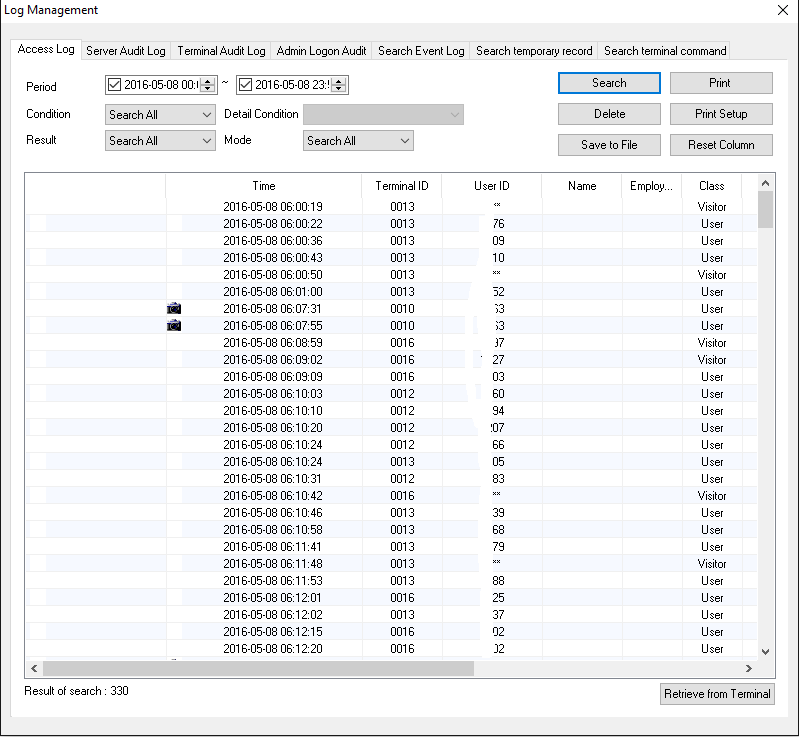
If you use the Virdi provided Oracle SQL script, be sure you will not able to use the log monitoring screen as the tenter table misses many vital columns.
Sequence of Oracle software installation
Scenario #1
64Bit Windows Server 2008 r2 or later with ONE STATIC IP address
Oracle 10g R2 64Bit (You can try 11g or 12c databases,provided you are pretty sure aware of the password complexity & expiry parts)
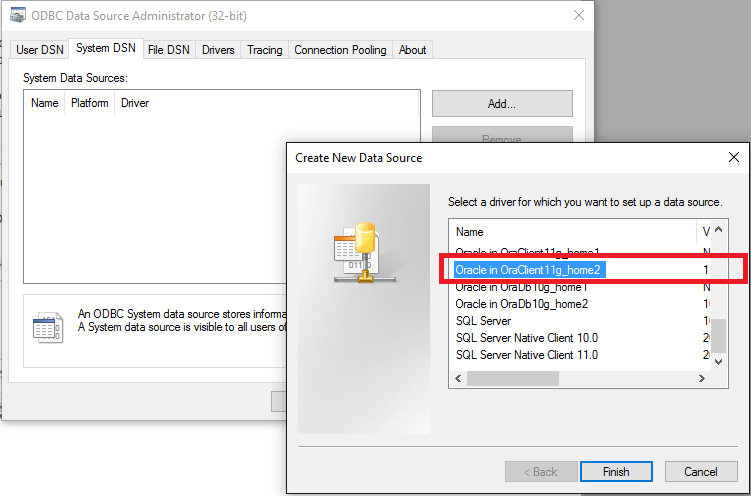
Oracle 11g 32Bit client, full administrator installation (UNIS Remote manager is strictly 32Bit software & if you don’t have Oracle client 32bit version installed, won’t able to communicate with the 64bit database). A hacked installation of Oracle 10g 31bit on Windows 10 will list the drivers under 32bit ODBC, however I strongly discourage using the driver (2006) as it is not at all compatible with Windows 10. If your business strictly needs to use Oracle 10g database, please make sure that you have either 11g or 12c 32bit client installed for the System DSN part.
As I clearly mentioned, the scripts I have provided are for UNIS remote manager version 3.2.3.6. In addition to it, I have modified the table creation script for tEnter table, which holds the attendance details as per the SQL table structure so that the log monitor part of UNIS remote manager could work. I don’t guarantee or answerable for any data loss that caused by slightly hacked scripts. If you are truly concerned about data safety and reliability, please contact Virdi for support (as if they care!)
(I have tried the same against a 12c 64bit installation, unfortunately, there are some errors which fail to fetch tables after the database opened. I need reconfirm it is nothing related to the case sensitive password or complex password related mess-ups)
Windows 10 has two entries for odbc with the control panel, while Windows 2008 R2 you have to startup the 32bit odbc from the following place (Assuming Windows is installed in default location)
C:\Windows\SysWOW64\odbcad32.exe
Restart the services (Incase if you setup the Oracle part once after the UNIS software was installed)
UNIS Software instalation
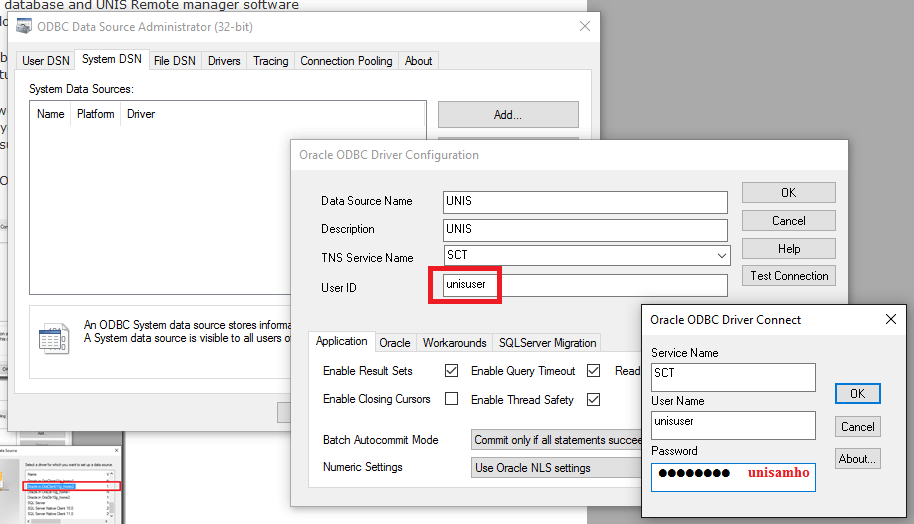
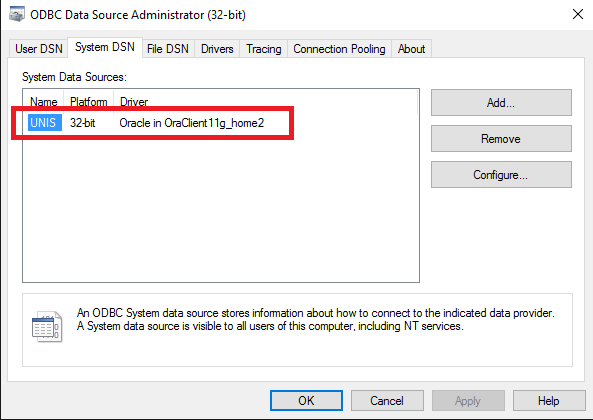
Install the software using setup & and no specific settings changes are necessary to make the software communicate with the Oracle database. Said, there are no settings available with the UNIS Remote Manager to setup the database. UNIS software looks for a system DSN with the names UNIS and UNIS_Temp and if connections could be initiated, works against the available database through the DSN(s)
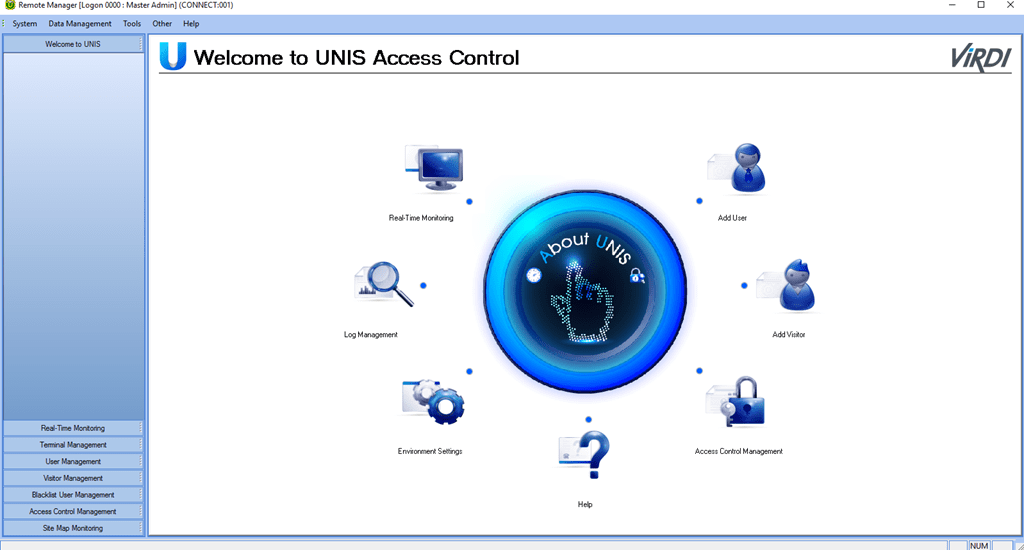
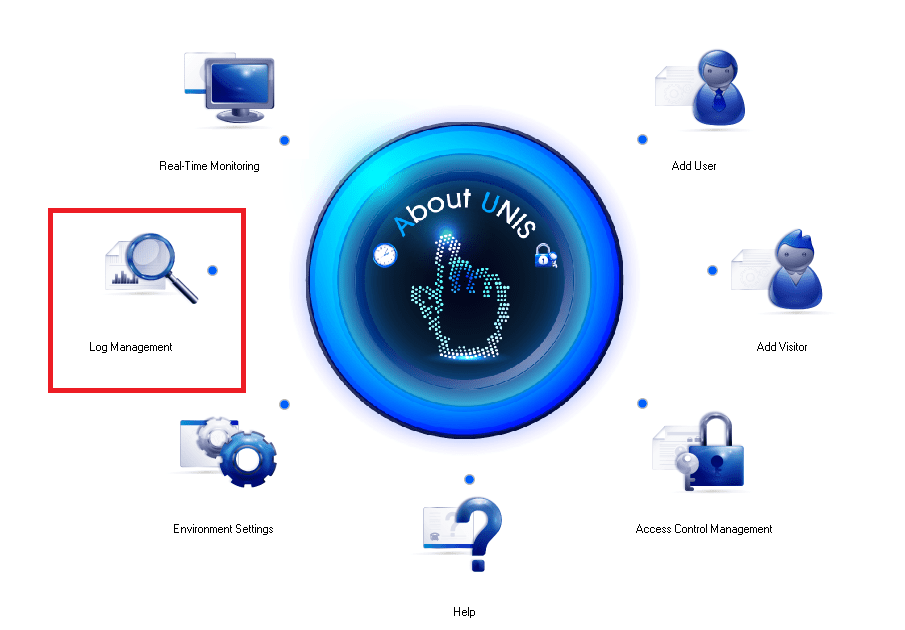
Try to start UNIS Remote Manager software and if your configurations were correct in the place, should start without giving any errors
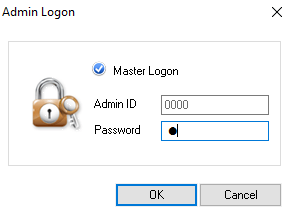
(Check the Master Logon, that will put “0000” in Admin ID and the default password for Admin account “0000” is “1”)
I have populated the Oracle table tenter with data extracted from SQL table in order to make sure that UNIS is communicating with Oracle database properly.