Oracle ERP 12.0.6, Customer Aging SQL Query


Update:07th March 2013

A much simpler script

[sourcecode language="sql" padlinenumbers="true"]
Select customer_id, customer_number,customer_name,
overall_credit_limit, currency_code,
customer_type,
 Balance,
cr_balance,
 "<=30",
 "31-60",
 "61-90",
 "91-180",
 "181-270",
"271-360",
">360"
from(
Select customer_id, customer_number,customer_name,
xx_customer_credit_limit_f(:P_ORG_ID,a.customer_id) overall_credit_limit, NULL currency_code,
decode(a.CUSTOMER_TYPE,'R','Ex','I','In') customer_type,
nvl(omscustbalance_f (a.customer_id, :P_ORG_ID ,0,0,0),0) Balance,
0 cr_balance,
omscustbalance_f (a.customer_id, :P_ORG_ID,1,0,0) "<=30",
omscustbalance_f (a.customer_id, :P_ORG_ID,2,31,60) "31-60",
omscustbalance_f (a.customer_id, :P_ORG_ID,3,61,90) "61-90",
omscustbalance_f (a.customer_id, :P_ORG_ID,4,91,180) "91-180",
omscustbalance_f (a.customer_id, :P_ORG_ID,5,181,270) "181-270",
omscustbalance_f (a.customer_id, :P_ORG_ID,6,271,360) "271-360",
omscustbalance_f (a.customer_id, :P_ORG_ID,7,0,0) ">360"
from ar_customers a
where 
1=1
and a.customer_id = NVL(:P_CUSTOMER_ID, a.customer_id)
and decode(a.CUSTOMER_TYPE,'R','Ex','I','In') = NVL(:P_CUST_TYPE, decode(a.CUSTOMER_TYPE,'R','Ex','I','In') )
and customer_id IN (Select customer_id from ar_payment_schedules_v)
and a.status = 'A'
)
where balance <> 0
ORDER BY 3
[/sourcecode]

Oracle says they have the best business practices :P, however our “Accountant” geeks believe the opposite.

They are not happy with the aging buckets, provided as standard and recently IT was challenged with a requirement to produce some output which will a total of 7 buckets!!!

Hence here it is, the script


[sourcecode language="sql" padlinenumbers="true"]
SELECT  su.org_id organization_id, acct.cust_account_id customer_id, acct.account_number customer_number,  PARTY.PARTY_NAME customer_name, overall_credit_limit,cl.currency_code,
decode(acct.CUSTOMER_TYPE,'R','Ex','I','In') customer_type,
omscustbalance_f (acct.cust_account_id, su.org_id,0,0,0) Balance,
(nvl(overall_credit_limit,0)-nvl(omscustbalance_f (acct.cust_account_id, su.org_id,0,0,0),0)) cr_balance,
omscustbalance_f (acct.cust_account_id, su.org_id,1,0,0) "<=30",
omscustbalance_f (acct.cust_account_id, su.org_id,2,31,60) "31-60",
omscustbalance_f (acct.cust_account_id, su.org_id,3,61,90) "61-90",
omscustbalance_f (acct.cust_account_id, su.org_id,4,91,180) "91-180",
omscustbalance_f (acct.cust_account_id, su.org_id,5,181,270) "181-270",
omscustbalance_f (acct.cust_account_id, su.org_id,6,271,360) "271-360",
omscustbalance_f (acct.cust_account_id, su.org_id,7,0,0) ">360"
       FROM   hz_cust_profile_amts cl,
            hz_cust_site_uses_all su,
            hz_cust_accounts acct,
            HZ_PARTIES PARTY,
            OMS_GL_ORG_HOOKUP_V ood
    WHERE       su.org_id = :P_ORG_ID
    and ood.organization_id = su.org_id
            AND acct.cust_account_id = NVL(:P_CUSTOMER_ID, acct.cust_account_id)
            AND party.party_id = acct.party_id
            AND cl.cust_account_id = acct.cust_account_id
            AND cl.site_use_id = su.site_use_id
            AND cl.currency_code = ood.currency_code --'KWD'
            AND su.status = 'A'
order by su.org_id, PARTY.PARTY_NAME
[/sourcecode]

With this query we are referring couple of custom objects like

omscustbalance_f – function calculating the outstanding balance

&

a custom view OMS_GL_ORG_HOOKUP_V, which links both ORG_ORGANIZATION_DEFINITIONS table and GL ledger information

Code for omscustbalance_f

[sourcecode language="sql"]
CREATE OR REPLACE FUNCTION APPS.omscustbalance_f (cust_id         IN NUMBER,
                                                  p_org_id        IN NUMBER,
                                                  bucket_number   IN NUMBER,
                                                  AGE1            IN NUMBER,
                                                  AGE2            IN NUMBER)
   RETURN NUMBER
AS
   total_due    NUMBER := 0;
   att_string   VARCHAR2 (2000);
BEGIN
   --1 <= 30
   --2 31-60
   --3 61-90
   --4 91-180
   --5 181-270
   --6 271-360
   --7 >360
   --0 balance

   IF bucket_number = 0
   THEN
      SELECT SUM (b.amount_due_remaining)
        INTO total_due
        FROM ar_payment_schedules_v b
       WHERE     b.customer_id = cust_id
             AND b.AL_STATUS_MEANING = 'Open'
             AND b.cust_trx_type_id IN (SELECT cust_trx_type_id trx_type
                                          FROM xxksalestypes
                                         WHERE org_id = p_org_id
                                        UNION ALL
                                        SELECT credit_memo_type_id trx_type
                                          FROM xxksalestypes
                                         WHERE org_id = p_org_id)
             AND b.org_id = p_org_id;
   ELSIF bucket_number = 1
   THEN
      SELECT SUM (b.amount_due_remaining)
        INTO total_due
        FROM ar_payment_schedules_v b
       WHERE     b.customer_id = cust_id
             AND b.AL_STATUS_MEANING = 'Open'
             AND b.cust_trx_type_id IN (SELECT cust_trx_type_id trx_type
                                          FROM xxksalestypes
                                         WHERE org_id = p_org_id
                                        UNION ALL
                                        SELECT credit_memo_type_id trx_type
                                          FROM xxksalestypes
                                         WHERE org_id = p_org_id)
             AND b.org_id = p_org_id
             AND b.days_past_due <= 30;
   ELSIF bucket_number = 7
   THEN
      SELECT SUM (b.amount_due_remaining)
        INTO total_due
        FROM ar_payment_schedules_v b
       WHERE     b.customer_id = cust_id
             AND b.AL_STATUS_MEANING = 'Open'
             AND b.cust_trx_type_id IN (SELECT cust_trx_type_id trx_type
                                          FROM xxksalestypes
                                         WHERE org_id = p_org_id
                                        UNION ALL
                                        SELECT credit_memo_type_id trx_type
                                          FROM xxksalestypes
                                         WHERE org_id = p_org_id)
             AND b.org_id = p_org_id
             AND b.days_past_due > 360;
   ELSE
      SELECT SUM (b.amount_due_remaining)
        INTO total_due
        FROM ar_payment_schedules_v b
       WHERE     b.customer_id = cust_id
             AND b.AL_STATUS_MEANING = 'Open'
             AND 
--you may avoid the following lines---custom requirement---
b.cust_trx_type_id IN (SELECT cust_trx_type_id trx_type
                                          FROM xxksalestypes
                                         WHERE org_id = p_org_id
                                        UNION ALL
                                        SELECT credit_memo_type_id trx_type
                                          FROM xxksalestypes
                                         WHERE org_id = p_org_id)
--you may avoid the code until here---custom requirement---
             AND b.org_id = p_org_id
             AND b.days_past_due BETWEEN AGE1 AND AGE2;
   END IF;


   RETURN TOTAL_DUE;
END omscustbalance_f;
/
[/sourcecode]

and finally the script for view “OMS_GL_ORG_HOOKUP_V”


[sourcecode language="sql"]
DROP VIEW APPS.OMS_GL_ORG_HOOKUP_V;

/* Formatted on 3/3/2013 8:55:56 AM (QP5 v5.163.1008.3004) */
CREATE OR REPLACE FORCE VIEW APPS.OMS_GL_ORG_HOOKUP_V
(
   LEDGER_ID,
   NAME,
   CURRENCY_CODE,
   ORGANIZATION_NAME,
   ORGANIZATION_ID,
   ORGANIZATION_CODE,
   OPERATING_UNIT
)
AS
     SELECT gll.ledger_id,
            gll.name,
            gll.currency_code,
            ood.organization_name,
            ood.organization_id,
            ood.organization_code,
            ood.operating_unit
       FROM GL_LEDGERS gll, org_organization_definitions ood
      WHERE ood.set_of_books_id = gll.ledger_id
   ORDER BY 1;
[/sourcecode]


Are you done yet? Not really. If you have to run the query from a PL/SQL node, you have to initialize the security using the following

[sourcecode language="sql"]
Begin
begin
MO_GLOBAL.SET_POLICY_CONTEXT('S',:P_ORG_ID);
end ;

begin
--fnd_global.apps_initialize(:P_USER_ID,:P_RESP_ID,:P_RESP_APPL_ID);
fnd_global.apps_initialize(1353, 50595, 222);
end;


begin
MO_GLOBAL.INIT('AR'); -- Receivables
end;

return (TRUE);
end;
[/sourcecode]

Enjoy another quality solution from us!

regards,

admin

Oracle E-Business Suite R12 Rapid forms development using Developer 6i forms


Moving from client server architecture to R12 based domains could be quite challenging for Oracle developers, especially those who have spent years, enjoying the flexibility of testing forms modules from the local development machines prior moving the “working” modules to the production instances.

Let us see the general development scenario for R12 instances.

  1. From 10g forms, connect to database
  2. open TEMPLATE.fmb and save as “XXMYFORM” etc
  3. Then keep on adding the elements

Now, move the form module to $AU_TOP/forms/US and compile it to respective application repositories

Create form, menu items…

A long list and the most frustrating is keeping on FTP the slightly modified forms module to the R12 instance to compile and testing.

We have came across a quick resolution for this PIA(Pain in the ASS) approach (for forms modules which do not use folder views) by using developer 6i (Uhu, beware Oracle fan boys would tell you, Oracle does not support developer 6i any further)

Create a template.fmb using Developer 6i forms

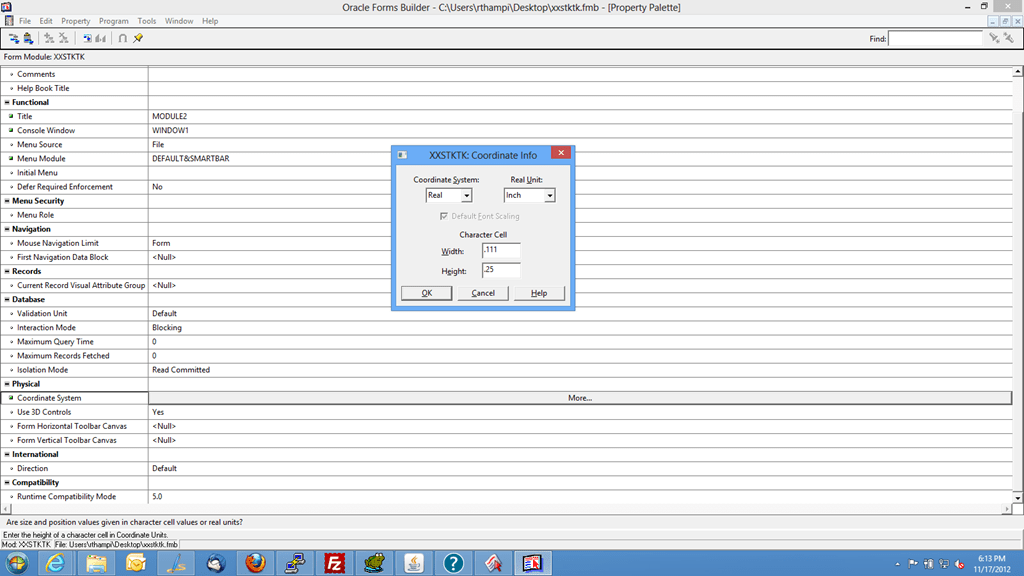
Change the system coordinates to use inches in the place of points

image

  1. Save the template.fmb
  2. Using save as, save your template.fmb as a new fmb file (eg: aa.fmb)
  3. Connect to apps database instance and start adding windows, canvases, blocks etc to the form and TEST IT locally!!!
  4. TEST it until the results are as expected.
  5. Make a backup for your working module (copy aa.fmb to bb.fmb for example)


Open your aa.fmb file, developed using forms 6i with Developer suite 10g forms designer (You will get prompts stating the possible conversions for triggers, coding etc)

Open TEMPLATE.fmb and save it as “MYAPPSFORM.fmb”

Now, please give maximum attention towards copying the objects from your 6i module which is opened with Developer 10g forms, TO your form module which will go to apps instance

  1. Copy all the windows you have created with 6i module to 10g forms
  2. Copy all the canvases you have created with 6i module to 10g forms
  3. Copy all the blocks you have created with 6i module to 10g forms
  4. Copy record groups, lovs, form level triggers if any

Now, try to compile the 10g form. If you have copied everything from 6i, this new form shouldn’t give you any compilation errors.

Move the form to apps instance, compile, create forms, menus and do final testing, confirming everything is working fine.

regards,

admin

Oracle developer 10g, developer 6i default values for columns using :PARAMETER.name

We just came across a peculiar situation. Recently we had developed a new approach towards developing new applications for Oracle EBS instance.

We do the following

Develop the prototype using developer 6i forms (hacked and patched for Windows 7 & Windows 8). The only change we make with the developer 6i is changing the “coordinate system” property from points to “inches”

image

This approach gives us rapid development scenarios, as we don’t have to upload the form module to instance top and compile it and try it against the TEST instances.

All we are doing is, once the complete application is tested on developer 6i, a copy of the same opened with Developer 10g forms, and copying the objects following the following sequence

  1. Window( s )
  2. Canvases
  3. Blocks
  4. Procedures & functions
  5. Parameters (if any)

Once mapping the PARAMETERS with PROFILE values, the form is ready for APPS instance testing (99% of the times everything is already tested, so a failure is seldom experienced)

Now, coming to one actual issue we are still struggling with is, using the :PARAMETER.xyz, :PARAMETER.abc as initial values for block elements.

The hacked developer 6i does not populate the initial value from :PARAMETER.xyz or :PARAMETER.abc during run time. ie, the first record (record orientation: forms) will not show the already populated values for the columns, however, the very next record(a delete does it) starts showing the :PARAMETER.xyz, abc values being populated to columns wherever they are set as initial values!!!

Do you have solutions? Please let us know with the comment section

Update 19.11.2012

With developer forms 6i, we loaded the values to column through the WHEN-NEW-FORM-INSTANCE like following

:PARAMETER.ORGANIZATION_ID := FND_PROFILE.VALUE(‘org_id’);
:PARAMETER.ORG_ID := FND_PROFILE.VALUE(‘mfg_organization_id’);
:PARAMETER.USERNAME := FND_PROFILE.VALUE(‘username’);

then, explicitly assigned the values to block columns like

:BLOCK.COLUMN1 := :PARAMETER.ORGANIZATION_ID;

in addition to setting up the initial value for the columns using :PARAMETER.xyz

Looks like the stuff are in place now :)

With Developer 10g, this issue has much easier to fix. All we had to do was to change the case of coding like following:

:parameter.organization_id := fnd_profile.value(‘org_id’);
:parameter.org_id := fnd_profile.value(‘mfg_organization_id’);
:parameter.username := fnd_profile.value(‘username’);

To

:PARAMETER.ORGANIZATION_ID := FND_PROFILE.VALUE(‘org_id’);
:PARAMETER.ORG_ID := FND_PROFILE.VALUE(‘mfg_organization_id’);
:PARAMETER.USERNAME := FND_PROFILE.VALUE(‘username’);

and without any further hacks, the 10g forms started showing initial values.

If you experienced the same, have a solution, please provide us the same with the comment section

regards,

admin

Oracle E-Business Suite 12.1.3 Templates, Deploying over VirtualBox using Oracle VM Server & VM Manager


When we decided to launch this blog, we made a promise to ourselves that we will never cut and copy something from a webpage or blog unless we try it out and make sure that, whatever we post here will be 100% tried out solution.

So guys, here we are once again, proving many geeks wrong and virtualizing the virtualization and bringing up Oracle 12.1.3 Vision instance, using Oracle VirtualBox!

Everything

We will publish a whitepaper towards setting up the entire exercises involved in setting up the entire stuff in coming days, sure guys it is bit too much and we need time to put everything in proper places! So stay tuned

follow @w7bugs on twitter. We will post the developments with the documentation(s)

Regards,

Admin

Oracle VM Templates, Are you sure you want to try them?


I have a application DBA friend who is good, knows his stuff and agreed to setup my home desktop machine with Oracle E-Business Suite R12 12.0.4 for certain kind of researches, even though I have access to three test instances at work!

After spending almost three years developing Oracle E-Business custom applications and reports, I just finished a full functional training on module Supply Chain Management from Oracle university, and I came across “Oracle VM Templates”, great, my life was just beautiful until

To run a vision instance all you need is 4GB of spare memory, 500GB storage, VirtualBox and Oracle Enterprise linux. Almost everything here other than the hardware part is free(?) to certain extends, I should had gone for it, instead I opted Oracle VM templates

Now, I needed to download around 37Gb (I already have Oracle supplied DVDs for R12 12.0.3, both 32/64bit) of template files, which come in .zip format. I need Linux environment to join them, OH YES, Oracle documentation for the same is great, provided you are BLIND

Now to use the downloaded templates (which are bundles of application and database tier, pre-configured and expected to run over virtual machines) I need Oracle VM server and Oracle VM Manager which runs only from linux environment (heh, did I say Oracle Linux Only?)

So in total I need 2 numbers of servers, ie, I run two virtual machines using VirtualBox, 1st one is used for a bare metal installation of Oracle VM server, Second is for Oracle Enterprise Linux, on top of which I  install Oracle VM Manager)

Ah, forgot to mention, I need two NICs to balance the network load, ie, my hopes to try out the VM templates from company provided hi-end laptop has just started fading….not entirely yet, though

So the story is becoming interesting, ain’t it? We will expand the story as much possible in coming days, until then, please share our joy, we just got our first hundred thousand hits…


for Windows7bugs

Admin

Oracle Descriptive flexfields, hands-on training


(This document was prepared from a blog/website entry and unfortunately the actual link was not copied while we made a local document, if you are the original author of this article, please contact us and we will add the document credits to you)


A training article on Descriptive flexfields, also refered as DFF

First some basic Question and answers, and then we will do screenshots detailing how flexfields are configured.
Question: What does DFF mean?
Answer: DFF is a mechanism that lets us create new fields in screens that are delivered by Oracle.
Question: Oh good, but can these new fields be added without modifying/customization of the screen?.
Answer: Yes, certainly. Only some setup is needed, but no programmatic change is needed to setup DFF.
Question: Why the word Descriptive in Name DFF?
Answer: I think Oracle used this terminology because by means of setup…you are describing the structure of these new fields. Or may be Oracle simply used a silly word to distinguish DFF from KFF(discussed in latter training lesson).
Question: Are these DFF’s flexible?
Answer: A little flexible, for example, depending upon the value in a field, we can make either Field1 or Field2 to appear in DFF.
Question: So we create new fields in existing screen, but why the need of doing so?
Answer: Oracle delivers a standard set of fields for each screen, but different customers have different needs, hence Oracle lets us create new fields to the screen.
Question: Are these new fields that get created as a result of DFF free text?
I mean, can end user enter any junk into the new fields that are added via DFF?
Answer: If you attach a value set to the field(at time of setup of dff), then field will no longer be free text. The entered value in the field will be validated, also a list of valid values will be provided in LOV.
Question : Will the values that get entered by the user in dff fields be updated to database?
Answer: Indeed, this happens because for each field that you create using DFF will be mapped to a column in Oracle Applications.
Question: Can I create a DFF on any database column?
Answer: Not really. Oracle delivers a predefined list of columns for each table that are meant for DFF usage. Only those columns can be mapped to DFF segments. These columns are named similar to ATTRIBUTE1, ATTRIBUTE2, ATTRIBUTE3 ETC. Usually Oracle provides upto 15 columns, but this number can vary.
Question: Can I add hundreds of fields to a given screen?
Answer: This depends on the number of attribute columns in the table that screen uses. Also, those columns must be flagged as DFF enabled in DFF Registration screen. Don’t need to worry much about this because all the ATTRIBUTE columns are by default flagged for their DFF usage.
Question: Hmmm, I can see that DFFs are related to table and columns…
Answer: Yes correct. Each DFF is mapped to one table. And also each segment(or call it field) is mapped to one of the attribute columns in that table.
Question: I want these fields to appear in screen only when certain conditions are met. Is it possible?
Answer: Yes, we have something known as Context Sensitive Descriptive Flexfields.
In Order to do this, we will follow the below steps(screenshots will follow) :-
1. Navigate to the DFF Registration screen in Oracle Apps and query on Table AP_BANK_BRANCES. Now click on Reference Field
2. Navigate to DFF Segments screen and query on the Title of the “Bank Branch” and Unfreeze the Flexfield and add segments as to Section “GLOBAL Data Elements” as shown in screenshots.

Here are the screenshots……The descriptions are embedded within the screenshots.
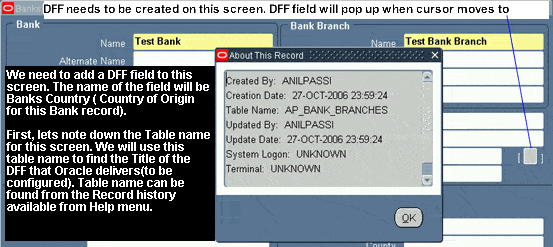
We are in “Bank Branches screen” below, that is available in Payables responsibility. We need to add a new field as below.
clip_image001
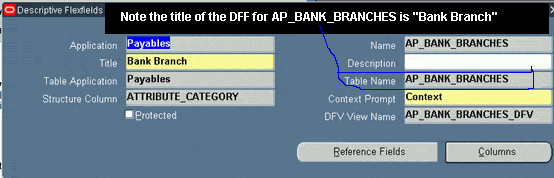
Once having noted down the table, we try to find the Title of the DFF for that Table. We go to Flexfield/Register
clip_image002
Here we pick the Title of the respective DFF
clip_image003
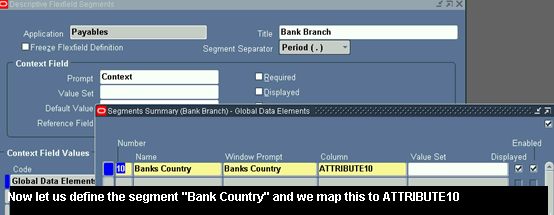
Query on that DFF Title from Descriptive Flexfield Segment Screen
clip_image004
Add a new segment under “Global Data Elements”
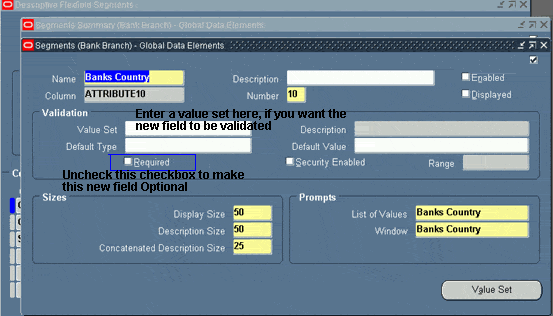
clip_image005
The options for making mandatory or enabling validations for the new field.
clip_image006

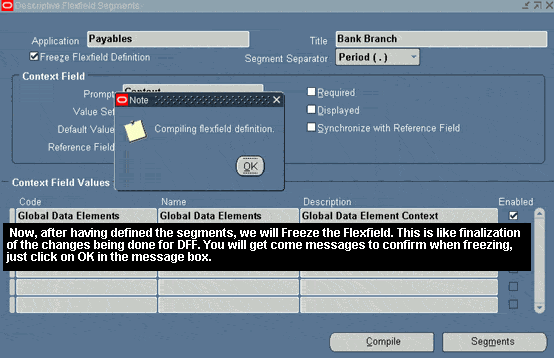
Once you finalize the changes, you will be prompted to Freeze the DFF definition. Click on OK
clip_image007
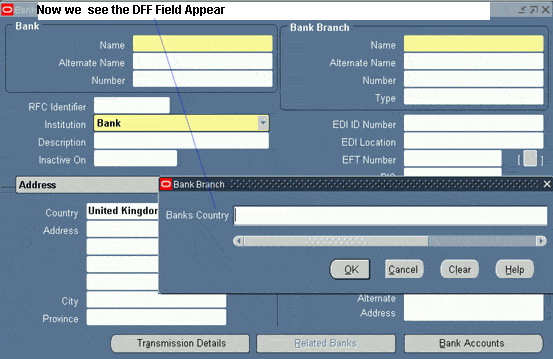
Now, we see the fruits of our configuration
clip_image008

for Windows7bugs

Admin

Oracle Application “Position Hierarchy SQL Query”


If you are asked to make a report for listing the elements with a named Position Hierarchy, it could quite difficult because of the complexity with the way Oracle is maintaining the position hierarchies. please find below a practical solution to this requirement

Step 1

Create a view

Create view XXPOSHIERARCHY_V
AS
SELECT pps.NAME, LPAD (' ', 5 * LEVEL) || has.NAME hierarchy, has.position_id,LEVEL rep_level,
hap.NAME parent_name, pse.parent_position_id, has.NAME child_name,
pse.subordinate_position_id
FROM (SELECT NAME, position_id
FROM hr_all_positions_f_tl
WHERE LANGUAGE = USERENV ('LANG')) hap,
(SELECT NAME, position_id
FROM hr_all_positions_f_tl
WHERE LANGUAGE = USERENV ('LANG')) has,
per_pos_structure_elements pse,
per_pos_structure_versions pve,
per_position_structures pps
WHERE pse.business_group_id = 81 --Replace with your own business group id
AND pve.position_structure_id = pps.position_structure_id
AND pse.POS_STRUCTURE_VERSION_ID = pve.POS_STRUCTURE_VERSION_ID
AND sysdate between pve.date_from and NVL(pve.date_to, sysdate)
AND hap.position_id = pse.parent_position_id
AND has.position_id = pse.subordinate_position_id
start with pse.parent_position_id = 
(SELECT parent_position_id FROM per_pos_structure_elements a
WHERE A.POS_STRUCTURE_VERSION_ID = pse.pos_structure_version_id
AND a.POS_STRUCTURE_ELEMENT_ID = (SELECT MIN (POS_STRUCTURE_ELEMENT_ID)
FROM per_pos_structure_elements b WHERE b.POS_STRUCTURE_VERSION_ID = A.POS_STRUCTURE_VERSION_ID))
CONNECT BY PRIOR pse.subordinate_position_id = pse.parent_position_id
AND PRIOR pse.pos_structure_version_id = pse.pos_structure_version_id
AND PRIOR pse.business_group_id = pse.business_group_id;

Now from the view above, you can easily populate the reporting structure using the following query (including the positions, employee names etc)

Select 0 rnum, opv.parent_name position_effective, 0 rep_level, paaf.person_id, papf.full_name,
opv.parent_position_id, opv.name hierarchy_name
from XXPOSHIERARCHY_V opv, per_all_assignments_f paaf,
per_all_people_f  papf
where NAME LIKE 'XYZ PR%'
and paaf.position_id = opv.parent_position_id
and papf.person_id = paaf.person_id
and sysdate between paaf.effective_start_date and nvl(paaf.effective_end_date, sysdate)
and sysdate between papf.effective_start_date and nvl(papf.effective_end_date, sysdate)
and rep_level = 1
UNION ALL
Select ROWNUM rnum, opv.hierarchy, opv.rep_level, paaf.person_id, papf.full_name,
opv.parent_position_id, opv.name
from XXPOSHIERARCHY_V opv, per_all_assignments_f paaf,
per_all_people_f  papf
where NAME LIKE 'XYZ PR%'
and paaf.position_id = opv.position_id
and papf.person_id = paaf.person_id
and sysdate between paaf.effective_start_date and nvl(paaf.effective_end_date, sysdate)
and sysdate between papf.effective_start_date and nvl(papf.effective_end_date, sysdate)
order by 1;

Adding rownum along with the query will provide you the flexibility to maintain the rpad -ed position names intact while retrieving a particular position hierarchy details.

In order to make the entire reporting dynamic we have created a PL/SQL sequence, populating all hierarchies into a local table. Please find the logic below

CREATE TABLE XXHIERELEMENTS
(
  RNUM                NUMBER,
  POSITION_EFFECTIVE  VARCHAR2(4000 BYTE),
  REP_LEVEL           NUMBER,
  PERSON_ID           NUMBER(10),
  FULL_NAME           VARCHAR2(240 BYTE),
  PARENT_POSITION_ID  NUMBER(15),
  HIERARCHY_NAME      VARCHAR2(30 BYTE)
)

and by executing the below PL/SQL sequence populate the table one time prior the report ran (please do not forget to truncate the table prior each report run!)


SET SERVEROUTPUT ON;

DECLARE
   CURSOR c1
   IS
        SELECT DISTINCT name hierarchy_name
          FROM XXPOSHIERARCHY_V  ORDER BY 1;
BEGIN
   FOR i IN C1
   LOOP
      DBMS_OUTPUT.PUT_LINE (i.hierarchy_name);

      INSERT INTO XXHIERELEMENTS
         SELECT 0 rnum,
                opv.parent_name position_effective,
                0 rep_level,
                paaf.person_id,
                papf.full_name,
                opv.parent_position_id,
                opv.name hierarchy_name
           FROM XXPOSHIERARCHY_V opv,
                per_all_assignments_f paaf,
                per_all_people_f papf
          WHERE     NAME = i.hierarchy_name
                AND paaf.position_id = opv.parent_position_id
                AND papf.person_id = paaf.person_id
                AND SYSDATE BETWEEN paaf.effective_start_date
                                AND NVL (paaf.effective_end_date, SYSDATE)
                AND SYSDATE BETWEEN papf.effective_start_date
                                AND NVL (papf.effective_end_date, SYSDATE)
                AND rep_level = 1
         UNION ALL
         SELECT ROWNUM rnum,
                opv.hierarchy,
                opv.rep_level,
                paaf.person_id,
                papf.full_name,
                opv.parent_position_id,
                opv.name
           FROM XXPOSHIERARCHY_V opv,
                per_all_assignments_f paaf,
                per_all_people_f papf
          WHERE     NAME = i.hierarchy_name
                AND paaf.position_id = opv.position_id
                AND papf.person_id = paaf.person_id
                AND SYSDATE BETWEEN paaf.effective_start_date
                                AND NVL (paaf.effective_end_date, SYSDATE)
                AND SYSDATE BETWEEN papf.effective_start_date
                                AND NVL (papf.effective_end_date, SYSDATE);
   END LOOP;

   COMMIT;
END;

We hope this thread is useful for you

For Windows7bugs,

Admin

Oracle Applications R12, Creating Sales orders against item(s) with Serial Control @ “At Sales Order Issue” attribute


Please find instructions explaining Creating Sales Orders against inventory items with “At Sales Order Issue” attribute

Defining Inventory Attributes

image

Once the item created, assign the item to Organizations wherever the item would be used for pre-determined business requirements

Switch to Order Management Responsibility and start creating a Sales order for the item you defined above

image

Book the order and note down the Sales Order Number for Shipping Transaction

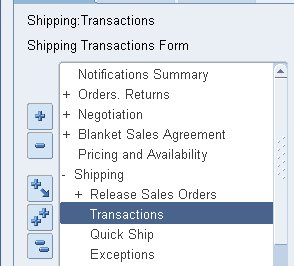
Navigate to Shipping Transactions form

image

Find your Sales Order Details using “Query Manager”

image


image

Verify the details and make sure the “pick status” information message as “Ready to Release”

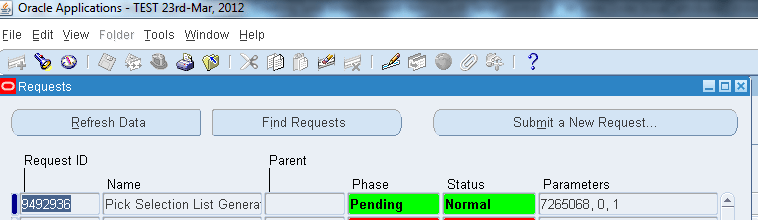
From Actions dropdown menu select “Launch pick release” and press the “Go” button. This will submit the concurrent program “Pick Selection List Generation”. Wait until the concurrent program completed successfully.

image

Once the concurrent program completed successfully, re-query the sales order using “Query Manager”

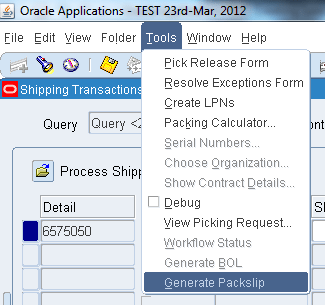
Scroll to right and locate the column “Shipped Quantity”. Click on Tools menu and check whether the Serial Numbers menu option is yet enabled, it shouldn’t be…

image

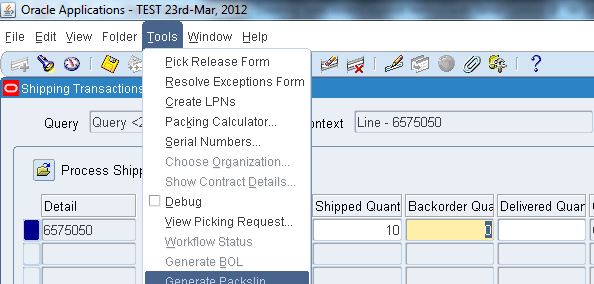
Now enter the desired quantity in the “Shipped Quantity” column and save the transaction, which will turn the “Backorder Quantity” column mandatory.

image

Recheck whether the “Serial Numbers” menu option under “Tools” menu has been enabled for populating serial numbers for the item.

image

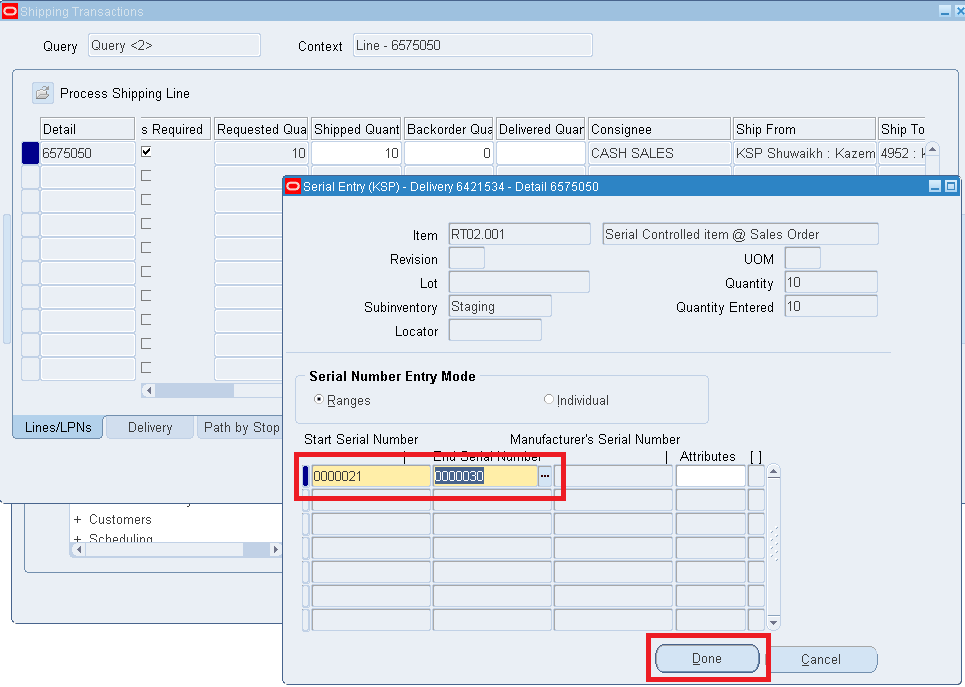
The menu option should be enabled for you now, click on “Serial Numbers” menu option and proceed towards generating Serial Numbers for the item.

image

(Enter the starting serial number and system will populate the end serial number based on the Shipped Quantity you provided in the above step)

Click the “Done” button if everything seems fine and save the transaction.

Click on “Delivery” Sub-Tab and Click on “Ship Confirm” which will popup another window

image

Accept/Modify according to your specific business requirements and click the “Ok” button

image

Confirm whether the message states the delivery was successful, if not start investigating the issues. On successful delivery, recall the Sales order and check the line status, it must be “Shipped”


For Windows7bugs,

Admin

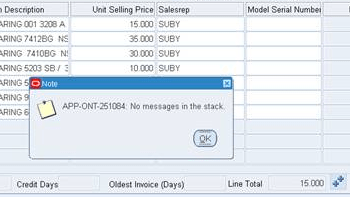
APP-ONT-251084 No Messages in the Stack

Updated: 25th October 2021

Another situation could be when the customer you have created doesn’t have Payment Terms set. Once the Payment Terms set, open the Sales Order that is stuck using Order organizer, set the payment terms on both header and line levels and try to book once again. This should solve the situation.

A user may be provided this particular error while trying to book a sales order. If checked in Oracle support documentation, you may not find much useful information addressing this particular error.

Our case, most of the times this error occured while users tried to book an order against a customer who doesn’t have site information for that particular organization. ie, Customer ‘ABC’ was created for organization ‘XYZ’ and users from organization ‘DEF’ tried to create sales orders for customer ‘ABC’. This issue could happen to any organization which has “multi-org” structure.

The first thing the consultant should check should be the customer site information for the organization, if the site information is missing, proceed towards creating it. Once the site information is updated, manually select the shipping address and other details and proceed to book the order.

If the error is not addressed after creating the site information, proceed to next level of trouble shooting. Metalink documentation points towards items not in price list and tax etc.
Metalink document id(s) : 396427.1, 988810.1

Oracle EBS R12 how to call standard API/packages from custom form or reports

Okay guys and gals

We had a requirement to use certain Oracle standard API/packages from custom developer forms. After loads of struggle and asking various Oracle related forums, we hardly had a chance to get any satisfactory answers to our query “how to call oracle standard API or packages through custom forms or reports”

Finally with the help of a long term friend cum technical support person Mr. Anil Menon, we were able to successfully call the standard API or package call with our custom (test) form.

For the example we used “apps.INV_QUANTITY_TREE_PUB.QUERY_QUANTITIES” procedure which indirectly refers fnd_api.g_false and apps.inv_quantity_tree_pub.g_transaction_mode parameters/constants defined in the package definitions.

Actual call to the API through a PL/SQL environment (Toad/Oracle PL/SQL) code is as following

SET SERVEROUTPUT ON;
DECLARE
v_api_return_status VARCHAR2 (1);
v_qty_oh NUMBER;
v_qty_res_oh NUMBER;
v_qty_res NUMBER;
v_qty_sug NUMBER;
v_qty_att NUMBER;
v_qty_atr NUMBER;
v_msg_count NUMBER;
v_msg_data VARCHAR2(1000);
v_inventory_item_id VARCHAR2(250);
v_organization_id VARCHAR2(10);
BEGIN

v_inventory_item_id := 24445;
v_organization_id := 901;

inv_quantity_tree_grp.clear_quantity_cache;
DBMS_OUTPUT.put_line ('Transaction Mode');
DBMS_OUTPUT.put_line ('Onhand For the Item :'|| v_inventory_item_id );
DBMS_OUTPUT.put_line ('Organization :'|| v_organization_id);
apps.INV_QUANTITY_TREE_PUB.QUERY_QUANTITIES
(p_api_version_number => 1.0,
p_init_msg_lst => apps.fnd_api.g_false,
x_return_status => v_api_return_status,
x_msg_count => v_msg_count,
x_msg_data => v_msg_data,
p_organization_id => v_organization_id,
p_inventory_item_id => v_inventory_item_id,
p_tree_mode => apps.inv_quantity_tree_pub.g_transaction_mode,
p_onhand_source => 3,
p_is_revision_control => FALSE,
p_is_lot_control => FALSE,
p_is_serial_control => FALSE,
p_revision => NULL,
p_lot_number => NULL,
p_subinventory_code => 'ABC-01', --NULL for whole org
p_locator_id => NULL,
x_qoh => v_qty_oh,
x_rqoh => v_qty_res_oh,
x_qr => v_qty_res,
x_qs => v_qty_sug,
x_att => v_qty_att,
x_atr => v_qty_atr);
DBMS_OUTPUT.put_line ('on hand Quantity :'|| v_qty_oh);
DBMS_OUTPUT.put_line ('Reservable quantity on hand :'|| v_qty_res_oh);
DBMS_OUTPUT.put_line ('Quantity reserved :'|| v_qty_res);
DBMS_OUTPUT.put_line ('Quantity suggested :'|| v_qty_sug);
DBMS_OUTPUT.put_line ('Quantity Available To Transact :'|| v_qty_att);
DBMS_OUTPUT.put_line ('Quantity Available To Reserve :'|| v_qty_atr);
END;

This PL/SQL procedure will successfully print the results during a PL/SQL session through Toad or Oracle PL/SQL session. However, if you would try to invoke the same code through a PL/SQL procedure from a developer form development instance, the errors will start from the call to “fnd_api.g_false” stating “Implementation restriction: ‘APPS.FND_API.G_FALSE’ cannot directly access remote package variable or cursor. Under the package specification you will find G_FALSE constant has the the value ‘F’ and apps.inv_quantity_tree_pub.g_transaction_mode has a value ‘2’ pre-defined.

Umm, not a straight forward method to dwell the packages, find the constant values and modifying the PL/SQL script. For a small API call like above one, a programmer could use this approach as a work around, however, while dealing with APIs which take 10s of parameters, it could be really tiring.

Here is the workaround we used

Created a custom database level package


CREATE OR REPLACE PACKAGE XX_CHK_QTY IS
PROCEDURE retrive_quantity(item_id NUMBER, org_id NUMBER, subinv VARCHAR2, oqtt OUT NUMBER, oqtr OUT NUMBER);
END;

and created corresponding package body as following


CREATE OR REPLACE PACKAGE BODY XX_CHK_QTY AS
PROCEDURE retrive_quantity(item_id NUMBER, org_id NUMBER, subinv VARCHAR2, oqtt OUT NUMBER, oqtr OUT NUMBER) IS
v_api_return_status  VARCHAR2 (1);
v_qty_oh             NUMBER;
v_qty_res_oh         NUMBER;
v_qty_res            NUMBER;
v_qty_sug            NUMBER;
v_qty_att            NUMBER;
v_qty_atr            NUMBER;
v_msg_count          NUMBER;
v_msg_data           VARCHAR2(1000);
--v_inventory_item_id  VARCHAR2(250);
--v_organization_id    VARCHAR2(10) ;
BEGIN
inv_quantity_tree_grp.clear_quantity_cache;
apps.INV_QUANTITY_TREE_PUB.QUERY_QUANTITIES
(p_api_version_number  => 1.0,
p_init_msg_lst        => apps.fnd_api.g_false,
--p_init_msg_lst        => 'F',
x_return_status       => v_api_return_status,
x_msg_count           => v_msg_count,
x_msg_data            => v_msg_data,
p_organization_id     => org_id, --v_organization_id,
p_inventory_item_id   => item_id, --v_inventory_item_id,
p_tree_mode           => apps.inv_quantity_tree_pub.g_transaction_mode,
--p_tree_mode           => 2,
p_onhand_source       => 3,
p_is_revision_control => FALSE,
p_is_lot_control      => FALSE,
p_is_serial_control   => FALSE,
p_revision            => NULL,
p_lot_number          => NULL,
p_subinventory_code   => subinv,
p_locator_id          => NULL,
x_qoh                 => v_qty_oh,
x_rqoh                => v_qty_res_oh,
x_qr                  => v_qty_res,
x_qs                  => v_qty_sug,
x_att                 => v_qty_att,
x_atr                 => v_qty_atr);
oqtt := v_qty_att;
oqtr := v_qty_atr;
END;
END XX_CHK_QTY;


As you could see we are using 2 numbers of OUT variables to store the output data, which will be referred in the forms at later stages.

Our sample form has a control block and 3 items

:ITEM_ID, :QTY_AVL_TRANSACT,:QTY_AVL_RESERVE and under the WVI(WHEN-VALIDATE-ITEM) scope for the block item :ITEM_ID  we wanted to populate total quantity available to transact and total quantity available to reserve into block items :QTY_AVL_TRANSACT,:QTY_AVL_RESERVE

Following is how we call the custom procedure through WVI trigger:

Declare
oqtt number := 0;
oqtr number := 0;
Begin
apps.XX_CHK_QTY.retrive_quantity(:CTRL.ITEM_ID,901,’ABC-01′,oqtt,oqtr);
:CTRL.QTY_AVL_TRANSACT := oqtt;
:CTRL.QTY_AVL_RESERVE := oqtr;
End;

and bingo! as the procedure was called from a database package, there were no compilation errors pointing towards referring remote variables or cursors and once executed all intended results were fetched to corresponding block items.

As we are also learning how to use Oracle APIs within custom forms/reports, we hope this guideline would be useful for those few who are trying to find a way to start calling Oracle’s standard API/packages from such environments.

for Windows7bugs

Admin