
Oracle Inventory | Item update API | EGO_ITEM_PUB.ITEM_TBL_TYPE

Kuwait commerce department is making it mandatory to include Arabic in the item descriptions and we also started working on this requirement. Our Oracle EBS R12 environment is set for both English and Arabic, hence the only task was to update the Arabic description for the items. We’ve considerably large items database and updating such a huge repository definitely required an API interface. We selected a small set of items for the first attempt and everything worked as expected, however started getting multiple errors when we tried to execute the same API for 10k items. One of the errors as seen below (The question marks should be SQL Developer’s bug) and I was able to pick the words “MTL_ITEM_BULKLOAD_RECS_N2” and “APPS_TS_INTERFACE” from the error message.

EGO_ITEM_PVT Process_Items: ORA-01654: INV.MTL_ITEM_BULKLOAD_RECS_N2 APPS_TS_INTERFACE
Initialized applications context: 1353 50599 401
Error Messages :
??? ??? ??? ????? ?? ????? EGO_ITEM_PVT ?????? Process_Items: ORA-01654: ?? ???? ?? ???? INV.MTL_ITEM_BULKLOAD_RECS_N2 ?????? 16  ?????? ?????? APPS_TS_INTERFACE
 ???? ??????? ?????? ?????? ?? ?????? ????? ?????

Searched Oracle support documents and couldn’t find anything relevant until I noticed the term “APPS_TS_INTERFACE” & as I handle the Oracle EBS R12 12.2 database myself, immediately assumed the same to be another APPS related tablespace. I was not wrong, the seeded tablespace comes with 2 data files and both were almost full with just few kilobytes left. All I needed was to add new data file with a size of 4GB (didn’t want to take another risk). We’ve been using the application for last 13 years and the tablespace size until the new file was merely 3GBs, hence the new data file should hold the fort for another many years ahead.

We were updating the Arabic description part of the master items and the sample API as given below.

SET DEFINE OFF;
SET SERVEROUTPUT ON SIZE UNLIMITED;

DECLARE
        x_item_tbl		     EGO_ITEM_PUB.ITEM_TBL_TYPE;     
        x_message_list     Error_Handler.Error_Tbl_Type;
        x_return_status		 VARCHAR2(2);
        x_msg_count		     NUMBER := 0;
    
        l_user_id		      NUMBER := -1;
        l_resp_id		      NUMBER := -1;
        l_application_id	NUMBER := -1;
        
        l_rowcnt		      NUMBER := 1;
        l_api_version		   NUMBER := 1.0; 
        l_init_msg_list		 VARCHAR2(2) := FND_API.G_TRUE; 
        l_commit	      	 VARCHAR2(2) := FND_API.G_FALSE; 
        l_item_tbl		     EGO_ITEM_PUB.ITEM_TBL_TYPE; 
        l_role_grant_tbl	 EGO_ITEM_PUB.ROLE_GRANT_TBL_TYPE; 
        l_user_name		VARCHAR2(30) := 'USERNAME';
        l_resp_name		VARCHAR2(30) := 'XYZ INV Super User';    
        
        l_item_catalog_group_id NUMBER := 0;
		
		--CREATE a staging table with the column names as given in the below select statement.
		--If your staging table has different column names, adjust the below select statement.
        
        CURSOR item_list IS
        SELECT ORG_ID,INVENTORY_ITEM_ID,ITEM_CODE, DESC_AR FROM XX_AR_DESCRIPTIONS
        WHERE NVL(STATUS,'E')='E'; -- for retry purposes.


BEGIN
         -- Get the user_id
          SELECT user_id
          INTO l_user_id
          FROM fnd_user
          WHERE user_name = l_user_name;
        
          -- Get the application_id and responsibility_id
          SELECT application_id, responsibility_id
          INTO l_application_id, l_resp_id
          FROM fnd_responsibility_vl
          WHERE responsibility_name = l_resp_name;
        
          FND_GLOBAL.APPS_INITIALIZE(l_user_id, l_resp_id, l_application_id);  

--Set the language context, here we are updating the item master with Arabic language

--Sample few other languages
--FND_GLOBAL.SET_NLS_CONTEXT(P_NLS_LANGUAGE => 'PORTUGUESE');
--FND_GLOBAL.SET_NLS_CONTEXT(P_NLS_LANGUAGE => 'AMERICAN');
--FND_GLOBAL.SET_NLS_CONTEXT(P_NLS_LANGUAGE => 'JAPANESE');
--Is It Possible to Update Item Description in Local Language in MTL_SYSTEM_ITEMS_TL Using Public API ? (Doc ID 2542546.1)

  
  FND_GLOBAL.SET_NLS_CONTEXT(P_NLS_LANGUAGE => 'ARABIC');
          dbms_output.put_line('Initialized applications context: '|| l_user_id || ' '|| l_resp_id ||' '|| l_application_id );

        
        FOR i in item_list loop
            l_item_tbl(l_rowcnt).Transaction_Type := 'UPDATE';
            l_item_tbl(l_rowcnt).inventory_item_id := i.inventory_item_id;
            l_item_tbl(l_rowcnt).organization_id := i.org_id;--Should be your master inventory organization id.
            --l_item_tbl(l_rowcnt).ATTRIBUTE6 := i.movement;
            l_item_tbl(l_rowcnt).Description := i.DESC_AR;

          -- call API to load Items
         EGO_ITEM_PUB.PROCESS_ITEMS( 
                                   p_api_version            => l_api_version
                                   ,p_init_msg_list         => l_init_msg_list
                                   ,p_commit                => l_commit
                                   ,p_item_tbl              => l_item_tbl
                                   ,p_role_grant_tbl        => l_role_grant_tbl
                                   ,x_item_tbl              => x_item_tbl
                                   ,x_return_status         => x_return_status
                                   ,x_msg_count             => x_msg_count);
                                    

--How To Clean Or Avoid Error Data In Interface Tables Using EGO_ITEM_PUB.Process_Item (Doc ID 1548555.1)
        IF (x_return_status <> FND_API.G_RET_STS_SUCCESS) THEN
          DBMS_OUTPUT.PUT_LINE('Error Messages :');
          Error_Handler.GET_MESSAGE_LIST(x_message_list=>x_message_list);
          FOR i IN 1..x_message_list.COUNT LOOP
            DBMS_OUTPUT.PUT_LINE(x_message_list(i).message_text);
          END LOOP;
          DBMS_OUTPUT.PUT_LINE( i.item_code||' Failed Update'); --comment, only for correction purposes.
--We willl update the staging table with failed status
          UPDATE XX_AR_DESCRIPTIONS SET STATUS='E' WHERE INVENTORY_ITEM_ID=i.INVENTORY_ITEM_ID;
          ELSE
--Update the staging table with success status
          UPDATE XX_AR_DESCRIPTIONS SET STATUS='S' WHERE INVENTORY_ITEM_ID=i.INVENTORY_ITEM_ID;
       END IF;
END loop;
commit;

EXCEPTION
WHEN OTHERS THEN
DBMS_OUTPUT.PUT_LINE('Exception Occurred :');
DBMS_OUTPUT.PUT_LINE(SQLCODE ||':'||SQLERRM);
DBMS_OUTPUT.PUT_LINE('=====================================');
ROLLBACK;
RETURN;
        
END;


The following documents were referred during the attempts, which you may not experience.

  • Is It Possible to Update Item Description in Local Language in MTL_SYSTEM_ITEMS_TL Using Public API ? (Doc ID 2542546.1)
  • How To Clean Or Avoid Error Data In Interface Tables Using EGO_ITEM_PUB.Process_Item (Doc ID 1548555.1)

Oracle Application TCA | Supplier API | Sample

Hi guys

I’m posting a sample script for creating suppliers, sites and contacts. I’ve referred multiple sample scripts and believe the below code block is a fine tuned one, however standing refinement at all levels. Please note, I haven’t added the API block for creating banks for suppliers. Will, and update the scripts as I make advancements.

[code language=”sql” gutter=”false”]
/* Formatted on 10/5/2015 11:12:16 AM (QP5 v5.163.1008.3004) */
SET DEFINE OFF;
SET SERVEROUTPUT ON;

DECLARE
–For supplier parameters

p_api_version NUMBER;
p_init_msg_list VARCHAR2 (200);
p_commit VARCHAR2 (200);
p_validation_level NUMBER;
x_return_status VARCHAR2 (200);
x_msg_count NUMBER;
x_msg_data VARCHAR2 (200);
p_vendor_rec apps.ap_vendor_pub_pkg.r_vendor_rec_type;
x_vendor_id NUMBER;
x_party_id NUMBER;
V_MSG_INDEX_OUT NUMBER;

–Site parameters

l_vendor_site_rec ap_vendor_pub_pkg.r_vendor_site_rec_type;
lc_return_status VARCHAR2 (10);
ln_msg_count NUMBER;
lc_msg_data VARCHAR2 (1000);
ln_vendor_site_id NUMBER;
ln_party_site_id NUMBER;
ln_location_id NUMBER;

–Contact parameters

p_vendor_contact_rec apps.ap_vendor_pub_pkg.r_vendor_contact_rec_type;
x_vendor_contact_id NUMBER;
x_per_party_id NUMBER;
x_rel_party_id NUMBER;
x_rel_id NUMBER;
x_org_contact_id NUMBER;
x_party_site_id NUMBER;

–General exception

local_exception EXCEPTION;
local_failed_at VARCHAR2 (10);

p_vendor_number VARCHAR2(30) := NULL;

BEGIN
–Please note: This API was tested against Release 12 (12.0.6)
–You are warned against undesired results, if tried against unsupported application releases

–Initialize application
–"Master Data" responsibility details
mo_global.init (‘SQLAP’);
fnd_global.apps_initialize (user_id => 1353,
resp_id => 50997,
resp_appl_id => 200);
fnd_global.set_nls_context (‘AMERICAN’);

mo_global.set_policy_context (‘S’, 101);

p_api_version := 1.0;
p_init_msg_list := FND_API.G_TRUE;
p_commit := FND_API.G_TRUE;
p_validation_level := FND_API.G_VALID_LEVEL_FULL;
x_return_status := NULL;
x_msg_count := NULL;
x_msg_data := NULL;
p_vendor_rec.vendor_name := ‘WINDOWS7BUGS BLOG’;
p_vendor_rec.vendor_type_lookup_code := ‘VENDOR’; –Vendor type supplier
p_vendor_rec.SUMMARY_FLAG := ‘N’;
p_vendor_rec.ENABLED_FLAG := ‘Y’;
— p_vendor_rec.women_owned_flag := ‘N’;
— p_vendor_rec.small_business_flag := ‘Y’;

— Supplier MUST have a global level payment method
— So that individual companies can defer the default payment method while sites are created
— I have tried the following @ site levels, didn’t work until at supplier level assigned. You may post corrections with
— Comments section

p_vendor_rec.ext_payee_rec.Exclusive_Pay_Flag:=’N’;
p_vendor_rec.ext_payee_rec.default_pmt_method := ‘CHECK’;

— if the Payable System setup is set automatic numbering for the suppliers (table ->AP_PRODUCT_SETUP Column -> SUPPLIER_NUMBERING_METHOD = ‘AUTOMATIC’)
— You can get the next number from column NEXT_AUTO_SUPPLIER_NUM
— if you are following manual numbering (Alpha Numeric )
— p_vendor_rec.segment1 :=’865′; –(insert non duplicate number, in case if the supplier numbers are not fetched from a sequence, check your setups)

— We do have an automatic numbering for suppliers, hence the below block is used
— If your setups are not as explained above
— Comment from BEING until p_vendor_rec.segment1 := p_vendor_number;

BEGIN
Select NEXT_AUTO_SUPPLIER_NUM into p_vendor_number from AP_PRODUCT_SETUP
where SUPPLIER_NUMBERING_METHOD= ‘AUTOMATIC’;
EXCEPTION
WHEN NO_DATA_FOUND then
local_failed_at := ‘NUMBER’;
RAISE local_exception;
END;

p_vendor_rec.segment1 := p_vendor_number;

x_vendor_id := NULL;
x_party_id := NULL;
apps.ap_vendor_pub_pkg.create_vendor (p_api_version,
p_init_msg_list,
p_commit,
p_validation_level,
x_return_status,
x_msg_count,
x_msg_data,
p_vendor_rec,
x_vendor_id,
x_party_id);
DBMS_OUTPUT.put_line (‘X_RETURN_STATUS = ‘ || x_return_status);
DBMS_OUTPUT.put_line (‘X_MSG_COUNT = ‘ || TO_CHAR (x_msg_count));
DBMS_OUTPUT.put_line (‘X_MSG_DATA = ‘ || x_msg_data);
DBMS_OUTPUT.put_line (‘Supplier Number = ‘ || p_vendor_number);
DBMS_OUTPUT.put_line (‘X_VENDOR_ID = ‘ || TO_CHAR (x_vendor_id));
DBMS_OUTPUT.put_line (‘X_PARTY_ID = ‘ || TO_CHAR (x_party_id));
DBMS_OUTPUT.put_line (”);

IF x_return_status <> ‘S’
THEN
IF x_msg_count > 0
THEN
FOR v_index IN 1 .. x_msg_count
LOOP
fnd_msg_pub.get (p_msg_index => v_index,
p_encoded => ‘F’,
p_data => x_msg_data,
p_msg_index_out => v_msg_index_out);
x_msg_data := SUBSTR (x_msg_data, 1, 200);
DBMS_OUTPUT.put_line (x_msg_data);
END LOOP;
END IF;

local_failed_at := ‘SUPPLIER’;
RAISE local_exception;
END IF;

–Create Site
l_vendor_site_rec.vendor_id := x_vendor_id; — 1117549;
l_vendor_site_rec.vendor_site_code := ‘Kuwait’;
l_vendor_site_rec.address_line1 := ‘Office Address line 1’;
l_vendor_site_rec.city := ‘Kuwait’;
l_vendor_site_rec.country := ‘KW’;
l_vendor_site_rec.org_id := 101;

l_vendor_site_rec.ext_payee_rec.default_pmt_method := ‘CHECK’;

— ————–
— Optional
— ————–
l_vendor_site_rec.purchasing_site_flag := ‘Y’;
l_vendor_site_rec.pay_site_flag := ‘Y’;
l_vendor_site_rec.rfq_only_site_flag := ‘N’;

pos_vendor_pub_pkg.create_vendor_site (
— ——————————
— Input data elements
— ——————————
p_vendor_site_rec => l_vendor_site_rec,
— ———————————
— Output data elements
— ———————————
x_return_status => lc_return_status,
x_msg_count => ln_msg_count,
x_msg_data => lc_msg_data,
x_vendor_site_id => ln_vendor_site_id,
x_party_site_id => ln_party_site_id,
x_location_id => ln_location_id);

IF (lc_return_status <> ‘S’)
THEN
IF ln_msg_count > 1
THEN
FOR i IN 1 .. ln_msg_count
LOOP
DBMS_OUTPUT.put_line (
SUBSTR (FND_MSG_PUB.Get (p_encoded => FND_API.G_FALSE), 1, 255));
END LOOP;
END IF;

local_failed_at := ‘SITE’;
RAISE local_exception;
ELSE
DBMS_OUTPUT.put_line (‘Vendor Site Id: ‘ || ln_vendor_site_id);
DBMS_OUTPUT.put_line (‘Party Site Id: ‘ || ln_party_site_id);
DBMS_OUTPUT.put_line (‘Location Id: ‘ || ln_location_id);
END IF;

–Create Contact

p_api_version := 1.0;
p_init_msg_list := ‘T’;
p_commit := ‘T’;
p_validation_level := FND_API.G_VALID_LEVEL_FULL;
x_return_status := NULL;
x_msg_count := NULL;
x_msg_data := NULL;

— p_vendor_contact_rec.vendor_contact_id := po_vendor_contacts_s.NEXTVAL;
— DBMS_OUTPUT.put_line (‘po_vendor_contacts_s.NEXTVAL = ‘ || po_vendor_contacts_s.NEXTVAL);

— P_VENDOR_CONTACT_REC.vendor_site_id := ln_vendor_site_id; –OPTIONAL If you want to attach the contact to a particular site
P_VENDOR_CONTACT_REC.PERSON_FIRST_NAME := ‘windows7bugs’;
P_VENDOR_CONTACT_REC.PERSON_LAST_NAME := ‘blog’; — Mandatory
P_VENDOR_CONTACT_REC.PHONE := ‘22445566’;
P_VENDOR_CONTACT_REC.EMAIL_ADDRESS := ‘admin@nocom.com.kw’;
P_VENDOR_CONTACT_REC.URL := ‘http://windows7bugs.wordpress.com&#8217;;
P_VENDOR_CONTACT_REC.org_id := 101; — Security Organization Id
p_vendor_contact_rec.party_site_id := ln_party_site_id;
— p_vendor_contact_rec.org_party_site_id := 2273595; –optional, system autofills the column with party_site_id used
p_vendor_contact_rec.VENDOR_ID := x_vendor_id;
p_vendor_contact_rec.prefix := ‘MR.’;
x_vendor_contact_id := NULL;
x_per_party_id := NULL;
x_rel_party_id := NULL;
x_rel_id := NULL;
x_org_contact_id := NULL;
x_party_site_id := NULL;
apps.ap_vendor_pub_pkg.create_vendor_contact (p_api_version,
p_init_msg_list,
p_commit,
p_validation_level,
x_return_status,
x_msg_count,
x_msg_data,
p_vendor_contact_rec,
x_vendor_contact_id,
x_per_party_id,
x_rel_party_id,
x_rel_id,
x_org_contact_id,
x_party_site_id);

IF x_return_status <> ‘S’
THEN
IF x_msg_count > 0
THEN
FOR v_index IN 1 .. x_msg_count
LOOP
fnd_msg_pub.get (p_msg_index => v_index,
p_encoded => ‘F’,
p_data => x_msg_data,
p_msg_index_out => v_msg_index_out);
x_msg_data := SUBSTR (x_msg_data, 1, 200);
DBMS_OUTPUT.put_line (x_msg_data);
END LOOP;
END IF;

local_failed_at := ‘CONTACT’;
RAISE local_exception;
ELSE
DBMS_OUTPUT.put_line (‘X_RETURN_STATUS = ‘ || x_return_status);
DBMS_OUTPUT.put_line (‘X_MSG_COUNT = ‘ || TO_CHAR (x_msg_count));
DBMS_OUTPUT.put_line (‘X_MSG_DATA = ‘ || x_msg_data);
DBMS_OUTPUT.put_line (
‘X_VENDOR_CONTACT_ID = ‘ || TO_CHAR (x_vendor_contact_id));
DBMS_OUTPUT.put_line (‘X_PER_PARTY_ID = ‘ || TO_CHAR (x_per_party_id));
DBMS_OUTPUT.put_line (‘X_REL_PARTY_ID = ‘ || TO_CHAR (x_rel_party_id));
DBMS_OUTPUT.put_line (‘X_REL_ID = ‘ || TO_CHAR (x_rel_id));
DBMS_OUTPUT.put_line (
‘X_ORG_CONTACT_ID = ‘ || TO_CHAR (x_org_contact_id));
DBMS_OUTPUT.put_line (
‘X_PARTY_SITE_ID = ‘ || TO_CHAR (x_party_site_id));
DBMS_OUTPUT.put_line (”);
END IF;

COMMIT;

EXCEPTION
WHEN local_exception
THEN
IF local_failed_at = ‘SUPPLIER’
THEN
DBMS_OUTPUT.put_line (‘API failed at Supplier Creation’);
ELSIF local_failed_at = ‘SITE’
THEN
DBMS_OUTPUT.put_line (‘API failed at Site Creation’);
ELSIF local_failed_at = ‘CONTACT’
THEN
DBMS_OUTPUT.put_line (‘API failed at Contact Creation’);
ELSIF local_failed_at = ‘NUMBER’
THEN
DBMS_OUTPUT.put_line (‘API failed at getting Supplier Number’);
END IF;

ROLLBACK;
WHEN OTHERS
THEN
DBMS_OUTPUT.PUT_LINE (SQLERRM);
ROLLBACK;
END;
[/code]

You can download the .sql file from here

Please post your comments, if you come across issues.

regards,

Oracle Inventory, Historical Inventory Values

Update: 11.Jan.2018

We’ve rectified the minor inventory value differences between the API generated values & the standard report “Inventory Value Report – by Subinventory” as due to the item costs those are used.

For average costing organizations, the report always generates the cut off date values again the current costs, instead of the costs those are populated to the intermediate tables.

IC_TOTAL_COST, the column that shows the cost as on cut off date is using the following formula

NVL(CIQT.rollback_qty,0) * DECODE(NVL(SEC.asset_inventory,1), 1, NVL(CIC.item_cost,0), 0) *:P_EXCHANGE_RATE IC_TOTAL_COST

following the same formula with the private API function has generated the same value as per the inventory report.

The updated API is packaged once again and available to download from here 

Update: 06.May.2013

Recently we received few comments about the inventory values generated using the below hack not matching the transaction historical summary report values (R12). We had gone through a series of exercises to evaluate such claims and confirmed that all those comments were valid. Below are the few possible explanations.

Though both the above said reports call the same API to populate inventory details, parameters passed into the API are slightly different.

For the report “Inventory Value By Subinventory” the API is called like following

CST_Inventory_PUB.Calculate_InventoryValue(
p_api_version => 1.0,
p_init_msg_list => CST_Utility_PUB.get_true,
p_organization_id => :P_ORG_ID,
p_onhand_value => 1,
p_intransit_value => 1,
p_receiving_value => 0,
p_valuation_date => to_date(:P_AS_OF_DATE,'YYYY/MM/DD HH24:MI:SS'),
p_cost_type_id => :P_COST_TYPE_ID,
p_item_from => :P_ITEM_FROM,
p_item_to => :P_ITEM_TO,
p_category_set_id => :P_CATEGORY_SET,
p_category_from => :P_CAT_FROM,
p_category_to => :P_CAT_TO,
p_cost_group_from => NULL,
p_cost_group_to => NULL,
p_subinventory_from => :P_SUBINV_FROM,
p_subinventory_to => :P_SUBINV_TO,
p_qty_by_revision => :P_ITEM_REVISION,
p_zero_cost_only => :P_ZERO_COST,
p_zero_qty => :P_ZERO_QTY,
p_expense_item => :P_EXP_ITEM,
p_expense_sub => l_exp_sub,
p_unvalued_txns => :P_UNCOSTED_TXN,
p_receipt => 1,
p_shipment => 1,
x_return_status => l_return_status,
x_msg_count => l_msg_count,
x_msg_data => l_msg_data
);

Parameter “p_intransit_value => 1” makes the entire scenario different from “Transaction Historical Summary” as the inventory values are calculated against the quantities including the quantities in transit also. Further, for Average cost organizations, the report calculates the values against the current date item costs (We are trying to get an explanation for the same from multiple oracle communities, including communities.oracle.com)

Further, the rollback date column, unless entered as cutoff date 23:59:59 (eg: 31-dec-2012 23:59:59) always rolls back to 31-dec-2012 00:00:00, thus not picking up lines whichever were processed later for the entered date.

On the other hand, Transaction Historical Summary report calls the API like following

CST_Inventory_PUB.Calculate_InventoryValue(
p_api_version => 1.0,
p_init_msg_list => CST_Utility_PUB.get_true,
p_organization_id => :P_org_id ,
p_onhand_value => 1,
p_intransit_value => NULL,
p_receiving_value => 0,
p_valuation_date => l_hist_date,
p_cost_type_id => NULL,
p_item_from => :p_item_lo ,
p_item_to => :p_item_hi ,
p_category_set_id => :p_cat_set_id ,
p_category_from => :p_cat_lo,
p_category_to => :p_cat_hi,
p_cost_group_from => :p_cg_lo,
p_cost_group_to => :p_cg_hi,
p_subinventory_from => :p_subinv_lo,
p_subinventory_to => :p_subinv_hi ,
p_qty_by_revision => NULL,
p_zero_cost_only => NULL,
p_zero_qty => NULL,
p_expense_item => NULL,
p_expense_sub => NULL,
p_unvalued_txns => 0,
p_receipt => NULL,
p_shipment => NULL,
x_return_status => l_return_status,
x_msg_count => l_msg_count,
x_msg_data => l_msg_data
);

Here the parameter “p_intransit_value => NULL” is set as NULL, thus the quantities in transit are not calculated. Further, the historical average costs are picked up for the transactions (material costs)

Further the rollback date is always expected to be entered like “31-dec-2012 23:59:59” in order to include the all the material transactions happened on the date.

So the in-transit quantity differences, item costs and the material transactions happened within the cutoff date time frame creates the variances what the user see with both the reports.

We had done the exercises more than few dozen times to reach to these unconfirmed conclusions. If as an experienced Oracle application user, dealing with Oracle inventory has any other explanations, Please, come ahead and we will amend the post with your valued inputs.

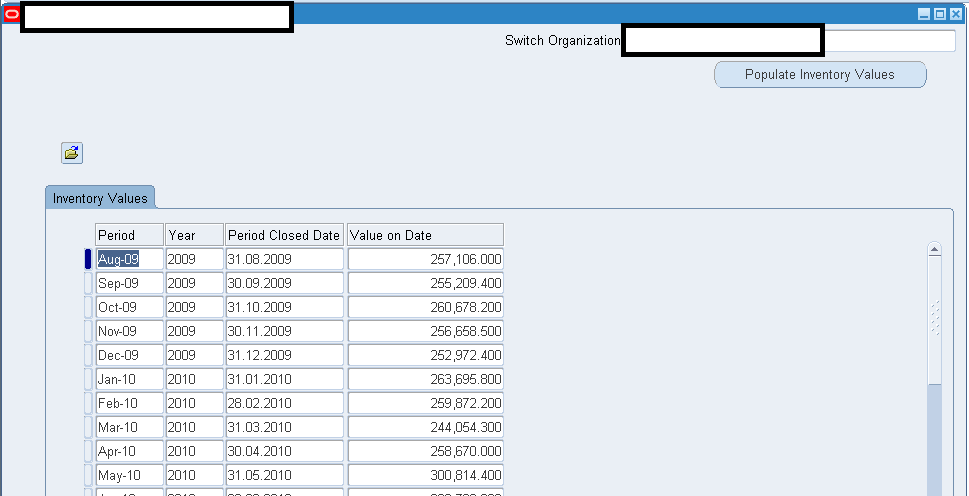
Requirement details: Oracle provides multiple standard reports to generate Inventories values on specified dates and depending upon the volume of transactions all these reports generate thousands of lines details to reach to such cut off date inventory values. Our requirement was to provide the auditors a quick view to inventory values as on end of each month, thus the entire development of below provided solution started.

How it works

Folder view supported form module developed by us calls a stored procedure, generates the rows into GLOBAL TEMPORARY tables and a stored function sum ups the material value and inserts into a local table (Base table with the form module)

For all the closed inventory periods, an insert statement picks up the values for the cut off dates from the view“cst_period_summary_v” and the months which are not already in the “cst_period_summary_v” view are populated by calling PVT APIs what we have heavily customized.

We achieved our goal by disabling the gather table statistics which are called from the PUBLIC API, then exclusively calling a COMMIT from the primary loop initiated by “populate history values” button press, thus indirectly flushing out the GLOBAL TEMPORARY TABLES for next run.

We hope this solution will be useful for organizations around the world who are running Oracle ERP 12.x.xx suites.

Oracle clearly states the API CST_Inventory_PUB  is private and shouldn’t be called by the users exclusively from any other procedures or packages. Please refer to :“Using Oracle API CST_Inventory_PUB Package ID 847101.1]”

Hence you are going to use the solution provided by us at your own risk (Ironically, this PVT API is nothing more than few select statements based on different parameters passed in)


Here we are providing a solution to populate inventory values until “last month” by a mere mouse click

image

The entire solution could be downloaded from here

Regards,

Admin

Oracle EBS R12 how to call standard API/packages from custom form or reports

Okay guys and gals

We had a requirement to use certain Oracle standard API/packages from custom developer forms. After loads of struggle and asking various Oracle related forums, we hardly had a chance to get any satisfactory answers to our query “how to call oracle standard API or packages through custom forms or reports”

Finally with the help of a long term friend cum technical support person Mr. Anil Menon, we were able to successfully call the standard API or package call with our custom (test) form.

For the example we used “apps.INV_QUANTITY_TREE_PUB.QUERY_QUANTITIES” procedure which indirectly refers fnd_api.g_false and apps.inv_quantity_tree_pub.g_transaction_mode parameters/constants defined in the package definitions.

Actual call to the API through a PL/SQL environment (Toad/Oracle PL/SQL) code is as following

SET SERVEROUTPUT ON;
DECLARE
v_api_return_status VARCHAR2 (1);
v_qty_oh NUMBER;
v_qty_res_oh NUMBER;
v_qty_res NUMBER;
v_qty_sug NUMBER;
v_qty_att NUMBER;
v_qty_atr NUMBER;
v_msg_count NUMBER;
v_msg_data VARCHAR2(1000);
v_inventory_item_id VARCHAR2(250);
v_organization_id VARCHAR2(10);
BEGIN

v_inventory_item_id := 24445;
v_organization_id := 901;

inv_quantity_tree_grp.clear_quantity_cache;
DBMS_OUTPUT.put_line ('Transaction Mode');
DBMS_OUTPUT.put_line ('Onhand For the Item :'|| v_inventory_item_id );
DBMS_OUTPUT.put_line ('Organization :'|| v_organization_id);
apps.INV_QUANTITY_TREE_PUB.QUERY_QUANTITIES
(p_api_version_number => 1.0,
p_init_msg_lst => apps.fnd_api.g_false,
x_return_status => v_api_return_status,
x_msg_count => v_msg_count,
x_msg_data => v_msg_data,
p_organization_id => v_organization_id,
p_inventory_item_id => v_inventory_item_id,
p_tree_mode => apps.inv_quantity_tree_pub.g_transaction_mode,
p_onhand_source => 3,
p_is_revision_control => FALSE,
p_is_lot_control => FALSE,
p_is_serial_control => FALSE,
p_revision => NULL,
p_lot_number => NULL,
p_subinventory_code => 'ABC-01', --NULL for whole org
p_locator_id => NULL,
x_qoh => v_qty_oh,
x_rqoh => v_qty_res_oh,
x_qr => v_qty_res,
x_qs => v_qty_sug,
x_att => v_qty_att,
x_atr => v_qty_atr);
DBMS_OUTPUT.put_line ('on hand Quantity :'|| v_qty_oh);
DBMS_OUTPUT.put_line ('Reservable quantity on hand :'|| v_qty_res_oh);
DBMS_OUTPUT.put_line ('Quantity reserved :'|| v_qty_res);
DBMS_OUTPUT.put_line ('Quantity suggested :'|| v_qty_sug);
DBMS_OUTPUT.put_line ('Quantity Available To Transact :'|| v_qty_att);
DBMS_OUTPUT.put_line ('Quantity Available To Reserve :'|| v_qty_atr);
END;

This PL/SQL procedure will successfully print the results during a PL/SQL session through Toad or Oracle PL/SQL session. However, if you would try to invoke the same code through a PL/SQL procedure from a developer form development instance, the errors will start from the call to “fnd_api.g_false” stating “Implementation restriction: ‘APPS.FND_API.G_FALSE’ cannot directly access remote package variable or cursor. Under the package specification you will find G_FALSE constant has the the value ‘F’ and apps.inv_quantity_tree_pub.g_transaction_mode has a value ‘2’ pre-defined.

Umm, not a straight forward method to dwell the packages, find the constant values and modifying the PL/SQL script. For a small API call like above one, a programmer could use this approach as a work around, however, while dealing with APIs which take 10s of parameters, it could be really tiring.

Here is the workaround we used

Created a custom database level package


CREATE OR REPLACE PACKAGE XX_CHK_QTY IS
PROCEDURE retrive_quantity(item_id NUMBER, org_id NUMBER, subinv VARCHAR2, oqtt OUT NUMBER, oqtr OUT NUMBER);
END;

and created corresponding package body as following


CREATE OR REPLACE PACKAGE BODY XX_CHK_QTY AS
PROCEDURE retrive_quantity(item_id NUMBER, org_id NUMBER, subinv VARCHAR2, oqtt OUT NUMBER, oqtr OUT NUMBER) IS
v_api_return_status  VARCHAR2 (1);
v_qty_oh             NUMBER;
v_qty_res_oh         NUMBER;
v_qty_res            NUMBER;
v_qty_sug            NUMBER;
v_qty_att            NUMBER;
v_qty_atr            NUMBER;
v_msg_count          NUMBER;
v_msg_data           VARCHAR2(1000);
--v_inventory_item_id  VARCHAR2(250);
--v_organization_id    VARCHAR2(10) ;
BEGIN
inv_quantity_tree_grp.clear_quantity_cache;
apps.INV_QUANTITY_TREE_PUB.QUERY_QUANTITIES
(p_api_version_number  => 1.0,
p_init_msg_lst        => apps.fnd_api.g_false,
--p_init_msg_lst        => 'F',
x_return_status       => v_api_return_status,
x_msg_count           => v_msg_count,
x_msg_data            => v_msg_data,
p_organization_id     => org_id, --v_organization_id,
p_inventory_item_id   => item_id, --v_inventory_item_id,
p_tree_mode           => apps.inv_quantity_tree_pub.g_transaction_mode,
--p_tree_mode           => 2,
p_onhand_source       => 3,
p_is_revision_control => FALSE,
p_is_lot_control      => FALSE,
p_is_serial_control   => FALSE,
p_revision            => NULL,
p_lot_number          => NULL,
p_subinventory_code   => subinv,
p_locator_id          => NULL,
x_qoh                 => v_qty_oh,
x_rqoh                => v_qty_res_oh,
x_qr                  => v_qty_res,
x_qs                  => v_qty_sug,
x_att                 => v_qty_att,
x_atr                 => v_qty_atr);
oqtt := v_qty_att;
oqtr := v_qty_atr;
END;
END XX_CHK_QTY;


As you could see we are using 2 numbers of OUT variables to store the output data, which will be referred in the forms at later stages.

Our sample form has a control block and 3 items

:ITEM_ID, :QTY_AVL_TRANSACT,:QTY_AVL_RESERVE and under the WVI(WHEN-VALIDATE-ITEM) scope for the block item :ITEM_ID  we wanted to populate total quantity available to transact and total quantity available to reserve into block items :QTY_AVL_TRANSACT,:QTY_AVL_RESERVE

Following is how we call the custom procedure through WVI trigger:

Declare
oqtt number := 0;
oqtr number := 0;
Begin
apps.XX_CHK_QTY.retrive_quantity(:CTRL.ITEM_ID,901,’ABC-01′,oqtt,oqtr);
:CTRL.QTY_AVL_TRANSACT := oqtt;
:CTRL.QTY_AVL_RESERVE := oqtr;
End;

and bingo! as the procedure was called from a database package, there were no compilation errors pointing towards referring remote variables or cursors and once executed all intended results were fetched to corresponding block items.

As we are also learning how to use Oracle APIs within custom forms/reports, we hope this guideline would be useful for those few who are trying to find a way to start calling Oracle’s standard API/packages from such environments.

for Windows7bugs

Admin