Oracle EBS R12 12.2 database cloning

I am not a certified Database/APPS DBA. I wanted to develop a shell/bash script or set of scripts that could duplicate the Oracle EBS PRODUCTION database on demand on a test instance. I thought of doing it as a single script, step by step and later decided to go with multiple scripts to narrow down the damages/or better error correction. Please note, you cannot just copy and start using these scripts at your environment already! You may have to modify many of the parameters & kindly be reminded that, these scripts were developed for an environment that was being cloned repeatedly. Remember to run the main script as “root”

Environment: OS: Oracle Linux 7, Oracle EBS R12 12.2.10, Oracle database 19c, multi-tenant. Approximate size 700GB

Let us create a parameter file for the duplication of EBS database on the TEST instance. The hostname and few other details will be automatically picked up by the shell scripts, however, few other details are provided by the parameter file. This approach gives me greater flexibility to utilize the scripts with different hostnames and contexts. I call this parameter file as “restoreparam.txt”. If you are planning to change the name, you have to replace it in each and every other bash script that is used within the main script.

#Oracle base
s_target_base=/u01/test/
# Source CDB sid
s_source_cdbSid=PRODCDB
# Target CDB sid
s_target_cdbSid=DEVPCDB
# Source EBS database sid (PDB)
s_source_dbSid=PROD
# Target EBS database sid (PDB)
s_target_dbSid=DEVP
# We have database files for both CBD and EBS kept in different paths
# Defining these paths and modifying the RMAN run instructions are crucial for successful restoration and cloning.
s_source_data_path_1=/u01/prod/oradata/PRODCDB/
s_source_data_path_2=/u01/prod/PROD/db/apps_st/data/
# Target data paths
s_data_path_1=/u01/test/oradata/DEVPCDB/
s_data_path_2=/u01/test/DEVP/db/apps_st/data/
# Target PDB Service requires it's own listener information
s_listener_port=1526
# Oracle and Appl manager OS level users
s_db_user=oracle
s_appl_manager=applmgr
# EBS user, by default it is "apps"
s_apps_user=apps
s_apps_pass=********
# Oracle database system account password
s_system_pass=*******
# Path where RMAN backup chunks are kept
s_rman_path=/u04/RMAN/DAILYBKP
# Path where this file be created.
s_rman_param_path=/u04/RMAN/RESTORE
# Target system Oracle inventory path
s_ora_invenoty_path=/u01/test/oraInventory
# Oracle inventory entry identifier for the database. Using this string, entry for the database will be
# deleted from the inventory file. So don't make mistakes
s_ora_inv_dbString=DEVP_DB__u01_test_DEVP_db_tech_st_19_0_0

You can’t make mistakes with the above parameter file. Now we will create the main shell script “doclone.sh”

#!/bin/sh

: <<'END'
This script & associated must be executed as root
This script is meant for single instances.
This script expects both ORACLE, APPLMGR users bash profiles sourcing environment files.
This script was last tested against Oracle EBS R12 12.2.10/19c
Last modified on: 21st October 2024
Author: Rajesh Thampi
License: Public
END

me=$(basename "$0")
parameter_file="/u04/RMAN/RESTORE/restoreparam.txt"
ORACLE_USER=`grep 's_db_user' $parameter_file | cut -d "=" -f2`
APPS_USER=`grep 's_appl_manager' $parameter_file | cut -d "=" -f2`
db_path_1=`grep 's_data_path_1' $parameter_file | cut -d "=" -f2`
db_path_2=`grep 's_data_path_2' $parameter_file | cut -d "=" -f2`
rman_path=`grep 's_rman_path' $parameter_file | cut -d "=" -f2`

ORACLE_HOME=$(su - ${ORACLE_USER} -c 'echo "$ORACLE_HOME"')
ORACLE_SID=$(su - ${ORACLE_USER} -c 'echo "$ORACLE_SID"')
ORACLE_CONTEXT=$(su - ${APPS_USER} -c 'echo "$CONTEXT_NAME"')
APPS_SCRIPTS_HOME=$(su - ${APPS_USER} -c 'echo "$RUN_BASE/inst/apps/$CONTEXT_NAME/admin/scripts"')
DB_SCRIPTS_HOME=$(su - ${ORACLE_USER} -c 'echo "$ORACLE_HOME"')/appsutil/scripts/$ORACLE_CONTEXT


# We'll stop the application and database instances now.
echo "We'll shutdown the EBS instace now"

sh startstopebsr12.sh stop
if [ $? -eq 0 ]; then
echo "We'll shutdown the EBS instace now"
sleep 60
else
echo "There was an error shutting down the instance."
exit 1
fi

# As we are cloning the instance, we can kill all ORACLE & APPLMGR processes immediately
pkill -9 -u ${APPS_USER}
pkill -9 -u ${ORACLE_USER}
echo "All services for ORACLE, APPLMGR are terminated now"

# remove the datafiles from data tops now
rm -rf ${db_path_1}*
rm -rf ${db_path_2}*
echo "All data files are removed from the data tops now"

#change of the ownership of the rman chunks now
chown -R ${ORACLE_USER}:oinstall ${rman_path}

sleep 10

# Start the database as not mounted

sh startdbnomount.sh
if [ $? -eq 0 ]; then
    echo "Database started nomount"
else
    echo "There were some errors starting the database in the nomount status"
    exit 1
fi

# Start RMAN Restore

sleep 10
echo "Starting RMAN restore processes now, this could take many hours based on the current size of the database"
sh dormanrestore.sh

if [ $? -eq 0 ]; then
    echo "RMAN restore completed"
else
    echo "There were some errors starting the database in the nomount status"
    exit 1
fi
sleep 10

# Startup the database and disable archive logging

sh startdbmount.sh
if [ $? -eq 0 ]; then
    echo "Starting database and disabling archivelog. Sleep 15 seconds"
else
    exit 1
fi
sleep 15
# We will create a backup for the oracle inventory file and remove the database entry before running the adcfgclone
sh dofirstclone.sh
if [ $? -eq 0 ]; then
    echo "Initial Cloning completed. Sleep 15 seconds"
else
    exit 1
fi
sleep 15

# Setup the PDB and related services now
sh dodbsetup.sh
if [ $? -eq 0 ]; then
    echo "PDB recreated and all services are restarted, will sleep 15 seconds"
else
    exit 1
fi
sleep 15

# We will setup the UTL files and run the adcfgclone
sh doutlfile.sh
if [ $? -eq 0 ]; then
    echo "UTL directories set, final cloning completed. Will sleep 15 seconds"
else
    exit 1
fi
sleep 15

# Finally we will run the autoconfig on database and both application file systems
sh doautoconfig.sh
if [ $? -eq 0 ]; then
    echo "All done. You can try to restart the applicatio now. Sleeping 10"
else
    exit 1
fi

Now we will create other shells scripts that are called from the main script and I will try to explain them briefly as much of them will be pretty familiar for a seasoned DBA. Script “startstopebsr12.sh” accepts one input value, either “start” or “stop”. This script is used to stop the instance from the main script and not parameterized because I use it for multiple contexts.

#!/bin/sh

: <<'END'
This script is meant for single instances.
This script expects both ORACLE, APPLMGR users bash profiles sourcing environment files.
This script was last tested against Oracle EBS R12 12.2.10/19c
Last modified on: 2nd October 2024
Author: Rajesh Thampi
License: Public
END


# I will not be using the clone parameter file as this script is multiple places in different contexts.
# If you want to use it exclusively for the cloning purpose, please refer it here.

me=$(basename "$0")
ORACLE_SID=$(su - oracle -c 'echo "$ORACLE_SID"')
APPS_ORACLE_CONTEXT=$(su - applmgr -c 'echo "$CONTEXT_NAME"')
APPS_SCRIPTS_HOME=$(su - applmgr -c 'echo "$RUN_BASE/inst/apps/$CONTEXT_NAME/admin/scripts"')
DB_SCRIPTS_HOME=$(su - oracle -c 'echo "$ORACLE_HOME"')/appsutil/scripts/$APPS_ORACLE_CONTEXT

if [[ -z $1 ]]; then
    echo "No parameter was passed"
    exit 1
else
    if [[ "$1" == "start" ]]; then
        echo "All Oracle EBS R12 Services will be started now."
        su - oracle -c "sh $DB_SCRIPTS_HOME/adcdbctl.sh start;"
        if [ $? -ne 0 ]; then
            echo "Couldn't start the database services successfully. Aborting"
            exit 1
        else
            su - oracle -c "sh $DB_SCRIPTS_HOME/adcdblnctl.sh start $ORACLE_SID;"
        fi
        if [ $? -ne 0 ]; then
            echo "Couldn't start the listener services successfully. Aborting"
            exit 1
        else
            su - applmgr -c "cd $APPS_SCRIPTS_HOME;{ echo apps; echo apps; echo welcome123; } | adstrtal.sh;"
        fi
        if [ $? -ne 0 ]; then
            echo "Couldn't start the Application services successfully. Check log files for errors and try again"
        else
            echo "All EBS Services were successfully started."
        fi

    elif [[ "$1" == "stop" ]]; then
        echo "All Oracle EBS R12 Services will be stopped now."
        su - applmgr -c "cd $APPS_SCRIPTS_HOME;{ echo apps; echo apps; echo welcome123; } | adstpall.sh;"
        if [ $? -ne 0 ]; then
            echo "Couldn't stop the application services successfully. Aborting"
            exit 1
        else
            su - oracle -c "sh $DB_SCRIPTS_HOME/adcdblnctl.sh stop $ORACLE_SID;"
        fi
        if [ $? -ne 0 ]; then
            echo "Couldn't stop the Listener services successfully. Aborting"
            exit 1
        else
            su - oracle -c "sh $DB_SCRIPTS_HOME/adcdbctl.sh stop immediate;"
        fi
        if [ $? -ne 0 ]; then
            echo "Couldn't stop the Database services successfully. Check log files for errors and try again."
            exit 1
        else
            echo "All EBS Services were successfully stopped."
        fi
    else
        echo "Syntax: sh $me start/stop"

    fi
fi

The main script will continue once after both application and database instances are stopped. data files from the data paths will be deleted & ownership of the RMAN files will be set for Oracle user. Oracle services will restarted and the database will not be mounted using the script “startdbnomount.sh”. I didn’t feel parameterization was necessary for this script ;)

#!/bin/sh
su - oracle -c "sqlplus / as sysdba <<EOF
startup nomount;
quit;
EOF"

Now, the main script will call “dormanrestore.sh” script, which is one of the most critical scripts, duplicating the PRODUCTION database. You have to carefully adjust the below to ensure that your database is duplicated successfully. Please give special attentions to comments provided inside the script.

#!/bin/sh

parameter_file="/u04/RMAN/RESTORE/restoreparam.txt"
rman_param_path=$(grep 's_rman_param_path' $parameter_file | cut -d "=" -f2)
target_cdbsid=$(grep 's_target_cdbSid' $parameter_file | cut -d "=" -f2)
rman_path=$(grep 's_rman_path' $parameter_file | cut -d "=" -f2)
s_data_path_1=$(grep 's_source_data_path_1' $parameter_file | cut -d "=" -f2)
s_data_path_2=$(grep 's_source_data_path_2' $parameter_file | cut -d "=" -f2)
t_data_path_1=$(grep 's_data_path_1' $parameter_file | cut -d "=" -f2)
t_data_path_2=$(grep 's_data_path_2' $parameter_file | cut -d "=" -f2)

LOGFILE=${rman_param_path}"/full_restore_`date +%d%b%y_%H%M%S`.log"

# Make sure that db_file_name_convert & number of channels are adjusted based on your specific environments.
# Keeping multiple channels open could directly affect the restoration and overall performance of the process.
# Adjust the number of redo log files, size & path based on your specific requirements.
echo "RMAN restore will start now"

su - oracle <<EOF
rman auxiliary / log='$LOGFILE' <<RMN
run
{
ALLOCATE AUXILIARY CHANNEL c1 DEVICE TYPE disk;
ALLOCATE AUXILIARY CHANNEL c2 DEVICE TYPE disk;
ALLOCATE AUXILIARY CHANNEL c3 DEVICE TYPE disk;
ALLOCATE AUXILIARY CHANNEL c4 DEVICE TYPE disk;
duplicate database to "${target_cdbsid}" backup location '${rman_path}' nofilenamecheck
db_file_name_convert=('${s_data_path_1}','${t_data_path_1}','${s_data_path_2}','${t_data_path_2}')
LOGFILE
GROUP 1 (
'${t_data_path_1}redo01a.log',
'${t_data_path_1}redo01b.log'
) SIZE 1200M ,
GROUP 2 (
'${t_data_path_1}redo02a.log',
'${t_data_path_1}redo02b.log'
) SIZE 1200M ,
GROUP 3 (
'${t_data_path_1}redo03a.log',
'${t_data_path_1}redo03b.log'
) SIZE 1200M ,
GROUP 4 (
'${t_data_path_1}redo04a.log',
'${t_data_path_1}redo04b.log'
) SIZE 1200M ;
}
RMN
EOF

RMAN duplication could take hours based on multiple factors. Size of the database, channels and hardware efficiency. The log file will bear the data and time stamp, keep monitoring it for the progress. Once RMAN successfully completes, main script will call the script “startdbmount.sh”. This script will start the database and mount it, without opening it. The archive logging will be disabled during this stop for the duplicated database.

#!/bin/sh

su - oracle -c "sqlplus / as sysdba <<EOF
shutdown immediate;
startup mount;
alter database noarchivelog;
shutdown immediate;
quit;
EOF"

Now the main script will call “dofirstclone.sh”, that will do the initial clone of the database. A number of parameters are referenced from the parameter file, hence make sure that your parameter is constructed with utmost attention.

#!/bin/sh

parameter_file="/u04/RMAN/RESTORE/restoreparam.txt"
rman_param_path=$(grep 's_rman_param_path' $parameter_file | cut -d "=" -f2)
ora_inventory_path=$(grep 's_ora_invenoty_path' $parameter_file | cut -d "=" -f2)
ora_inv_dbString=$(grep 's_ora_inv_dbString' $parameter_file | cut -d "=" -f2)
ORACLE_USER=$(grep 's_db_user' $parameter_file | cut -d "=" -f2)
APPS_USER=$(grep 's_appl_manager' $parameter_file | cut -d "=" -f2)

ORACLE_HOME=$(su - ${ORACLE_USER} -c 'echo "$ORACLE_HOME"')
ORACLE_SID=$(su - ${ORACLE_USER} -c 'echo "$ORACLE_SID"')
ORACLE_CONTEXT=$(su - ${APPS_USER} -c 'echo "$CONTEXT_NAME"')
APPS_SCRIPTS_HOME=$(su - ${APPS_USER} -c 'echo "$RUN_BASE/inst/apps/$CONTEXT_NAME/admin/scripts"')
DB_SCRIPTS_HOME=$(su - ${ORACLE_USER} -c 'echo "$ORACLE_HOME"')/appsutil/scripts/$ORACLE_CONTEXT

# Application user password

APPS_PASSWD=$(grep 's_apps_pass' $parameter_file | cut -d "=" -f2)

su - ${ORACLE_USER} <<EOF
cd ${ora_inventory_path}/ContentsXML
cp -f inventory.xml inventory_backup.xml
awk '!/'${ora_inv_dbString}'/' inventory.xml  > tmpfile.xml && mv tmpfile.xml inventory.xml
EOF

su - ${ORACLE_USER} <<EOF
cd $ORACLE_HOME/appsutil/clone/bin
{ echo $APPS_PASSWD; } | perl adcfgclone.pl dbTechStack $ORACLE_HOME/appsutil/${ORACLE_CONTEXT}.xml
EOF

echo "Cloning successfully completed, will sleep 10 seconds"
sleep 10

su - ${ORACLE_USER} <<EOF
cd $ORACLE_HOME/appsutil/install/$ORACLE_CONTEXT
sqlplus / as sysdba;
startup;
@adupdlib.sql so;
shutdown immediate;
EOF
echo "Database shutdown completed. Sleep 15 seconds"
sleep 15

su - ${ORACLE_USER} <<EOF
sqlplus / as sysdba;
startup;
quit;
EOF
echo "Database restart completed."

Initial cloning should happen without throwing errors. Once the initial cloning done, next script “dodbsetup.sh” setup will drop the PDB from PRODUCTION and recreate the TEST PDB instance, rename the services, reconfigure the local listener for PDB etc.

#!/bin/sh
ORACLE_SID=$(su - oracle -c 'echo "$ORACLE_SID"')
ORACLE_HOME=$(su - oracle -c 'echo "$ORACLE_HOME"')
parameter_file="/u04/RMAN/RESTORE/restoreparam.txt"
SOURCE_SID=`grep 's_source_dbSid' $parameter_file | cut -d "=" -f2`
TARGET_SID=`grep 's_target_dbSid' $parameter_file | cut -d "=" -f2`
ORACLE_BASE=`grep 's_target_base' $parameter_file | cut -d "=" -f2`
ORACLE_USER=`grep 's_db_user' $parameter_file | cut -d "=" -f2`
LISTENER_PORT=`grep 's_listener_port' $parameter_file | cut -d "=" -f2`
TARGET_LISTNER=$HOSTNAME:$LISTENER_PORT

source_ebs_patch=$SOURCE_SID"_ebs_patch"
target_ebs_patch=$TARGET_SID"_ebs_patch"

su - ${ORACLE_USER} <<EOF
sqlplus / as sysdba
alter pluggable database ${SOURCE_SID} unplug into '${ORACLE_HOME}/dbs/${SOURCE_SID}.xml';
drop pluggable database ${SOURCE_SID};
create pluggable database ${TARGET_SID} using '${ORACLE_HOME}/dbs/${SOURCE_SID}.xml' NOCOPY SERVICE_NAME_CONVERT=('ebs_${SOURCE_SID}','ebs_${TARGET_SID}','${SOURCE_SID}_ebs_patch', '${TARGET_SID}_ebs_patch');
alter pluggable database all open read write services=all;
alter pluggable database all save state;
alter session set container=${TARGET_SID};
alter system set local_listener='${TARGET_LISTNER}' scope=spfile;
shutdown immediate;
startup;
exit;
EOF

echo "Finished setting up PDB. Sleep 15 seconds after shutdown"
sleep 15

Creation of the PDB and rest shouldn’t take too much time. Now it is time for the final cloning, that will setup the UTL directories and more. Let us see the “doutlfile.sh” now. Please note, prior executing the below script, you must create a copy of PDBNAME_utlfiledir.txt that is available in $ORACLE_HOME/dbs/ path to PDBNAME_utlfiledir.txt.backup (example: DEVP_utlfiledir.txt to DEVP_utlfiledir.txt.backup). This backup will be used for replacing the UTL file directory paths setup within this cycle.

#!/bin/sh

parameter_file="/u04/RMAN/RESTORE/restoreparam.txt"
target_dbsid=$(grep 's_target_dbSid' $parameter_file | cut -d "=" -f2)

ORACLE_USER=`grep 's_db_user' $parameter_file | cut -d "=" -f2`
APPS_USER=`grep 's_appl_manager' $parameter_file | cut -d "=" -f2`
echo ${ORACLE_USER}

APPS_PASSWD=`grep 's_apps_pass' $parameter_file | cut -d "=" -f2`
EBS_USER=`grep 's_apps_user' $parameter_file | cut -d "=" -f2`
SYSTEM_PASSWD=`grep 's_system_pass' $parameter_file | cut -d "=" -f2`

ORACLE_HOME=$(su - ${ORACLE_USER} -c 'echo "$ORACLE_HOME"')
ORACLE_SID=$(su - ${ORACLE_USER} -c 'echo "$ORACLE_SID"')
ORACLE_CONTEXT=$(su - ${APPS_USER} -c 'echo "$CONTEXT_NAME"')
APPS_SCRIPTS_HOME=$(su - ${APPS_USER} -c 'echo "$RUN_BASE/inst/apps/$CONTEXT_NAME/admin/scripts"')
DB_SCRIPTS_HOME=$(su - ${ORACLE_USER} -c 'echo "$ORACLE_HOME"')/appsutil/scripts/$ORACLE_CONTEXT


# We will use a copy of the utilfile for repeated cloning.

su - ${ORACLE_USER} <<EOF
cd ${ORACLE_HOME}
source ${ORACLE_CONTEXT}.env
sh $DB_SCRIPTS_HOME/adcdblnctl.sh start ${ORACLE_SID}


{ echo $APPS_PASSWD; } | perl ${ORACLE_HOME}/appsutil/bin/txkCfgUtlfileDir.pl -contextfile=${ORACLE_HOME}/appsutil/${ORACLE_CONTEXT}.xml -oraclehome=${ORACLE_HOME} -outdir=${ORACLE_HOME}/appsutil/log -mode=getUtlFileDir
cp -f ${ORACLE_HOME}/dbs/${target_dbsid}_utlfiledir.txt.backup ${ORACLE_HOME}/dbs/${target_dbsid}_utlfiledir.txt
{ echo $APPS_PASSWD; echo $SYSTEM_PASSWD; } | perl ${ORACLE_HOME}/appsutil/bin/txkCfgUtlfileDir.pl -contextfile=${ORACLE_HOME}/appsutil/${ORACLE_CONTEXT}.xml -oraclehome=${ORACLE_HOME} -outdir=${ORACLE_HOME}/appsutil/log -mode=setUtlFileDir -servicetype=onpremise
{ echo $APPS_PASSWD; } | perl ${ORACLE_HOME}/appsutil/bin/txkCfgUtlfileDir.pl -contextfile=${ORACLE_HOME}/appsutil/${ORACLE_CONTEXT}.xml -oraclehome=${ORACLE_HOME} -outdir=${ORACLE_HOME}/appsutil/log -mode=syncUtlFileDir -skipautoconfig=yes
cd ${ORACLE_HOME}/appsutil/clone/bin
{ echo $APPS_PASSWD; } | perl adcfgclone.pl dbconfig ${ORACLE_HOME}/appsutil/${ORACLE_CONTEXT}.xml


su - ${APPS_USER} -c "sqlplus ${EBS_USER}/${APPS_PASSWD}@${target_dbsid} <<EOF
EXEC FND_CONC_CLONE.SETUP_CLEAN;
Commit;
quit;
EOF"

Now we will do the autoconfiguration on both database and application tiers using the script “doautoconfig.sh”. I’m leaving the application env file path hardcoded as I missed parameterizing it in the file. Add a new value to the parameter file if you want to refer it from the it. Please note, both my Oracle and Applmgr users bash profiles are modified to call the respective environment files. Missing them in the bash profiles could be one of the reasons for the scripts failing.

#!/bin/sh

parameter_file="/u04/RMAN/RESTORE/restoreparam.txt"
ORACLE_USER=`grep 's_db_user' $parameter_file | cut -d "=" -f2`
APPS_USER=`grep 's_appl_manager' $parameter_file | cut -d "=" -f2`
APPS_PASSWD=`grep 's_apps_pass' $parameter_file | cut -d "=" -f2`
SYSTEM_PASSWD=`grep 's_system_pass' $parameter_file | cut -d "=" -f2`

ORACLE_SID=$(su - ${ORACLE_USER} -c 'echo "$ORACLE_SID"')
ORACLE_HOME=$(su - ${ORACLE_USER} -c 'echo "$ORACLE_HOME"')
ORACLE_CONTEXT=$(su - ${APPS_USER} -c 'echo "$CONTEXT_NAME"')
DB_SCRIPTS_HOME=$(su - ${ORACLE_USER} -c 'echo "$ORACLE_HOME"')/appsutil/scripts/$ORACLE_CONTEXT

su - ${ORACLE_USER} <<EOF
cd $DB_SCRIPTS_HOME
{ echo $APPS_PASSWD; } | sh adautocfg.sh
EOF


su - ${APPS_USER} <<EOF
{ echo $APPS_PASSWD; } | adautocfg.sh;
sqlplus system/${SYSTEM_PASSWD};
alter trigger ebs_logon disable;
quit;
EOF

su - ${APPS_USER} <<EOF
source /u02/oracle/apps/EBSapps.env patch;
{ echo $APPS_PASSWD; } | adautocfg.sh;
sqlplus system/${SYSTEM_PASSWD};
alter trigger ebs_logon enable;
quit;
EOF

su - ${APPS_USER} <<EOF
source /u02/oracle/apps/EBSapps.env run;
EOF

That’s all. If there were no errors, it is okay to start the test instance now. If you are coming across issues that I have overlooked, do let me through comments.

How to disable Windows Virtualization/Device Based Security #VBS

This post was last updated on 24th March 2025. One of the visitors commented that VBS was disabled by turning off Tamper Protection. I received a confirmation from other visitor, using Windows 11 Home Edition.

This post was last updated on 5th February 2025 to confirm that the below hacks are not applicable for Windows Home Editions. If we come across any, will duly share them. Cheers!

This post was last updated on 27th January 2025 to include additional information with another laptop HP Probook 450 G10 running Windows 11 23H2 and VBS was already enabled when we received this device at work. I observed the below while disabling VBS on the same.

  • No need to disable Kernel DMA Support
  • Secure boot disabled

To disable VBS, this time I approached the below sequence

  • Disabled Core Isolation->Memory Integrity->Reboot
  • Ran Device Guard Readiness script with switch “Disabled” (Explained below)->Reboot. Accepted the prompts to disable both Credential Guard & VBS opt-outs and VBS was disabled completely.

This post was last updated on 15th January 2025 to include my experiments with a new Dell G16 7630 gaming laptop that I changed my six years old laptop with. For the same, I have disabled 2 things on BIOS prior continuing with other attempts from the OS.

  • Kernel DMA Support
  • Secure Boot

Once again, the methods that I listed below should only be referred as workaround solutions and you must let Microsoft handle such stuffs the best ways it suits to offer maximum security and stability for your devices.

I use virtual machines almost everyday & recently I took the risk of upgrading my finely tuned Windows 11 23H2 development laptop to 24H2 using my insider account. The upgrade was smooth without any troubles and none of the existing software that I use reported issues. Then I wanted to use my virtual machines!

As usual, multiple security related features are added or enhanced in 24H2 build and many of them are totally depending upon Hyper-V, Microsoft’s own virtualization platform. So, after a successful upgrade to 24H2, don’t be surprised if your find Hyper-V running in the background while so called “Windows Features are still disabled for it”. Read more about VBS here.

As our primary objective is to disable the VBS so that we can go back with our virtual machines, you should know the most disappointing thing at this point, there are no toggle switches available to completely disable VBS. You have to toggle few switches, run some scripts, fiddle around with group policy etcetera to get the task done.

You can use good old “System Information” to check whether VBS is running/enabled. I’ve enabled VBS once again to demonstrate how to disable it for this article. Please note, depending upon your hardware, you may see few or more details than that are visible in the picture below.

As per the system information gathered, my computer is currently enabled with VBS. This laptop has a TPM 2.0 chip & UEFI secure boot disabled.

Based on whether the secure boot is enabled, disabling VBS can become pretty complex. I will share some links to Microsoft articles explaining how to deal with such situations as well.

First we will see how to disable the virtualization based security when the secured boot is disabled. Go to “Settings->Privacy & Security->Device Security”

Toggle the Memory integrity to turned off.

Reboot & check whether the VBS is disabled. If not, proceed to next step.

Go to this link Download Device Guard and Credential Guard hardware readiness tool from Official Microsoft Download Center, download the archive file and extract it to a folder.

Before trying to execute the PowerShell script, make sure the execution policy has been set as “unrestricted”. Without, the script will execute and show some information, that wouldn’t really tell you what went wrong.

Now open an elevated command prompt/PowerShell, switch to the path where you have extracted the file that you downloaded earlier. If you are using PowerShell, switch to the path first then type the first couple of letters, for example “DG” and tap the tab key, that will fetch the full name of the script. Ignore the error messages.

Accept the prompts & restart your computer. Restarting is a must after every attempt. There will be two prompts asking you whether to disable two different features, which should be accepted. The first prompt asks for Credential Guard opt-out confirmation, that you should accept by pressing “F3” key.

The same will be confirmed in the next screen.

Now “Virtualization Based Security” opt-out will be presented. Once you again press “F3” to proceed.

Much of the times, this should resolve the issue & VBS should be disabled.

If the VBS is not yet disabled, try setting up the Group policy. I truly hope you know what you are doing!

Open group policy editor, Local Computer Policy->Computer Configuration->Administrative Templates->System->Device Guard->Turn On Virtualization Based Security->Disabled

Now restart your computer once again. Check whether the VBS is disabled or not.

Still having troubles? Let’s check few more things.

Run “System Information” once again & check the elements as marked in the image below.

If VBS is still running and “A hypervisor has been detected. Features required for Hyper-V will not displayed” is shown, it means Hyper-V is still running after the above exercises. We can try to disable Hyper-V from the boot now.

Open powershell/Terminal as Administrator & execute the following command.

bcdedit /enum | findstr -i hypervisorlaunchtype

If running the command returns nothing, it means hypervisor is turned off in the boot & fixing the VBS looks almost impossible (in case if all the above were already tried). On the other hand, if it returns one of the below

  • hypervisorlaunchtype Auto
  • hypervisorlaunchtype On

Then you still have a chance to fix the VBS issues. Execute the below command in the same powershell session.

bcdedit /set hypervisorlaunchtype off

Reboot and check the system information window once again and you should see something similar to below image.

If VBS is shown as “Not Enabled” or “Not Running”, then you are all good. Now, the million dollar question is, should you disable Hyper-V at all? Windows is building many features on top of Hyper-V that will provide a sandboxed environment for the OS. Tomorrow, Microsoft might decide not to let the users disable Hyper-V using hacks. Regardless, let us all hope Oracle VirtualBox or VMWare tweaks their hypervisors so that they can coexist with Hyper-V and still ensure the same performance.

Let’s see what Copilot has to tell us about the potential risks associated with disabling VBS

References

Bash script for starting and stopping Oracle Application (EBS) R12 12.2

I am working on a new script/set of scripts for single-instance database cloning and came across the need to shut down and restart the application by calling a second script. Here, I am sharing it with you today. Copy it to a fresh .sh file, name it whatever you want, and enjoy! :) Do not forget to adjust the passwords!

#!/bin/sh

: <<'END'
This script is ran as "root"
This script is meant for single instances.
This script expects both ORACLE, APPLMGR users bash profiles sourcing environment files.
This script was last tested against Oracle EBS R12 12.2.10/19c
Last modified on: 2nd October 2024
Author: Rajesh Thampi
License: Public
END
me=$(basename "$0")
ORACLE_SID=$(su - oracle -c 'echo "$ORACLE_SID"')
APPS_ORACLE_CONTEXT=$(su - applmgr -c 'echo "$CONTEXT_NAME"')
APPS_SCRIPTS_HOME=$(su - applmgr -c 'echo "$RUN_BASE/inst/apps/$CONTEXT_NAME/admin/scripts"')
DB_SCRIPTS_HOME=$(su - oracle -c 'echo "$ORACLE_HOME"')/appsutil/scripts/$APPS_ORACLE_CONTEXT

if [[ -z $1 ]]; then
    echo "No parameter was passed"
    exit 1
else
    if [[ "$1" == "start" ]]; then
        echo "All Oracle EBS R12 Services will be started now."
        su - oracle -c "sh $DB_SCRIPTS_HOME/adcdbctl.sh start;"
        if [ $? -ne 0 ]; then
            echo "Couldn't start the database services successfully. Aborting"
            exit 1
        else
            su - oracle -c "sh $DB_SCRIPTS_HOME/adcdblnctl.sh start $ORACLE_SID;"
        fi
        if [ $? -ne 0 ]; then
            echo "Couldn't start the listener services successfully. Aborting"
            exit 1
        else
            su - applmgr -c "cd $APPS_SCRIPTS_HOME;{ echo apps; echo apps; echo password123; } | adstrtal.sh;"
        fi
        if [ $? -ne 0 ]; then
            echo "Couldn't start the Application services successfully. Check log files for errors and try again"
        else
            echo "All EBS Services were successfully started."
        fi

    elif [[ "$1" == "stop" ]]; then
        echo "All Oracle EBS R12 Services will be stopped now."
        su - applmgr -c "cd $APPS_SCRIPTS_HOME;{ echo apps; echo apps; echo password123; } | adstpall.sh;"
        if [ $? -ne 0 ]; then
            echo "Couldn't stop the application services successfully. Aborting"
            exit 1
        else
            su - oracle -c "sh $DB_SCRIPTS_HOME/adcdblnctl.sh stop $ORACLE_SID;"
        fi
        if [ $? -ne 0 ]; then
            echo "Couldn't stop the Listener services successfully. Aborting"
            exit 1
        else
            su - oracle -c "sh $DB_SCRIPTS_HOME/adcdbctl.sh stop immediate;"
        fi
        if [ $? -ne 0 ]; then
            echo "Couldn't stop the Database services successfully. Check log files for errors and try again."
            exit 1
        else
            echo "All EBS Services were successfully stopped."
        fi
    else
        echo "Syntax: sh $me start/stop"

    fi
fi

That’s all folks. Have comments? let me know

Can’t find file TBAddInSetup64.msi | Oracle Analytics Publisher Desktop installation

Last updated on 27th January 2025

As on date, latest version of Oracle Analytical Publisher (12.2.7.6.0) is fully compatible with Microsoft Office 2021 & users can continue with updating the Office software (until Oracle/Microsoft breaks it)

Installing Oracle software on Windows is always fun. One time it gets installed & the other times it won’t. As simple as that. For our Oracle E-Business suite, we adapted XML reporting from last many years & faced one or more issues with almost every version of Microsoft Office. Sometimes the 64Bit version of the Analytics Publisher will not work with the version of Office you have, forcing you to install the 32Bit Office. The most perplexing is when the add-in gets disabled once after the software crashes. I will get back to that area by the end of this article.

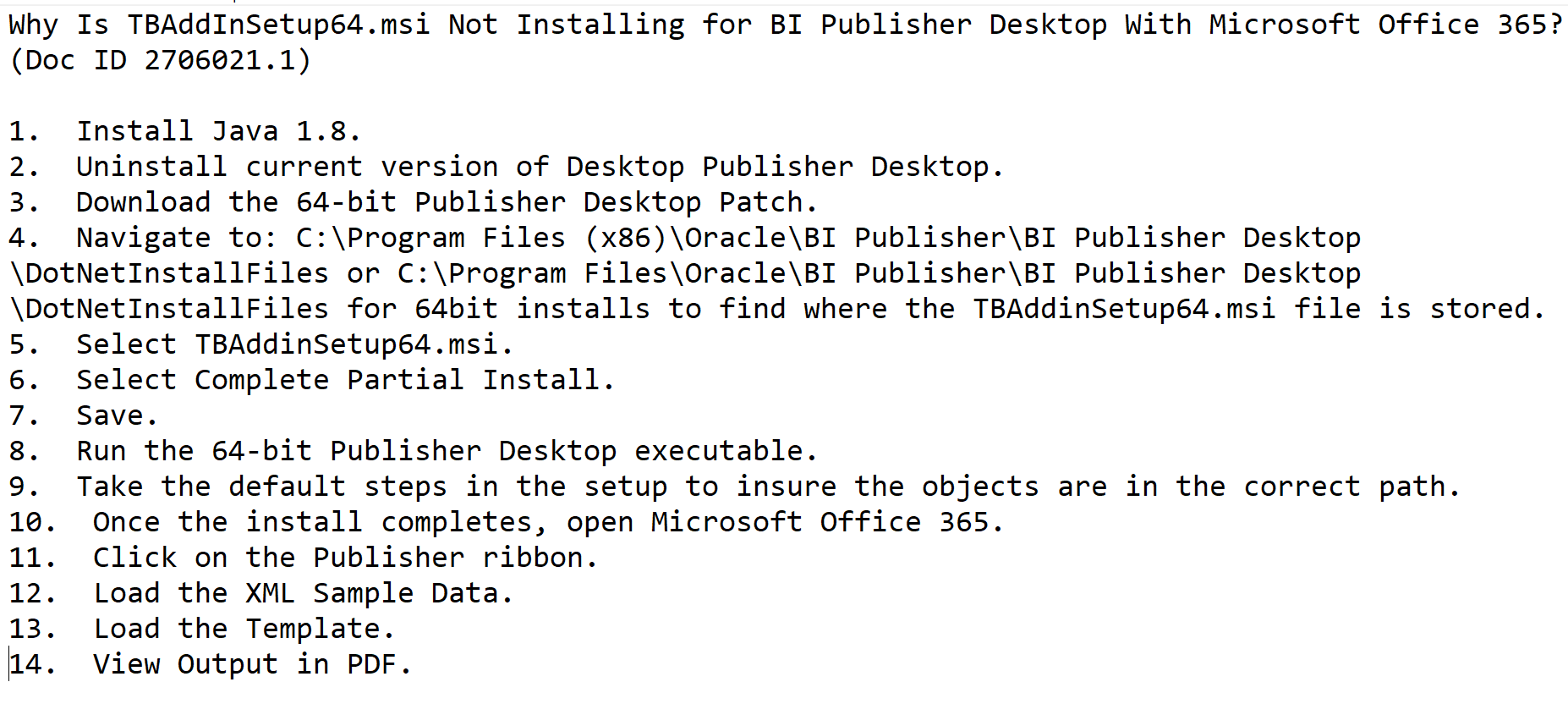
Oracle has two support documents explaining how to resolve this installation issue. Let’s see the beauty of their documentation.

Starting from the point number 3 everything is mere bullshit as uninstalling the software deletes all executables from the paths mentioned. They are missing the reference for the patch and points 5,6,7?? Anyway, discussing about Oracle documents is like opening a can of worms.

So, what is the immediate solution if all of a sudden you find the “Publisher” stopped appearing over the menu area? Well, the simplest solution is to uninstall Office & re-install it. Then try to install Oracle publisher. As simple as it is. This hack was tested with Office 2021 Professional, both 32 & 64Bit. You may follow the below sequence to ensure a successful installation.

  • Uninstall Microsoft Office & all other office products like OneNote
  • Uninstall Oracle Analytics Publisher Desktop
  • RESTART your computer!!! If you don’t, it’s certain that your next attempt will also fail.
  • Install Microsoft office first, then proceed with installing Oracle software.

Now, coming back to the Add-in getting disabled, especially from Microsoft Word. I’ve came across some convincing Oracle community discussions & confirming that, it’s due to the latest Microsoft Office updates, Add-in for Word gets disabled. Oracle has a bug logged and they are investigating the issues. Rolling back to a previous build of Office will resolve this issue. Please check the following links for more details. Please note, you must use the exact version number for the update rollback mentioned in the articles. For example, Office 2019, 2021 & 365 bear the version number “16” & you can get the exact version number from the about product page. Please disable the automatic update for Office products prior you attempt the below given instructions.

Based on the Oracle discussions, the safest version was 2406 & If your Office version is 16.0.x.x, from an elevated command prompt execute the following command:

C:\Program Files\Common Files\microsoft shared\ClickToRun\OfficeC2RClient.exe /update user updatetoversion=16.0.17726.20160

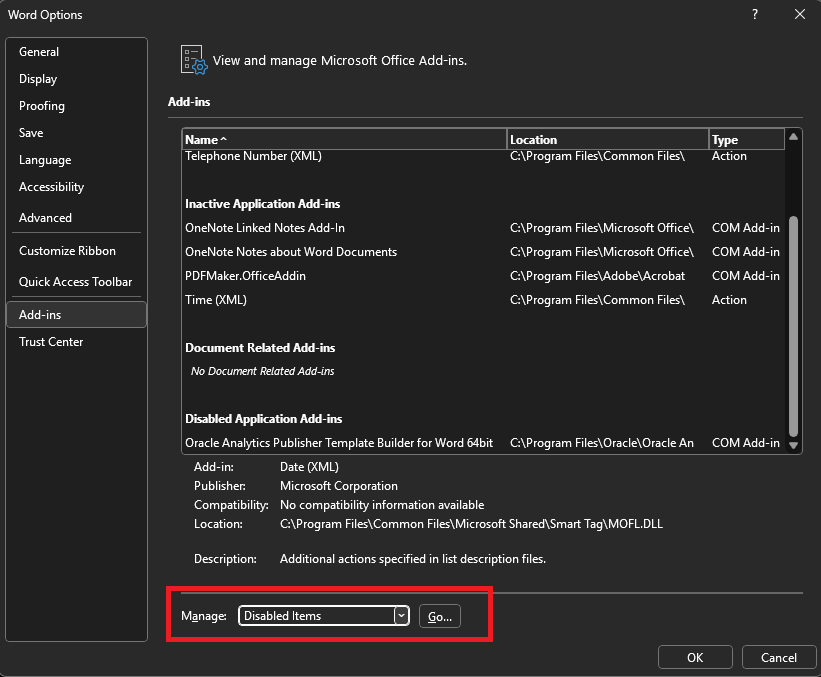
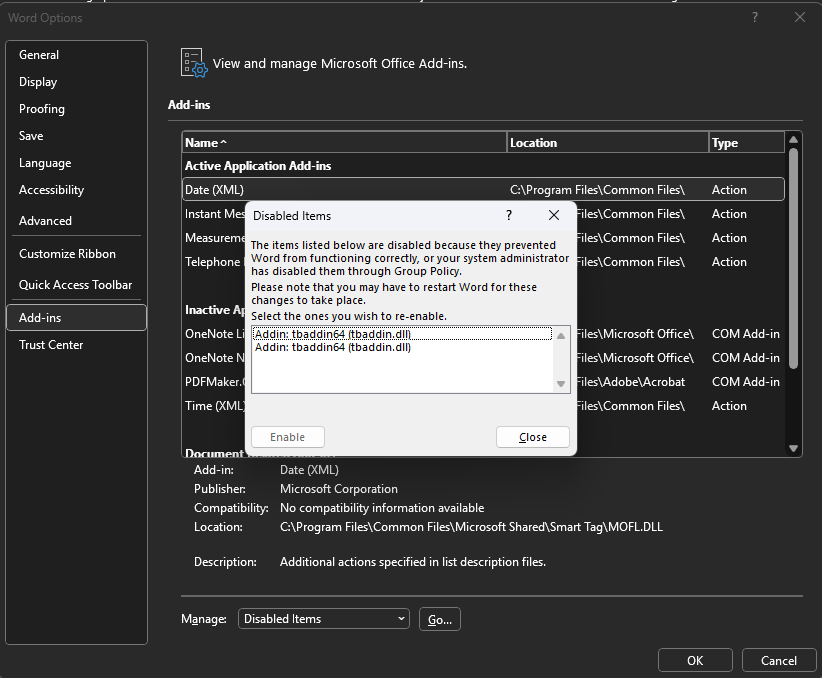
After downgrading your Office, open Microsoft Word as Administrator (right click, run as administrator). Navigate to File->Options. Below image shows “Oracle Analytics Publisher Desktop” as disabled.

Change the Manage option to “Disabled” and click the “Go” button.

(Please don’t mind the Add-in appearing twice in the below image, be sure I did something wrong ;) )

Select the Add-in “tbaddin64” and try to enable, that closes the window. Close Word and open again. This should bring back the “Publisher” back in the menu.

Windows 11 #24H2

I’ve been a Windows insider from the very beginning. However, my insider experiments were always limited to a virtual machine as release previews previously broke my fine tuned environments. This time I couldn’t get the Windows 11 VM upgraded due to some unknown issues preventing VirtualBox getting stuck at boot after the update installed. So, I decided to upgrade my development machine. One of the funniest situations I came across was the upgrade not being offered after setting up “insider program”
Let us check how to get the update step by step this time.

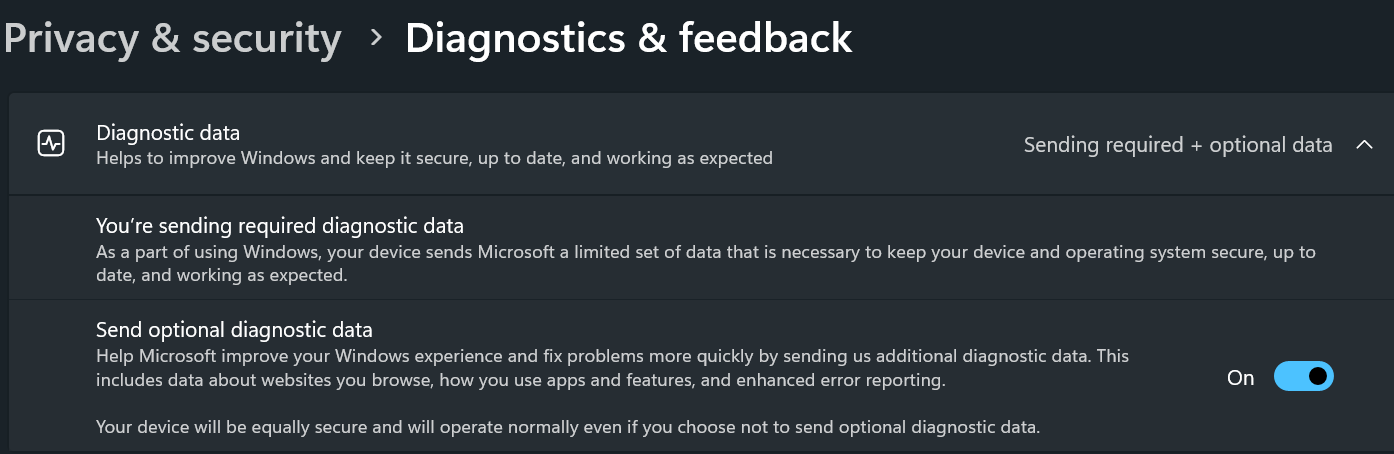
You must share diagnostic data with Microsoft for the insider program to work properly.

Once set, you can go to Windows update and enroll for insider program. Setting up the insider account could get stuck, just wait for few minutes and try again. It should be fixed. As I was only interested about #24H2, I’ve opted for unenrollment when the update is generally available for everyone.

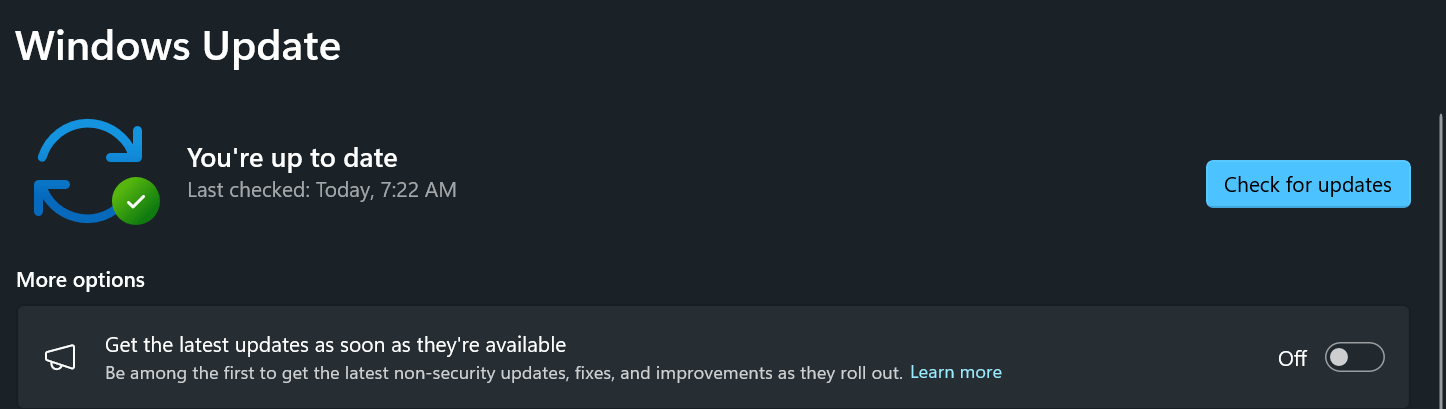
Well, setting up and restarting and checking for new updates may not show you the #24H2 update yet, you need to enable one more setting. You need to turn on “Get the latest updates as soon as they’re available” option. Do another round of check for updates and #24H2 will be definitely offered to you. Happy upgrading.

If you are a seasoned Windows OS user, every update opens room for more bugs & release previews WILL not be anything different. If you don’t have the luxury to reset if required, wait for the final version of the update is available. That could save you some frustrations.

Internal error [ph2exp:case]

We’re using Oracle EBS release 12 for our business and we are stuck with Oracle Developer 10g as we have many inhouse developed applications, especially for Order Management requiring frequent development and maintenance.

Once in a while, after Windows updates, Oracle’s obsolete development suite starts acting weird (Windows wouldn’t maximize, sporadic internal errors…) & ironically, restarting fixes most of them.

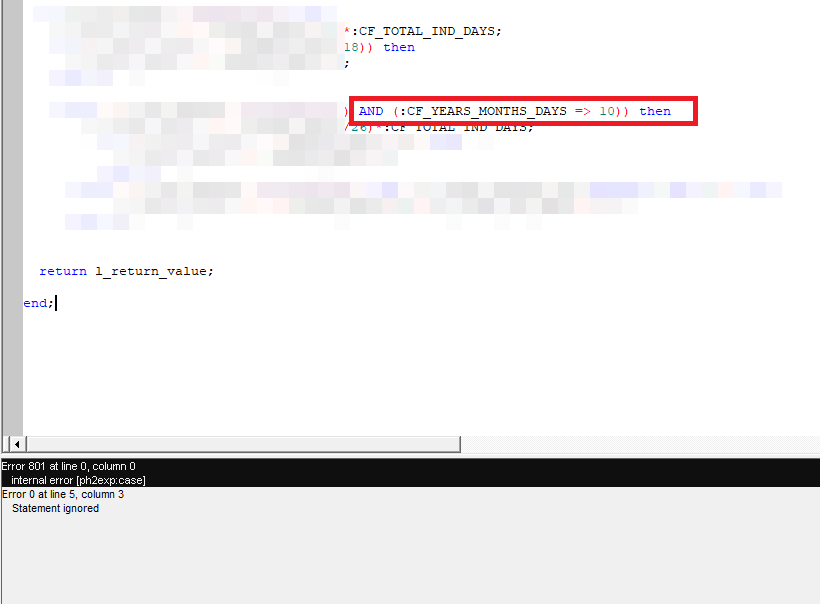
Recently, I had some issues with Report developer 10g. The error message was “internal error [ph2exp:case]”. As an “experienced” PL/SQL developer, I was sure that my code was great and these errors WERE another set of issues produced by Oracle’s obsolete stack. Well, I was wrong.

The error was due to constructing the operators wrongly. Instead of “Greater than or equal to” I set up “Equal to or greater than” causing the compiler to raise the error. Oracle document 1093084.1 should give you more information.

Hence, if you ever run into this compiler error, please don’t blame Oracle. Just correct the positions of the operators.

Windows reset NTFS permissions

Okay, consider this as a personal journal entry for quick access ;). I don’t remember the exact source, regardless I copied and kept it for years and hopefully it would help you also.

If one of your experiments goes truly bad, messing the NTFS permissions, use the following command(s) to reset them. Open an elevated command prompt and

To reset permissions for a file: icacls "full path to your file" /reset.
To reset permissions for a folder: icacls "full path to the folder" /reset.
To reset permissions for a folder, its files, and subfolders: icacls "full path to the folder" /reset /t /c /l.

Cheers.

Oracle APEX Summit sample application

Recently, after setting up APEX for the nth time, I wanted to give the stack a try. I’ve been developing around Oracle technologies for more than 20 years and I felt it was the time. After some serious searches, I came across an Oracle blog that was discussing about migrating from Oracle Forms & APEX, which I was looking for.

[Forms to APEX] Creating a Migration Project (oracle.com)

By the end of the article, author had given a link to the sample application “Summit” that was directly migrated from Oracle Forms. Currently, APEX doesn’t support direct migrations from anymore. Regardless, the example project was truly informative. I suggest you to create a document using the explanations provide with the blog, which could help you with many details later.

As on 28th November 2024, against the feedback, Oracle APEX team has updated the download section with a latest export & it works without any issues once after imported. Hence, majority of the bashing has been removed from this post ;)

Although you can import the application database objects to an existing schema, it is better to be on a schema dedicated for the application so that you don’t have to scavenge through dozens of objects to identify the app specific ones.

CREATE USER SUMMIT IDENTIFIED BY SUMMIT
DEFAULT TABLESPACE EXAMPLE
TEMPORARY TABLESPACE TEMP
/
GRANT DBA TO SUMMIT
/
GRANT CONNECT TO SUMMIT
/
GRANT RESOURCE TO SUMMIT
/

Newly created “Summit” schema prior the demo application installation.

Once you created the schema, add it to your APEX workspace and import the APEX sample application that you downloaded. It is a pretty straight forward thing and when the installer asks you to install the additional components, proceed.

Do not forget to change the Parsing Schema in case if your workspace is associated with multiple schemas.

Proceed with the installation. It takes just few seconds and must install the supporting Objects (that are tables, procedures, sequences, functions etc).

Run the application and you should be welcomed with a beautiful dashboard!

javax.net.ssl.SSLHandshakeException: sun.security.validator.ValidatorException

We’ve our own Microsoft Exchange server & recently we changed the multi-domain SSL certificate with one Wildcard certificate. We’ve got the new certificate against the same FQDN that was used with the MDC and things were working, until we had to restart our servers after a power cycle.

Exchange server stopped sending receiving and sending emails & we had to setup the Exchange Back End server with new Wildcard certificate, that we never did earlier whenever the MDC was renewed. Well, much more were in the pipeline.

After a regular maintenance restart, we noticed our Oracle Application R12 instance completely stopped sending Workflow mailer notifications that allowed our users to respond to work notifications through emails. The strangest thing was, we were able to send email from the EBS host console, using shell scripts…however reconfiguring the notification mailer always failed, complaining about wrong username or password. Checking the smtp log file shown us the error message:

%% Invalidated:  [Session-1, SSL_NULL_WITH_NULL_NULL]
%% Invalidated:  [Session-2, TLS_ECDHE_RSA_WITH_AES_256_CBC_SHA384]
Thread-10, SEND TLSv1.2 ALERT:  fatal, description = certificate_unknown
Thread-10, WRITE: TLSv1.2 Alert, length = 2
[Raw write]: length = 7
0000: 15 03 03 00 02 02 2E                               .......
Thread-10, called closeSocket()
Thread-10, handling exception: javax.net.ssl.SSLHandshakeException: sun.security.validator.ValidatorException: PKIX path validation failed: java.security.cert.CertPathValidatorException: validity check failed

We “knew” that there was nothing wrong with the certificate as it worked everywhere else. On 4th day, we decided to check the Exchange environment.

We found both expired (We moved to SSL 10+ years back and never removed expired certificates from the stores) & new certificates and yet everything looked as they should (Exchange was working!). After some quick discussions, decided to remove the expired certificate from Exchange to give it a try. That was it. Technically, it looks like both the expired and new certificates were matching FQDN and java mailer was referring the expired certificate as it was the first one in the list.