Windows reset NTFS permissions

Okay, consider this as a personal journal entry for quick access ;). I don’t remember the exact source, regardless I copied and kept it for years and hopefully it would help you also.

If one of your experiments goes truly bad, messing the NTFS permissions, use the following command(s) to reset them. Open an elevated command prompt and

To reset permissions for a file: icacls "full path to your file" /reset.
To reset permissions for a folder: icacls "full path to the folder" /reset.
To reset permissions for a folder, its files, and subfolders: icacls "full path to the folder" /reset /t /c /l.

Cheers.

Oracle APEX Summit sample application

Recently, after setting up APEX for the nth time, I wanted to give the stack a try. I’ve been developing around Oracle technologies for more than 20 years and I felt it was the time. After some serious searches, I came across an Oracle blog that was discussing about migrating from Oracle Forms & APEX, which I was looking for.

[Forms to APEX] Creating a Migration Project (oracle.com)

By the end of the article, author had given a link to the sample application “Summit” that was directly migrated from Oracle Forms. Currently, APEX doesn’t support direct migrations from anymore. Regardless, the example project was truly informative. I suggest you to create a document using the explanations provide with the blog, which could help you with many details later.

As on 28th November 2024, against the feedback, Oracle APEX team has updated the download section with a latest export & it works without any issues once after imported. Hence, majority of the bashing has been removed from this post ;)

Although you can import the application database objects to an existing schema, it is better to be on a schema dedicated for the application so that you don’t have to scavenge through dozens of objects to identify the app specific ones.

CREATE USER SUMMIT IDENTIFIED BY SUMMIT
DEFAULT TABLESPACE EXAMPLE
TEMPORARY TABLESPACE TEMP
/
GRANT DBA TO SUMMIT
/
GRANT CONNECT TO SUMMIT
/
GRANT RESOURCE TO SUMMIT
/

Newly created “Summit” schema prior the demo application installation.

Once you created the schema, add it to your APEX workspace and import the APEX sample application that you downloaded. It is a pretty straight forward thing and when the installer asks you to install the additional components, proceed.

Do not forget to change the Parsing Schema in case if your workspace is associated with multiple schemas.

Proceed with the installation. It takes just few seconds and must install the supporting Objects (that are tables, procedures, sequences, functions etc).

Run the application and you should be welcomed with a beautiful dashboard!

javax.net.ssl.SSLHandshakeException: sun.security.validator.ValidatorException

We’ve our own Microsoft Exchange server & recently we changed the multi-domain SSL certificate with one Wildcard certificate. We’ve got the new certificate against the same FQDN that was used with the MDC and things were working, until we had to restart our servers after a power cycle.

Exchange server stopped sending receiving and sending emails & we had to setup the Exchange Back End server with new Wildcard certificate, that we never did earlier whenever the MDC was renewed. Well, much more were in the pipeline.

After a regular maintenance restart, we noticed our Oracle Application R12 instance completely stopped sending Workflow mailer notifications that allowed our users to respond to work notifications through emails. The strangest thing was, we were able to send email from the EBS host console, using shell scripts…however reconfiguring the notification mailer always failed, complaining about wrong username or password. Checking the smtp log file shown us the error message:

%% Invalidated:  [Session-1, SSL_NULL_WITH_NULL_NULL]
%% Invalidated:  [Session-2, TLS_ECDHE_RSA_WITH_AES_256_CBC_SHA384]
Thread-10, SEND TLSv1.2 ALERT:  fatal, description = certificate_unknown
Thread-10, WRITE: TLSv1.2 Alert, length = 2
[Raw write]: length = 7
0000: 15 03 03 00 02 02 2E                               .......
Thread-10, called closeSocket()
Thread-10, handling exception: javax.net.ssl.SSLHandshakeException: sun.security.validator.ValidatorException: PKIX path validation failed: java.security.cert.CertPathValidatorException: validity check failed

We “knew” that there was nothing wrong with the certificate as it worked everywhere else. On 4th day, we decided to check the Exchange environment.

We found both expired (We moved to SSL 10+ years back and never removed expired certificates from the stores) & new certificates and yet everything looked as they should (Exchange was working!). After some quick discussions, decided to remove the expired certificate from Exchange to give it a try. That was it. Technically, it looks like both the expired and new certificates were matching FQDN and java mailer was referring the expired certificate as it was the first one in the list.

ORA-20987: APEX – Schema is restricted – Contact your application administrator

I reinstalled Oracle database 19c & lost the APEX setup I had. I installed and configured APEX with ORDS and was online quickly and wanted to add the additional sample schemas, as this time I “was” “SERIOUS” about learning APEX ;)

After setting up the additional sample schemas, I noticed that the new schemas were not available to add to APEX workspaces! Sample schemas those were installed as part of the DBCA were the only ones available for APEX.

Soon, I realized that it was NOT a very stupid silly situation. There were hardly many articles explaining how to overcome this issue and the closest ones were not on Oracle forums as usual, instead on stackoverflow!

Anyway, I stumbled upon a question about APEX 4 and there was one answer dealing with APEX 5, that is still effective on APEX 23.2. Let’s quickly have a look at it.

Find the schemas that are restricted for APEX. Connect as SYS or SYSTEM

ALTER SESSION SET CONTAINER="ORCL"; --your PDB on which the APEX is installed your sample schemas reside
/
SELECT * FROM APEX_230200.wwv_flow_restricted_schemas;
/

The above should provide you a list of schemas that are restricted. “OE” and other sample schemas that you have installed once after setting up the database must be listed in this listing. Now proceed to derestrict the schema for APEX. We will use the sample schema “OE” for this exercise.

EXEC APEX_INSTANCE_ADMIN.UNRESTRICT_SCHEMA('OE');
/

EXEC APEX_INSTANCE_ADMIN.ADD_SCHEMA('YOUR_WORKSPACE_NAME', 'OE');
/
-- Don't forget to commit!
commit;
/

That’s all. Once logged in, APEX will show the schema “OE” or all other schemas you have added following the above method under the targeted workspace.

DBT-50000 Unable to check for available memory

You may run into this error while trying to setup a new database using Oracle 19c DBCA immediately after “software only” installation. The version of software that is available to download from Oracle repository is age old (19.3.0.0 for Windows) & if you are very attentive, notice that the installation process clearly warns about uncertified OS, while the software being installed on latest versions of Windows 11 / or other.

While this doesn’t have anything to do with the “Disabled Admin Shares”, identified as a bug & has a solution.

Open an elevated command prompt, switch to Oracle Home bin folder. and execute the DBCA

dbca.bat -J-Doracle.assistants.dbca.validate.ConfigurationParams=false

You should able to configure the new database without any additional issues this time.

ORA-12518, TNS:listener could not hand off client connection

I recently had to reinstall the 19c database and chose not to configure a new listener since I already had an 11g listener set up. Everything was fine until I attempted to set up APEX again. The APEX installation went well, but when I tried to set up ORDS, I began encountering the following errors..

Connecting to database user: system url: jdbc:oracle:thin:@//localhost:1521/orcl
Failed to connect to user: system url: jdbc:oracle:thin:@//localhost:1521/orcl
Listener refused the connection with the following error:
ORA-12518, TNS:listener could not hand off client connection
  (CONNECTION_ID=GUdr3KiAROGLcH8vxlpaMg==)
java.sql.SQLException: Listener refused the connection with the following error:
ORA-12518, TNS:listener could not hand off client connection
  (CONNECTION_ID=GUdr3KiAROGLcH8vxlpaMg==)

The situation seemed dire. Oracle support articles primarily addressed process deficiencies and the reconfiguration of 11g listeners for 19c database services, but these methods were ineffective for me this time. After some research, I stumbled upon a post detailing Oracle Net Services versions 9.2.0.5 to 10.2.0.1, notorious for ORA-12518 errors.

Consequently, I eliminated all 19c references from the 11g listener services and established a new 19c listener service. That turned out to be the solution. It appears that the jdbc thin clients utilized by the latest ORDS versions are incompatible with 11g net services, according to my tests. If this resolves your issue, please inform us in the comments!

(This post was rewritten using #Microsoft #Copilot preview)

Install & use Windows 11 without Microsoft account

A day back Elon Musk has complained about Microsoft being petty about forcing users to use Microsoft accounts to setup a new PC. Well, “you really don’t have to” is the shortest answer. So let us see how to setup Windows11 without Microsoft account.

Once the installation completed, Windows will start setting up the PC, collecting information about the geographical location, keyboard and layout etc. Once after renaming your PC, the box will restart.

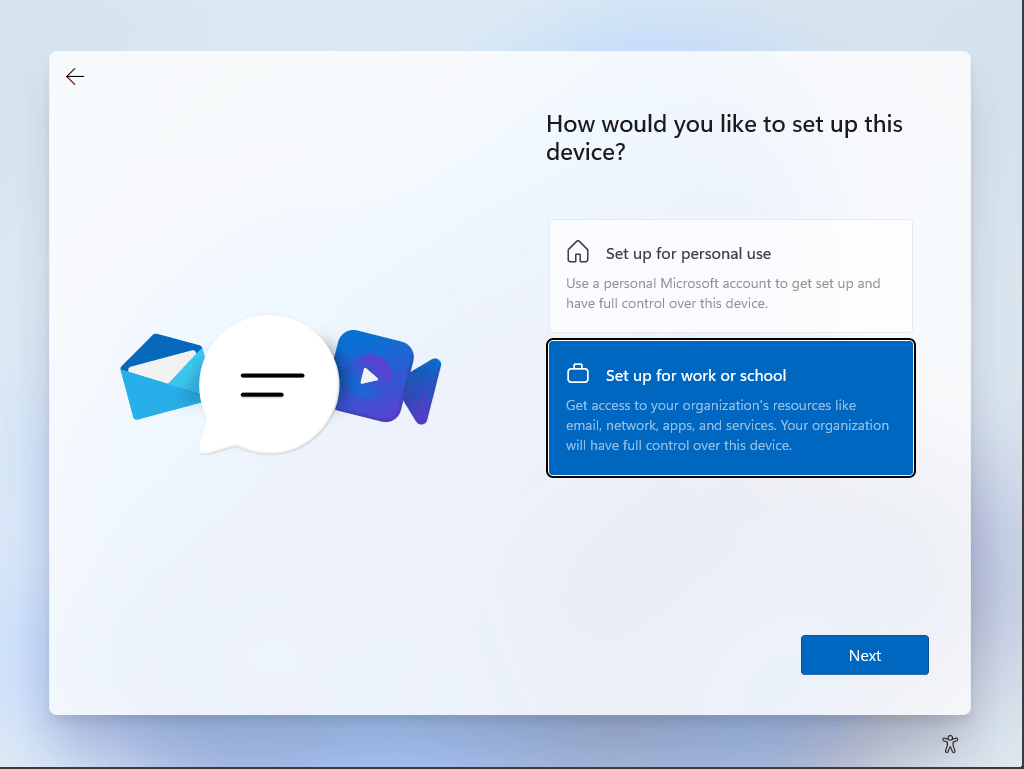
Now you can setup the PC without a Microsoft account by following the instructions below. Select “Set up for work or school” from the given options.

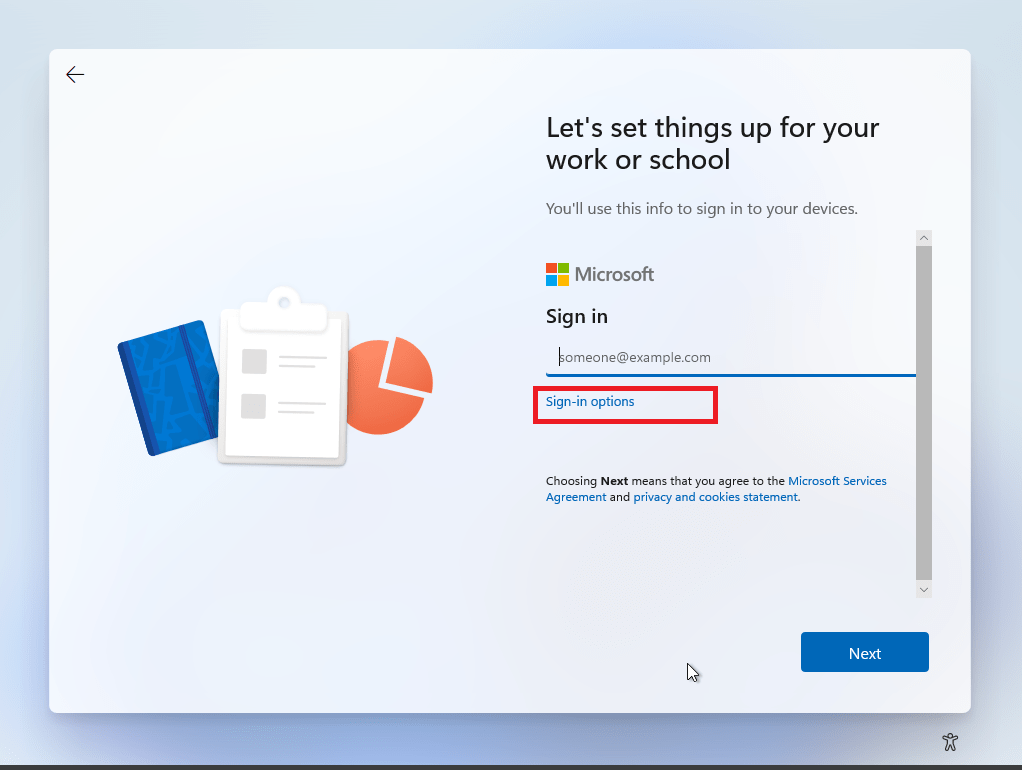
Click “Sign-in option” that Microsoft tries to make look less significant & that’s what let you create a local account instead of using Microsoft account.

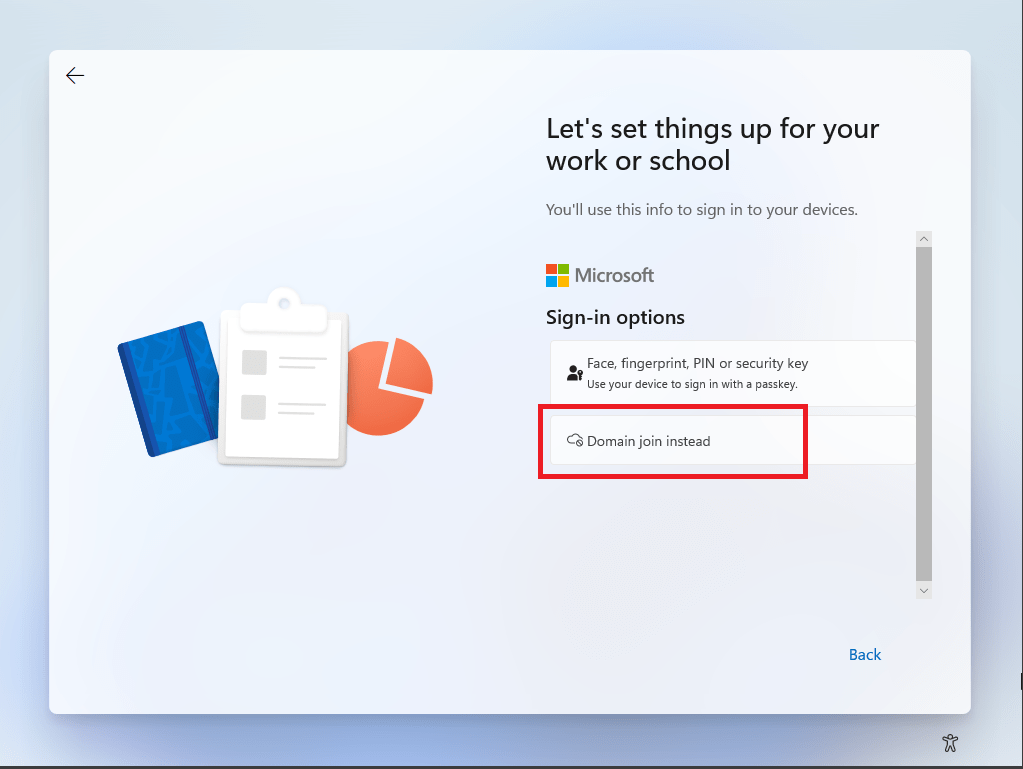
Select “Domain join instead”

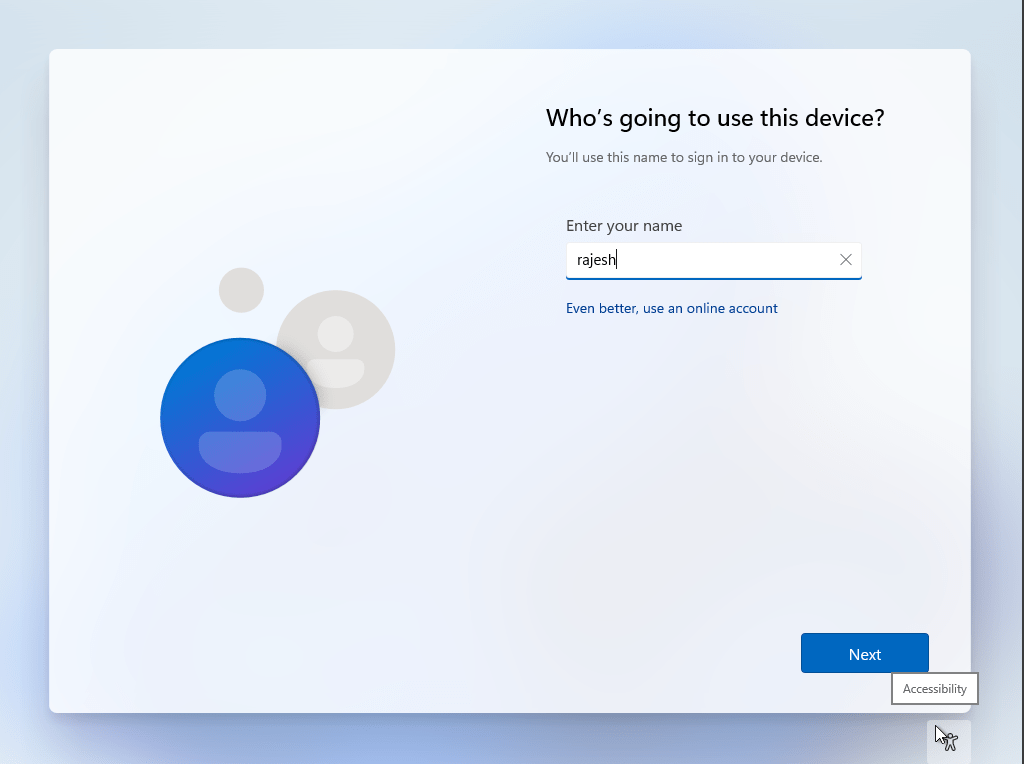
Enter your username

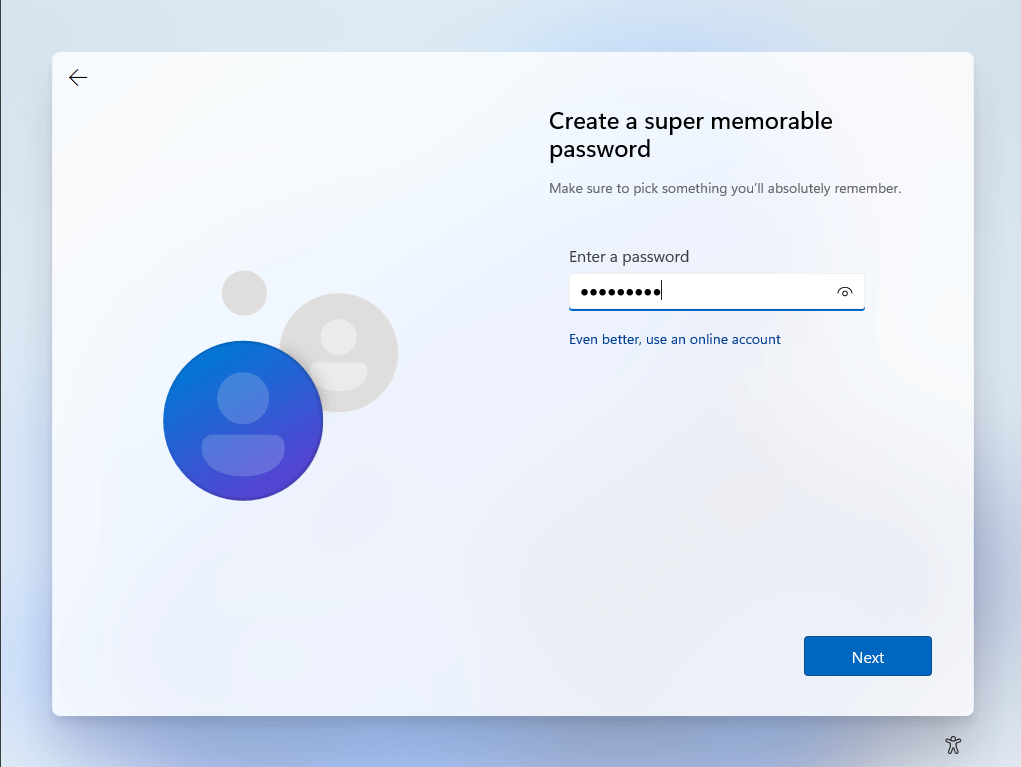
Setup your password

Confirm the password in the next screen.

Setup 3 different security questions and answers for situations when you forget your password in next three screens.

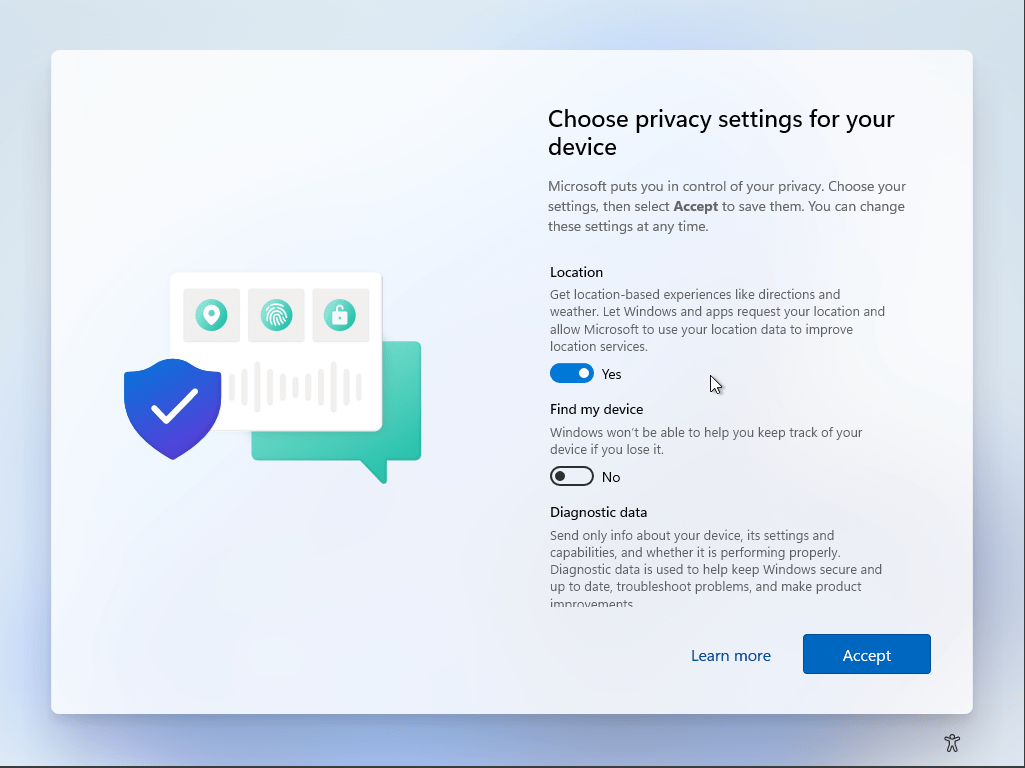
Basically you don’t have to agree to any of the options proved in the “Choose privacy settings for your device” screen. Toggle all of them to No if you prefer. I keep location yes (usually)

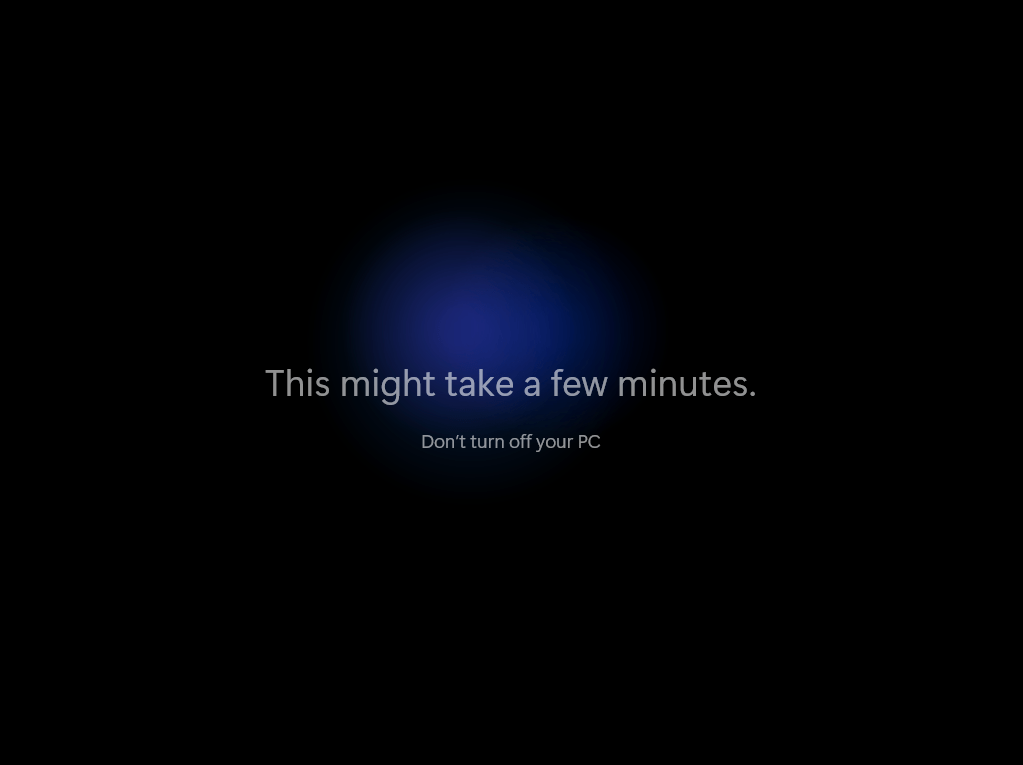
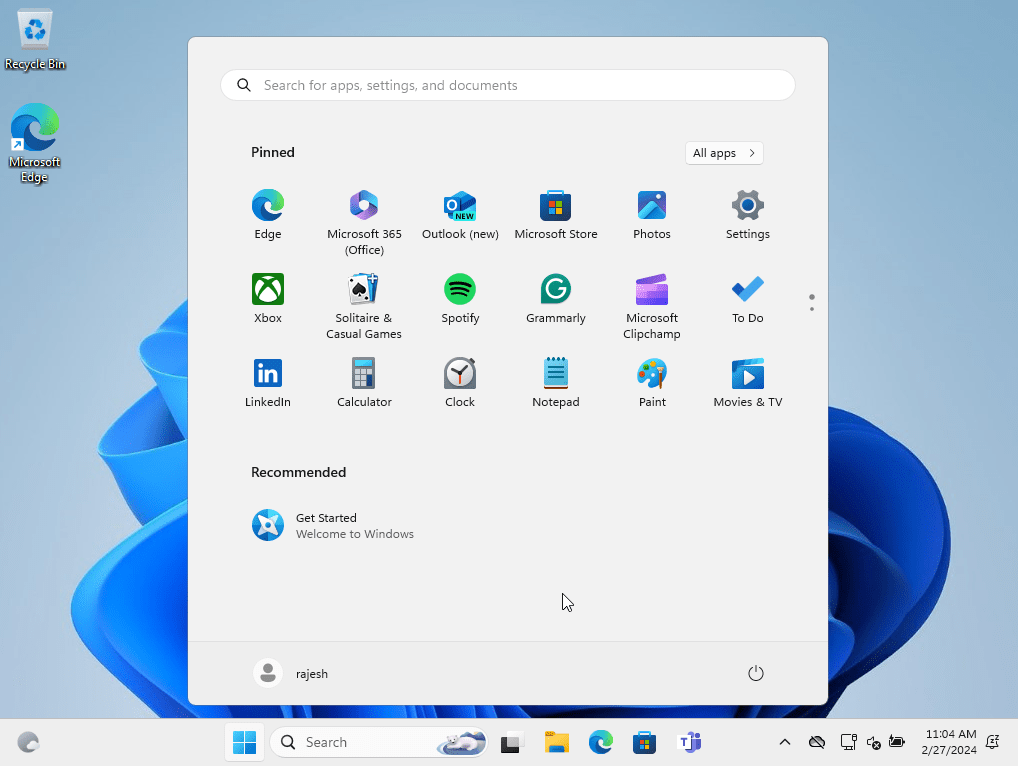
That’s all folks. Your PC will take few minutes to setup & soon you should using your PC without a Microsoft account.

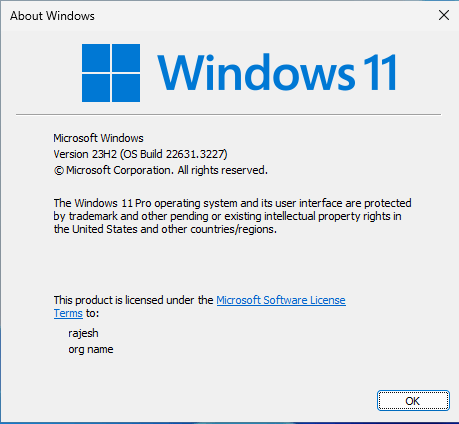
The above instructions were tested on Windows 11 23H2 (OS Build 22631.3227)

Yes, I am tagging #ElonMusk

Oracle Applications (EBS R12) Site level Tax Profile API

No, there are no documented APIs are available for this requirement, or that is what claimed by Oracle community MOSC support on different discussions. So what happens when the country where you live and work decides to implement Tax (example, Middle East countries) and you were using Oracle applications(EBS) over a decade already without Tax setup? Are you going to open up each and every other customer/supplier account and setup the Tax profile? We are using Multi-organization structure and we have 8 companies under the same business group. We’ve 13,000 unique parties in our database and most of them are linked to all these organizations! It didn’t look good for us, I am sure it doesn’t look good for anyone else either!

Then I came across a poorly constructed sample for an API “zx_registrations_pkg.insert_row” that is “not well documented” by Oracle. This means, Oracle doesn’t categorize this API as public & they will not support the customer if something goes wrong while using this API. Hence, make sure that you are going to use an API that could turn stuffs into a nightmare.

Let’s see how to use this API now. Some technical details for better understanding where to look for some mandatory elements. Every time a new site created for customer or supplier, the TAX profile table (ZX_PARTY_TAX_PROFILE) is inserted with a new row, bearing the PARTY_ID column populated with newly created Site’s id (PARTY_SITE_ID) value. Given example below, I am setting up Tax profiles for customers and suppliers that were created for a new organization bearing organization id “285”

For the purpose, I created a new view comprise of both customer and supplier sites details. Please judge me because I am using “A” and “B” for aliases ;)

CREATE VIEW XXKCC_VAT_TABLE_V AS SELECT
hcas.org_id, ac.customer_id party_id, ac.customer_number party_number, ac.customer_name party_name,ac.customer_type party_type, hcas.party_site_id, 'CUSTOMER' as party_classification
FROM
hz_cust_acct_sites_all hcas
inner join ar_customers ac on ac.customer_id= hcas.cust_account_id
where
1=1
and hcas.status='A'
AND ac.status ='A'
AND NVL(ac.customer_type,'R') ='R'--Account type is empty for maximum bahrain customers
AND hcas.org_id=285
UNION ALL
select b.org_id, b.vendor_id party_id, A.segment1 party_number, a.vendor_name,NULL party_type, b.party_site_id, 'SUPPLIER' as party_classification
from AP_SUPPLIERS A
inner join AP_SUPPLIER_SITES_ALL B ON B.VENDOR_ID = A.VENDOR_ID
where B.ORG_ID = 285
/

I am using two different staging tables with VAT/TRN numbers & aliased as “B” in the following PL/SQL blocks. I executed the same script twice, once for customer and other time for supplier. Please note, I have hard coded many parameters, including TAX_AUTHORITY_ID. Make sure that you change such information to suit your environment. Although, we applied this solution to PRODUCTION, I would recommend everyone to practice caution, make backups.

DECLARE
CURSOR CUSTOMER_RECORD IS
SELECT B.VAT_TRN_NUMBER vat_registration_num,'VAT' REGISTRATION_TYPE_CODE, 'UP' ROUNDING_RULE_CODE,'TAX BH JURISDICTION' TAX_JURISDICTION_CODE,
'REGISTERED' REGISTRATION_STATUS_CODE, 'TAX BAHRAIN' TAX, 'TAX REGIME BAHRAIN' TAX_REGIME_CODE,5379228 TAX_AUTHORITY_ID,'N' SELF_ASSESS_FLAG,'IMPLICIT' REGISTRATION_SOURCE_CODE,
'N' INCLUSIVE_TAX_FLAG,'USER_DEFINED' RECORD_TYPE_CODE,
A.* FROM XXKCC_VAT_TABLE_V A
INNER JOIN XX_BAH_CUSTOMER_T B ON B.ERP_CUSTOMER_ID = A.PARTY_ID
WHERE
1=1
AND A.PARTY_CLASSIFICATION='CUSTOMER'
AND B.VAT_TRN_NUMBER IS NOT NULL;
--AND A.PARTY_SITE_ID=3702712;
g_return_status varchar2(1);
l_party_tax_profile_id NUMBER;
BEGIN
for i in CUSTOMER_RECORD loop
BEGIN
Select PARTY_TAX_PROFILE_ID into l_party_tax_profile_id from
ZX_PARTY_TAX_PROFILE
where party_id = i.party_site_id;
EXCEPTION
when no_data_found then
l_party_tax_profile_id:=NULL;
END;
IF l_party_tax_profile_id IS NOT NULL THEN
zx_registrations_pkg.insert_row(
p_request_id => NULL
,p_attribute1 => NULL
,p_attribute2 => NULL
,p_attribute3 => NULL
,p_attribute4 => NULL
,p_attribute5 => NULL
,p_attribute6 => NULL
,p_rounding_rule_code => i.ROUNDING_RULE_CODE
,p_validation_rule => NULL
,p_tax_jurisdiction_code => i.TAX_JURISDICTION_CODE
,p_self_assess_flag => i.SELF_ASSESS_FLAG
,p_registration_status_code => i.REGISTRATION_STATUS_CODE
,p_registration_source_code => i.REGISTRATION_SOURCE_CODE
,p_registration_reason_code => NULL
,p_tax => i.TAX
,p_tax_regime_code => i.TAX_REGIME_CODE
,p_inclusive_tax_flag => i.INCLUSIVE_TAX_FLAG
,p_effective_from => SYSDATE
,p_effective_to => NULL
,p_rep_party_tax_name => NULL
,p_default_registration_flag => NULL
,p_bank_account_num => NULL
,p_record_type_code => i.RECORD_TYPE_CODE
,p_legal_location_id => NULL
,p_tax_authority_id => i.TAX_AUTHORITY_ID
,p_rep_tax_authority_id => NULL
,p_coll_tax_authority_id => NULL
,p_registration_type_code => i.REGISTRATION_TYPE_CODE
,p_registration_number => i.vat_registration_num
,p_party_tax_profile_id => l_party_tax_profile_id
,p_legal_registration_id => NULL
,p_bank_id => NULL
,p_bank_branch_id => NULL
,p_account_site_id => NULL
,p_attribute14 => NULL
,p_attribute15 => NULL
,p_attribute_category => NULL
,p_program_login_id => NULL
,p_account_id => NULL
,p_tax_classification_code => NULL
,p_attribute7 => NULL
,p_attribute8 => NULL
,p_attribute9 => NULL
,p_attribute10 => NULL
,p_attribute11 => NULL
,p_attribute12 => NULL
,p_attribute13 => NULL
,x_return_status => g_return_status
);
END IF;
DBMS_OUTPUT.PUT_LINE(i.PARTY_NUMBER||', '||i.party_name||' Process status : '||g_return_status);
--"S" for success, any other means trouble ;)
END loop;
--COMMIT;
END;
/

That’s all folks. Have questions? Use the comments section to let me know.

Purger | File shredder project for Windows

One of the major benefits of getting exposed to Linux was coming across some fabulous tools for managing and manipulating files. Let it be a simple utility that could replace strings within hundreds of files within a path or find and delete files matching patterns, age etcetera was out of the box available on most of the Linux distributions. Windows Operating System lacks such tools out of the box & next possibility is to write own scripts, which is not very possible for many users.

“Purger” is a file shredding project that I devised few years ago, while we were still hosting our Oracle 11g R2 version on Windows for multiple custom business applications, that generated multiple log files. Today I am sharing a working version of the software with you!

Download Purger

This software can, recursively scan and list files that match the age specified by the user & delete them from the file system. I’ve a minimalistic help file (PDF) under the help section of the software, please make sure that you will read it before using the software.

I’ve tried my level best to ensure that the software doesn’t give the user surprises. Regardless, observe caution when you are using the same as the software is expected to “delete” or “purge” files from your system permanently. If you are not using the “Send to Recyclebin” option, you might end up using tools like Recuva to recover the files deleted!

Do let me know if you have comments.

Microsoft Exchange | empty ECP OWA pages

Recently we switched to wildcard SSL certificate & our on premise exchange services were configured to use the new certificate from ECP. Then, we upgraded our Antivirus software on the Exchange server and needed a reboot.

Once after the physical reboot, Exchange services completely looked toasted. Although the users were able to logon to OWA, after authentication it was just blank, empty pages. We are using Microsoft Exchange 2013 and a quick search landed us on this page.

As per instructions provided by Microsoft, we found out that the IIS “Exchange Back End” site didn’t have the SSL certificate assigned. Once after assigning the new wildcard certificate, we restarted IIS and all services came online immediately after that.