Oracle Applications R12 | error while loading shared libraries: libig.so.0…


applprod@erp-prodbak.my.home:/u01/applprod/PROD/apps/apps_st/appl/au/12.0.0/forms/US>frmcmp_batch module=$AU_TOP/forms/US/XXITMDTLS.fmb userid=apps/apps output_file=$ONT_TOP/forms/US/XXITMDTLS.fmx Module_Type=FORM compile_all=Special
frmcmp_batch: error while loading shared libraries: libig.so.0: cannot open shared object file: No such file or directory
applprod@erp-prodbak.my.home:/u01/applprod/PROD/apps/apps_st/appl/au/12.0.0/forms/US>

Recently I cloned our Production instance to check the feasibility of OEL 6.7 & as usual securely copied most of the bash profile for the Oracle and Application manager users from the production server.

I came across the “cannot open shared object file: No such file or directory” error while trying to compile an old form module & hadn’t have a clue for how to deal with this error, that happened to me first time in last 8 years with Oracle applications.

I crosschecked the folder permissions against production instance and everything was fine. All I could remember which could have gone wrong was narrowed down to the bash profile for the application user and after validating I realized that I was sourcing a wrong environment file!

Instead of sourcing the “/apps/apps_st/appl/APPSPRODBAK_hostname.env” file, I was sourcing “/apps/apps_st/appl/PRODBAK_hostname.env”. I realized it while trying to echo the $ORACLE_HOME variable as application manager user.

So, if you come across “error while loading shared libraries” error while trying to compile, before start dismantling your instance, try to see whether you have sourced the environment variables correctly.

regards,

rajesh

Java runtime 1.8.0.91 | Oracle EBS R12 (12.0.6)

Hi guys

You could run into a situation after the latest Java client runtime update, your R12 instance failing to load forms, complaining about the lower version of JRE. This is mainly due to the fact that, if your Windows OS is 64Bit, the latest java runtime update installs both 64Bit & 32Bit and most of the R12 environments run against 32Bit JRE.

Internet explorer (the only one browser that runs the JRE properly for EBS R12) loads the 64Bit java runtime by default from a 64Bit Windows OS & eventually the forms will fail to load.

At present the only possible solution to address this situation is to uninstall the 64bit version of java runtime, using “Programs and features” or “Add remove programs” based on the version of Windows you are using.

Hope this helps few out there :)

regards,

rajesh


R12 | Clone response file | adcfgclone automation

Hi guys

If you are familiar with R12 cloning, the entire process requires loads of input from a DBA before the cloning really starts kicking in. Now, there could be hundreds of reasons for the cloning process to fail and keeping on entering the responses for the cloning prompts are NOT at all fun, minimum for me.

So I started searching for “R12 clone response file” & google landed me in this post

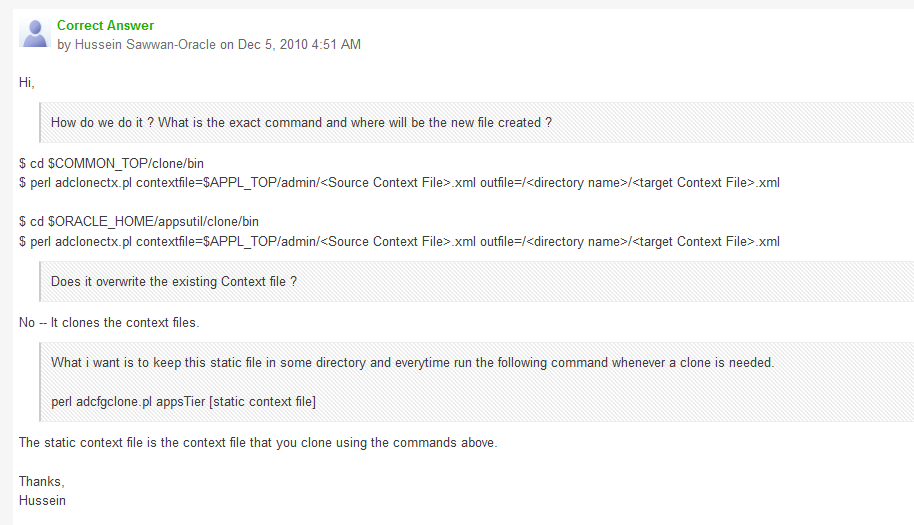
Excellent way Hussein Sawwan-Oracle has explained how to create the response files for both db, apps tier.

clone

First of all, context file to response file creation has a validation flag, which confirms the responses provided are valid throughout the response collection. This validate has a downside with the port pool selection. You will receive a port is not free error while the Oracle application is online, for which a system reboot is most recommended (rather than selecting “No” for the validation process”) after graceful shutdown of both application and database tiers.

I’m using .bash_profile files to source the environment for both my Oracle (oraprod) and Application Manager (applprod) accounts, hence I was able to shorten the efforts like following

As Oracle user (oraprod)

# cd $ORACLE_HOME/appsutil/clone/bin
# perl adclonectx.pl contextfile=$CONTEXT_FILE outfile=/u02/db.xml

Provided the responses and the db.xml was successfully created under /u02 and the context file creation log was created under /u02/log folder.

Please make sure you do “echo $CONTEXT_FILE” to check whether you $CONTEXT_FILE returns a meaningful file name!

As Application Manager user (applprod)

# cd $COMMON_TOP/clone/bin
# perl adclonectx.pl contextfile=$CONTEXT_FILE outfile=/u02/appl.xml

Now you should able to run the cloning processes using the newly cloned context files, for example

# perl adcfgclone.pl dbTier /u02/db.xml
# perl adcfgclone.pl appsTier /u02/appl.xml

That’s all folks, it works like a charm & you are NOT anymore typing in whole those lengthy paths and other variables :)

regards,

rajesh

RC-50004, AC-00005: No write permissions for creating the Context file – /tmp/temp.xml

Hi guys

Linux file/folder permissions could be very confusing for a beginner, minimum for me! After these many years of interacting with Linux I still get confused deciding what rights should be given to users or groups on certain folders :)

I came across a situation where the application tier cloning was continuously failing with the title error

RC-50004, AC-00005: No write permissions for creating the Context file – /tmp/temp.xml ?

I checked the for the /tmp folder permissions and realized the application user (applmgr/appltest) had proper right permissions on /tmp folder, yet the adcfgclone will not proceed after

[code language=”text”]

Do you want to preserve the Display [erp-prod:0.0] (y/n) ? : n

Target System Display [erp-prodbak:0.0] :
RC-50004: Error occurred in CloneContext:
AC-00005: No write permissions for creating the Context file – /tmp/temp.xml
Raised by oracle.apps.ad.context.AppsContext
Check Clone Context logfile /u01/applprod/PROD/apps/apps_st/comn/clone/bin/CloneContext_1208121418.log for details.

[/code]

After few attempts I came against another blog, that was explaining the situation in a different way. http://newgendba.blogspot.com/2009/08/how-to-quick-solve-this-post-clone.html

Blogger has suggested to check whether temp.xml created by another user exist in the /tmp folder, which was the actual reason in my case. I found temp.xml file created by “root” and deleted the same and cloning process just went all the way fine.


Hope this info helps few of those once in a bluemoon DBAs out there :)


regards,

rajesh


Oracle R12 Cloning | dbTier "ouicli.pl INSTE8_APPLY 1"

Hi guys

There could be thousands (exaggerated) reasons why a Oracle cloning process could go all bad. I’m not an application DBA, however, have enough experience with the architecture, technology as I interact with it everyday as a part of my job.

Few months back, I started doing something what a DBA should do, cloning. My prior attempts were mostly at home, using virtual machines and test instances and they were NOT as mission critical as what we do at work.

So, after the storage device was revamped with new partition structures I was asked to do a cloning for the production instance. Let me explain how the application was deployed prior the storage restructuring

  1. We had the database tier on mount point /u05
  2. Application on /u06 mount point

So, I recreated the same mount points and started the cloning process for dbTier and the process got terminated at 2% and the log files shown me an error that I was not familiar with.

“ouicli.pl INSTE8_APPLY 1”

Google searches fetched me hundreds of results for “ouicli.pl INSTE8_APPLY”, however the error codes were mostly for 255 or “-1” and apparently I didn’t have any clue what was going wrong.

So I unzipped the tar ball for database tier once again, and the cloning process got aborted at 2%,  and I was getting nervous as I was expected to make the instance online by early morning 7AM

Most of the reference materials were explaining about non-existent Oracle inventory locations, and I confirmed that it was not the case from my part (Obviously, I was overlooking at this constrain itself!)

After half a dozen times tasting failure, finally I tried to see what was written inside the oraInst.loc file

oraprod@erp-prod:/home/oraprod>cd $ORACLE_HOME
oraprod@erp-prod:/u05/oraprod/PROD/db/tech_st/10.2.0>cat oraInst.loc
inventory_loc=/u01/oraprod/PROD/db/tech_st/10.2.0/admin/oui/PROD_erp-prod/oraInventory

and I realized that inventory location was wrongly pointing towards an non-existing mount point and physical location!

I modified the oraInst.loc content with the correct mount point

inventory_loc=/u05/oraprod/PROD/db/tech_st/10.2.0/admin/oui/PROD_erp-prod/oraInventory

and the cloning process went ahead without giving another errors.

We had an instance that was running from last 6 years, which was only once cloned from a cold backup during the storage device change, and somehow the inventory location remain unchanged with the repositories.

I hope this finding could help few newbies like me out there

regards,

rajesh

Oracle Application TCA | Supplier API | Sample

Hi guys

I’m posting a sample script for creating suppliers, sites and contacts. I’ve referred multiple sample scripts and believe the below code block is a fine tuned one, however standing refinement at all levels. Please note, I haven’t added the API block for creating banks for suppliers. Will, and update the scripts as I make advancements.

[code language=”sql” gutter=”false”]
/* Formatted on 10/5/2015 11:12:16 AM (QP5 v5.163.1008.3004) */
SET DEFINE OFF;
SET SERVEROUTPUT ON;

DECLARE
–For supplier parameters

p_api_version NUMBER;
p_init_msg_list VARCHAR2 (200);
p_commit VARCHAR2 (200);
p_validation_level NUMBER;
x_return_status VARCHAR2 (200);
x_msg_count NUMBER;
x_msg_data VARCHAR2 (200);
p_vendor_rec apps.ap_vendor_pub_pkg.r_vendor_rec_type;
x_vendor_id NUMBER;
x_party_id NUMBER;
V_MSG_INDEX_OUT NUMBER;

–Site parameters

l_vendor_site_rec ap_vendor_pub_pkg.r_vendor_site_rec_type;
lc_return_status VARCHAR2 (10);
ln_msg_count NUMBER;
lc_msg_data VARCHAR2 (1000);
ln_vendor_site_id NUMBER;
ln_party_site_id NUMBER;
ln_location_id NUMBER;

–Contact parameters

p_vendor_contact_rec apps.ap_vendor_pub_pkg.r_vendor_contact_rec_type;
x_vendor_contact_id NUMBER;
x_per_party_id NUMBER;
x_rel_party_id NUMBER;
x_rel_id NUMBER;
x_org_contact_id NUMBER;
x_party_site_id NUMBER;

–General exception

local_exception EXCEPTION;
local_failed_at VARCHAR2 (10);

p_vendor_number VARCHAR2(30) := NULL;

BEGIN
–Please note: This API was tested against Release 12 (12.0.6)
–You are warned against undesired results, if tried against unsupported application releases

–Initialize application
–"Master Data" responsibility details
mo_global.init (‘SQLAP’);
fnd_global.apps_initialize (user_id => 1353,
resp_id => 50997,
resp_appl_id => 200);
fnd_global.set_nls_context (‘AMERICAN’);

mo_global.set_policy_context (‘S’, 101);

p_api_version := 1.0;
p_init_msg_list := FND_API.G_TRUE;
p_commit := FND_API.G_TRUE;
p_validation_level := FND_API.G_VALID_LEVEL_FULL;
x_return_status := NULL;
x_msg_count := NULL;
x_msg_data := NULL;
p_vendor_rec.vendor_name := ‘WINDOWS7BUGS BLOG’;
p_vendor_rec.vendor_type_lookup_code := ‘VENDOR’; –Vendor type supplier
p_vendor_rec.SUMMARY_FLAG := ‘N’;
p_vendor_rec.ENABLED_FLAG := ‘Y’;
— p_vendor_rec.women_owned_flag := ‘N’;
— p_vendor_rec.small_business_flag := ‘Y’;

— Supplier MUST have a global level payment method
— So that individual companies can defer the default payment method while sites are created
— I have tried the following @ site levels, didn’t work until at supplier level assigned. You may post corrections with
— Comments section

p_vendor_rec.ext_payee_rec.Exclusive_Pay_Flag:=’N’;
p_vendor_rec.ext_payee_rec.default_pmt_method := ‘CHECK’;

— if the Payable System setup is set automatic numbering for the suppliers (table ->AP_PRODUCT_SETUP Column -> SUPPLIER_NUMBERING_METHOD = ‘AUTOMATIC’)
— You can get the next number from column NEXT_AUTO_SUPPLIER_NUM
— if you are following manual numbering (Alpha Numeric )
— p_vendor_rec.segment1 :=’865′; –(insert non duplicate number, in case if the supplier numbers are not fetched from a sequence, check your setups)

— We do have an automatic numbering for suppliers, hence the below block is used
— If your setups are not as explained above
— Comment from BEING until p_vendor_rec.segment1 := p_vendor_number;

BEGIN
Select NEXT_AUTO_SUPPLIER_NUM into p_vendor_number from AP_PRODUCT_SETUP
where SUPPLIER_NUMBERING_METHOD= ‘AUTOMATIC’;
EXCEPTION
WHEN NO_DATA_FOUND then
local_failed_at := ‘NUMBER’;
RAISE local_exception;
END;

p_vendor_rec.segment1 := p_vendor_number;

x_vendor_id := NULL;
x_party_id := NULL;
apps.ap_vendor_pub_pkg.create_vendor (p_api_version,
p_init_msg_list,
p_commit,
p_validation_level,
x_return_status,
x_msg_count,
x_msg_data,
p_vendor_rec,
x_vendor_id,
x_party_id);
DBMS_OUTPUT.put_line (‘X_RETURN_STATUS = ‘ || x_return_status);
DBMS_OUTPUT.put_line (‘X_MSG_COUNT = ‘ || TO_CHAR (x_msg_count));
DBMS_OUTPUT.put_line (‘X_MSG_DATA = ‘ || x_msg_data);
DBMS_OUTPUT.put_line (‘Supplier Number = ‘ || p_vendor_number);
DBMS_OUTPUT.put_line (‘X_VENDOR_ID = ‘ || TO_CHAR (x_vendor_id));
DBMS_OUTPUT.put_line (‘X_PARTY_ID = ‘ || TO_CHAR (x_party_id));
DBMS_OUTPUT.put_line (”);

IF x_return_status <> ‘S’
THEN
IF x_msg_count > 0
THEN
FOR v_index IN 1 .. x_msg_count
LOOP
fnd_msg_pub.get (p_msg_index => v_index,
p_encoded => ‘F’,
p_data => x_msg_data,
p_msg_index_out => v_msg_index_out);
x_msg_data := SUBSTR (x_msg_data, 1, 200);
DBMS_OUTPUT.put_line (x_msg_data);
END LOOP;
END IF;

local_failed_at := ‘SUPPLIER’;
RAISE local_exception;
END IF;

–Create Site
l_vendor_site_rec.vendor_id := x_vendor_id; — 1117549;
l_vendor_site_rec.vendor_site_code := ‘Kuwait’;
l_vendor_site_rec.address_line1 := ‘Office Address line 1’;
l_vendor_site_rec.city := ‘Kuwait’;
l_vendor_site_rec.country := ‘KW’;
l_vendor_site_rec.org_id := 101;

l_vendor_site_rec.ext_payee_rec.default_pmt_method := ‘CHECK’;

— ————–
— Optional
— ————–
l_vendor_site_rec.purchasing_site_flag := ‘Y’;
l_vendor_site_rec.pay_site_flag := ‘Y’;
l_vendor_site_rec.rfq_only_site_flag := ‘N’;

pos_vendor_pub_pkg.create_vendor_site (
— ——————————
— Input data elements
— ——————————
p_vendor_site_rec => l_vendor_site_rec,
— ———————————
— Output data elements
— ———————————
x_return_status => lc_return_status,
x_msg_count => ln_msg_count,
x_msg_data => lc_msg_data,
x_vendor_site_id => ln_vendor_site_id,
x_party_site_id => ln_party_site_id,
x_location_id => ln_location_id);

IF (lc_return_status <> ‘S’)
THEN
IF ln_msg_count > 1
THEN
FOR i IN 1 .. ln_msg_count
LOOP
DBMS_OUTPUT.put_line (
SUBSTR (FND_MSG_PUB.Get (p_encoded => FND_API.G_FALSE), 1, 255));
END LOOP;
END IF;

local_failed_at := ‘SITE’;
RAISE local_exception;
ELSE
DBMS_OUTPUT.put_line (‘Vendor Site Id: ‘ || ln_vendor_site_id);
DBMS_OUTPUT.put_line (‘Party Site Id: ‘ || ln_party_site_id);
DBMS_OUTPUT.put_line (‘Location Id: ‘ || ln_location_id);
END IF;

–Create Contact

p_api_version := 1.0;
p_init_msg_list := ‘T’;
p_commit := ‘T’;
p_validation_level := FND_API.G_VALID_LEVEL_FULL;
x_return_status := NULL;
x_msg_count := NULL;
x_msg_data := NULL;

— p_vendor_contact_rec.vendor_contact_id := po_vendor_contacts_s.NEXTVAL;
— DBMS_OUTPUT.put_line (‘po_vendor_contacts_s.NEXTVAL = ‘ || po_vendor_contacts_s.NEXTVAL);

— P_VENDOR_CONTACT_REC.vendor_site_id := ln_vendor_site_id; –OPTIONAL If you want to attach the contact to a particular site
P_VENDOR_CONTACT_REC.PERSON_FIRST_NAME := ‘windows7bugs’;
P_VENDOR_CONTACT_REC.PERSON_LAST_NAME := ‘blog’; — Mandatory
P_VENDOR_CONTACT_REC.PHONE := ‘22445566’;
P_VENDOR_CONTACT_REC.EMAIL_ADDRESS := ‘admin@nocom.com.kw’;
P_VENDOR_CONTACT_REC.URL := ‘http://windows7bugs.wordpress.com&#8217;;
P_VENDOR_CONTACT_REC.org_id := 101; — Security Organization Id
p_vendor_contact_rec.party_site_id := ln_party_site_id;
— p_vendor_contact_rec.org_party_site_id := 2273595; –optional, system autofills the column with party_site_id used
p_vendor_contact_rec.VENDOR_ID := x_vendor_id;
p_vendor_contact_rec.prefix := ‘MR.’;
x_vendor_contact_id := NULL;
x_per_party_id := NULL;
x_rel_party_id := NULL;
x_rel_id := NULL;
x_org_contact_id := NULL;
x_party_site_id := NULL;
apps.ap_vendor_pub_pkg.create_vendor_contact (p_api_version,
p_init_msg_list,
p_commit,
p_validation_level,
x_return_status,
x_msg_count,
x_msg_data,
p_vendor_contact_rec,
x_vendor_contact_id,
x_per_party_id,
x_rel_party_id,
x_rel_id,
x_org_contact_id,
x_party_site_id);

IF x_return_status <> ‘S’
THEN
IF x_msg_count > 0
THEN
FOR v_index IN 1 .. x_msg_count
LOOP
fnd_msg_pub.get (p_msg_index => v_index,
p_encoded => ‘F’,
p_data => x_msg_data,
p_msg_index_out => v_msg_index_out);
x_msg_data := SUBSTR (x_msg_data, 1, 200);
DBMS_OUTPUT.put_line (x_msg_data);
END LOOP;
END IF;

local_failed_at := ‘CONTACT’;
RAISE local_exception;
ELSE
DBMS_OUTPUT.put_line (‘X_RETURN_STATUS = ‘ || x_return_status);
DBMS_OUTPUT.put_line (‘X_MSG_COUNT = ‘ || TO_CHAR (x_msg_count));
DBMS_OUTPUT.put_line (‘X_MSG_DATA = ‘ || x_msg_data);
DBMS_OUTPUT.put_line (
‘X_VENDOR_CONTACT_ID = ‘ || TO_CHAR (x_vendor_contact_id));
DBMS_OUTPUT.put_line (‘X_PER_PARTY_ID = ‘ || TO_CHAR (x_per_party_id));
DBMS_OUTPUT.put_line (‘X_REL_PARTY_ID = ‘ || TO_CHAR (x_rel_party_id));
DBMS_OUTPUT.put_line (‘X_REL_ID = ‘ || TO_CHAR (x_rel_id));
DBMS_OUTPUT.put_line (
‘X_ORG_CONTACT_ID = ‘ || TO_CHAR (x_org_contact_id));
DBMS_OUTPUT.put_line (
‘X_PARTY_SITE_ID = ‘ || TO_CHAR (x_party_site_id));
DBMS_OUTPUT.put_line (”);
END IF;

COMMIT;

EXCEPTION
WHEN local_exception
THEN
IF local_failed_at = ‘SUPPLIER’
THEN
DBMS_OUTPUT.put_line (‘API failed at Supplier Creation’);
ELSIF local_failed_at = ‘SITE’
THEN
DBMS_OUTPUT.put_line (‘API failed at Site Creation’);
ELSIF local_failed_at = ‘CONTACT’
THEN
DBMS_OUTPUT.put_line (‘API failed at Contact Creation’);
ELSIF local_failed_at = ‘NUMBER’
THEN
DBMS_OUTPUT.put_line (‘API failed at getting Supplier Number’);
END IF;

ROLLBACK;
WHEN OTHERS
THEN
DBMS_OUTPUT.PUT_LINE (SQLERRM);
ROLLBACK;
END;
[/code]

You can download the .sql file from here

Please post your comments, if you come across issues.

regards,

VirtualBox | SATA vs SCSI

Recently I tried to build a cloned instance of our production instance over VirtualBox for some emergency issues faced by our inventory module. As this instance was supposed to be only accessed by me, I opted to use my desktop machine for the same. Throughout the last many years I built my own machines, choosing the best available hardware at the time of building them. My current desktop configuration is like following

i7 processor, 16GB memory, 2x1TB 7200 RPM HDD, 2x2TB 5200 RPM HDD, 1x500GB HDD for the OS (Windows 8.1 64Bit)

and throughout the years I built dozens of Virtual Machines using Oracle VirtualBox, mainly for testing un-certified Oracle & other products in a sand-boxed environment, against the crippled VMplayer, VirtualBox’s unrestricted interface supported almost everything I needed from a virtual environment.

So I built my R12 instance, that is around 600GB roughly in size with almost 4.5-5 years of business data, media etc. The following resources were dedicated for the fresh VM

  • 4 processors
  • 10GB memory
  • 40GB fixed size SATA VDI for the Operating System (I used both OEL 5 & OEL 7 64bit)
  • 1.2TB fixed size SATA VDI for the instance files
  • A dedicated D-Link 10/100MB NIC

Once the instance came online, I removed, cancelled all the scheduled concurrent programs, changed the database level parameters like job_queue_processes etc, however the lag experienced throughout the access attempts remained the same. Sometimes the HTML pages took 5-6 minutes to open, forms based modules took 8-10 minutes to open and timeouts were happening, frustrating me to the most possible levels

That is when I decided to give VMPlayer a try, I converted the existing VDI for the OS as vmdk and created a fresh 850 fixed size vmdk for the instance files and attached the same as SCSI to the VM. Did the complete clone process and to my utter surprise, the login page loaded within a minutes once after the instance was started!

This lead me to do various attempts with the fresh instance, I was able to shutdown the instance much faster, forms were opening faster, though LOVs having more than thousands of items were taking more time than anticipated

Once again, I created another fresh VM with VirtualBox and attached the disks created for VMplayer with it and repeated the tests. Well, I got the same performances from the new VM and somehow I came to a conclusion that, both VirtualBox and VMPlayer provide better I/O for SCSI interfaces compared to plain SATA emulators, ironically, the disks were created over SATA drives!

This difference you may not experience with VMs those are not hosting resource hungry applications like Oracle E-Business Suite. So, if you are attempting what I had described above and notice the differences, please update me with comments section.


regards,


rajesh


Oracle EBS R12 | Inventory | Receipts stuck in pending status

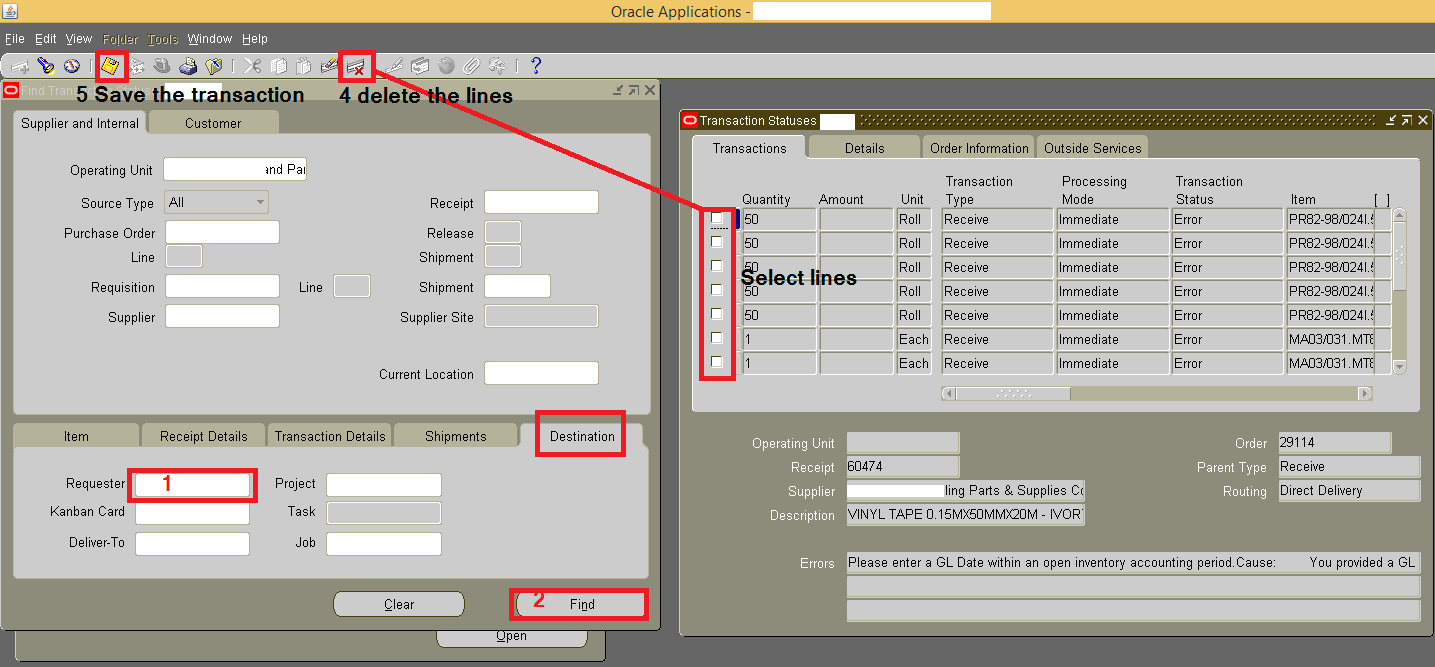
Sometimes the receipts against internal requests could get into trouble with the status pending. While the requester tries to receive the transaction, receipts get created with zero quantities and the internal sales order yet in open status and the quantities are seen in staging location. Please follow the below to delete such pending lines to receive the quantities once again to the targeted sub-inventory

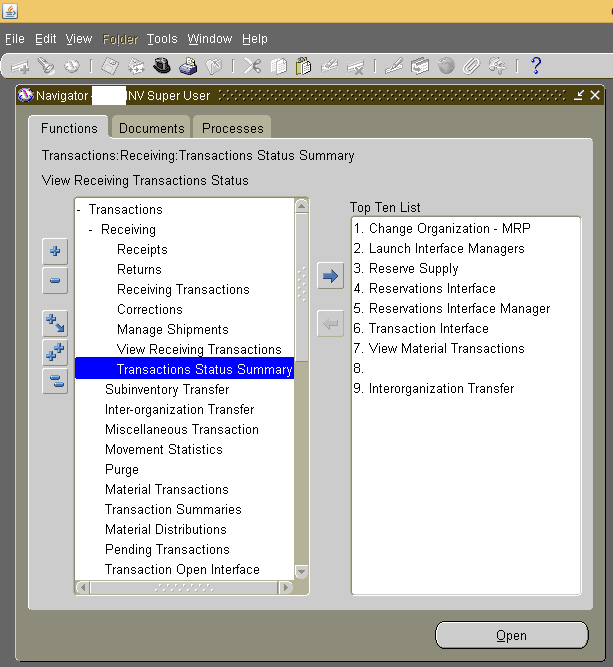
As inventory super user

Transactions -> Receiving -> Transactions Status Summary

1

Under the tab “Supplier and Internal”

Select the “Destination” tab

Enter the name of the requester name (the name of the user who has created the internal material request to limit the lines fetched) & find the transactions

Delete the lines matching the transaction & save

2

Go back to receipts and enter the request number once again to receive the materials

regards,

for Windows7bugs

rajesh

Oracle EBS R12, Install/Clone on Oracle/Red Hat Linux 7.x

Hi guys

Last reviewed on: 10th January 2022

Made changes to the body for Oracle Linux 7.9

References: http://www.slideshare.net/tianpan/oracle-ebs-r1213installationlinux64bitpantian

(and dozens of EBS R12 related blogs and oracle community posts)

As far I could recollect, Oracle EBS R12.0.x & R12 12.1.x are not certified yet for Linux 7.x, let it be Red Hat Linux or Oracle enterprise Linux. Does the certification path really make guys like us trying to clone, install EBS R12 over yet to be certified platforms? Well, my case, I always did attempt & succeeded to a certain levels. Starting with Oracle 10g over Windows 7, 8 etc.

This time, my attempt was to clone our existing EBS R12 12.0.6 instance from Red Hat linux Enterprise 5 64Bit to Oracle Enterprise linux 7 64Bit.

I can’t say whether it is a rightful thing for you or for your environment. For me it was a fun project, that I achieved to a maximum satisfactory level.

Environment: Source System

Red Hat Linux 5.11 64Bit, 48GB physical memory, HBA interfaced external storage, single node EBS R12 12.0.6 with Oracle database 10.2.0.3 database

Environment: Target System

1. Oracle VirtualBox VM with 4 processors, 10GB memory, Oracle Enterprise Linux 7.9 with GUI on demand

VDI fixed size of 1.3T holding both application tier & database tier files copied from source system

2. A Desktop machine with i7 Processor, 4.5 TB Storage, 16GB physical RAM for real hardware performance testing

How to?

Definitely, this is not for a production instance, not for a production instance, not for a production instance & REMEMBER, even if you have valid Oracle support, Oracle will NOT support YOU as the platform is NOT certified for 12.0.x or 12.1.x

Oracle Enterprise Linux 7.x is not certified for EBS R12.0.x , hence I was unable to find the pre-requisites install for EBS R12 for the OS. The hacks started from this point onward

Update(10th January 2022): Oracle Linux 7.9 has the “Add-on” repository that allows you to install the pre-requisites package, however meant for later certified versions of Oracle EBS. Hence, stick to Oracle Linux 6 public yum repository based package installation as mentioned below.

(Please make sure that you fully updated your OEL 7.x box prior the attempts listed below)

As root switch the directory to

cd /etc/yum.repos.d

Go to

http://public-yum.oracle.com/ and install the ol6 repo following instructions provided. The instruction might get in to folds, just follow the below.

cd /etc/yum.repos.d/
wget http://yum.oracle.com/public-yum-ol6.repo

Please note public yum repositories will be soon removed, if you are reading this post much later, make sure that you will find relevant sources to install the pre-requisites.

Open the ol6 repo file using gedit/vim and enable the add-on repo. Make sure the OEL7 repo doesn’t have the add-ons enabled. If you miss this, you might end up rebuilding the Linux Server (That’s what I did!)

install pre-requisites for EBS R12 by issuing the following command

yum install oracle-ebs-server-R12-preinstall -y

Once the installation completed, you will notice that you have two new users created

oracle

applmgr

If your cloned instance was having different user names for both application and database, create same usernames and add them to relevant groups

for example applprod to oinstall group and oraprod to dba, oinstall groups (mandatory)

Special note: If you are attempting these hacks for Production instances, sorry buddy, YOU will never be supported by Oracle as they have recently confirmed to me through a private message that they don’t have any plans to certify 12.0.x versions on OEL 6 or 7

Prior you attempt to clone or install the 12.0.6 instance on OEL 6, 7 make sure that you have taken care of few things prior the attempt. There are few OS level files formatting mandatory for Oracle applications, those caused me almost 3 weeks of reading various blog posts, and NOT a single solution to address a weird error associated with “Error: Missing ormi[s]://<host>:<port>” error while shutting down the application services using adstpall.sh script file! And the reason was default formatting of /etc/hosts file by OEL 7 installation!

Few errors you should see when the /etc/hosts file is NOT formatted as per Oracle’s installation notes…

Executing service control script:
 …../admin/scripts/adoacorectl.sh stop
 Timeout specified in context file: 100 second(s) 

script returned:

  ERROR : Timed out( 100000 ): Interrupted Exception
  You are running adoacorectl.sh version 120.13 

So the /etc/hosts file must be formatted like below with your OEL/RHEL 6.x & 7.x installations

127.0.0.1 localhost.localdomain localhost 
::1 localhost6.localdomain6 localhost6 
192.168.10.15 erp-prodbak.xyz.com erp-prodbak #Your box 
192.168.10.16 erp-prod.xyz.com erp-prod #Your production server, if at all required 

Rest of the network related mandatory elements specified in the reference documents could be ignored, or you may format them as well. If you are going to touch your /etc/resolv.conf file at all, make sure that after changing the content of the resolv.conf, you make it read-only by issuing the following command

chattr +i resolv.conf 

else after a reboot, this file be rewritten by the networking admin services

Now let us refer to the /etc/sysctl.conf & /etc/security/limits.conf files, which are setting system level parameters for the application. While I noticed that the previously configured parameters were causing performance degradation once after the clone, I just copied these elements from a 12.1.3 vision instance and replaced to find that, my cloned instance started flying, giving me much better performance than our Production instance that has the latest hardware and 48GB physical memory!

Once again, thoroughly check the below parameters, if something looks not appropriate for your environment, refrain from updating

as a precaution, do a backup for both the above mentioned files

cp /etc/sysctl.conf /etc/sysctl.conf.original 
cp /etc/security/limits.conf /etc/security/limits.conf.original 

Now using your favorite editor, replace the content of you sysctl.conf file with following

# Kernel sysctl configuration file for Red Hat Linux
#
# For binary values, 0 is disabled, 1 is enabled.  See sysctl(8) and
# sysctl.conf(5) for more details.
#
# Use '/sbin/sysctl -a' to list all possible parameters.

# Controls IP packet forwarding
net.ipv4.ip_forward = 0

# Controls source route verification
net.ipv4.conf.default.rp_filter = 1

# Do not accept source routing
net.ipv4.conf.default.accept_source_route = 0

# Controls the System Request debugging functionality of the kernel
kernel.sysrq = 0

# Controls whether core dumps will append the PID to the core filename.
# Useful for debugging multi-threaded applications.
kernel.core_uses_pid = 1

# Controls the use of TCP syncookies
net.ipv4.tcp_syncookies = 1

# Controls the default maxmimum size of a mesage queue
kernel.msgmnb = 65536

# Controls the maximum size of a message, in bytes
kernel.msgmax = 65536

# Controls the maximum shared segment size, in bytes

# Controls the maximum number of shared memory segments, in pages
kernel.shmall = 4294967296

# oracle-ebs-server-R12-preinstall setting for fs.file-max is 6815744
fs.file-max = 6815744

# oracle-ebs-server-R12-preinstall setting for kernel.sem is '256 32000 100 142'
kernel.sem = 256 32000 100 142

# oracle-ebs-server-R12-preinstall setting for kernel.shmmni is 4096
kernel.shmmni = 4096

# oracle-ebs-server-R12-preinstall setting for kernel.shmall is 1073741824 on x86_64
# oracle-ebs-server-R12-preinstall setting for kernel.shmall is 2097152 on i386

# oracle-ebs-server-R12-preinstall setting for kernel.shmmax is 4398046511104 on x86_64
# oracle-ebs-server-R12-preinstall setting for kernel.shmmax is 4294967295 on i386
kernel.shmmax = 4398046511104

# oracle-ebs-server-R12-preinstall setting for kernel.msgmni is 2878
kernel.msgmni = 2878

# oracle-ebs-server-R12-preinstall setting for net.core.rmem_default is 262144
net.core.rmem_default = 262144

# oracle-ebs-server-R12-preinstall setting for net.core.rmem_max is 4194304
net.core.rmem_max = 4194304

# oracle-ebs-server-R12-preinstall setting for net.core.wmem_default is 262144
net.core.wmem_default = 262144

# oracle-ebs-server-R12-preinstall setting for net.core.wmem_max is 1048576
net.core.wmem_max = 1048576

# oracle-ebs-server-R12-preinstall setting for fs.aio-max-nr is 1048576
fs.aio-max-nr = 1048576

# oracle-ebs-server-R12-preinstall setting for net.ipv4.ip_local_port_range is 9000 65500
net.ipv4.ip_local_port_range = 9000 65500

Save the file and issue the following command

sysctl -p

Now, change the limits.conf file with following content

# /etc/security/limits.conf
#
#Each line describes a limit for a user in the form:
#
#            
#
#Where:
# can be:
#        - a user name
#        - a group name, with @group syntax
#        - the wildcard *, for default entry
#        - the wildcard %, can be also used with %group syntax,
#                 for maxlogin limit
#
# can have the two values:
#        - "soft" for enforcing the soft limits
#        - "hard" for enforcing hard limits
#
# can be one of the following:
#        - core - limits the core file size (KB)
#        - data - max data size (KB)
#        - fsize - maximum filesize (KB)
#        - memlock - max locked-in-memory address space (KB)
#        - nofile - max number of open file descriptors
#        - rss - max resident set size (KB)
#        - stack - max stack size (KB)
#        - cpu - max CPU time (MIN)
#        - nproc - max number of processes
#        - as - address space limit (KB)
#        - maxlogins - max number of logins for this user
#        - maxsyslogins - max number of logins on the system
#        - priority - the priority to run user process with
#        - locks - max number of file locks the user can hold
#        - sigpending - max number of pending signals
#        - msgqueue - max memory used by POSIX message queues (bytes)
#        - nice - max nice priority allowed to raise to values: [-20, 19]
#        - rtprio - max realtime priority
#
#                 
#

#*               soft    core            0
#*               hard    rss             10000
#@student        hard    nproc           20
#@faculty        soft    nproc           20
#@faculty        hard    nproc           50
#ftp             hard    nproc           0
#@student        -       maxlogins       4

# * hard nofile 65535
# * soft nofile 4096
# * hard nproc 16384
# * soft nproc 2047


# oracle-ebs-server-R12-preinstall setting for nofile soft limit is 4096
oratest   soft   nofile    4096
appltest   soft   nofile    4096

# oracle-ebs-server-R12-preinstall setting for nofile hard limit is 65536
oratest   hard   nofile    65536
appltest   hard   nofile    65536

# oracle-ebs-server-R12-preinstall setting for nproc soft limit is 16384
# refer orabug15971421 for more info.
oratest   soft   nproc    16384
appltest   soft   nproc    16384

# oracle-ebs-server-R12-preinstall setting for nproc hard limit is 16384
oratest   hard   nproc    16384
appltest   hard   nproc    16384

# oracle-ebs-server-R12-preinstall setting for stack soft limit is 10240KB
oratest   soft   stack    10240
appltest   soft   stack    10240

# oracle-ebs-server-R12-preinstall setting for stack hard limit is 32768KB
oratest   hard   stack    32768
appltest   hard   stack    32768


# End of file

Install unzip version 5 from https://oss.oracle.com/el4/unzip/unzip.html

(This is mandatory as 12.0.x doesn’t support unzip versions above 5, and your cloning will fail with error notifying unzip is not supported)

Source the libdb.so.2 library file to /usr/lib from your source system, as the libgdbm.so.4.0.0 soft link hack will not work. If the libdb.so.2 is already a soft link in your source system, move the source file “libgdbm.so.2.0.0” from source to target box and create the soft link.

Now go ahead and enjoy the cloning/installation of your R12 12.0.x, or R12.1.x releases over OEL/RHEL 7.x (CENTOS is GNU release of RHEL, so you may experiment with that distro as well, nothing guaranteed though)

Please be warned, I have read many places that, few modules do not work on Linux 6,7 releases. Hence, the entire exercises you painfully executed may turn futile at later stages, and once again, if you have a live Oracle support, do not attempt such with your Production instance!

Enjoy guys :)

for Windows7bugs

rajesh

Oracle Applications R12 | Disable Purchase Request Attachments

Hello guys

We have an instance, with the database which has grown to almost 1TB in size within last four years of time & the main culprit were the attachments end users uploaded with the purchase requests. Now, the approach to upload documents to database was a wrong wrong wrong choice, however, with what we lived for last many years.

Recently the we have decided to stop uploading the attachments to database, instead start using certain other methods. That’s how we started to find a “method” to disable the attachment functionality. There were not many leads, however we stumbled upon the following thread

http://www.strsoftware.com/blog/disabling-attachment-menu-button-with-forms-personalization

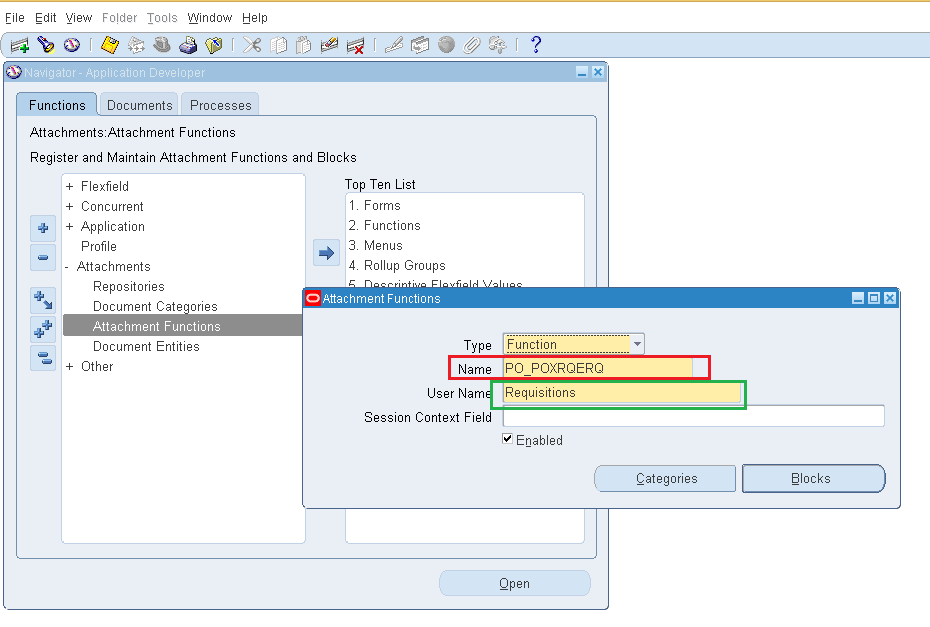
As all we needed were just some kind of leads, browsing through the “Application Developer=> Attachments=>Attachment Functions”

Navigation

PR

We were able to locate the Name “PO_POXRQERQ”, that refers to Requisitions. All we were supposed to do was the remove all the lines found under “Blocks”, that disables the attachment button available with purchase requisition form! Read more about it from the link provided above.

Hope this information comes handy for few others out there!

Merry X-Mas and very happy new year for everyone!

regards,