
Author: windows7bugs
Oracle certified developer with more than ten years of experiences with Windows based domains and client operating systems.
Oracle Backup to Google Drive?
Hi guys
This is a follow up post to my previous post about using a simple batch script for creating a dump export file on regular basis for Oracle database.
Backup. The most essential, however many times highly ignored element of the digital world even today as many small scale industries find the investments made to this particular mechanism hardly comes in effect, unless a disaster arises. My personal experiences with convincing the management to go for sophisticated backup solutions were always the toughest, until we had a HUGE disaster.
As a thumb rule, the first thing I always did for an Oracle database was to setup a dump export every night (if the database is truly small in size), after the normal working hours, in addition to RMAN backups. These export files are kept in a different partition & regularly monitored and purged by the beginning of a new month, keeping the last day backup for the previous month, which is deleted by the beginning of a new year.
Keeping the backup in the same hardware could prove fatal when the hardware fails, and almost all the servers are configured to use RAID, using different levels. In such scenarios even if the drives are intact, retrieving the data from raided volumes will be a professional job, costing investment and time.
For small databases, like the one I have mentioned with my previous post we can design multiple options like mapping a network folder & copying the files automatically once after a new dump file is created as the part of a backup script.
I have devised two methods for my party, and they were
- FTP the compressed latest dump file to another machine hosting FTP server
- Using google drive (Free 15GB), upload the latest compressed dump file
The first method was already explained here so I will go to 2nd method in which Google drive sync is used to insure that the party has a valid backup stored somewhere in the cloud
- Database dump export size: 300MB approximately
- Zipped dump file size: 50MB approximately
Install google drive on your Windows 2008 x, Windows 2012 server machine. You may need to install corresponding Visual C++ Redistributable packages in order to come across python related errors. Please read more here for solutions.
Once the google drive starts working fine, you can use the following script, which will create a dump file first, then create a zip file against the latest dump file created and then copy the zip file to google drive for cloud synching.
Please note, I have moved the google drive folder from the default location to somewhere else, like E:\Google_Drive to make sure that my batch file has shortest path entry for the copying. If you plan the same, you can change the default location for google drive by exiting the application first, then pointing google drive to your folder of choice when google drive complains about missing default location
Windows batch file for Creating, zipping & copying the files to Google Drive
[code language=”text” gutter=”false”]
@echo off
FOR /F "tokens=2-4 delims=/ " %%a IN (‘date/t’) DO exp system/password@connectionstring full = y file=d:\Orabackup\exp_%%b%%a%%c.dmp
SETLOCAL
::Get the latest dump file name, generated using exp command
::Switch to the folder where the dump (.dmp) files are stored
CD D:\Orabackup\
:: D:\Orabackup is the folder where everyday dump files are stored.
for /f "tokens=*" %%a in (‘dir *.dmp /o:-d /b’) do set NEWEST=%%a&& goto :next
:next
REM echo The most recently created file is %NEWEST%
::http://stackoverflow.com/questions/15567809/batch-extract-path-and-filename-from-a-variable
FOR %%i IN ("%NEWEST%") DO (
REM ECHO filedrive=%%~di
REM ECHO filepath=%%~pi
SET ZIPNAME=%%~ni
REM ECHO fileextension=%%~xi
)
SET ZIPNAME=%ZIPNAME%.zip
::You can use built-in zip or 7-Zip to create archives
zip %ZIPNAME% %NEWEST%
::E:\Google_Drive is the folder used by the google drive in my setup
COPY %ZIPNAME% E:\Google_Drive
del %ZIPNAME%
::Exit
[/code]
While this method looks pretty awesome for small size databases, please be noted that, may not be at all feasible for larger ones. I will OPT this method for a backup dump file that could be compressed to a size of 400-500MB maximum, including the possibilities of corrupt compressed files.
Whatever, as far the party has a reliable internet connection with decent bandwidth, based on the size of compressed file, will always have access to a recent backup dump file, stored free in the cloud!
Does it look decent? ;)
Tip: Running Google drive sync as Windows Service
regards,
rajesh
Oracle database 11g on Windows 2008 R2 & later | ORA-12518 error
Hi guys
Recently I was approached by a party to migrate their 14+ years old mini ERP system that is client/server architecture to a new hardware. This legacy application has such a small footprint that, the export dump was hardly reaching 300Mbs in size after a full database export.
Scenario
- OS: Windows 2003 SP3, 32-Bit
- Oracle Database: 10g Release 1
- Client side, Developer 6i with Patch 18
- Clients using Windows 7, 64-Bit with DLL hacks for running forms/reports based application
Requirement(s)
- Database upgrade to 11g R2 64-Bit, in order to maximize the performance and properly utilize the new hardware (HP DL380 g9 with 32GB memory and more than 1TB storage)
We’ve initiated the migration by testing all possible scenarios using ORACLE VirtualBox. Created a VM for Windows 2008 R2 server, Created both Windows 10 & Windows 7 SP1 VMs for client side testing. After thorough checking to insure that there were no technical errors, decided to move the solution to physical server. Throughout the testing using VMs we never changed any database parameters (not even CASE SENSITIVE logon), yet all clients were happily connecting and executing forms and reports as expected.
The following were performed on the physical server after installing & updating Windows Server 2008 R2
- Installed Developer Suite 6i
- Installed Oracle Database 11g r2 (11.2.0.4), accommodating 40% the physical memory and set the memory management as automatic.
- Configured RMAN
- Imported specific users from the latest export dump
We tried to start the application from one of the clients and the application started & the queries were executed at lightning speed. Client exit from the application and tried to restart, hitting Oracle not found error!
All of a sudden from the smirks, panic took over all the parties involved. We shutdown the services, restarted. Client gets connected, and 2nd attempt returns the same error ‘Oracle not found’
Again the client connects and trying to run the reports prompts them a popup windows asking for logon to database.
After cross checking between VMs and Physical server, we confirm that both the scenarios share the same database and client settings (totally missing the PROCESSES parameter). Yet the physical scenario was continuously falling victim to Oracle not found error
A quick googling brought to me a blog page that asked to check the number of processes parameter set in the database instance, which was 150 by default in our case. I have cross checked with the VM instance and found the value to be 200. I have to redo the exercises to figure out whether I have changed the parameter after creating the database using DBCA.
Next I ran the following SQL as root to figure out the max processes count registered by the database
select resource_name, current_utilization, max_utilization from v$resource_
limit where resource_name in (‘processes’,’sessions’);
which returned me the following:
RESOURCE_NAME CURRENT_UTILIZATION MAX_UTILIZATION
—————————— ——————- —————
processes 47 175
sessions 54 173
Obviously, the max_utilization has crossed the default value of 150 processes & I changed the parameter with 450 using alter system command.
Alter system set processes=450 scope=spfile;
After altering the system, a shutdown immediate followed by startup has fixed nightmare.
Further readings has given me a fairly good idea that 11g R2 has not the above said issues related to number of processes, many other related to network stack.
So, if you are planning to setup 11g to work with Developer 6i, which is not certified as a combination by Oracle, be prepared to bite the silver bullet(S)
regards,
ORA-32004: obsolete or deprecated parameter(s) specified for RDBMS instance
Last updated on 13th December 2023
You must add the below line into your SQLNET.ORA file in order to avoid accounts other than root failing to authenticate after the password complexity changes.
SQLNET.ALLOWED_LOGON_VERSION_SERVER=10
or
SQLNET.ALLOWED_LOGON_VERSION_SERVER=11
This is mandatory in the case of Oracle database 19c onwards. Stick to version 10 if you have legacy clients connecting to the database.
I’m back to blogging after couple of busy weeks and quite bit of traveling. I’m currently playing around with Oracle 12c database Release 2 & Developer 6i with Patch 18, again hacked using Patch 3 DLL files in order to execute forms/reports on Windows7-10
Obvious that, starting from Oracle 11g, Oracle has introduced stricter password policies by implementing case sensitive logons, number of attempts and password age etc. I hardly believe small industries are really ever going to implement these policies as Oracle intended to in real life scenarios as it would require a full time DBA, a lot of tracking and auditing (which in my experience never happens)
Anyway, for testing, I have always kept the commands ready to disable said all three security elements. Once a new test database is made, prior attempting any other, I change password complexity, expiry & reuse times using the below given alter commands
- alter system set sec_case_sensitive_logon=false scope=both;
- alter profile DEFAULT limit PASSWORD_REUSE_TIME unlimited;
- alter profile DEFAULT limit PASSWORD_LIFE_TIME unlimited;
With 12c Oracle has made many changes to the security, SQL Net connections etc. If you are truly interested, please refer this document to understand what has been deprecated Upgrade Guide 12c Release 1 (12.1) E41397-11
According to the documentation, SEC_CASE_SENSITIVE_LOGON is maintained only for backward compatibility & most probably will be dropped from future builds. I’ve checked altering sec_case_sensitive_logon on a 12c R2 database it works. However, during each startup, I receive a notification that says “ORA-32004: obsolete or deprecated parameter(s) specified for RDBMS instance”

and executing the following command returns a number of parameters those are not supposed to be used against 12c release 
SELECT name from v$parameter WHERE isdeprecated = 'TRUE' ORDER BY name;and the following will be listed
NAME
——————————————————————————–
O7_DICTIONARY_ACCESSIBILITY
active_instance_count
asm_preferred_read_failure_groups
background_dump_dest
buffer_pool_keep
buffer_pool_recycle
commit_write
cursor_space_for_time
db_block_buffers
fast_start_io_target
instance_groups
NAME
——————————————————————————–
lock_name_space
log_archive_start
parallel_adaptive_multi_user
plsql_debug
plsql_v2_compatibility
rdbms_server_dn
remote_os_authent
resource_manager_cpu_allocation
sec_case_sensitive_logon
serial_reuse
sql_trace
NAME
——————————————————————————–
standby_archive_dest
unified_audit_sga_queue_size
user_dump_dest
utl_file_dir
26 rows selected.
SQL>
So, we could see that sec_case_sensitive_logon has been listed as deprecated. Now, how exactly we are going to work around this little annoyance totally depends upon us, developers & DBAs. While I prefer a test environment with no password related hassles, a production environment should be designed to accommodate case sensitive logons & other recommended password policies as Oracle may not re-introduce the parameter in future builds.
While the notification/warning we receive about deprecated parameters are generic to all deprecated parameters, in this post, I have only mentioned about case sensitive passwords.
regards,
Oracle 12c database installation | Points to consider
Update(11th July 2018)
One of the visitors said the following:
“Just some minutes after my post I found a clue. The problem for my was that my machine name was longer than 15 characters!! If your computer name is longer than that then this error rises. I don’t understand why this should be a problem nowadays.” visitor Ax is referring to the area of the post where I am discussing about Admin Share related issues.
As I never had a box having names longer the limited number of characters, haven’t had this experience. Thanks Ax for the great tip!
Hi guys
Have you noticed the major changes with the installation media of Oracle 12c database release 2? Oracle has made it as a single package, eliminating the user to merge the folders from 2 different installation media to get it done. While I welcome such a move from Oracle with whole heart, once again there are few difficulties getting the software installed properly.
One of the major issues is, when the administrator decides to disable hidden admin shares to secure the box from accessed using C$, D$ calls from a remote machine with domain/local administrative privileges. Disabling the admin shares are handled by tweaking the registry & easily forgotten in the long run. Lack of earlier experiences with installing Oracle software could force one to finally formatting the box to address the registry tweaking for disabling the admin shares.
Few of the errors present are like following:
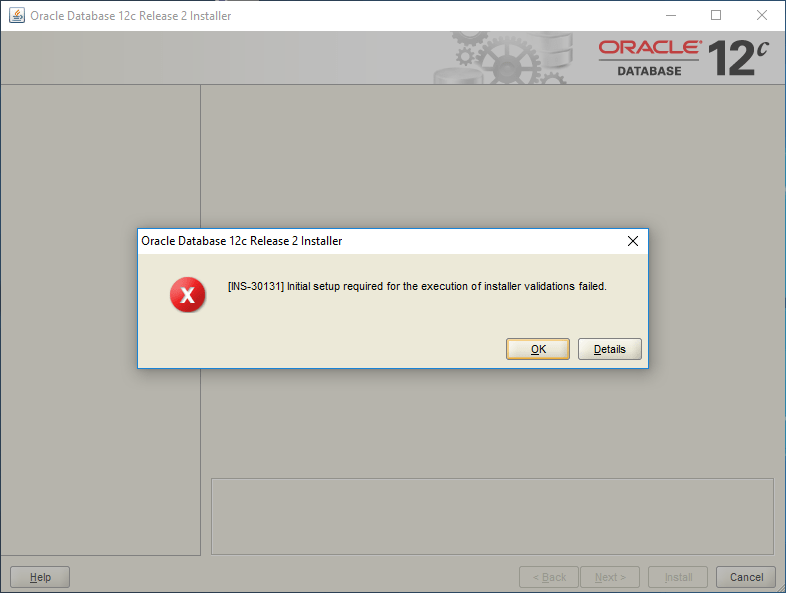

And the error message reads like following:
Cause – Failed to access the temporary location. Action – Ensure that the current user has required permissions to access the temporary location. Additional Information:
– PRVG-1901 : failed to setup CVU remote execution framework directory “C:\Users\username\AppData\Local\Temp\CVU_12.2.0.1.0_username\” on nodes “hostname” – Cause: An operation requiring remote execution could not complete because
the attempt to set up the Cluster Verification Utility remote
execution framework failed on the indicated nodes at the
indicated directory location because the CVU remote execution
framework version did not match the CVU java verification
framework version. The accompanying message provides detailed
failure information. – Action: Ensure that the directory indicated exists or can be created and
the user executing the checks has sufficient permission to
overwrite the contents of this directory. Also review the
accompanying error messages and respond to them. Summary of the failed nodes hostname- Version of exectask could not be retrieved from node “hostname” – Cause: Cause Of Problem Not Available – Action: User Action Not Available – Version of exectask could not be retrieved from node “hostname” – Cause: Cause Of Problem Not Available – Action: User Action Not Available
Hence, the 1st place to look for is the registry, precisely, Computer\HKEY_LOCAL_MACHINE\SYSTEM\CurrentControlSet\Services\LanmanServer\Parameters and to make sure that a REG DWORD named “AutoShareWks” exists with a value “0”. If yes, change the value to “1” and restart the box.
2nd, if you have a 32bit Oracle client installed prior attempting to install the 12c/11g 64Bit database, make sure you Stop “OracleRemExecServiceV2” service using the Windows Service console. There is a conflict between the 32Bit & 64Bit installation procedures and unless this particular service is stopped, the 64Bit installation will not proceed.
Now attempt the 12c/11g 64Bit database installation.
If you come across more errors, please update us using the comments section and we would love to investigate them.
regards,
Windows 10 | MAP SMS/MMS Other devices
Hi guys
To be very frank, though I started using Windows 10 from the Technical Preview days & was an insider for a long time. After each build, one of the best things I loved about Windows 10 was it’s ability to identify and install the best drivers (Occasionally requiring manufacturer drivers for additional enhancements (Sound, VGA, Wifi)) even for pretty old hardware components.
With the Creators update, started reading many frustrated users complaining about missing drivers which were not so loud till build 1603. Out of curiosity, I found that almost four devices were not recognized for my almost 5 years old work laptop, a Dell Latitude E6420.

Throughout my Windows 10 experiences, I hardly bothered to find Windows 10 specific drivers from DELL support because my product is not supported for Windows 10 & the latest available are for Windows 8. Well, almost all the executables by DELL are packed in a different way that Intel drivers & extracting the packages using 7-zip didn’t always let me point the device manager to extracted files locations and pick correct drivers. Hence, I just run the executable & take a chance with almost all missing drivers.
This time after patching the way mentioned above (Which can break your system, be warned & trust me, I know what I am doing, so just lost a whole partition 2 days back) I found one item under “Other devices” & it read “MAP SMS/MMS”. I tried to locate the hardware details, which has only a long string that read something more than mere google searches could help, until I came across this post today.
2nd page of the article, user vkgupta suggests to remove connected Bluetooth devices to see whether this “Other device” disappears after the unpair process.
I unpaired my LG G3 & the “Other device” disappeared. Paired it again, letting the Other device to reappear with a ? mark once again. So, if you are another someone who is trying to “find” a proper driver for your SMS/MMS other device, give this trick a try.
Hope this helps few out there!
rajesh
Migrate from Microsoft SQL Server to Oracle database
Last revised on 26th November 2024
This time I am going to share my experience with migrating a small MS SQL database to Oracle database using Oracle’s SQL Developer
Scenario
- Microsoft SQL Server 2008 or later
- Oracle database 11g (or later, last tested Oracle 19c)
Requirement
Business requires a 3rd party software that depends upon MS SQL Server to be migrated to Oracle platform
Pre-requisites
- Oracle database 11g installed and instance is up and online
- Oracle SQL Developer 4.2 or later. My first attempts were made using 4.x and I can confirm the same approaches work with 24.3.x
- JDBC driver for MS SQL connectivity. Download the driver from following link
http://sourceforge.net/projects/jtds/files/
Please follow https://kentgraziano.com/2013/01/14/tech-tip-connect-to-sql-server-using-oracle-sql-developer/ to learn how to install and configure the driver in order to establish a connection from SQL developer to MS SQL server.
Scope
I am going to migrate a database called “OPMS” from SQL Server 2008 R2 express edition to Oracle database 11g R2 64Bit. You can safely try the same with Oracle 19c multitenant database also.

Please note, the JDBC driver fails to connect to the SQL Server using Windows Authentication, hence you must define a login with for your database, change the instance authentication methods to mixed in order to establish a successful connection.

As you could see with the above image, I don’t have any connections to Oracle database defined.
For the database migration, We must define two connections. One connection using SYSTEM user & the 2nd connection using MWREP user that we will create in like following
DROP USER MWREP CASCADE
/
CREATE USER MWREP IDENTIFIED BY mwrep
DEFAULT TABLESPACE BAYAN
TEMPORARY TABLESPACE TEMP1
QUOTA UNLIMITED ON BAYAN
/
GRANT DBA,CONNECT,RESOURCE TO MWREP
Once the migration is over, you may drop this repository safely. Hence don’t worry about the grants given to the new user. I failed to successfully get the things done properly without DBA role assigned to this migration schema
I’ve struggled hours to understand why the “tables” were not created as a part of the migration process which said “Successfully completed” after the execution and my probing through the log files pointed towards a schema OPMS not existing in indirect wordings.
(I’m pretty sure that I missed something & the intended schema was NOT created during the migration process run. Regardless, creating the Schema manually gives many tuning choices like tablespace selection, quota setting etc)
So, to get the migration work successfully, you need to create a schema with the the same name of your SQL Database. In my example the SQL database name is “OPMS”, the same I pre-defined with the Oracle database, although the script generated by the migration has DDL for creating the user against default tablespace “USERS”. Well, I didn’t want my OPMS schema using “USERS” tablespace…
I created the OPMS user as below
DROP USER OPMS CASCADE
/
CREATE USER OPMS IDENTIFIED BY opms
DEFAULT TABLESPACE BAYAN
TEMPORARY TABLESPACE TEMP1
QUOTA UNLIMITED ON BAYAN
/
GRANT DBA,CONNECT,RESOURCE TO OPMS
I am all set to start the migration now, so should be you!
Created a new connection for user “System”

Created another connection for “MWREP” user, which will hold the migration repository

Now we have to create the migration repository. Right click on the MWREP connection and expand Migration Repository, then Associate Migration repository

Progress
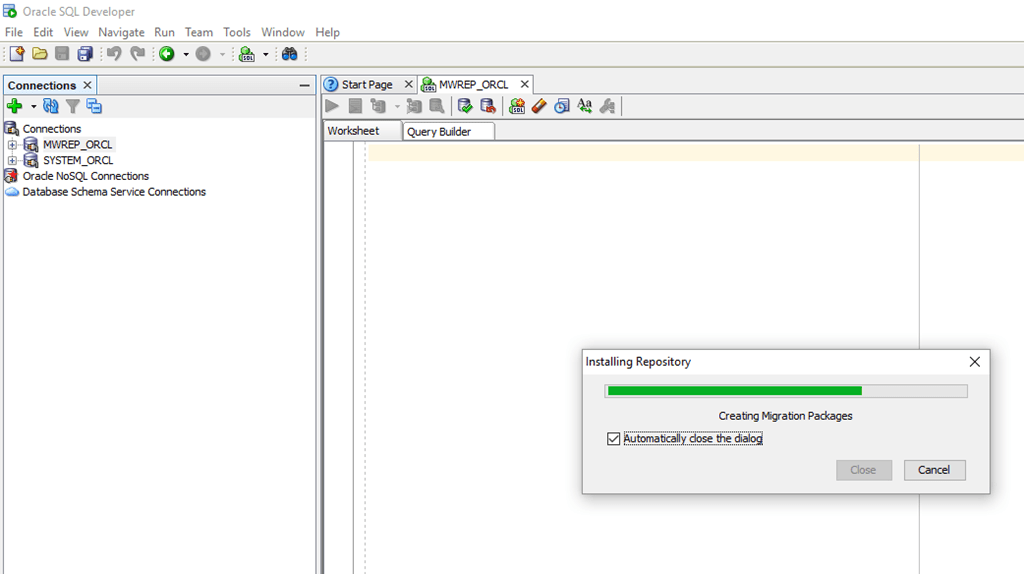
Finished

If the repository association fails for any reasons, you have restart by dropping the migration schema that you have created and go through the steps once again.
As I have completed creating the migration repository, next step is to connect the SQL developer to MS SQL Server (in my case SQL Server 2008 R2 Express edition)

So you have all the 3 connections required for the migration now.

As soon as you connect the MWREP, you will notice that Migration Windows showing an entry like seen with the below image

Now we will start the migration.

The welcome screen provides you an overview of the activities those will be completed for the SQL database migration. Move ahead

By default your migration repository will be selected, however cross check it and click “Next”

Provide a meaningful name for your Project and Select output directory

Make sure you have selected the correct Source database

The default database for the currently connected SQL database user will be selected by default for capturing. Confirm and click next

Under the convert step (6), make necessary changes. Refer the image for more details

A number of objects will be selected, unless you are pretty confident about objects you don’t want to migrate, leave the default selection intact.

Select the “System” connection for Target Database

Make sure you select SQL connection for source and MWREP connection as target in the move data step (9)

Click finish & the migration immediately starts. Depending upon the size of your source database it may take while for the process to create and move data between the technologies.

Progress


Create a connection to Oracle database for the newly created (We created the OPMS schema prior the migration) schema & verify whether the objects were created by the migration process.

That’s all folks!
rajesh
Recover your corrupt VirtualBox .vdi (Virtual Disk Image)
Hi guys
I have 3 Windows 10 Professional licenses (Yes, paid licenses). 2 of the licenses are used in two hardware devices & the 3rd one I am using with a VirtualBox VM machine.
My semi server class desktop computer at home has approximately 4.5T storage, consolidated from different disks. My Windows10 VM is frequently factory reset to try out different software (Mostly Oracle software at uncertified environments) & the particular partition on which I had the VM was running out of space & I planned to move the VM & the disks to a different partition with bigger free space.
Scenario: Move “Windows 10” VM from L: drive to M: drive
My nightmare started when the copy process stopped abruptly with Windows popping an error window stating there were read errors while copying disk1.vdi & I attempted again to realize that the disk1.vdi is has bad sectors or clusters.
I hurried to confirm that the VM is still accessible by restarting the VM couple of times & to my greatest pleasure the VM did start, did shutdown properly and I was able to access the Oracle database installation.
Fix:
A quick googling suggested that an attempt to repair the hard disks using “CHKDSK”, the old utility could fix the .vdi corruptions & without wasting more time I jumped in
At an elevated command prompt issued the command
> chkdsk L: /F
My partition is of 1TB & after 15-16 minutes the chkdsk completed with few messages like fixing some cluster information.
I tried to copy the disk1.vdi once again to M: drive, and this time the copy process managed almost 19GB out of 29.1GB and again presented me the read error.
Now, I was left with just one more option in front of me & it was to attempt recover the bad sectors, and there were chances that my virtual disk may get corrupt if the damages are more in numbers. knowing my VM is already Activated by Microsoft, I could try to reinstall Windows in a new virtual disk and retain the license as long as I am still using the other VM files as the id of the machine registered with Microsoft.
Please be informed, if you copy ONLY the vdi file, the activation will be nullified and you will be prompted to activate the copy of the Windows as soon as you start the new VM built using the copied VDI file!
So I proceeded to
>chkdsk L: /F /R
Windows suggested that it may take around 6 hrs for the repair process & I woke up next day morning to read multiple status messages about moving the corrupt sectors to new positions & some errors those could not be repaired.
I hurried to copy the disk once again & even though it seemed like forever, finally I was able to copy the disk1.vdi to M: drive!
So if you ever come across such a situation, give the above a try. If you are not cursed, most probably you will able to recover the virtual disk.
regards,
RMAN vs Dump Export
Hi guys
Recently I spent pretty good amount of time trying out RMAN & was able to apply what I learned at multiple production environments those were purely depending upon export dumps over a decade. Once after committing many hours for recovery using RMAN to a standby instance, I started wondering whether such efforts are really worth for a database that was hardly couple of GBs after 10+ years of data collection. I read many articles from reputed Oracle related sites, including this one.
A majority of the small scale industries don’t invest on DBAs because, FOR them DBAs are found doing “nothing” at all throughout the salary periods & most of them have unmatched ego that don’t allow them to learn anything other than what they are “certified to”. I have some pretty bad experiences with bunch of DBAs who didn’t even have a clue about SGA, PGA setups for a 10g database because they were “Certified” for 11g
Throughout the years, we have many hardware crashes and always restored the database(s) from export dumps (.dmp). A clearly documented schema/tablespace details were all we needed as the data that was expected to be restored were always sized in few GBs.
An Oracle developer with moderate database skills could, within an hour time can go online with the database restored using the simple import, which may not be the case with RMAN. RMAN strongly depends upon many factors for backup, restore & and from my limited DBA skills, should be adapted to bigger database environments.
So, you have a very small database and want to restore it from a dump file after a hardware crash or while switching to better hardware, you are very happy to know that importing from a dump export is much easier than RMAN (as you don’t have a clue what it is). Is it a fail proof method? Well, depends. If you are dealing with a hardly documented environment, you can land in hot soup with import screaming about non-existing objects referred by the currently imported schema. An interesting discussion you may find here that is closed as answered once after I confirmed it.
Obviously, I started the topic explaining how easy it looks to use pure dump files for restoration purposes, however ending the topic by saying that if you have a supported database, please implement RMAN immediately, which is a beautiful piece of technology helping you to recover the entire database with moderate level of DBA skills.
regards,