Ever wondered how to fetch the last logon details for a domain member computer or user? Using .Net Microsoft has made it pretty easier for the developers to populate the active directory attributes to desired data repositories, however getting the last logon date time value still remains a complex stuff (for beginners like us), especially when your domain consist of multiple domain controllers and they are spread across different geographical areas and subnets :)
After dwelling for long a while, I came across a C# code snippet @ http://www.codeproject.com/Articles/19181/Find-LastLogon-Across-All-Windows-Domain-Controlle that was mostly built against http://www.rlmueller.net/Last%20Logon.htm
I had to copy the codes those were split into multiple blocks for proper explanations, re-arrange and then using the online C# to VB.Net converters, convert to readable VB.Net coding. Again, there were few mismatches and I was able to figure them out through stackoverflow & tech forums posts.
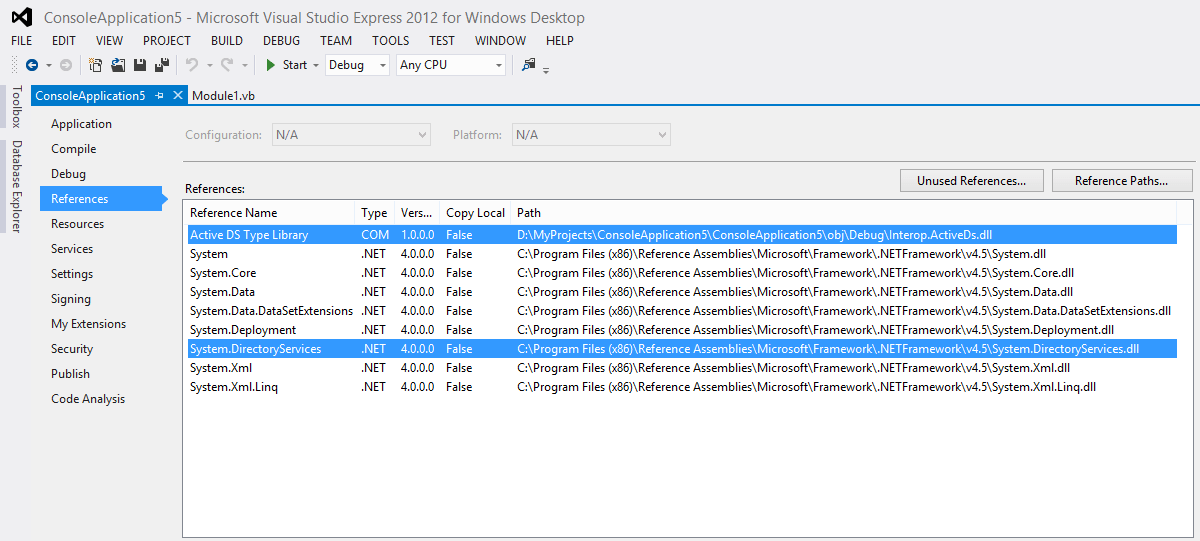
Without going on with what and how I did it, here comes the complete coding. Please note, this is a console application solution, and you should add the references as seen with the below image in order to successfully call the methods and types
[code language=”vb” gutter=”false” wraplines=”true”]
Imports System.DirectoryServices
Imports ActiveDs
Module Module1
”’ <summary>
”’ You should able to easily convert this console application to windows form application
”’ with least efforts
”’ Original code was posted with http://www.codeproject.com/Articles/19181/Find-LastLogon-Across-All-Windows-Domain-Controlle
”’ using C#, I converted most of the C# Codes using online converter(s)
”’ and ammended at few places, as the code block provided with the project were not fetching decent results
”’ Rajesh Thampi / 15-Jan-2015 | w7bugs at gmail dot com | windows7bugs.wordpress.com
”’ </summary>
”’ <remarks></remarks>
Sub Main()
‘Get the root of the directory data tree on a directory server.
Dim rootDse As New DirectoryEntry("LDAP://rootDSE")
‘Dictionary object to hold the records retrived by the search
Dim lastLogons As Dictionary(Of String, Int64) = New Dictionary(Of String, Int64)
‘Local variable for holding formatted last logon values in datetime format
Dim llogon As DateTime = Nothing
‘for User last logon
‘Dim TargetUsername As String = "george" ‘ -> Pass sAMAccountName
‘Dim objType As Integer = 805306368 ‘-> 805306368 User | 805306369 Computer
‘for Computer
Dim TargetUsername As String = "JOSE-KSP$" ‘ -> Pass sAMAccountName
Dim objType As Integer = 805306369 ‘-> 805306368 User | 805306369 Computer
‘Loop through all available domain controllers
For Each dsDC As DirectoryServices.ActiveDirectory.DomainController In _
DirectoryServices.ActiveDirectory.Domain.GetCurrentDomain.DomainControllers
‘Print the individual domain controller name
‘Debug.Write(dsDC.Name & vbCrLf) ‘ Uncomment for print
‘Get the Entry details for domain controller
Dim dirEntry As DirectoryEntry = New DirectoryEntry("LDAP://" + dsDC.Name + "/" + DirectCast(rootDse.Properties("defaultNamingContext").Value, String))
‘Define searcher for the objects of interest
Dim dirObjects As DirectorySearcher = New DirectorySearcher(dirEntry)
‘Define a large integer to hold the COM object translated value
‘ActiveDS COM object is a MUST reference, yet to find another way to deal with highpart, lowpart values obtained from "lastlogon"
Dim lastLogonThisServer As Int64 = New Int64()
‘Set up the filter for object to be returned through findall method
dirObjects.Filter = "(&(sAMAccountType=" & objType & ")(sAMAccountName=" & TargetUsername & "))"
‘ Loop through the records found
For Each objRecords In dirObjects.FindAll()
‘Get the directory entry, this will return all the attributes associated with the object (Computer/User)
Dim dirObj As DirectoryEntry = objRecords.GetDirectoryEntry()
If Not dirObj Is Nothing Then
‘ Get the distinguishedName and lastLogon for each user
Dim distinguishedName As String = dirObj.Properties("distinguishedName").Value.ToString()
Try
If Not dirObj.Properties("lastLogon").Value Is Nothing Then
Dim lgIntas As ActiveDs.LargeInteger = dirObj.Properties("lastLogon").Value
Dim lngHigh As Long = lgIntas.HighPart
Dim lngLow As Long = lgIntas.LowPart
lastLogonThisServer = (lngHigh * (2 ^ 32) – lngLow)
End If
Catch ex As Exception
Debug.Write(ex.Message)
End Try
‘Different date time formats you can play around with
‘Dim format As String = "MMM ddd d HH:mm yyyy" -> Jan Thu 15 08:11 2015
‘Dim format As String = "dd/MMM/yyyy HH:mm tt" -> 15/Jan/2015 08:36 AM
‘Debug.Write(distinguishedName & ";" _
‘& DateTime.FromFileTime(lastLogonThisServer).ToString(format, Globalization.CultureInfo.InvariantCulture) & vbCrLf)
‘Save the most recent logon for each user in a Dictionary object
‘How it works
‘lastLogons dictionary object has two parts, key and corresponding value
‘Prior adding a new record, using ContainsKey call we can check the array for existing keys
‘With this example, the key is "distinguishedName"
‘If the distinguishedName as key found
If lastLogons.ContainsKey(distinguishedName) Then
‘We compare the latest fetched logon date integer value against the key value of the dictionary object
If lastLogons(distinguishedName) < lastLogonThisServer Then
‘If the existing value is smaller than the new value "lastLogonThisServer" holds
lastLogons(distinguishedName) = lastLogonThisServer
‘We will update the existing key value with recent lastLogonThisServer value
End If
Else
‘We will add a new entry to the dictionary object
lastLogons.Add(distinguishedName, lastLogonThisServer)
End If
End If
Next
Next
‘Now we will loop through the dictionary object and fetch the details
‘For a single user/computer the dictionary object will not have more than one entry
For Each kvp As KeyValuePair(Of String, Int64) In lastLogons
Dim v1 As String = kvp.Key
Dim v2 As DateTime = DateTime.FromFileTime(kvp.Value).ToString()
‘ llogon = v2
Dim format As String = "dd/MMM/yyyy HH:mm tt"
Debug.Write("Distinguished Name :" & v1 & "; Last logged :" & v2.ToString(format) & vbCrLf)
Next
End Sub
End Module
[/code]
You may download the solution from https://drive.google.com/file/d/0B-3iVeOMTCbWWFliTGN1NmNxMjQ/view?usp=sharing
regards,
rajesh