Oracle EBS R12 12.2 database cloning

I am not a certified Database/APPS DBA. I wanted to develop a shell/bash script or set of scripts that could duplicate the Oracle EBS PRODUCTION database on demand on a test instance. I thought of doing it as a single script, step by step and later decided to go with multiple scripts to narrow down the damages/or better error correction. Please note, you cannot just copy and start using these scripts at your environment already! You may have to modify many of the parameters & kindly be reminded that, these scripts were developed for an environment that was being cloned repeatedly. Remember to run the main script as “root”

Environment: OS: Oracle Linux 7, Oracle EBS R12 12.2.10, Oracle database 19c, multi-tenant. Approximate size 700GB

Let us create a parameter file for the duplication of EBS database on the TEST instance. The hostname and few other details will be automatically picked up by the shell scripts, however, few other details are provided by the parameter file. This approach gives me greater flexibility to utilize the scripts with different hostnames and contexts. I call this parameter file as “restoreparam.txt”. If you are planning to change the name, you have to replace it in each and every other bash script that is used within the main script.

#Oracle base
s_target_base=/u01/test/
# Source CDB sid
s_source_cdbSid=PRODCDB
# Target CDB sid
s_target_cdbSid=DEVPCDB
# Source EBS database sid (PDB)
s_source_dbSid=PROD
# Target EBS database sid (PDB)
s_target_dbSid=DEVP
# We have database files for both CBD and EBS kept in different paths
# Defining these paths and modifying the RMAN run instructions are crucial for successful restoration and cloning.
s_source_data_path_1=/u01/prod/oradata/PRODCDB/
s_source_data_path_2=/u01/prod/PROD/db/apps_st/data/
# Target data paths
s_data_path_1=/u01/test/oradata/DEVPCDB/
s_data_path_2=/u01/test/DEVP/db/apps_st/data/
# Target PDB Service requires it's own listener information
s_listener_port=1526
# Oracle and Appl manager OS level users
s_db_user=oracle
s_appl_manager=applmgr
# EBS user, by default it is "apps"
s_apps_user=apps
s_apps_pass=********
# Oracle database system account password
s_system_pass=*******
# Path where RMAN backup chunks are kept
s_rman_path=/u04/RMAN/DAILYBKP
# Path where this file be created.
s_rman_param_path=/u04/RMAN/RESTORE
# Target system Oracle inventory path
s_ora_invenoty_path=/u01/test/oraInventory
# Oracle inventory entry identifier for the database. Using this string, entry for the database will be
# deleted from the inventory file. So don't make mistakes
s_ora_inv_dbString=DEVP_DB__u01_test_DEVP_db_tech_st_19_0_0

You can’t make mistakes with the above parameter file. Now we will create the main shell script “doclone.sh”

#!/bin/sh

: <<'END'
This script & associated must be executed as root
This script is meant for single instances.
This script expects both ORACLE, APPLMGR users bash profiles sourcing environment files.
This script was last tested against Oracle EBS R12 12.2.10/19c
Last modified on: 21st October 2024
Author: Rajesh Thampi
License: Public
END

me=$(basename "$0")
parameter_file="/u04/RMAN/RESTORE/restoreparam.txt"
ORACLE_USER=`grep 's_db_user' $parameter_file | cut -d "=" -f2`
APPS_USER=`grep 's_appl_manager' $parameter_file | cut -d "=" -f2`
db_path_1=`grep 's_data_path_1' $parameter_file | cut -d "=" -f2`
db_path_2=`grep 's_data_path_2' $parameter_file | cut -d "=" -f2`
rman_path=`grep 's_rman_path' $parameter_file | cut -d "=" -f2`

ORACLE_HOME=$(su - ${ORACLE_USER} -c 'echo "$ORACLE_HOME"')
ORACLE_SID=$(su - ${ORACLE_USER} -c 'echo "$ORACLE_SID"')
ORACLE_CONTEXT=$(su - ${APPS_USER} -c 'echo "$CONTEXT_NAME"')
APPS_SCRIPTS_HOME=$(su - ${APPS_USER} -c 'echo "$RUN_BASE/inst/apps/$CONTEXT_NAME/admin/scripts"')
DB_SCRIPTS_HOME=$(su - ${ORACLE_USER} -c 'echo "$ORACLE_HOME"')/appsutil/scripts/$ORACLE_CONTEXT


# We'll stop the application and database instances now.
echo "We'll shutdown the EBS instace now"

sh startstopebsr12.sh stop
if [ $? -eq 0 ]; then
echo "We'll shutdown the EBS instace now"
sleep 60
else
echo "There was an error shutting down the instance."
exit 1
fi

# As we are cloning the instance, we can kill all ORACLE & APPLMGR processes immediately
pkill -9 -u ${APPS_USER}
pkill -9 -u ${ORACLE_USER}
echo "All services for ORACLE, APPLMGR are terminated now"

# remove the datafiles from data tops now
rm -rf ${db_path_1}*
rm -rf ${db_path_2}*
echo "All data files are removed from the data tops now"

#change of the ownership of the rman chunks now
chown -R ${ORACLE_USER}:oinstall ${rman_path}

sleep 10

# Start the database as not mounted

sh startdbnomount.sh
if [ $? -eq 0 ]; then
    echo "Database started nomount"
else
    echo "There were some errors starting the database in the nomount status"
    exit 1
fi

# Start RMAN Restore

sleep 10
echo "Starting RMAN restore processes now, this could take many hours based on the current size of the database"
sh dormanrestore.sh

if [ $? -eq 0 ]; then
    echo "RMAN restore completed"
else
    echo "There were some errors starting the database in the nomount status"
    exit 1
fi
sleep 10

# Startup the database and disable archive logging

sh startdbmount.sh
if [ $? -eq 0 ]; then
    echo "Starting database and disabling archivelog. Sleep 15 seconds"
else
    exit 1
fi
sleep 15
# We will create a backup for the oracle inventory file and remove the database entry before running the adcfgclone
sh dofirstclone.sh
if [ $? -eq 0 ]; then
    echo "Initial Cloning completed. Sleep 15 seconds"
else
    exit 1
fi
sleep 15

# Setup the PDB and related services now
sh dodbsetup.sh
if [ $? -eq 0 ]; then
    echo "PDB recreated and all services are restarted, will sleep 15 seconds"
else
    exit 1
fi
sleep 15

# We will setup the UTL files and run the adcfgclone
sh doutlfile.sh
if [ $? -eq 0 ]; then
    echo "UTL directories set, final cloning completed. Will sleep 15 seconds"
else
    exit 1
fi
sleep 15

# Finally we will run the autoconfig on database and both application file systems
sh doautoconfig.sh
if [ $? -eq 0 ]; then
    echo "All done. You can try to restart the applicatio now. Sleeping 10"
else
    exit 1
fi

Now we will create other shells scripts that are called from the main script and I will try to explain them briefly as much of them will be pretty familiar for a seasoned DBA. Script “startstopebsr12.sh” accepts one input value, either “start” or “stop”. This script is used to stop the instance from the main script and not parameterized because I use it for multiple contexts.

#!/bin/sh

: <<'END'
This script is meant for single instances.
This script expects both ORACLE, APPLMGR users bash profiles sourcing environment files.
This script was last tested against Oracle EBS R12 12.2.10/19c
Last modified on: 2nd October 2024
Author: Rajesh Thampi
License: Public
END


# I will not be using the clone parameter file as this script is multiple places in different contexts.
# If you want to use it exclusively for the cloning purpose, please refer it here.

me=$(basename "$0")
ORACLE_SID=$(su - oracle -c 'echo "$ORACLE_SID"')
APPS_ORACLE_CONTEXT=$(su - applmgr -c 'echo "$CONTEXT_NAME"')
APPS_SCRIPTS_HOME=$(su - applmgr -c 'echo "$RUN_BASE/inst/apps/$CONTEXT_NAME/admin/scripts"')
DB_SCRIPTS_HOME=$(su - oracle -c 'echo "$ORACLE_HOME"')/appsutil/scripts/$APPS_ORACLE_CONTEXT

if [[ -z $1 ]]; then
    echo "No parameter was passed"
    exit 1
else
    if [[ "$1" == "start" ]]; then
        echo "All Oracle EBS R12 Services will be started now."
        su - oracle -c "sh $DB_SCRIPTS_HOME/adcdbctl.sh start;"
        if [ $? -ne 0 ]; then
            echo "Couldn't start the database services successfully. Aborting"
            exit 1
        else
            su - oracle -c "sh $DB_SCRIPTS_HOME/adcdblnctl.sh start $ORACLE_SID;"
        fi
        if [ $? -ne 0 ]; then
            echo "Couldn't start the listener services successfully. Aborting"
            exit 1
        else
            su - applmgr -c "cd $APPS_SCRIPTS_HOME;{ echo apps; echo apps; echo welcome123; } | adstrtal.sh;"
        fi
        if [ $? -ne 0 ]; then
            echo "Couldn't start the Application services successfully. Check log files for errors and try again"
        else
            echo "All EBS Services were successfully started."
        fi

    elif [[ "$1" == "stop" ]]; then
        echo "All Oracle EBS R12 Services will be stopped now."
        su - applmgr -c "cd $APPS_SCRIPTS_HOME;{ echo apps; echo apps; echo welcome123; } | adstpall.sh;"
        if [ $? -ne 0 ]; then
            echo "Couldn't stop the application services successfully. Aborting"
            exit 1
        else
            su - oracle -c "sh $DB_SCRIPTS_HOME/adcdblnctl.sh stop $ORACLE_SID;"
        fi
        if [ $? -ne 0 ]; then
            echo "Couldn't stop the Listener services successfully. Aborting"
            exit 1
        else
            su - oracle -c "sh $DB_SCRIPTS_HOME/adcdbctl.sh stop immediate;"
        fi
        if [ $? -ne 0 ]; then
            echo "Couldn't stop the Database services successfully. Check log files for errors and try again."
            exit 1
        else
            echo "All EBS Services were successfully stopped."
        fi
    else
        echo "Syntax: sh $me start/stop"

    fi
fi

The main script will continue once after both application and database instances are stopped. data files from the data paths will be deleted & ownership of the RMAN files will be set for Oracle user. Oracle services will restarted and the database will not be mounted using the script “startdbnomount.sh”. I didn’t feel parameterization was necessary for this script ;)

#!/bin/sh
su - oracle -c "sqlplus / as sysdba <<EOF
startup nomount;
quit;
EOF"

Now, the main script will call “dormanrestore.sh” script, which is one of the most critical scripts, duplicating the PRODUCTION database. You have to carefully adjust the below to ensure that your database is duplicated successfully. Please give special attentions to comments provided inside the script.

#!/bin/sh

parameter_file="/u04/RMAN/RESTORE/restoreparam.txt"
rman_param_path=$(grep 's_rman_param_path' $parameter_file | cut -d "=" -f2)
target_cdbsid=$(grep 's_target_cdbSid' $parameter_file | cut -d "=" -f2)
rman_path=$(grep 's_rman_path' $parameter_file | cut -d "=" -f2)
s_data_path_1=$(grep 's_source_data_path_1' $parameter_file | cut -d "=" -f2)
s_data_path_2=$(grep 's_source_data_path_2' $parameter_file | cut -d "=" -f2)
t_data_path_1=$(grep 's_data_path_1' $parameter_file | cut -d "=" -f2)
t_data_path_2=$(grep 's_data_path_2' $parameter_file | cut -d "=" -f2)

LOGFILE=${rman_param_path}"/full_restore_`date +%d%b%y_%H%M%S`.log"

# Make sure that db_file_name_convert & number of channels are adjusted based on your specific environments.
# Keeping multiple channels open could directly affect the restoration and overall performance of the process.
# Adjust the number of redo log files, size & path based on your specific requirements.
echo "RMAN restore will start now"

su - oracle <<EOF
rman auxiliary / log='$LOGFILE' <<RMN
run
{
ALLOCATE AUXILIARY CHANNEL c1 DEVICE TYPE disk;
ALLOCATE AUXILIARY CHANNEL c2 DEVICE TYPE disk;
ALLOCATE AUXILIARY CHANNEL c3 DEVICE TYPE disk;
ALLOCATE AUXILIARY CHANNEL c4 DEVICE TYPE disk;
duplicate database to "${target_cdbsid}" backup location '${rman_path}' nofilenamecheck
db_file_name_convert=('${s_data_path_1}','${t_data_path_1}','${s_data_path_2}','${t_data_path_2}')
LOGFILE
GROUP 1 (
'${t_data_path_1}redo01a.log',
'${t_data_path_1}redo01b.log'
) SIZE 1200M ,
GROUP 2 (
'${t_data_path_1}redo02a.log',
'${t_data_path_1}redo02b.log'
) SIZE 1200M ,
GROUP 3 (
'${t_data_path_1}redo03a.log',
'${t_data_path_1}redo03b.log'
) SIZE 1200M ,
GROUP 4 (
'${t_data_path_1}redo04a.log',
'${t_data_path_1}redo04b.log'
) SIZE 1200M ;
}
RMN
EOF

RMAN duplication could take hours based on multiple factors. Size of the database, channels and hardware efficiency. The log file will bear the data and time stamp, keep monitoring it for the progress. Once RMAN successfully completes, main script will call the script “startdbmount.sh”. This script will start the database and mount it, without opening it. The archive logging will be disabled during this stop for the duplicated database.

#!/bin/sh

su - oracle -c "sqlplus / as sysdba <<EOF
shutdown immediate;
startup mount;
alter database noarchivelog;
shutdown immediate;
quit;
EOF"

Now the main script will call “dofirstclone.sh”, that will do the initial clone of the database. A number of parameters are referenced from the parameter file, hence make sure that your parameter is constructed with utmost attention.

#!/bin/sh

parameter_file="/u04/RMAN/RESTORE/restoreparam.txt"
rman_param_path=$(grep 's_rman_param_path' $parameter_file | cut -d "=" -f2)
ora_inventory_path=$(grep 's_ora_invenoty_path' $parameter_file | cut -d "=" -f2)
ora_inv_dbString=$(grep 's_ora_inv_dbString' $parameter_file | cut -d "=" -f2)
ORACLE_USER=$(grep 's_db_user' $parameter_file | cut -d "=" -f2)
APPS_USER=$(grep 's_appl_manager' $parameter_file | cut -d "=" -f2)

ORACLE_HOME=$(su - ${ORACLE_USER} -c 'echo "$ORACLE_HOME"')
ORACLE_SID=$(su - ${ORACLE_USER} -c 'echo "$ORACLE_SID"')
ORACLE_CONTEXT=$(su - ${APPS_USER} -c 'echo "$CONTEXT_NAME"')
APPS_SCRIPTS_HOME=$(su - ${APPS_USER} -c 'echo "$RUN_BASE/inst/apps/$CONTEXT_NAME/admin/scripts"')
DB_SCRIPTS_HOME=$(su - ${ORACLE_USER} -c 'echo "$ORACLE_HOME"')/appsutil/scripts/$ORACLE_CONTEXT

# Application user password

APPS_PASSWD=$(grep 's_apps_pass' $parameter_file | cut -d "=" -f2)

su - ${ORACLE_USER} <<EOF
cd ${ora_inventory_path}/ContentsXML
cp -f inventory.xml inventory_backup.xml
awk '!/'${ora_inv_dbString}'/' inventory.xml  > tmpfile.xml && mv tmpfile.xml inventory.xml
EOF

su - ${ORACLE_USER} <<EOF
cd $ORACLE_HOME/appsutil/clone/bin
{ echo $APPS_PASSWD; } | perl adcfgclone.pl dbTechStack $ORACLE_HOME/appsutil/${ORACLE_CONTEXT}.xml
EOF

echo "Cloning successfully completed, will sleep 10 seconds"
sleep 10

su - ${ORACLE_USER} <<EOF
cd $ORACLE_HOME/appsutil/install/$ORACLE_CONTEXT
sqlplus / as sysdba;
startup;
@adupdlib.sql so;
shutdown immediate;
EOF
echo "Database shutdown completed. Sleep 15 seconds"
sleep 15

su - ${ORACLE_USER} <<EOF
sqlplus / as sysdba;
startup;
quit;
EOF
echo "Database restart completed."

Initial cloning should happen without throwing errors. Once the initial cloning done, next script “dodbsetup.sh” setup will drop the PDB from PRODUCTION and recreate the TEST PDB instance, rename the services, reconfigure the local listener for PDB etc.

#!/bin/sh
ORACLE_SID=$(su - oracle -c 'echo "$ORACLE_SID"')
ORACLE_HOME=$(su - oracle -c 'echo "$ORACLE_HOME"')
parameter_file="/u04/RMAN/RESTORE/restoreparam.txt"
SOURCE_SID=`grep 's_source_dbSid' $parameter_file | cut -d "=" -f2`
TARGET_SID=`grep 's_target_dbSid' $parameter_file | cut -d "=" -f2`
ORACLE_BASE=`grep 's_target_base' $parameter_file | cut -d "=" -f2`
ORACLE_USER=`grep 's_db_user' $parameter_file | cut -d "=" -f2`
LISTENER_PORT=`grep 's_listener_port' $parameter_file | cut -d "=" -f2`
TARGET_LISTNER=$HOSTNAME:$LISTENER_PORT

source_ebs_patch=$SOURCE_SID"_ebs_patch"
target_ebs_patch=$TARGET_SID"_ebs_patch"

su - ${ORACLE_USER} <<EOF
sqlplus / as sysdba
alter pluggable database ${SOURCE_SID} unplug into '${ORACLE_HOME}/dbs/${SOURCE_SID}.xml';
drop pluggable database ${SOURCE_SID};
create pluggable database ${TARGET_SID} using '${ORACLE_HOME}/dbs/${SOURCE_SID}.xml' NOCOPY SERVICE_NAME_CONVERT=('ebs_${SOURCE_SID}','ebs_${TARGET_SID}','${SOURCE_SID}_ebs_patch', '${TARGET_SID}_ebs_patch');
alter pluggable database all open read write services=all;
alter pluggable database all save state;
alter session set container=${TARGET_SID};
alter system set local_listener='${TARGET_LISTNER}' scope=spfile;
shutdown immediate;
startup;
exit;
EOF

echo "Finished setting up PDB. Sleep 15 seconds after shutdown"
sleep 15

Creation of the PDB and rest shouldn’t take too much time. Now it is time for the final cloning, that will setup the UTL directories and more. Let us see the “doutlfile.sh” now. Please note, prior executing the below script, you must create a copy of PDBNAME_utlfiledir.txt that is available in $ORACLE_HOME/dbs/ path to PDBNAME_utlfiledir.txt.backup (example: DEVP_utlfiledir.txt to DEVP_utlfiledir.txt.backup). This backup will be used for replacing the UTL file directory paths setup within this cycle.

#!/bin/sh

parameter_file="/u04/RMAN/RESTORE/restoreparam.txt"
target_dbsid=$(grep 's_target_dbSid' $parameter_file | cut -d "=" -f2)

ORACLE_USER=`grep 's_db_user' $parameter_file | cut -d "=" -f2`
APPS_USER=`grep 's_appl_manager' $parameter_file | cut -d "=" -f2`
echo ${ORACLE_USER}

APPS_PASSWD=`grep 's_apps_pass' $parameter_file | cut -d "=" -f2`
EBS_USER=`grep 's_apps_user' $parameter_file | cut -d "=" -f2`
SYSTEM_PASSWD=`grep 's_system_pass' $parameter_file | cut -d "=" -f2`

ORACLE_HOME=$(su - ${ORACLE_USER} -c 'echo "$ORACLE_HOME"')
ORACLE_SID=$(su - ${ORACLE_USER} -c 'echo "$ORACLE_SID"')
ORACLE_CONTEXT=$(su - ${APPS_USER} -c 'echo "$CONTEXT_NAME"')
APPS_SCRIPTS_HOME=$(su - ${APPS_USER} -c 'echo "$RUN_BASE/inst/apps/$CONTEXT_NAME/admin/scripts"')
DB_SCRIPTS_HOME=$(su - ${ORACLE_USER} -c 'echo "$ORACLE_HOME"')/appsutil/scripts/$ORACLE_CONTEXT


# We will use a copy of the utilfile for repeated cloning.

su - ${ORACLE_USER} <<EOF
cd ${ORACLE_HOME}
source ${ORACLE_CONTEXT}.env
sh $DB_SCRIPTS_HOME/adcdblnctl.sh start ${ORACLE_SID}


{ echo $APPS_PASSWD; } | perl ${ORACLE_HOME}/appsutil/bin/txkCfgUtlfileDir.pl -contextfile=${ORACLE_HOME}/appsutil/${ORACLE_CONTEXT}.xml -oraclehome=${ORACLE_HOME} -outdir=${ORACLE_HOME}/appsutil/log -mode=getUtlFileDir
cp -f ${ORACLE_HOME}/dbs/${target_dbsid}_utlfiledir.txt.backup ${ORACLE_HOME}/dbs/${target_dbsid}_utlfiledir.txt
{ echo $APPS_PASSWD; echo $SYSTEM_PASSWD; } | perl ${ORACLE_HOME}/appsutil/bin/txkCfgUtlfileDir.pl -contextfile=${ORACLE_HOME}/appsutil/${ORACLE_CONTEXT}.xml -oraclehome=${ORACLE_HOME} -outdir=${ORACLE_HOME}/appsutil/log -mode=setUtlFileDir -servicetype=onpremise
{ echo $APPS_PASSWD; } | perl ${ORACLE_HOME}/appsutil/bin/txkCfgUtlfileDir.pl -contextfile=${ORACLE_HOME}/appsutil/${ORACLE_CONTEXT}.xml -oraclehome=${ORACLE_HOME} -outdir=${ORACLE_HOME}/appsutil/log -mode=syncUtlFileDir -skipautoconfig=yes
cd ${ORACLE_HOME}/appsutil/clone/bin
{ echo $APPS_PASSWD; } | perl adcfgclone.pl dbconfig ${ORACLE_HOME}/appsutil/${ORACLE_CONTEXT}.xml


su - ${APPS_USER} -c "sqlplus ${EBS_USER}/${APPS_PASSWD}@${target_dbsid} <<EOF
EXEC FND_CONC_CLONE.SETUP_CLEAN;
Commit;
quit;
EOF"

Now we will do the autoconfiguration on both database and application tiers using the script “doautoconfig.sh”. I’m leaving the application env file path hardcoded as I missed parameterizing it in the file. Add a new value to the parameter file if you want to refer it from the it. Please note, both my Oracle and Applmgr users bash profiles are modified to call the respective environment files. Missing them in the bash profiles could be one of the reasons for the scripts failing.

#!/bin/sh

parameter_file="/u04/RMAN/RESTORE/restoreparam.txt"
ORACLE_USER=`grep 's_db_user' $parameter_file | cut -d "=" -f2`
APPS_USER=`grep 's_appl_manager' $parameter_file | cut -d "=" -f2`
APPS_PASSWD=`grep 's_apps_pass' $parameter_file | cut -d "=" -f2`
SYSTEM_PASSWD=`grep 's_system_pass' $parameter_file | cut -d "=" -f2`

ORACLE_SID=$(su - ${ORACLE_USER} -c 'echo "$ORACLE_SID"')
ORACLE_HOME=$(su - ${ORACLE_USER} -c 'echo "$ORACLE_HOME"')
ORACLE_CONTEXT=$(su - ${APPS_USER} -c 'echo "$CONTEXT_NAME"')
DB_SCRIPTS_HOME=$(su - ${ORACLE_USER} -c 'echo "$ORACLE_HOME"')/appsutil/scripts/$ORACLE_CONTEXT

su - ${ORACLE_USER} <<EOF
cd $DB_SCRIPTS_HOME
{ echo $APPS_PASSWD; } | sh adautocfg.sh
EOF


su - ${APPS_USER} <<EOF
{ echo $APPS_PASSWD; } | adautocfg.sh;
sqlplus system/${SYSTEM_PASSWD};
alter trigger ebs_logon disable;
quit;
EOF

su - ${APPS_USER} <<EOF
source /u02/oracle/apps/EBSapps.env patch;
{ echo $APPS_PASSWD; } | adautocfg.sh;
sqlplus system/${SYSTEM_PASSWD};
alter trigger ebs_logon enable;
quit;
EOF

su - ${APPS_USER} <<EOF
source /u02/oracle/apps/EBSapps.env run;
EOF

That’s all. If there were no errors, it is okay to start the test instance now. If you are coming across issues that I have overlooked, do let me through comments.

Windows reset NTFS permissions

Okay, consider this as a personal journal entry for quick access ;). I don’t remember the exact source, regardless I copied and kept it for years and hopefully it would help you also.

If one of your experiments goes truly bad, messing the NTFS permissions, use the following command(s) to reset them. Open an elevated command prompt and

To reset permissions for a file: icacls "full path to your file" /reset.
To reset permissions for a folder: icacls "full path to the folder" /reset.
To reset permissions for a folder, its files, and subfolders: icacls "full path to the folder" /reset /t /c /l.

Cheers.

Install Oracle 18c on Windows 10

Hello guys

I am kind of disappointed, to be frank. After long planning, I decided to post about installing Oracle 18c on Windows 10 & started hearing about 19c. Well, shit happens and we will continue with what we were planning to do.

Before getting in to the real business, let me remind you. Oracle stack depends upon hell loads of VC++ components, and missing those packages could make things pretty difficult on Windows. So, as a thumb rule, please make sure that you have all available VC++ packages installed with your Windows box. Never forget that .Net 3.5 is also required by multiple Oracle software on Windows. Finally, do update your Windows.

You may refer this image for the VC++ & .Net components those are installed in my Windows 10 computer.

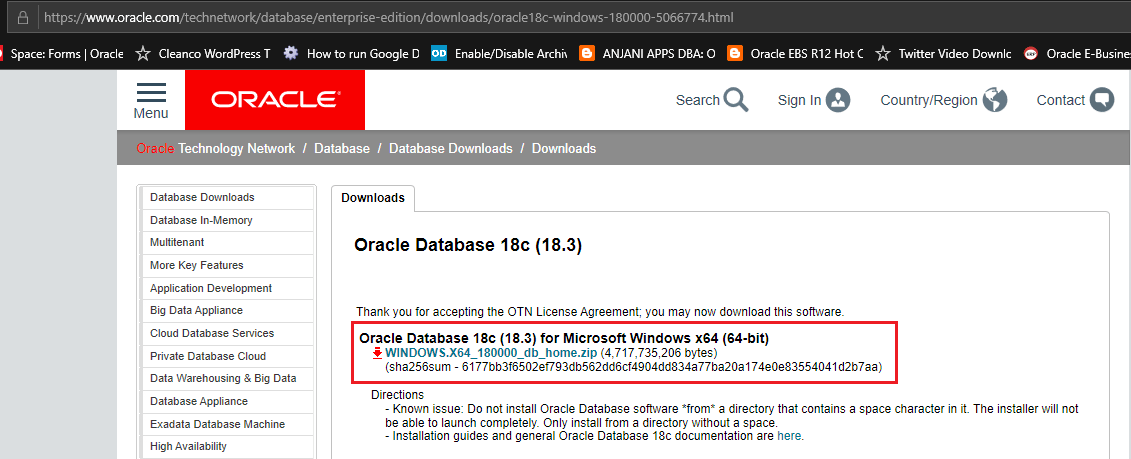
You can download Oracle 18c installation media for Windows 64Bit from the following link

https://www.oracle.com/technetwork/database/enterprise-edition/downloads/oracle18c-windows-180000-5066774.html

Please spend a moment to read what Oracle says just below the media link, “Do not install Oracle Database from a directory that contains a space character in it”

That means, while extracting the downloaded ZIP file, make sure you are extracting the archive to a folder like “D:\Oracle18c” NOT “D:\Oracle 18c” or “D:\Oracle Database 18c”

Oracle never liked “space” character in the directory name & if you are going to ignore this, you are going to have true troubles waiting for you mate.

What I have came to conclusion about Oracle 18c installation is:

Oracle is NOT anymore copying all the source files to a new destination. For example, usually when you install a software on Windows, there is installation source, from which necessary files are copied to a new destination (installed folder). This time Oracle is approaching the installation in a different fashion.

It ONLY configures the database.

That means, Once you extract the media, say to a folder called “D:\Oracle18c”, this is the same folder where the database will be installed! You will only be asked for Oracle base location, where the diagnostics and others will be configured.

The above is MY PERSONAL observation & I am yet to refer the installation documents from Oracle for clarify against what I found. Feel free to prove me wrong.

With the below installation example, I have extracted the 18c source media to a folder called “D:\Oracle_Installers\18c”, which will be the installation folder also

Run “setup.exe” as “Administrator”, that brings up a console sort of Windows that lists the installation progress (minimalistic)

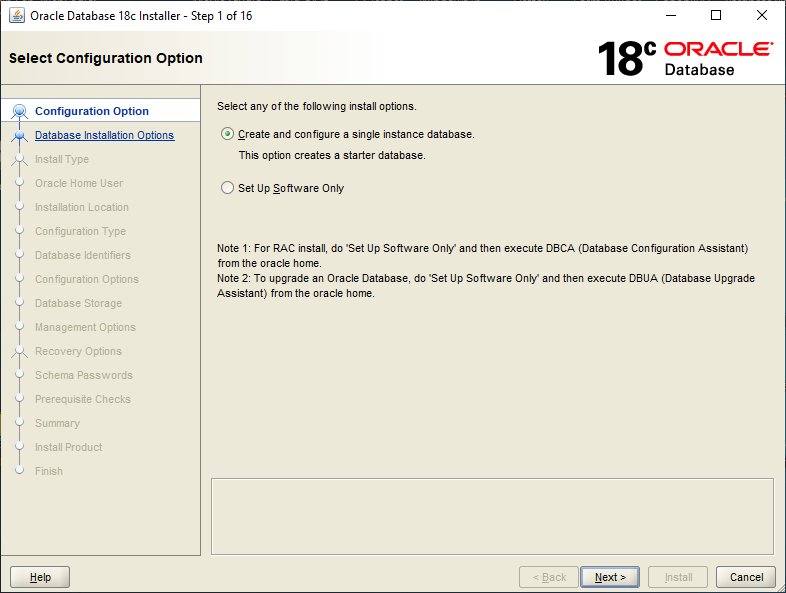
We’ll create a database along with the installation, which is quick and effective (for this TEST)

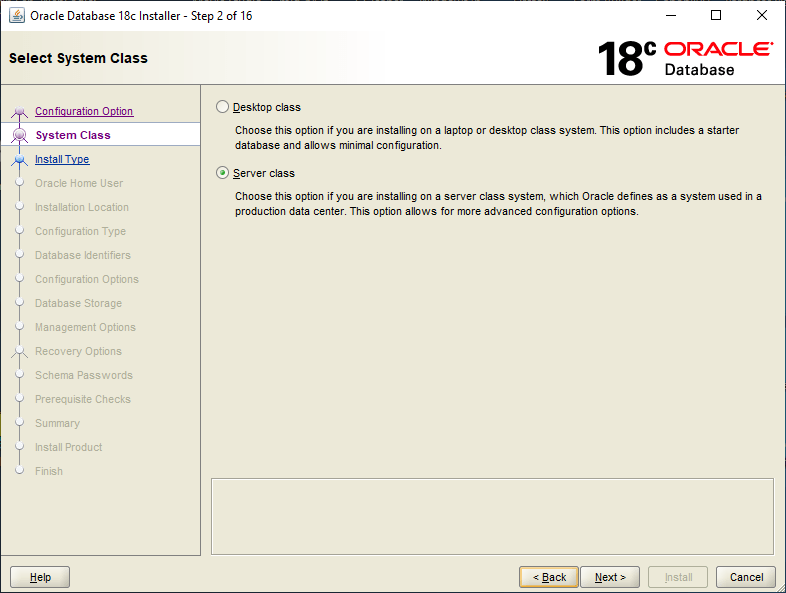
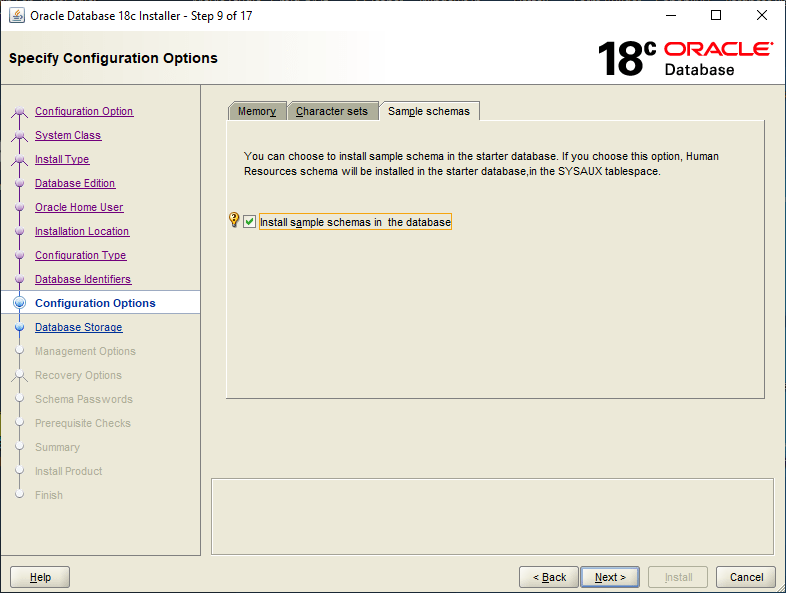
Although we are installing the software on Windows 10, We will select “Server class” for System Class to “experience” the load stress.

Usually I choose “Advanced Install”, so that I can minutely access the different options available for the database like character set, memory etc

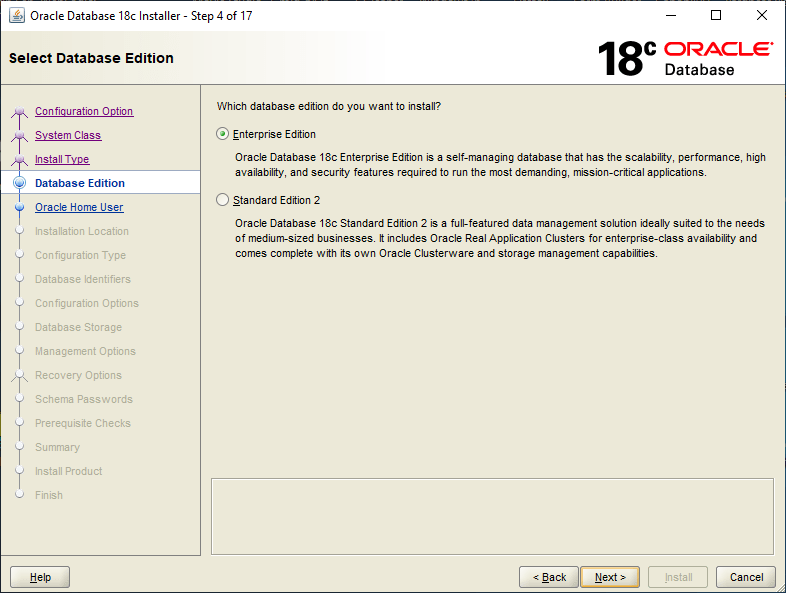
Database Edition should be “Enterprise” to experience the same “Cloud” version capabilities.

I’ve one Windows user account “Oracle” that I use for Oracle installations and setup. I suggest you also to create a non-administrator windows user “oracle” or something equivalent specifically for Oracle software.

As I have mentioned in the beginning, “The Software directory is the Oracle Database home directory”, ie, the folder from which you start the setup.exe will be the Database home directory. The path that specified by you will be the Oracle base & usually the diagnostics elements will be placed within.

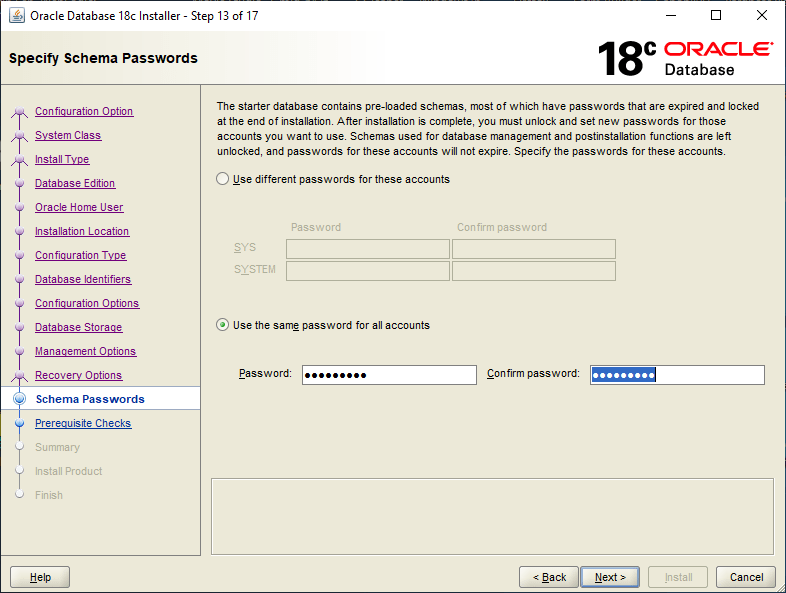
As a rule, I always select the same password for all vital accounts & the pattern is something like ‘Abcxyz123’. For a TEST lab, this saves me unwanted complexities & less documentation. For a production instance, please follow Oracle’s recommendations.

My laptop boasts one i7 8th generation processor, 16GB DDR-4 memory and 512GB Samsung 860PRO SSD. Yet, the installation takes it’s own time. So if you have less hardware configurations please wait patiently.

You know what to do with JAVA security prompts!

Once the installation over, you will be provided the link to Oracle Enteprise Manager Database Express, which is a minimalistic EM for the database. You can log in and view the database details and interact the database parameters through this interface.

I know you are smart enough to find out that I altered the below image a little bit…Well it looks something like this…

My laptop doesn’t have FLASH installed, hence I am using Internet Explorer for accessing the EM. I have to check whether I can access the EM using Firefox after installing Flash.

That’s all folks. The installation is pretty straight forward other than for the installation folder/directory design part. For a production environment, you may need to truly plan how the folder/directory name is going to be.

Ah, finally! My laptop is lagging beyond expected levels with the database services running.

Have comments & suggestions, please let them come in.

regards,

rajesh

Google Drive (Backup and sync) Service

Hello guys

Google Drive (now Backup and Sync from Google) desktop software is for personal use & terminates the software execution as soon as the user logs off from the computer. We needed a solution for a server in which we were using Google drive for legacy database backups. Following the instructions @ http://www.myrtec.com.au/kb/331-running-google-drive-as-a-windows-service, we were able to setup a Windows service executing the drive executable, which looked bit dirty from different angles as we were using some stone age software to run the Service.

Then we came across couple of discussions at

https://superuser.com/questions/463801/sync-google-drive-when-not-logged-in

https://stackoverflow.com/questions/20148768/google-drive-as-service-or-background-operation

and, were able to design a far better solution. Here how it works:

Install & setup Google Drive (Backup and Sync) software (your box/Server)

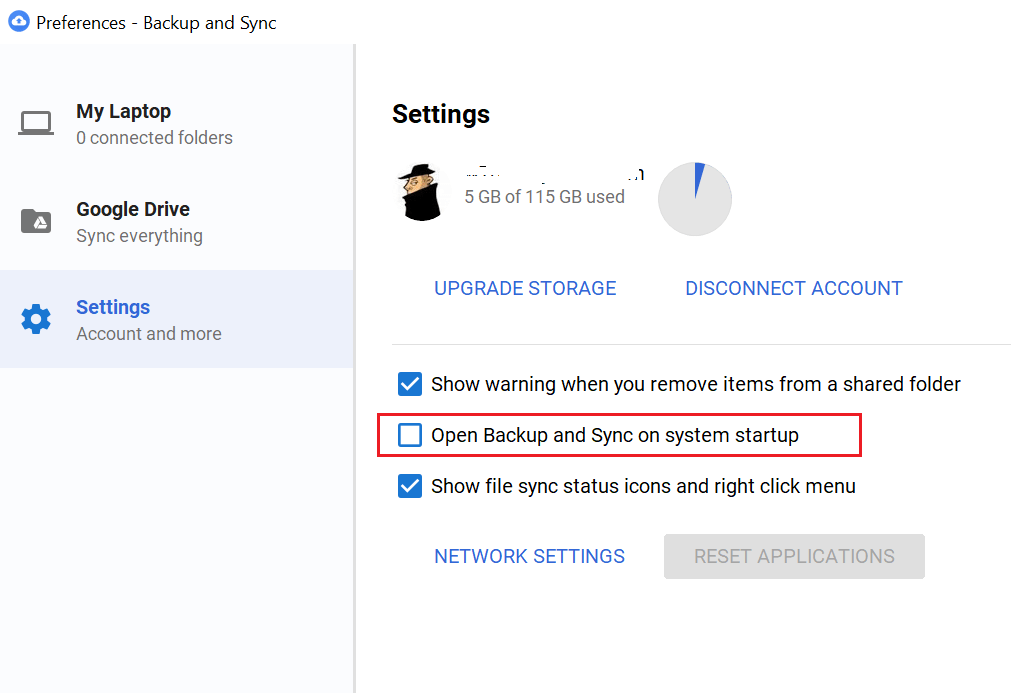
Go to settings & disable “Open Backup and Sync” on system startup

Now, you can safely quit the Backup and Sync software (Right click, quit)

Fire up Windows Task Scheduler and create a task, let us called it “Google backup and sync”

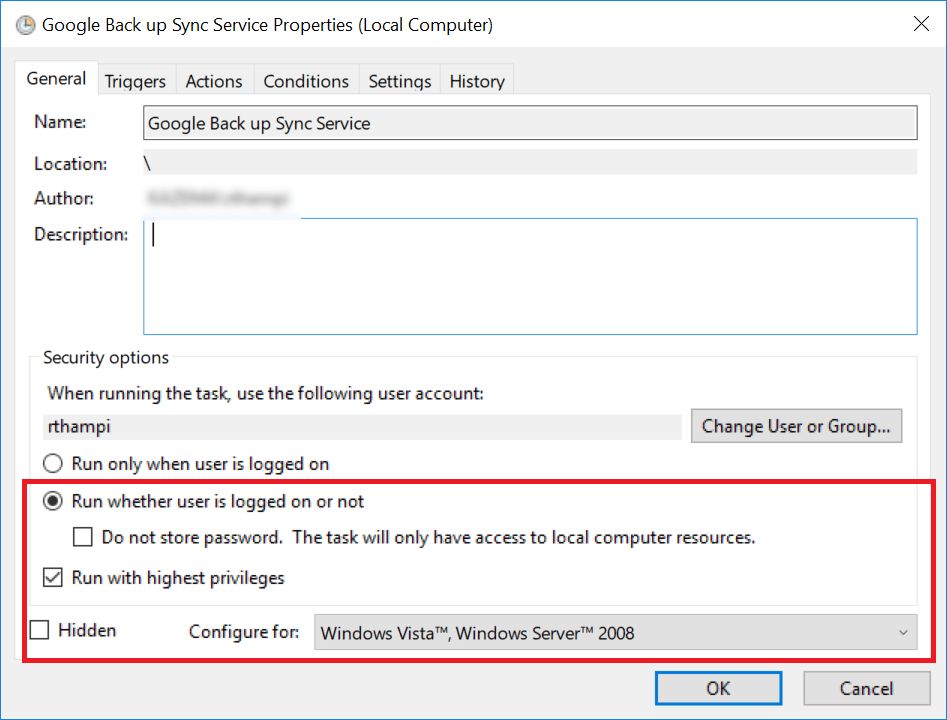
Make sure the tasks runs without the user being logged in.

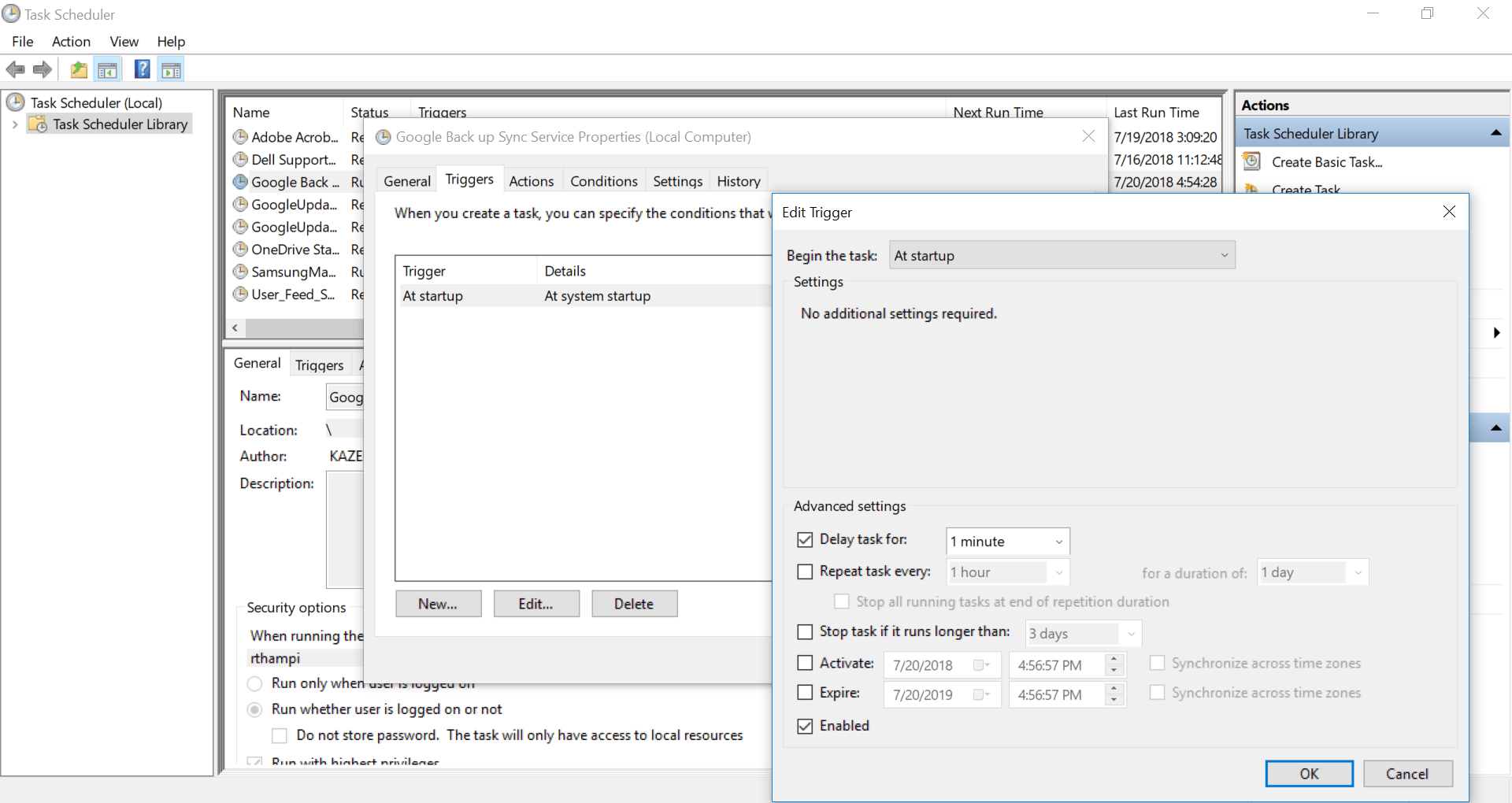
Depending upon the startup load on the server (If your server/box many services which require maximum memory and processor, delay starting the this new task by few minutes)

It is advisable to setup the startup path for the task. Just copy and paste the executable path.

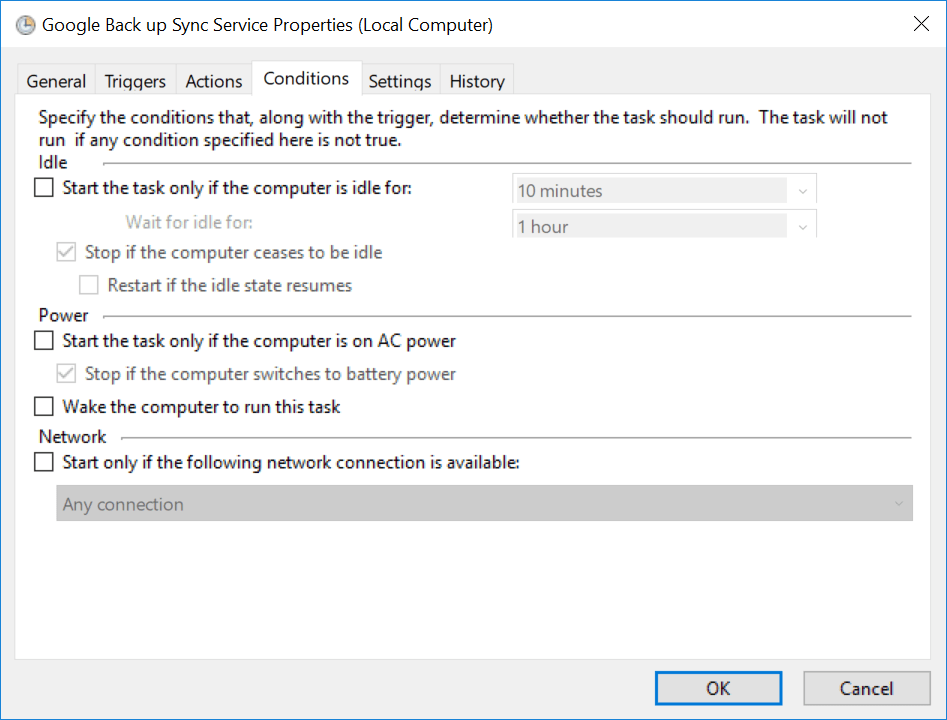
Most importantly, if you are using a laptop, make sure you are setting up whether the drive sync task should start while the laptop is on battery power.

Once all these settings, you will be asked to provide the current user password. If you have a password policy, remember to change the password for the task once after you change the account password.

That’s all. Right click and execute the task and monitor the task manager, you should see two instances of google drive sync exe file. Now, logging off shouldn’t terminate the google backup and sync.

I hope this post makes it easier for you to setup Google backup and sync for Windows servers.


rajesh

Windows 10 | 0x80070035

Update: In my case, I was able to fix the issues by re-installing Windows using the installation media over an existing Windows 10 1709 installation. I chose to keep files and applications and once after the re-installation successfully completed, achieved the desired results.

Update: Basically this is a bug, which doesn’t affect those who were keeping on upgrading from builds to new builds (ie from 15xx to 17xx). Affects most of the users who did clean installation of 1703/1709 which is yet to be addressed by Microsoft. My case, I did an upgrade from 16xx and resetting the TCP/IP, Winsock etc did the damage for me (Well, it realized that, this issue also exists ;) )

Today, I managed to realize that by just unchecking OK, Checking again and OK combinations on File and Printer Sharing Services for the network adapter fixes the dreaded issues until a restart.

12

Here are the workaround solutions until Microsoft finally releases a patch/update for it.

http://partnersupport.microsoft.com/en-us/par_clientsol/forum/par_win/windows10-1703-file-and-sharing-printer-net-view/9569d27f-d979-4c5a-9a01-98cd9c99c4f2?page=2

Other references:

https://social.technet.microsoft.com/Forums/windows/en-US/671fdb58-7d82-4078-a372-e3b50433faa4/windows-file-sharing-stops-after-every-restart?forum=win10itpronetworking

https://superuser.com/questions/443329/windows-7-file-and-printer-sharing-doesnt-work-for-me


Hi guys

Recently I tried to enable mobile hotspot on my Windows 10 (1709) Pro machine at work that is a domain member. By the time I figured out that the connection issues clients connected to the ad-hoc network were purely related to some authentication issues with our UTM device…it was too late.

I did enough damage to the network stack of my box, reset winsock, rebuilt TCP/IP, resetting the firewall.. and after fixing the issues with mobile hotspot, started having issues with the HP printer and a particular folder that I share with my team.

Both the printer and shared folder cannot be accessed over network, the funniest part was from my local machine itself I couldn’t access the shared folder by calling it like

\\mymachinename\foldername

So as usual I tried to fix the issues using Windows trouble shooters and all the time I was getting the same info “0x80070035” and further diagnostics gave me:

“The device or resource <<HOSTNAME>> is not set up to accept connections on port “The File and printer sharing (SMB)”.”

I tried to find more details, especially about the above statement and unfortunately, none of the questions asked by users in relation were satisfactorily answered by Microsoft.

Then I landed on a Microsoft page @ https://answers.microsoft.com/en-us/windows/forum/windows_10-networking/windows-10-pc-rejecting-incoming-connections/a36974c7-3208-4489-ad44-962838c38b29

The last contributor asks Is “File and Printer sharing for Microsoft Networks” enabled under the properties of the network card?, for obvious reasons I was sure that this service is enabled under the network properties of my Ethernet device.

Logically, my next approach was to uninstall this service from the adaptor, re-install it. Immediately after reinstalling the service, all the shared assets from my laptop were accessible over the network.

Still not happy, I rebooted the machine, to find out that the shares were once again having the same issue(s).

0x80070035

So I uninstalled and reinstalled the “File and Printer sharing for Microsoft Networks” service and this time reset the Defender Firewall to defaults. Instead of restart I did a shutdown, waited few minutes and restarted it.

As I am drafting this post, I have checked the access it is working perfect. Will reboot one more time to insure that this fix is permanent.

I don’t know the technical reasons behind this erratic behavior, however it looks like one more time uninstalling and installing the “File and Printer sharing for Microsoft Networks” fixes the issues (minimum for now) & until a reboot.

If you are facing the same issue(s), why don’t give it a try.

regards,

rajesh


RMAN | Restore Linux Backup to Windows

Update(06-March-2018)

Once after I built the Windows Instance from Linux Backups, I have started a thread with community.oracle.com, expecting answers for few concerns. Below, please have a look at the thread

https://community.oracle.com/tech/developers/discussion/4126422/rman-oracle-11gr2-11-2-0-4-restoring-linux-backup-to-windows-instance

jgarry states, as the redo logs are not applied, I am risking data loss. Now, I don’t really think someone would move from Linux to Windows for Oracle database, when the opposite happens most of the times.

We will consider the entire exercise as limited LAB & for some reasons, if this has to be performed for a production instance, make sure AN IMAGE BACKUP/Cold Backup is available to avoid possible data loss. Cold backup routine as below:

RMAN> shutdown immediate;

RMAN> startup mount;

RMAN>backup database; #replace with your backup routine

RMAN>

Hi guys

Greetings. I have been hell busy during last few weeks. Traveling, fixing stuffs & as usual learning new “things”. This time I am working with RMAN, the recovery manager for Oracle database & trying to establish something that is NOT that orthodox or this is how I feel once after going through many documents.  Well, remember we did hack installations, we got “stuffs” work ;). So why not give it a try?
Attempted: Restoring Linux RMAN backup(s) to Windows. Doable? Well, YES.

Cons: No idea yet (6-March-2018, possible data loss as the redo log files will not be readable)

Could be used at Production: At your own risk

I am not going to break the flow anywhere, it is a lengthy one shot document. Prior giving it a try, make sure you have copied the backups from Linux machine to your Windows Machine.

Microsoft Windows [Version 10.0.16299.248]
(c) 2017 Microsoft Corporation. All rights reserved.

C:\WINDOWS\system32>d:

D:\>cd Oracle11g64\product\11.2.0\dbhome_1\BIN

D:\Oracle11g64\product\11.2.0\dbhome_1\BIN>oradim -new -sid LINUXDB
Instance created.

D:\Oracle11g64\product\11.2.0\dbhome_1\BIN>set ORACLE_SID=LINUXDB

D:\Oracle11g64\product\11.2.0\dbhome_1\BIN>rman target /

Recovery Manager: Release 11.2.0.4.0 - Production on Thu Mar 1 13:34:58 2018

Copyright (c) 1982, 2011, Oracle and/or its affiliates. All rights reserved.

connected to target database (not started)

RMAN> set DBID=439294518 shutdown immediate

using target database control file instead of recovery catalog
Oracle instance shut down
--We will use a copy of Windows environment specific INIT file to
--Manually create a INIT file for our new database
--sample
--make sure you have created all paths mentioned in the INIT file prior restarting the database
LINUXDB.__db_cache_size=486539264
LINUXDB.__java_pool_size=8388608
LINUXDB.__large_pool_size=8388608
LINUXDB.__shared_pool_size=746586112
LINUXDB.__streams_pool_size=0
*.audit_file_dest='D:\Oracle11g64\admin\LINUXDB\adump'
*.compatible='11.2.0.4.0'
*.control_files='D:\Oracle11g64\oradata\LINUXDB\control01.ctl','D:\Oracle11g64\oradata\LINUXDB\control02.ctl','D:\Oracle11g64\oradata\LINUXDB\control03.ctl'
*.db_block_size=8192
*.db_domain=''
*.db_file_multiblock_read_count=16
*.db_name='DB11G' #source database name
*.db_recovery_file_dest='D:\Oracle11g64\oradata\LINUXDB\flash_recovery_area'
*.db_recovery_file_dest_size=2147483648
*.dispatchers='(PROTOCOL=TCP) (SERVICE=DB11GXDB)'
*.job_queue_processes=10
*.log_archive_dest_1='LOCATION=H:\db11g\archivelog'
*.log_archive_format='DB11G_ARC%S_%R.%T'
*.open_cursors=300
*.pga_aggregate_target=418381824
*.processes=150
*.remote_login_passwordfile='EXCLUSIVE'
*.sga_target=1256194048
*.undo_management='AUTO'
*.undo_tablespace='UNDOTBS1'
--Sample INITFILE end

RMAN> startup nomount;

connected to target database (not started)
Oracle instance started

Total System Global Area 1252663296 bytes

Fixed Size 2280816 bytes
Variable Size 402653840 bytes
Database Buffers 838860800 bytes
Redo Buffers 8867840 bytes

RMAN> restore controlfile from 'H:\db11g\backup\bkpcontrol_file.ctl_DB11G_20180301';

Starting restore at 01-MAR-18
allocated channel: ORA_DISK_1
channel ORA_DISK_1: SID=63 device type=DISK

channel ORA_DISK_1: restoring control file
channel ORA_DISK_1: restore complete, elapsed time: 00:00:03
output file name=D:\ORACLE11G64\ORADATA\LINUXDB\CONTROL01.CTL
output file name=D:\ORACLE11G64\ORADATA\LINUXDB\CONTROL02.CTL
output file name=D:\ORACLE11G64\ORADATA\LINUXDB\CONTROL03.CTL
Finished restore at 01-MAR-18

RMAN> alter database mount;

database mounted
released channel: ORA_DISK_1

RMAN> catalog start with 'H:\db11g\backup';

Starting implicit crosscheck backup at 01-MAR-18
allocated channel: ORA_DISK_1
channel ORA_DISK_1: SID=191 device type=DISK
allocated channel: ORA_DISK_2
channel ORA_DISK_2: SID=129 device type=DISK
Crosschecked 18 objects
Finished implicit crosscheck backup at 01-MAR-18

Starting implicit crosscheck copy at 01-MAR-18
using channel ORA_DISK_1
using channel ORA_DISK_2
Finished implicit crosscheck copy at 01-MAR-18

searching for all files in the recovery area
cataloging files...
no files cataloged

searching for all files that match the pattern H:\db11g\backup

List of Files Unknown to the Database
=====================================
File Name: H:\DB11G\backup\archive_DB11G_lvl0_07ssmmpl_1_1
File Name: H:\DB11G\backup\archive_DB11G_lvl0_08ssmmpl_1_1
File Name: H:\DB11G\backup\archive_DB11G_lvl0_0kssmnh4_1_1
File Name: H:\DB11G\backup\archive_DB11G_lvl0_0lssmnh4_1_1
File Name: H:\DB11G\backup\bkpcontrol_file.ctl_DB11G_20180301
File Name: H:\DB11G\backup\ctl_c-439294518-20180301-00
File Name: H:\DB11G\backup\ctl_c-439294518-20180301-01
File Name: H:\DB11G\backup\ctl_c-439294518-20180301-02
File Name: H:\DB11G\backup\ctl_c-439294518-20180301-03
File Name: H:\DB11G\backup\ctl_c-439294518-20180301-04
File Name: H:\DB11G\backup\rman_comp_DB11G_lvl0_01ssmmoc_1_1
File Name: H:\DB11G\backup\rman_comp_DB11G_lvl0_02ssmmoc_1_1
File Name: H:\DB11G\backup\rman_comp_DB11G_lvl0_03ssmmoc_1_1
File Name: H:\DB11G\backup\rman_comp_DB11G_lvl0_04ssmmoc_1_1
File Name: H:\DB11G\backup\rman_comp_DB11G_lvl0_05ssmmoe_1_1
File Name: H:\DB11G\backup\rman_comp_DB11G_lvl0_0essmng7_1_1
File Name: H:\DB11G\backup\rman_comp_DB11G_lvl0_0fssmng7_1_1
File Name: H:\DB11G\backup\rman_comp_DB11G_lvl0_0gssmng7_1_1
File Name: H:\DB11G\backup\rman_comp_DB11G_lvl0_0hssmng7_1_1
File Name: H:\DB11G\backup\rman_comp_DB11G_lvl0_0issmnga_1_1

Do you really want to catalog the above files (enter YES or NO)? YES
cataloging files...
cataloging done

List of Cataloged Files
=======================
File Name: H:\DB11G\backup\archive_DB11G_lvl0_07ssmmpl_1_1
File Name: H:\DB11G\backup\archive_DB11G_lvl0_08ssmmpl_1_1
File Name: H:\DB11G\backup\archive_DB11G_lvl0_0kssmnh4_1_1
File Name: H:\DB11G\backup\archive_DB11G_lvl0_0lssmnh4_1_1
File Name: H:\DB11G\backup\bkpcontrol_file.ctl_DB11G_20180301
File Name: H:\DB11G\backup\ctl_c-439294518-20180301-00
File Name: H:\DB11G\backup\ctl_c-439294518-20180301-01
File Name: H:\DB11G\backup\ctl_c-439294518-20180301-02
File Name: H:\DB11G\backup\ctl_c-439294518-20180301-03
File Name: H:\DB11G\backup\ctl_c-439294518-20180301-04
File Name: H:\DB11G\backup\rman_comp_DB11G_lvl0_01ssmmoc_1_1
File Name: H:\DB11G\backup\rman_comp_DB11G_lvl0_02ssmmoc_1_1
File Name: H:\DB11G\backup\rman_comp_DB11G_lvl0_03ssmmoc_1_1
File Name: H:\DB11G\backup\rman_comp_DB11G_lvl0_04ssmmoc_1_1
File Name: H:\DB11G\backup\rman_comp_DB11G_lvl0_05ssmmoe_1_1
File Name: H:\DB11G\backup\rman_comp_DB11G_lvl0_0essmng7_1_1
File Name: H:\DB11G\backup\rman_comp_DB11G_lvl0_0fssmng7_1_1
File Name: H:\DB11G\backup\rman_comp_DB11G_lvl0_0gssmng7_1_1
File Name: H:\DB11G\backup\rman_comp_DB11G_lvl0_0hssmng7_1_1
File Name: H:\DB11G\backup\rman_comp_DB11G_lvl0_0issmnga_1_1

--Once the catalog built, query the schema for datafile details
RMAN> report schema;

RMAN-06139: WARNING: control file is not current for REPORT SCHEMA
Report of database schema for database with db_unique_name DB11G

List of Permanent Datafiles
===========================
File Size(MB) Tablespace RB segs Datafile Name
---- -------- -------------------- ------- ------------------------
1 0 SYSTEM *** /u01/app/oracle/oradata/DB11G/system01.dbf
2 0 SYSAUX *** /u01/app/oracle/oradata/DB11G/sysaux01.dbf
3 0 UNDOTBS1 *** /u01/app/oracle/oradata/DB11G/undotbs01.dbf
4 0 USERS *** /u01/app/oracle/oradata/DB11G/users01.dbf

List of Temporary Files
=======================
File Size(MB) Tablespace Maxsize(MB) Tempfile Name
---- -------- -------------------- ----------- --------------------
1 20 TEMP 32767 /u01/app/oracle/oradata/DB11G/temp01.dbf

--We can get the last sequence number of the archivelog by running the below query
--Which we will use for media recovery

RMAN> list archivelog all;

List of Archived Log Copies for database with db_unique_name DB11G
=====================================================================

Key Thrd Seq S Low Time
------- ---- ------- - ---------
1 1 5 A 01-MAR-18
Name: /u02/archivelog/DB11G_ARC0000000005_0969624950_0001.arc

2 1 6 A 01-MAR-18
Name: /u02/archivelog/DB11G_ARC0000000006_0969624950_0001.arc

3 1 7 A 01-MAR-18
Name: /u02/archivelog/DB11G_ARC0000000007_0969624950_0001.arc

4 1 8 A 01-MAR-18
Name: /u02/archivelog/DB11G_ARC0000000008_0969624950_0001.arc

--As 8 being the last sequence, we will add 8+1=9 AS the sequence number for the media recovery
RMAN> run
{
SET UNTIL SEQUENCE 9 THREAD 1;
set newname for datafile 1 to 'D:\Oracle11g64\oradata\LINUXDB\system01.dbf';
set newname for datafile 2 to 'D:\Oracle11g64\oradata\LINUXDB\sysaux01.dbf';
set newname for datafile 3 to 'D:\Oracle11g64\oradata\LINUXDB\undotbs01.dbf';
set newname for datafile 4 to 'D:\Oracle11g64\oradata\LINUXDB\users01.dbf';
restore database;
switch datafile all;
recover database;
}

executing command: SET until clause

executing command: SET NEWNAME

executing command: SET NEWNAME

executing command: SET NEWNAME

executing command: SET NEWNAME

Starting restore at 01-MAR-18
using channel ORA_DISK_1
using channel ORA_DISK_2

channel ORA_DISK_1: starting datafile backup set restore
channel ORA_DISK_1: specifying datafile(s) to restore from backup set
channel ORA_DISK_1: restoring datafile 00004 to D:\Oracle11g64\oradata\LINUXDB\users01.dbf
channel ORA_DISK_1: reading from backup piece H:\DB11G\BACKUP\RMAN_COMP_DB11G_LVL0_0ISSMNGA_1_1
channel ORA_DISK_2: starting datafile backup set restore
channel ORA_DISK_2: specifying datafile(s) to restore from backup set
channel ORA_DISK_2: restoring datafile 00003 to D:\Oracle11g64\oradata\LINUXDB\undotbs01.dbf
channel ORA_DISK_2: reading from backup piece H:\DB11G\BACKUP\RMAN_COMP_DB11G_LVL0_0GSSMNG7_1_1
channel ORA_DISK_1: piece handle=H:\DB11G\BACKUP\RMAN_COMP_DB11G_LVL0_0ISSMNGA_1_1 tag=DAILYFULL_DB_LVL0_BKP
channel ORA_DISK_1: restored backup piece 1
channel ORA_DISK_1: restore complete, elapsed time: 00:00:02
channel ORA_DISK_1: starting datafile backup set restore
channel ORA_DISK_1: specifying datafile(s) to restore from backup set
channel ORA_DISK_1: restoring datafile 00002 to D:\Oracle11g64\oradata\LINUXDB\sysaux01.dbf
channel ORA_DISK_1: reading from backup piece H:\DB11G\BACKUP\RMAN_COMP_DB11G_LVL0_0FSSMNG7_1_1
channel ORA_DISK_2: piece handle=H:\DB11G\BACKUP\RMAN_COMP_DB11G_LVL0_0GSSMNG7_1_1 tag=DAILYFULL_DB_LVL0_BKP
channel ORA_DISK_2: restored backup piece 1
channel ORA_DISK_2: restore complete, elapsed time: 00:00:08
channel ORA_DISK_2: starting datafile backup set restore
channel ORA_DISK_2: specifying datafile(s) to restore from backup set
channel ORA_DISK_2: restoring datafile 00001 to D:\Oracle11g64\oradata\LINUXDB\system01.dbf
channel ORA_DISK_2: reading from backup piece H:\DB11G\BACKUP\RMAN_COMP_DB11G_LVL0_0ESSMNG7_1_1
channel ORA_DISK_1: piece handle=H:\DB11G\BACKUP\RMAN_COMP_DB11G_LVL0_0FSSMNG7_1_1 tag=DAILYFULL_DB_LVL0_BKP
channel ORA_DISK_1: restored backup piece 1
channel ORA_DISK_1: restore complete, elapsed time: 00:00:22
channel ORA_DISK_2: piece handle=H:\DB11G\BACKUP\RMAN_COMP_DB11G_LVL0_0ESSMNG7_1_1 tag=DAILYFULL_DB_LVL0_BKP
channel ORA_DISK_2: restored backup piece 1
channel ORA_DISK_2: restore complete, elapsed time: 00:00:35
Finished restore at 01-MAR-18

datafile 1 switched to datafile copy
input datafile copy RECID=5 STAMP=969632161 file name=D:\ORACLE11G64\ORADATA\LINUXDB\SYSTEM01.DBF
datafile 2 switched to datafile copy
input datafile copy RECID=6 STAMP=969632161 file name=D:\ORACLE11G64\ORADATA\LINUXDB\SYSAUX01.DBF
datafile 3 switched to datafile copy
input datafile copy RECID=7 STAMP=969632161 file name=D:\ORACLE11G64\ORADATA\LINUXDB\UNDOTBS01.DBF
datafile 4 switched to datafile copy
input datafile copy RECID=8 STAMP=969632162 file name=D:\ORACLE11G64\ORADATA\LINUXDB\USERS01.DBF

Starting recover at 01-MAR-18
using channel ORA_DISK_1
using channel ORA_DISK_2

starting media recovery

channel ORA_DISK_1: starting archived log restore to default destination
channel ORA_DISK_1: restoring archived log
archived log thread=1 sequence=7
channel ORA_DISK_1: reading from backup piece H:\DB11G\BACKUP\ARCHIVE_DB11G_LVL0_0KSSMNH4_1_1
channel ORA_DISK_2: starting archived log restore to default destination
channel ORA_DISK_2: restoring archived log
archived log thread=1 sequence=8
channel ORA_DISK_2: reading from backup piece H:\DB11G\BACKUP\ARCHIVE_DB11G_LVL0_0LSSMNH4_1_1
channel ORA_DISK_1: piece handle=H:\DB11G\BACKUP\ARCHIVE_DB11G_LVL0_0KSSMNH4_1_1 tag=TAG20180301T132700
channel ORA_DISK_1: restored backup piece 1
channel ORA_DISK_1: restore complete, elapsed time: 00:00:01
archived log file name=H:\DB11G\ARCHIVELOG\DB11G_ARC0000000007_0969624950.0001 thread=1 sequence=7
channel ORA_DISK_2: piece handle=H:\DB11G\BACKUP\ARCHIVE_DB11G_LVL0_0LSSMNH4_1_1 tag=TAG20180301T132700
channel ORA_DISK_2: restored backup piece 1
channel ORA_DISK_2: restore complete, elapsed time: 00:00:01
archived log file name=H:\DB11G\ARCHIVELOG\DB11G_ARC0000000008_0969624950.0001 thread=1 sequence=8
media recovery complete, elapsed time: 00:00:02
Finished recover at 01-MAR-18

RMAN> exit

Recovery Manager complete.

D:\Oracle11g64\product\11.2.0\dbhome_1\BIN>

--SQL Activities
Microsoft Windows [Version 10.0.16299.248]
(c) 2017 Microsoft Corporation. All rights reserved.

C:\WINDOWS\system32>d:

D:\>cd D:\Oracle11g64\product\11.2.0\dbhome_1\BIN

D:\Oracle11g64\product\11.2.0\dbhome_1\BIN>set ORACLE_SID=LINUXDB

D:\Oracle11g64\product\11.2.0\dbhome_1\BIN>sqlplus / as sysdba

SQL*Plus: Release 11.2.0.4.0 Production on Thu Mar 1 14:18:44 2018

Copyright (c) 1982, 2013, Oracle. All rights reserved.

Connected to:
Oracle Database 11g Enterprise Edition Release 11.2.0.4.0 - 64bit Production
With the Partitioning, OLAP, Data Mining and Real Application Testing options

SQL> SELECT GROUP#, STATUS FROM V$LOG
2 /

GROUP# STATUS
---------- ----------------
1 INACTIVE
3 CURRENT
2 INACTIVE

SQL> SELECT MEMBER FROM V$LOGFILE;

MEMBER
--------------------------------------------------------------------------------
/u01/app/oracle/oradata/DB11G/redo03.log
/u01/app/oracle/oradata/DB11G/redo02.log
/u01/app/oracle/oradata/DB11G/redo01.log

--As the datafiles for the redo logs are pointing towards the LINUX file system
--We need to recreate redo log files for the Windows environment
--Prior that, we will try to drop those redo log groups which are inactive
--In our case redo log group 3 is the one active, hence 1,2 should be available to be dropped

SQL> alter database drop logfile group 1;

Database altered.

SQL> alter database drop logfile group 2;
alter database drop logfile group 2
*
ERROR at line 1:
ORA-01567: dropping log 2 would leave less than 2 log files for instance
linuxdb (thread 1)
ORA-00312: online log 2 thread 1: '/u01/app/oracle/oradata/DB11G/redo02.log'

--Minimum 2 redo log files are required for the instance, so dropping redo log group 2 fails in our case
--So we will add more redo groups to the database

SQL> alter database add logfile group 4
2 ('D:\Oracle11g64\oradata\LINUXDB\redo04.rdo','D:\Oracle11g64\oradata\LINUXDB\redo04a.rdo') size 50M;

Database altered.

SQL> alter database add logfile group 5
2 ('D:\Oracle11g64\oradata\LINUXDB\redo05.rdo','D:\Oracle11g64\oradata\LINUXDB\redo05a.rdo') size 50M;

Database altered.

SQL> alter database add logfile group 6
2 ('D:\Oracle11g64\oradata\LINUXDB\redo06.rdo','D:\Oracle11g64\oradata\LINUXDB\redo06a.rdo') size 50M;

Database altered.

--Now try to drop the rego log file group 2
SQL> alter database drop logfile group 2;

Database altered.

--Can we drop the redo group 3 finally?
SQL> alter database drop logfile group 3;
alter database drop logfile group 3
*
ERROR at line 1:
ORA-01623: log 3 is current log for instance linuxdb (thread 1) - cannot drop
ORA-00312: online log 3 thread 1: '/u01/app/oracle/oradata/DB11G/redo03.log'

--We cannot drop the redo group 3 because it is being the current redo group for the database
--We cannot switch the log file group because the database is not open

SQL> alter system switch logfile;
alter system switch logfile
*
ERROR at line 1:
ORA-01109: database not open

--We cannot rename the redo log group members because the filenames are not recognized by the Windows environment

SQL> alter database rename file '/u01/app/oracle/oradata/DB11G/redo03.log' to 'D:\Oracle11g64\oradata\LINUXDB\redo03.log';
alter database rename file '/u01/app/oracle/oradata/DB11G/redo03.log' to 'D:\Oracle11g64\oradata\LINUXDB\redo03.log'
*
ERROR at line 1:
ORA-01511: error in renaming log/data files
ORA-01516: nonexistent log file, data file, or temporary file
"/u01/app/oracle/oradata/DB11G/redo03.log"

--Though we know the database cannot be opened, let us give it an attempt
SQL> alter database open resetlogs;
alter database open resetlogs
*
ERROR at line 1:
ORA-00344: unable to re-create online log
'/u01/app/oracle/oradata/DB11G/redo03.log'
ORA-27040: file create error, unable to create file
OSD-04002: unable to open file
O/S-Error: (OS 3) The system cannot find the path specified.
--Expected, we will proceed to next step

SQL> shutdown immediate
ORA-01109: database not open

Database dismounted.
ORACLE instance shut down.
SQL> startup nomount
ORACLE instance started.

Total System Global Area 1252663296 bytes
Fixed Size 2280816 bytes
Variable Size 402653840 bytes
Database Buffers 838860800 bytes
Redo Buffers 8867840 bytes
SQL> alter database backup controlfile to trace as 'D:\Oracle11g64\oradata\LINUXDB\ctrlfile.trc';
alter database backup controlfile to trace as 'D:\Oracle11g64\oradata\LINUXDB\ctrlfile.trc'
*
ERROR at line 1:
ORA-01507: database not mounted

SQL> alter database mount
2 /

Database altered.
--We will trace the current control file to a readable format now

SQL> alter database backup controlfile to trace as 'D:\Oracle11g64\oradata\LINUXDB\ctrlfile.trc';

Database altered.

SQL> shutdown immediate;
ORA-01109: database not open

Database dismounted.
ORACLE instance shut down.

--Start the database in nomount state, so that we can try to create a fresh control file for the database
--Using NORESETLOGS
--COPY AND PASTE THE CREATE CONTROL FILE SEGEMENT FROM THE controlfile trace
--Do not forget to remove the line(s) pointing towards redo log files from LINUX enviornment
SQL> startup nomount
ORACLE instance started.

Total System Global Area 1252663296 bytes
Fixed Size 2280816 bytes
Variable Size 402653840 bytes
Database Buffers 838860800 bytes
Redo Buffers 8867840 bytes
SQL> CREATE CONTROLFILE REUSE DATABASE "DB11G" NORESETLOGS ARCHIVELOG
2 MAXLOGFILES 16
3 MAXLOGMEMBERS 3
4 MAXDATAFILES 100
5 MAXINSTANCES 8
6 MAXLOGHISTORY 292
7 LOGFILE
8 GROUP 4 (
9 'D:\ORACLE11G64\ORADATA\LINUXDB\REDO04.RDO',
10 'D:\ORACLE11G64\ORADATA\LINUXDB\REDO04A.RDO'
11 ) SIZE 50M BLOCKSIZE 512,
12 GROUP 5 (
13 'D:\ORACLE11G64\ORADATA\LINUXDB\REDO05.RDO',
14 'D:\ORACLE11G64\ORADATA\LINUXDB\REDO05A.RDO'
15 ) SIZE 50M BLOCKSIZE 512,
16 GROUP 6 (
17 'D:\ORACLE11G64\ORADATA\LINUXDB\REDO06.RDO',
18 'D:\ORACLE11G64\ORADATA\LINUXDB\REDO06A.RDO'
19 ) SIZE 50M BLOCKSIZE 512
20 -- STANDBY LOGFILE
21 DATAFILE
22 'D:\ORACLE11G64\ORADATA\LINUXDB\SYSTEM01.DBF',
23 'D:\ORACLE11G64\ORADATA\LINUXDB\SYSAUX01.DBF',
24 'D:\ORACLE11G64\ORADATA\LINUXDB\UNDOTBS01.DBF',
25 'D:\ORACLE11G64\ORADATA\LINUXDB\USERS01.DBF'
26 CHARACTER SET AL32UTF8
27 ;
CREATE CONTROLFILE REUSE DATABASE "DB11G" NORESETLOGS ARCHIVELOG
*
ERROR at line 1:
ORA-01503: CREATE CONTROLFILE failed
ORA-01192: must have at least one enabled thread

--So, next attempt we will try to create the control file using RESETLOGS

SQL> CREATE CONTROLFILE REUSE DATABASE "DB11G" RESETLOGS ARCHIVELOG
2 MAXLOGFILES 16
3 MAXLOGMEMBERS 3
4 MAXDATAFILES 100
5 MAXINSTANCES 8
6 MAXLOGHISTORY 292
7 LOGFILE
8 GROUP 4 (
9 'D:\ORACLE11G64\ORADATA\LINUXDB\REDO04.RDO',
10 'D:\ORACLE11G64\ORADATA\LINUXDB\REDO04A.RDO'
11 ) SIZE 50M BLOCKSIZE 512,
12 GROUP 5 (
13 'D:\ORACLE11G64\ORADATA\LINUXDB\REDO05.RDO',
14 'D:\ORACLE11G64\ORADATA\LINUXDB\REDO05A.RDO'
15 ) SIZE 50M BLOCKSIZE 512,
16 GROUP 6 (
17 'D:\ORACLE11G64\ORADATA\LINUXDB\REDO06.RDO',
18 'D:\ORACLE11G64\ORADATA\LINUXDB\REDO06A.RDO'
19 ) SIZE 50M BLOCKSIZE 512
20 -- STANDBY LOGFILE
21 DATAFILE
22 'D:\ORACLE11G64\ORADATA\LINUXDB\SYSTEM01.DBF',
23 'D:\ORACLE11G64\ORADATA\LINUXDB\SYSAUX01.DBF',
24 'D:\ORACLE11G64\ORADATA\LINUXDB\UNDOTBS01.DBF',
25 'D:\ORACLE11G64\ORADATA\LINUXDB\USERS01.DBF'
26 CHARACTER SET AL32UTF8
27 ;

Control file created.

SQL> alter database open resetlogs;

Database altered.

SQL> shutdown immediate;
Database closed.
Database dismounted.
ORACLE instance shut down.
SQL> startup
ORACLE instance started.

Total System Global Area 1252663296 bytes
Fixed Size 2280816 bytes
Variable Size 402653840 bytes
Database Buffers 838860800 bytes
Redo Buffers 8867840 bytes
Database mounted.
Database opened.
SQL> create temporary tablespace TEMP01 TEMPFILE 'D:\Oracle11g64\oradata\LINUXDB\TEMP01.dbf' SIZE 200M;

Tablespace created.

SQL> ALTER DATABASE DEFAULT TEMPORARY TABLESPACE TEMP01;

Database altered.

SQL> drop tablespace TEMP including contents and datafiles;

Tablespace dropped.

SQL> create temporary tablespace TEMP TEMPFILE 'D:\Oracle11g64\oradata\LINUXDB\TEMP02.dbf' SIZE 200M;

Tablespace created.

SQL> ALTER DATABASE DEFAULT TEMPORARY TABLESPACE TEMP;

Database altered.

--You may drop the TEMP01 tablespace and content once after a shutdown, startup procedure

--Now we will attempt to change the DBID &amp; DATABASE name for the database

SQL> shutdown immediate
Database closed.
Database dismounted.
ORACLE instance shut down.
SQL> startup mount
ORACLE instance started.

Total System Global Area 1252663296 bytes
Fixed Size 2280816 bytes
Variable Size 402653840 bytes
Database Buffers 838860800 bytes
Redo Buffers 8867840 bytes
Database mounted.
SQL> quit
Disconnected from Oracle Database 11g Enterprise Edition Release 11.2.0.4.0 - 64bit Production
With the Partitioning, OLAP, Data Mining and Real Application Testing options

D:\Oracle11g64\product\11.2.0\dbhome_1\BIN>nid target=/ DBNAME=LINUXDB

DBNEWID: Release 11.2.0.4.0 - Production on Thu Mar 1 14:52:32 2018

Copyright (c) 1982, 2011, Oracle and/or its affiliates. All rights reserved.

Connected to database DB11G (DBID=439294518)

Connected to server version 11.2.0

Control Files in database:
D:\ORACLE11G64\ORADATA\LINUXDB\CONTROL01.CTL
D:\ORACLE11G64\ORADATA\LINUXDB\CONTROL02.CTL
D:\ORACLE11G64\ORADATA\LINUXDB\CONTROL03.CTL

Change database ID and database name DB11G to LINUXDB? (Y/[N]) => Y

Proceeding with operation
Changing database ID from 439294518 to 3227660209
Changing database name from DB11G to LINUXDB
Control File D:\ORACLE11G64\ORADATA\LINUXDB\CONTROL01.CTL - modified
Control File D:\ORACLE11G64\ORADATA\LINUXDB\CONTROL02.CTL - modified
Control File D:\ORACLE11G64\ORADATA\LINUXDB\CONTROL03.CTL - modified
Datafile D:\ORACLE11G64\ORADATA\LINUXDB\SYSTEM01.DB - dbid changed, wrote new name
Datafile D:\ORACLE11G64\ORADATA\LINUXDB\SYSAUX01.DB - dbid changed, wrote new name
Datafile D:\ORACLE11G64\ORADATA\LINUXDB\UNDOTBS01.DB - dbid changed, wrote new name
Datafile D:\ORACLE11G64\ORADATA\LINUXDB\USERS01.DB - dbid changed, wrote new name
Datafile D:\ORACLE11G64\ORADATA\LINUXDB\TEMP02.DB - dbid changed, wrote new name
Control File D:\ORACLE11G64\ORADATA\LINUXDB\CONTROL01.CTL - dbid changed, wrote new name
Control File D:\ORACLE11G64\ORADATA\LINUXDB\CONTROL02.CTL - dbid changed, wrote new name
Control File D:\ORACLE11G64\ORADATA\LINUXDB\CONTROL03.CTL - dbid changed, wrote new name
Instance shut down

Database name changed to LINUXDB.
Modify parameter file and generate a new password file before restarting.
Database ID for database LINUXDB changed to 3227660209.
All previous backups and archived redo logs for this database are unusable.
Database is not aware of previous backups and archived logs in Recovery Area.
Database has been shutdown, open database with RESETLOGS option.
Succesfully changed database name and ID.
DBNEWID - Completed succesfully.

D:\Oracle11g64\product\11.2.0\dbhome_1\BIN>sqlplus / as sysdba

SQL*Plus: Release 11.2.0.4.0 Production on Thu Mar 1 14:52:57 2018

Copyright (c) 1982, 2013, Oracle. All rights reserved.

Connected to an idle instance.

SQL> startup nomount;
ORACLE instance started.

Total System Global Area 1252663296 bytes
Fixed Size 2280816 bytes
Variable Size 402653840 bytes
Database Buffers 838860800 bytes
Redo Buffers 8867840 bytes

SQL> create spfile from pfile;

File created.

SQL> shutdown immediate;
ORA-01507: database not mounted

ORACLE instance shut down.
SQL> startup nomount;
ORACLE instance started.

Total System Global Area 1252663296 bytes
Fixed Size 2280816 bytes
Variable Size 402653840 bytes
Database Buffers 838860800 bytes
Redo Buffers 8867840 bytes
SQL> alter system set DB_NAME=LINUXDB scope=spfile;

System altered.

SQL> shutdown immediate;
ORA-01507: database not mounted

ORACLE instance shut down.
SQL> startup mount;
ORACLE instance started.

Total System Global Area 1252663296 bytes
Fixed Size 2280816 bytes
Variable Size 402653840 bytes
Database Buffers 838860800 bytes
Redo Buffers 8867840 bytes
Database mounted.
SQL> alter database open resetlogs;

Database altered.

Give it a try, recompile the invalid objects (my case there were none).

That’s all folks

Batch file for FTP

Hi guys

We’ve a legacy application for our Bahrain operations and after a disastrous hardware failure we wanted to find a cost effective method to bring the database dumps to Kuwait for regular health checks.

Options in front of us were pretty limited. The business in Bahrain only had a basic internet connection(dial-up DSL) without static IP address, hence we were forced to workout something that is dependable. Finally we decided to FTP the dump file in compressed form after the dump export every Friday once after realizing that the total size of the compressed dump file was less than 100MB in size!

Here is the script file We’ve compiled after referring a number of blogs/tech forum visits. Please note, the methods we implement here uses passwords seen in clear text. Hence make sure that you take maximum attention while implementing our solution in your environments.
[code language=”text” gutter=”false”]
::http://blogs.msdn.com/b/oldnewthing/archive/2012/08/01/10334557.aspx
@echo off
SETLOCAL
::Get the latest dump file name, generated using exp command
for /f "tokens=*" %%a in (‘dir *.dmp /o:-d /b’) do set NEWEST=%%a&& goto :next

:next
REM echo The most recently created file is %NEWEST%
::http://stackoverflow.com/questions/15567809/batch-extract-path-and-filename-from-a-variable
FOR %%i IN ("%NEWEST%") DO (
REM ECHO filedrive=%%~di
REM ECHO filepath=%%~pi
SET ZIPNAME=%%~ni
REM ECHO fileextension=%%~xi
)

SET ZIPNAME=%ZIPNAME%.zip
::Creating ZIP file using Java Runtime
::Dump files could be huge and take hours to transfer in full size. So we will use Java RunTime Executable to create a zip file which
::Will be smaller in size
::Make sure you have JRE installed, and the installation path is set in the environment variables, if not call JRE using the full path
::eg: C:\java\jre
echo Creating Zip file for transfer, filename ""%ZIPNAME%""
::We will create the zip file without meta-info, hence the M switch is used
::jar -cfM %ZIPNAME% %NEWEST%
::Another option is to go with 7Zip, 3rd party utility that could create zip/7z files
::7z a %ZIPNAME% %NEWEST%
::Or using Windows built-in Zip utility
zip %ZIPNAME% %NEWEST%
::You can use IP address or fully qualified domain names for the FTP server
::If the FQDN is not registered, you can add an entry with your hosts file
::FTP accepts parameter files, ftp -s:parameter file, so we will create the parameter during the initial running
::Please note, the parameter file created is permanent & clear text format, hence make sure that adequate security measures are practiced
::to avoid getting sensitive details exposed.
echo open ftpservername(FQDN/IP)>ftp.txt
echo username>>ftp.txt
echo password>>ftp.txt
echo binary>>ftp.txt
echo put %ZIPNAME%>>ftp.txt
echo disconnect>>ftp.txt
echo quit>>ftp.txt

REM echo put filename2.dat >>ftp.txt
REM echo put filename3.dat >>ftp.txt
REM echo put filename4.dat >>ftp.txt
::We referred the following thread for making the batch file
::Google search keywords: pass parameter to ftp script
::http://stackoverflow.com/questions/5170627/is-it-possible-to-pass-a-variable-into-a-windows-ftp-script-file

ftp -s:ftp.txt
::Delete the zip file after transfer comples
del %ZIPNAME%

::Optionally you can use "exit" the command windows-ftp-script-file
::Exit
[/code]

and usually the ftp.txt should look like below

[code language=”text” gutter=”false”]
open ftp.myserver.com
username
password
binary
put exp_10032017.zip
disconnect
quit
[/code]

regards,

rajesh

Windows | ORA-12560: TNS:protocol adapter error

Hi guys

Not many DBAs prefer Windows for their Oracle databases. Linux is most preferred by most of them & most of the DBAs I know setup the bash profile under Oracle user to setup the environment during each logon to the server.

Our legacy business application database runs on Windows 2003 & trust me, we never had a single database crash (Other than the physical hardware failure that forced us to recover the database once). Depending upon how huge the database and application, the choices for hosting the Oracle database differ from one business to other.

We decided to upgrade our Oracle 10g 10.1.x.x 32Bit database to 11g R2 & as usual I have replicated the environment using my home semi-server class desktop, before the Production environment at work.

Installed 10g 32Bit, created the database using dump export file (The total size of the database is less than 7GB, hence I avoided the hectic RMAN backup and restore part)

  1. Configured RMAN against the new database & made full backup for archive logs and database.
  2. Installed 11g 11.2.0.4 64Bit database (Software Only installation)
  3. Created a new Windows Service using oradim
  4. Restored the database from RMAN backups & upgraded the database to 11g

So far so good. I had to restart the computer & after rechecking the database was up and running, tried to access the instance using sqlplus & was presented with

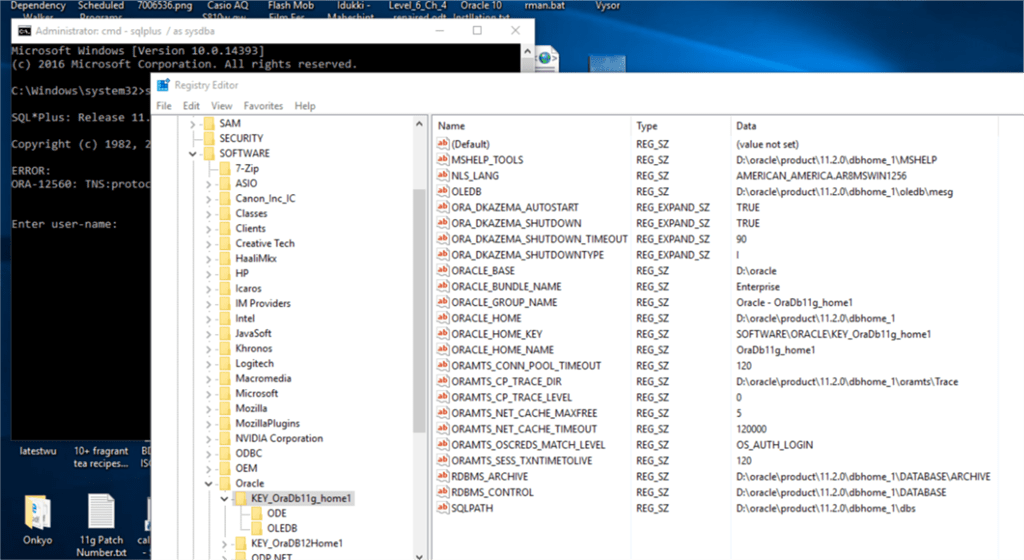
ORA-12560: TNS:protocol adapter error

REG_SID_MISSING

I setup ORACLE_SID=SID at the CMD window & sqlplus was happy after that.

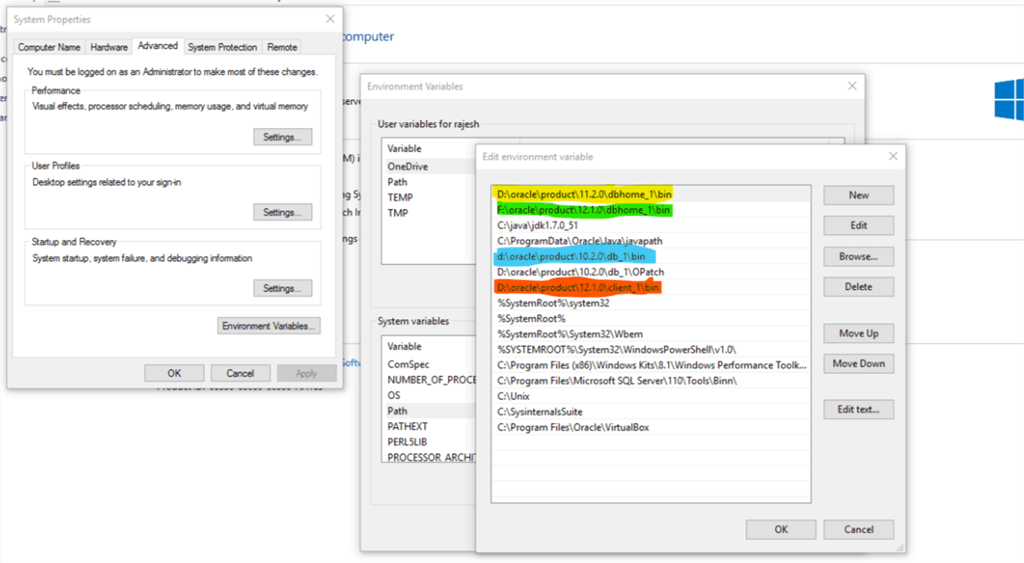
Usually, Windows doesn’t need environment variables set exclusively for the database as Windows registry takes care of it. This is very efficient when the box has only one database running. If you have more than one database or multiple Oracle homes, the scenario changes.

In addition to, Oracle always looks for the executable based on the PATH information it reads. For example my box has 10g,11g,12c database software installed without any databases created during the installation time.

Let us consider the scenario like I didn’t re-order the PATH entries after the latest installation of 12c & try to open SQL or RMAN. The call will find the executable from 12c path entry BIN as default, and a beginner could have enough confusions due to it.

In my case, I needed my 10g instance first, hence I moved the 10g folder as the 1st entry for Oracle products, and once I finished with 10g moved 11g home folder to the 1st position.

SID_Missing

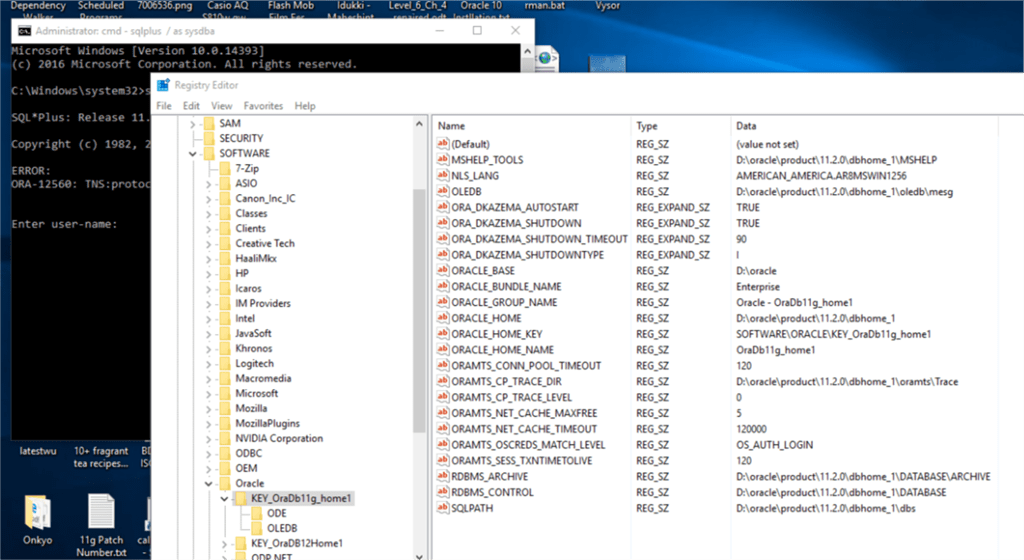
Anyway, after confirming the path settings, my immediate attention was towards registry, as Oracle services completely depend upon the registry values for each service registered.

To my utter surprise, found the 11g Service entry didn’t have ORACLE_SID string created during the instance creation using ORADIM.exe

REG_SID_MISSING

Oracle 11g 11.2.0.4 has a huge bug list and interim patches those should be applied before moving to Production instance. I really don’t know whether the missing ORACLE_SID string entry was due to one of such bugs.

So I stopped the Oracle service, added ORACLE_SID string entry with the value for my database

REG_SID_ADD

Restarted the service & sqlplus connected to the instance happily without setting up the environment variable like set ORACLE_SID=SIDNAME

REG_SID_ADDED

While the easiest solution is to setup both ORACLE_HOME, ORACLE_SID when someone wants to use the sqlplus or RMAN exclusively as a part of the database access, the above method is a definite way to deal with “ORA-12560: TNS:protocol adapter error”

regards,

rajesh

Oracle database 11g R2 | Issues with accessing enterprise manager | ssl_error_weak_server_cert_key

Hi guys

There is a problem with accessing the Oracle enterprise manager for 11g R2. After a default installation, the EM console will not even load in Internet explorer, while recent versions of firefox will show an error like following:

An error occurred during a connection to FQDN 1158. The server certificate included a public key that was too weak. (Error code: ssl_error_weak_server_cert_key)

This is due to the SSL certificate that used for securing the enterprise management console, if you are not using the database at a production environment, you can disable the secure mode and get the enterprise manager online with minimum efforts.

Please follow the instructions as given below

From an elevated command prompt

set ORACLE_UNQNAME=DATABASENAME

Issue the following command

emctl unsecure dbconsole

(Check the below image for more clarity)

dbconsole_http_change

The above exercise restarts the dbconsole service and you should able to access the enterprise manager without any issues.

Side note: Should you allow DBConsole (Enterprise Manager) & other Oracle services start automatically?

Allowing dbconsole & Oracle services starting with each restart of your laptop or desktop boxes having standard hardware configurations would be very displeasing experience. Oracle services require resources(true) and they definitely take much more time to start up and be online against most of other Windows services.

If you have a box that has barely 4GB memory and processor from an old generation, I suggest you to change the startup method to “Manual” from automatic immediately after the installation. Well, your call :)

Below find the Oracle services for which you can safely change the startup mode as “Manual”

  1. OracleDBConsole<database name> (Aka Enterprise manager, allows you to change system wide configurations, setup backups etc)
  2. OracleMTSRecoveryService (Microsoft Transaction Server, read more here at http://docs.oracle.com/cd/E11882_01/win.112/e26104/using.htm#NTMTS001)
  3. OracleOraDb11g_home1TNSListener (Oracle listener service, mandatory)
  4. OracleService<database name>(Oracle database service)

Once the database configurations are made, you are hardly going to use enterprise manager regularly. That means you don’t even have to start the DBConsole service every time while you restart the database service.

Oracle default Services

I hope the above guidelines help you to save much of the limited resources and let you use your box more effectively while the Oracle services are running.

for windows7bugs

rajesh


How to get a computer by computer view of installed software using the MAP toolkit

As an Administrator maintaining Windows domains, one of the herculean tasks usually one run into is to make a software asset inventory. There are plenty of excellent software to do the job for you, obviously for some cost.

Here we are suggesting you a cheaper alternative, using Microsoft’s own MAP toolkit. Be ready to sweat a bit, and we are sure you would love the outcome.

The entire write up is copied from Microsoft blog and tested by us for assuring, if you follow the instructions as given, within few hours of time you will have a neat software inventory list.

The original link is here

One of the most frequent questions we get at MAPFDBK@microsoft.com is how to get a list of the software discovered by the MAP toolkit on a computer by computer basis.  Most of the users who ask are using this to help them answer a licensing question but it can be used in a number of other scenarios as well for example Software Asset Management or user profiling for VDI (see http://blogs.technet.com/b/mapblog/archive/2012/07/09/planning-for-desktop-virtualization-with-the-map-toolkit-7-0-4-of-4.aspx).

In MAP 7.0, provided this information through a database view and Microsoft Excel.  The name of the view is InstalledProducts_view.

In MAP 8.0, this view has been renamed to [UT_WinServer_Reporting].[InstalledProductsView].

This view contains several key pieces of information that you can use to do a number of things including:

  • Understand what applications and versions are installed throughout your organization
  • See the Operating Systems on which these apps are running and whether the machine is physical or virtual
  • See who is using the machines on which the apps are running
  • Get important license related information such as processor counts, total cores and logical processor counts

To get started, you will need to open Excel and connect to your local SQL Server database that is storing the MAP data that you want to view.  There are two different ways to connect, depending on the version of SQL Server that you are using.

Using your own SQL Server instance

If you are using your own instance (the non-default MAP install), you will select the Data option on the Excel ribbon and select the ‘From other sources’ option.  Then select ‘From SQL Server’.

image_thumb6

Enter your server name and instance name and click ‘Next’.

image_thumb5

Select the database that contains the data you want and then pick InstalledProducts_view row under ‘Name’ for databases created with MAP 7.0.

For MAP 8.0, use [UT_WinServer_Reporting].[InstalledProductsView].

image_thumb7

You can also add some additional information to help describe the connection.  Then click ‘Finish’ and select the location where you want the query results to populate.

image_thumb9

Using the default (LocalDB) instance

In MAP 7.0, the default database installed moved to SQL Server 2012 LocalDB.  There are a couple of steps that are different than those used in other versions of SQL Server.

First, make sure that you have the SQL Server 2012 Native Client installed.  You can get it from

http://www.microsoft.com/en-us/download/details.aspx?id=29065.

With Excel open and the Data ribbon highlighted, select the ‘From other data sources’ option and select ‘From Data Connection Wizard’

image_thumb12

Select the ‘Other/Advanced’ option.

image_thumb13

Then select the option for SQL Server Native Client 11.0 as highlighted below.  If this option is not available, make sure that you have the native client installed – http://www.microsoft.com/en-us/download/details.aspx?id=29065.

image_thumb15

Next, you enter in the server name.  If you are using the default install the server name will be: (localdb)\maptoolkit.

Set the option in #2 to Use Windows NT Integrated Security

Hit ‘Test Connection’

image_thumb18

If you’ve done it correctly, you will get a success message!

image_thumb21

Then follow the same steps as above where you select the database name and the InstalledProducts_view for 7.0.  For 8.0, use [UT_WinServer_Reporting].[InstalledProductsView].

Populate the results in your spreadsheet!

What do I do next?

Well – that is entirely up to you.  One thing that we like to do is to create a pivot table and drill down into this information. Here is one that I created.  I filtered down the application name to include only those that had SQL Server components.  I could look at this by physical/virtual and by operating system.

Pretty cool – huh!

image_thumb23

As a reminder, here is a link to some valuable MAP community supported content.

Enjoy!