
Internal error [ph2exp:case]

We’re using Oracle EBS release 12 for our business and we are stuck with Oracle Developer 10g as we have many inhouse developed applications, especially for Order Management requiring frequent development and maintenance.

Once in a while, after Windows updates, Oracle’s obsolete development suite starts acting weird (Windows wouldn’t maximize, sporadic internal errors…) & ironically, restarting fixes most of them.

Recently, I had some issues with Report developer 10g. The error message was “internal error [ph2exp:case]”. As an “experienced” PL/SQL developer, I was sure that my code was great and these errors WERE another set of issues produced by Oracle’s obsolete stack. Well, I was wrong.
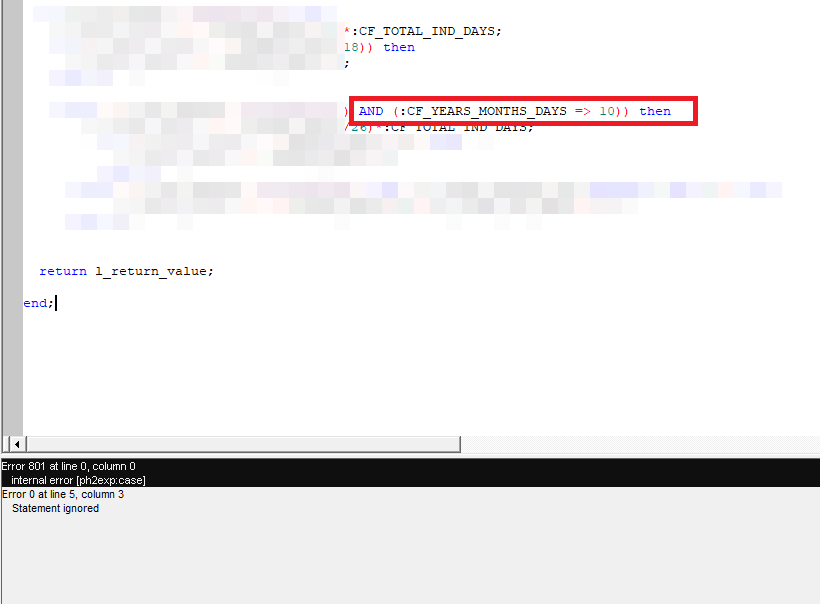
The error was due to constructing the operators wrongly. Instead of “Greater than or equal to” I set up “Equal to or greater than” causing the compiler to raise the error. Oracle document 1093084.1 should give you more information.

Hence, if you ever run into this compiler error, please don’t blame Oracle. Just correct the positions of the operators.

Windows | “ORA-12640-Authentication adapter initialization failed.”

Recently at a gathering I was asked about my job. I told a group of young chaps that I work with Oracle EBS and my primary role is developing extensions using Oracle Forms & Reports. Interestingly, none of them knew anything about Oracle Forms & Reports.

Couple of days back I installed Oracle 11G R2 database once “again” as I had to open our legacy software for some historical data access. Then I had to develop a report and to my utter surprise, found Oracle 10g report developer will not connect to 11G database, generating the following errors:

REP-0501: Unable to connect to the specified database.
ORA-12640: Authentication adapter initialization failed

I hurried to check the database sqlnet.ora file and found the authentication set as NTS (Windows default for Oracle products) & interestingly Developer 6i products were connecting to the database without any issues. This helped me to confirm that issues were from Developer 10g side & I changed the sqlnet.ora settings for the Developer 10g Suite.

from NTS to NONE did the trick.

I don’t know how my people are ever going to land on this page! Trust me, I haven’t seen an interesting question about Oracle Forms/Reports in any of the Oracle support forums from last many years. I will be pretty sad to see such a wonderful product that was built for developing Business applications on the go being ignored for some crappy browser based gimmicks.

Happy Diwali guys 🙏

Windows 10 | Install Oracle Products

I’m sure you guys didn’t hear much from us for a long time. Actually we were been too busy testing Windows 10 to make sure that we can safely migrate our existing domain joined computers. Almost everything works as they were working on Windows 8.x and we confirm the following to you:

  1. You can install Oracle developer Suite 10g in Windows 10 Professional edition, following the same hacks provided as provided with the following post https://simpleoracle.com/2010/02/18/install-oracle-10g-onward-database-developer-on-windows-7/
  2. You can install Toad 10.x without any issues over Windows 10 without any specific hacks
  3. You can install 11g client 32Bit without any issues, by ignoring the only one warning at the installation startup
  4. You can get over with the Oracle VirtualBox NIC related issues by installing the test build 5.0 (download from VirtualBox test builds)


We are yet to test the developer suite 6i, once completed we will update this thread.

So, we hope you would be more than happy to know that, almost all legacy Oracle products are installable over Microsoft’s latest OS!!


regards,

for Windows7bugs

rajesh