

Updated on: 09.March.2022
I apologize for not including the datapatch part with the post. I don’t know how did I miss it entirely, which is not me usually. Amending the datapatch part by the bottom of the article.
Much of the times I use latest Oracle technologies for learning & they hardly make to any of the PRODUCTION environments those I support at work. Recently I wanted to see how to patch Oracle 19c installation on Windows and to be frank, it was buttery smooth.
Let us quickly see how to apply a patch to a Windows installation of Oracle 19c database.
Shutdown all instances & Windows services for Oracle. Make sure you have taken adequate number of backups for the database(s).
Check you computer’s PATH variable. Insure you have %ORACLE_HOME%\perl\bin, in my case “D:\Oracle\19c\perl\bin” as the first entry for PERL.
This is how the PATH information before I make the above changes to it.
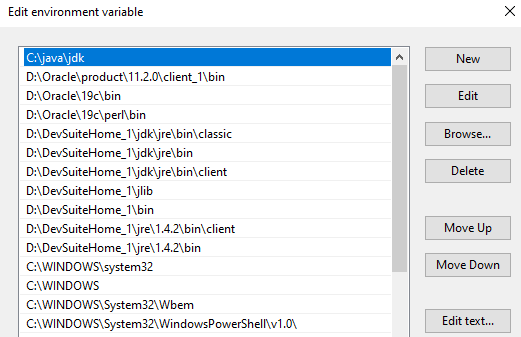

Once the patching done, you can rollback the PATH variable according to your requirements.
Visit Oracle support and download the patch, the latest patch for Oracle Database 19c is “32409154”. Patch is only available to customers with a valid support contract.
Extract the archive.
I’ve extracted the archive within the Download folder and the path is
C:\Users\xxxxxxx\Downloads\Oracle19c_Patch\p32409154_190000_MSWIN-x86-64
Now open an elevated command prompt and switch to the folder with patch number as it’s name. Check the below image for details.

Now we are ready to apply the patch. Make sure you did shutdown the database and stopped all Windows Services for Oracle prior patching the database.
Call the opatch utility from here, like given example below.
Microsoft Windows [Version 10.0.19043.985]
(c) Microsoft Corporation. All rights reserved.

C:\Oracle19c_Patch\p32409154_190000_MSWIN-x86-64\32409154>d:\Oracle\19c\OPatch\opatch apply
Oracle Interim Patch Installer version 12.2.0.1.15
Copyright (c) 2021, Oracle Corporation.  All rights reserved.


Oracle Home       : d:\Oracle\19c
Central Inventory : C:\Program Files\Oracle\Inventory
   from           :
OPatch version    : 12.2.0.1.15
OUI version       : 12.2.0.7.0
Log file location : d:\Oracle\19c\cfgtoollogs\opatch\opatch2021-06-23_10-47-41AM_1.log

Verifying environment and performing prerequisite checks...
OPatch continues with these patches:   32409154

Do you want to proceed? [y|n]
y
User Responded with: Y
All checks passed.

Please shutdown Oracle instances running out of this ORACLE_HOME on the local system.
(Oracle Home = 'd:\Oracle\19c')


Is the local system ready for patching? [y|n]
y
User Responded with: Y
Backing up files...
Applying interim patch '32409154' to OH 'd:\Oracle\19c'
ApplySession: Optional component(s) [ oracle.assistants.usm, 19.0.0.0.0 ] , [ oracle.rdbms.ic, 19.0.0.0.0 ] , [ oracle.rdbms.tg4ifmx, 19.0.0.0.0 ] , [ oracle.has.deconfig, 19.0.0.0.0 ] , [ oracle.swd.oui, 19.0.0.0.0 ] , [ oracle.has.cfs, 19.0.0.0.0 ] , [ oracle.rdbms.tg4tera, 19.0.0.0.0 ] , [ oracle.network.gsm, 19.0.0.0.0 ] , [ oracle.network.cman, 19.0.0.0.0 ] , [ oracle.rdbms.tg4msql, 19.0.0.0.0 ] , [ oracle.ons.daemon, 19.0.0.0.0 ] , [ oracle.options.olap.awm, 19.0.0.0.0 ] , [ oracle.rdbms.tg4db2, 19.0.0.0.0 ] , [ oracle.assistants.asm, 19.0.0.0.0 ] , [ oracle.usm, 19.0.0.0.0 ] , [ oracle.swd.oui.core.min, 19.0.0.0.0 ] , [ oracle.tomcat.crs, 19.0.0.0.0 ] , [ oracle.options.olap, 19.0.0.0.0 ] , [ oracle.has.crs, 19.0.0.0.0 ] , [ oracle.tfa, 19.0.0.0.0 ] , [ oracle.has.cvu, 19.0.0.0.0 ] , [ oracle.rdbms.tg4sybs, 19.0.0.0.0 ]  not present in the Oracle Home or a higher version is found.

Patching component oracle.sdo, 19.0.0.0.0...

Patching component oracle.rdbms.rman, 19.0.0.0.0...

Patching component oracle.aspnet_2, 19.0.0.0.0...

Patching component oracle.dbjava.ic, 19.0.0.0.0...

Patching component oracle.ons, 19.0.0.0.0...

Patching component oracle.ntoramts, 19.0.0.0.0...

Patching component oracle.rdbms.dbscripts, 19.0.0.0.0...

Patching component oracle.nlsrtl.rsf, 19.0.0.0.0...

Patching component oracle.xdk.parser.java, 19.0.0.0.0...

Patching component oracle.rdbms, 19.0.0.0.0...

Patching component oracle.blaslapack, 19.0.0.0.0...

Patching component oracle.rdbms.oci, 19.0.0.0.0...

Patching component oracle.assistants.acf, 19.0.0.0.0...

Patching component oracle.duma, 19.0.0.0.0...

Patching component oracle.sdo.locator.jrf, 19.0.0.0.0...

Patching component oracle.tfa.db, 19.0.0.0.0...

Patching component oracle.ldap.security.osdt, 19.0.0.0.0...

Patching component oracle.ctx.atg, 19.0.0.0.0...

Patching component oracle.xdk.rsf, 19.0.0.0.0...

Patching component oracle.precomp.common, 19.0.0.0.0...

Patching component oracle.dbjava.jdbc, 19.0.0.0.0...

Patching component oracle.rdbms.hsodbc, 19.0.0.0.0...

Patching component oracle.sqlplus.ic, 19.0.0.0.0...

Patching component oracle.oracore.rsf, 19.0.0.0.0...

Patching component oracle.rsf, 19.0.0.0.0...

Patching component oracle.precomp.common.core, 19.0.0.0.0...

Patching component oracle.network.client, 19.0.0.0.0...

Patching component oracle.precomp.lang, 19.0.0.0.0...

Patching component oracle.install.deinstalltool, 19.0.0.0.0...

Patching component oracle.ctx, 19.0.0.0.0...

Patching component oracle.dbjava.ucp, 19.0.0.0.0...

Patching component oracle.javavm.client, 19.0.0.0.0...

Patching component oracle.network.listener, 19.0.0.0.0...

Patching component oracle.ntoledb.odp_net_2, 19.0.0.0.0...

Patching component oracle.rdbms.util, 19.0.0.0.0...

Patching component oracle.rdbms.lbac, 19.0.0.0.0...

Patching component oracle.usm.deconfig, 19.0.0.0.0...

Patching component oracle.assistants.server, 19.0.0.0.0...

Patching component oracle.rdbms.deconfig, 19.0.0.0.0...

Patching component oracle.ntoledb, 19.0.0.0.0...

Patching component oracle.has.common, 19.0.0.0.0...

Patching component oracle.assistants.deconfig, 19.0.0.0.0...

Patching component oracle.ldap.rsf, 19.0.0.0.0...

Patching component oracle.ovm, 19.0.0.0.0...

Patching component oracle.has.db, 19.0.0.0.0...

Patching component oracle.rdbms.plsql, 19.0.0.0.0...

Patching component oracle.precomp.rsf, 19.0.0.0.0...

Patching component oracle.xdk.xquery, 19.0.0.0.0...

Patching component oracle.javavm.server, 19.0.0.0.0...

Patching component oracle.xdk, 19.0.0.0.0...

Patching component oracle.dbdev, 19.0.0.0.0...

Patching component oracle.sdo.locator, 19.0.0.0.0...

Patching component oracle.rdbms.install.plugins, 19.0.0.0.0...

Patching component oracle.rdbms.olap, 19.0.0.0.0...

Patching component oracle.rdbms.scheduler, 19.0.0.0.0...

Patching component oracle.rdbms.rsf.ic, 19.0.0.0.0...

Patching component oracle.ldap.owm, 19.0.0.0.0...

Patching component oracle.rdbms.rsf, 19.0.0.0.0...

Patching component oracle.mgw.common, 19.0.0.0.0...

Patching component oracle.network.rsf, 19.0.0.0.0...

Patching component oracle.oraolap, 19.0.0.0.0...

Patching component oracle.clrintg.ode_net_2, 19.0.0.0.0...

Patching component oracle.rdbms.dv, 19.0.0.0.0...

Patching component oracle.has.rsf, 19.0.0.0.0...

Patching component oracle.odbc.ic, 19.0.0.0.0...

Patching component oracle.sqlplus, 19.0.0.0.0...

Patching component oracle.has.common.cvu, 19.0.0.0.0...
Patch 32409154 successfully applied.
Log file location: d:\Oracle\19c\cfgtoollogs\opatch\opatch2021-06-23_10-47-41AM_1.log

OPatch succeeded.
As usual, based on your computer’s hardware capabilities, the patch would finish sooner or later. There will be 2 prompts those you need to say Yes in order to progress the patching.
Once OPatch completes, it is time for us to execute datapatch for the databases that are going to get upgraded to the latest version that you just patched.
Make sure that you have restarted the Windows Services for Oracle. Patching restarts the database, regardless I would suggest you to shutdown and restart the database once after Oracle services are restarted. Ensure the PDBs are opened.
Move to $ORACLE_HOME/OPatch folder & execure “datapatch.bat -verbose”
PS D:\Oracle19c\OPatch> .\datapatch.bat -verbose
SQL Patching tool version 19.3.0.0.0 Production on Wed Mar  9 18:32:28 2022
Copyright (c) 2012, 2019, Oracle.  All rights reserved.

Log file for this invocation: D:\Oracle19c\cfgtoollogs\sqlpatch\sqlpatch_12584_2022_03_09_18_32_28\sqlpatch_invocation.log

Connecting to database...OK
Gathering database info...done

Note:  Datapatch will only apply or rollback SQL fixes for PDBs
       that are in an open state, no patches will be applied to closed PDBs.
       Please refer to Note: Datapatch: Database 12c Post Patch SQL Automation
       (Doc ID 1585822.1)

Bootstrapping registry and package to current versions...done
Determining current state...done

Current state of interim SQL patches:
  No interim patches found

Current state of release update SQL patches:
  Binary registry:
    19.11.0.0.0 Release_Update 210417094636: Installed
  PDB CDB$ROOT:
    No release update patches installed
  PDB PDB$SEED:
    No release update patches installed
  PDB SCT:
    No release update patches installed

Adding patches to installation queue and performing prereq checks...done
Installation queue:
  For the following PDBs: CDB$ROOT PDB$SEED SCT
    No interim patches need to be rolled back
    Patch 32409154 (Windows Database Bundle Patch : 19.11.0.0.210420 (32409154)):
      Apply from 19.1.0.0.0 Feature Release to 19.11.0.0.0 Release_Update 210417094636
    No interim patches need to be applied

Installing patches...
Patch installation complete.  Total patches installed: 3

Validating logfiles...done
Patch 32409154 apply (pdb CDB$ROOT): SUCCESS
  logfile: D:\Oracle19c\cfgtoollogs\sqlpatch\32409154\24073904/32409154_apply_SCTCDB_CDBROOT_2022Mar09_18_33_46.log (no errors)
Patch 32409154 apply (pdb PDB$SEED): SUCCESS
  logfile: D:\Oracle19c\cfgtoollogs\sqlpatch\32409154\24073904/32409154_apply_SCTCDB_PDBSEED_2022Mar09_18_39_19.log (no errors)
Patch 32409154 apply (pdb SCT): SUCCESS
  logfile: D:\Oracle19c\cfgtoollogs\sqlpatch\32409154\24073904/32409154_apply_SCTCDB_SCT_2022Mar09_18_39_19.log (no errors)
SQL Patching tool complete on Wed Mar  9 18:45:01 2022
PS D:\Oracle19c\OPatch>
Now we have to check for invalid objects. My database didn’t have any objects, it was a default installation with 0 custom objects in the SCT. However, if you were having a PRODUCTION database, you must confirm that there are no invalid objects post patching. We will see how to accomplish this at next step.
C:\Windows\system32>SET ORACLE_HOME=D:\Oracle19c

C:\Windows\system32>sqlplus / as sysdba

SQL*Plus: Release 19.0.0.0.0 - Production on Wed Mar 9 18:54:54 2022
Version 19.11.0.0.0

Copyright (c) 1982, 2020, Oracle.  All rights reserved.


Connected to:
Oracle Database 19c Enterprise Edition Release 19.0.0.0.0 - Production
Version 19.11.0.0.0

SQL> @?/rdbms/admin/utlrp.sql

Session altered.


TIMESTAMP
--------------------------------------------------------------------------------
COMP_TIMESTAMP UTLRP_BGN              2022-03-09 18:55:49

DOC>   The following PL/SQL block invokes UTL_RECOMP to recompile invalid
DOC>   objects in the database. Recompilation time is proportional to the
DOC>   number of invalid objects in the database, so this command may take
DOC>   a long time to execute on a database with a large number of invalid
DOC>   objects.
DOC>
DOC>   Use the following queries to track recompilation progress:
DOC>
DOC>   1. Query returning the number of invalid objects remaining. This
DOC>      number should decrease with time.
DOC>         SELECT COUNT(*) FROM obj$ WHERE status IN (4, 5, 6);
DOC>
DOC>   2. Query returning the number of objects compiled so far. This number
DOC>      should increase with time.
DOC>         SELECT COUNT(*) FROM UTL_RECOMP_COMPILED;
DOC>
DOC>   This script automatically chooses serial or parallel recompilation
DOC>   based on the number of CPUs available (parameter cpu_count) multiplied
DOC>   by the number of threads per CPU (parameter parallel_threads_per_cpu).
DOC>   On RAC, this number is added across all RAC nodes.
DOC>
DOC>   UTL_RECOMP uses DBMS_SCHEDULER to create jobs for parallel
DOC>   recompilation. Jobs are created without instance affinity so that they
DOC>   can migrate across RAC nodes. Use the following queries to verify
DOC>   whether UTL_RECOMP jobs are being created and run correctly:
DOC>
DOC>   1. Query showing jobs created by UTL_RECOMP
DOC>         SELECT job_name FROM dba_scheduler_jobs
DOC>            WHERE job_name like 'UTL_RECOMP_SLAVE_%';
DOC>
DOC>   2. Query showing UTL_RECOMP jobs that are running
DOC>         SELECT job_name FROM dba_scheduler_running_jobs
DOC>            WHERE job_name like 'UTL_RECOMP_SLAVE_%';
DOC>#

PL/SQL procedure successfully completed.


TIMESTAMP
--------------------------------------------------------------------------------
COMP_TIMESTAMP UTLRP_END              2022-03-09 18:55:50

DOC> The following query reports the number of invalid objects.
DOC>
DOC> If the number is higher than expected, please examine the error
DOC> messages reported with each object (using SHOW ERRORS) to see if they
DOC> point to system misconfiguration or resource constraints that must be
DOC> fixed before attempting to recompile these objects.
DOC>#

OBJECTS WITH ERRORS
-------------------
                  0

DOC> The following query reports the number of exceptions caught during
DOC> recompilation. If this number is non-zero, please query the error
DOC> messages in the table UTL_RECOMP_ERRORS to see if any of these errors
DOC> are due to misconfiguration or resource constraints that must be
DOC> fixed before objects can compile successfully.
DOC> Note: Typical compilation errors (due to coding errors) are not
DOC>       logged into this table: they go into DBA_ERRORS instead.
DOC>#

ERRORS DURING RECOMPILATION
---------------------------
                          0


Function created.


PL/SQL procedure successfully completed.


Function dropped.


PL/SQL procedure successfully completed.

SQL> alter session set container=PDB$SEED;

Session altered.

SQL> alter session set "_oracle_script"=TRUE;

Session altered.

SQL> alter pluggable database pdb$seed close immediate instances=all;

Pluggable database altered.

SQL> alter pluggable database pdb$seed OPEN READ WRITE;

Pluggable database altered.

SQL> @?/rdbms/admin/utlrp.sql

Session altered.


TIMESTAMP
--------------------------------------------------------------------------------
COMP_TIMESTAMP UTLRP_BGN              2022-03-09 19:06:20

DOC>   The following PL/SQL block invokes UTL_RECOMP to recompile invalid
DOC>   objects in the database. Recompilation time is proportional to the
DOC>   number of invalid objects in the database, so this command may take
DOC>   a long time to execute on a database with a large number of invalid
DOC>   objects.
DOC>
DOC>   Use the following queries to track recompilation progress:
DOC>
DOC>   1. Query returning the number of invalid objects remaining. This
DOC>      number should decrease with time.
DOC>         SELECT COUNT(*) FROM obj$ WHERE status IN (4, 5, 6);
DOC>
DOC>   2. Query returning the number of objects compiled so far. This number
DOC>      should increase with time.
DOC>         SELECT COUNT(*) FROM UTL_RECOMP_COMPILED;
DOC>
DOC>   This script automatically chooses serial or parallel recompilation
DOC>   based on the number of CPUs available (parameter cpu_count) multiplied
DOC>   by the number of threads per CPU (parameter parallel_threads_per_cpu).
DOC>   On RAC, this number is added across all RAC nodes.
DOC>
DOC>   UTL_RECOMP uses DBMS_SCHEDULER to create jobs for parallel
DOC>   recompilation. Jobs are created without instance affinity so that they
DOC>   can migrate across RAC nodes. Use the following queries to verify
DOC>   whether UTL_RECOMP jobs are being created and run correctly:
DOC>
DOC>   1. Query showing jobs created by UTL_RECOMP
DOC>         SELECT job_name FROM dba_scheduler_jobs
DOC>            WHERE job_name like 'UTL_RECOMP_SLAVE_%';
DOC>
DOC>   2. Query showing UTL_RECOMP jobs that are running
DOC>         SELECT job_name FROM dba_scheduler_running_jobs
DOC>            WHERE job_name like 'UTL_RECOMP_SLAVE_%';
DOC>#

PL/SQL procedure successfully completed.


TIMESTAMP
--------------------------------------------------------------------------------
COMP_TIMESTAMP UTLRP_END              2022-03-09 19:06:22

DOC> The following query reports the number of invalid objects.
DOC>
DOC> If the number is higher than expected, please examine the error
DOC> messages reported with each object (using SHOW ERRORS) to see if they
DOC> point to system misconfiguration or resource constraints that must be
DOC> fixed before attempting to recompile these objects.
DOC>#

OBJECTS WITH ERRORS
-------------------
                  0

DOC> The following query reports the number of exceptions caught during
DOC> recompilation. If this number is non-zero, please query the error
DOC> messages in the table UTL_RECOMP_ERRORS to see if any of these errors
DOC> are due to misconfiguration or resource constraints that must be
DOC> fixed before objects can compile successfully.
DOC> Note: Typical compilation errors (due to coding errors) are not
DOC>       logged into this table: they go into DBA_ERRORS instead.
DOC>#

ERRORS DURING RECOMPILATION
---------------------------
                          0


Function created.


PL/SQL procedure successfully completed.


Function dropped.


PL/SQL procedure successfully completed.

SQL> alter pluggable database pdb$seed close immediate instances=all;

Pluggable database altered.

SQL> alter pluggable database pdb$seed OPEN READ ONLY;

Pluggable database altered.

SQL> alter session set "_oracle_script"=FALSE;

Session altered.

SQL> alter pluggable database pdb$seed close immediate instances=all;

Pluggable database altered.

SQL> alter pluggable database pdb$seed OPEN READ ONLY;

Pluggable database altered.

SQL> alter session set container=SCT;

Session altered.

SQL> @?/rdbms/admin/utlrp.sql

Session altered.


TIMESTAMP
--------------------------------------------------------------------------------
COMP_TIMESTAMP UTLRP_BGN              2022-03-09 18:56:35

DOC>   The following PL/SQL block invokes UTL_RECOMP to recompile invalid
DOC>   objects in the database. Recompilation time is proportional to the
DOC>   number of invalid objects in the database, so this command may take
DOC>   a long time to execute on a database with a large number of invalid
DOC>   objects.
DOC>
DOC>   Use the following queries to track recompilation progress:
DOC>
DOC>   1. Query returning the number of invalid objects remaining. This
DOC>      number should decrease with time.
DOC>         SELECT COUNT(*) FROM obj$ WHERE status IN (4, 5, 6);
DOC>
DOC>   2. Query returning the number of objects compiled so far. This number
DOC>      should increase with time.
DOC>         SELECT COUNT(*) FROM UTL_RECOMP_COMPILED;
DOC>
DOC>   This script automatically chooses serial or parallel recompilation
DOC>   based on the number of CPUs available (parameter cpu_count) multiplied
DOC>   by the number of threads per CPU (parameter parallel_threads_per_cpu).
DOC>   On RAC, this number is added across all RAC nodes.
DOC>
DOC>   UTL_RECOMP uses DBMS_SCHEDULER to create jobs for parallel
DOC>   recompilation. Jobs are created without instance affinity so that they
DOC>   can migrate across RAC nodes. Use the following queries to verify
DOC>   whether UTL_RECOMP jobs are being created and run correctly:
DOC>
DOC>   1. Query showing jobs created by UTL_RECOMP
DOC>         SELECT job_name FROM dba_scheduler_jobs
DOC>            WHERE job_name like 'UTL_RECOMP_SLAVE_%';
DOC>
DOC>   2. Query showing UTL_RECOMP jobs that are running
DOC>         SELECT job_name FROM dba_scheduler_running_jobs
DOC>            WHERE job_name like 'UTL_RECOMP_SLAVE_%';
DOC>#

PL/SQL procedure successfully completed.


TIMESTAMP
--------------------------------------------------------------------------------
COMP_TIMESTAMP UTLRP_END              2022-03-09 18:56:36

DOC> The following query reports the number of invalid objects.
DOC>
DOC> If the number is higher than expected, please examine the error
DOC> messages reported with each object (using SHOW ERRORS) to see if they
DOC> point to system misconfiguration or resource constraints that must be
DOC> fixed before attempting to recompile these objects.
DOC>#

OBJECTS WITH ERRORS
-------------------
                  0

DOC> The following query reports the number of exceptions caught during
DOC> recompilation. If this number is non-zero, please query the error
DOC> messages in the table UTL_RECOMP_ERRORS to see if any of these errors
DOC> are due to misconfiguration or resource constraints that must be
DOC> fixed before objects can compile successfully.
DOC> Note: Typical compilation errors (due to coding errors) are not
DOC>       logged into this table: they go into DBA_ERRORS instead.
DOC>#

ERRORS DURING RECOMPILATION
---------------------------
                          0


Function created.


PL/SQL procedure successfully completed.


Function dropped.


PL/SQL procedure successfully completed.

SQL>
Use SQL Developer & check whether there are any invalid objects. In addition to invalid objects, you must check plugged in database violations also. We will see how to in next few steps.

You need to check PDB violations on both root and pdb containers (CDB$ROOT, SCT (my pdb name)). Warnings could be addressed later, TYPE “ERROR” should be immediately addressed before you open the PDB for read write operations.
Fix the errors following instructions available from either Oracle support or blog posts (better & less complex)
Simple & neat right? Share your experience in the comments area.
