Oracle Inventory | Item update API | EGO_ITEM_PUB.ITEM_TBL_TYPE

Kuwait commerce department is making it mandatory to include Arabic in the item descriptions and we also started working on this requirement. Our Oracle EBS R12 environment is set for both English and Arabic, hence the only task was to update the Arabic description for the items. We’ve considerably large items database and updating such a huge repository definitely required an API interface. We selected a small set of items for the first attempt and everything worked as expected, however started getting multiple errors when we tried to execute the same API for 10k items. One of the errors as seen below (The question marks should be SQL Developer’s bug) and I was able to pick the words “MTL_ITEM_BULKLOAD_RECS_N2” and “APPS_TS_INTERFACE” from the error message.

EGO_ITEM_PVT Process_Items: ORA-01654: INV.MTL_ITEM_BULKLOAD_RECS_N2 APPS_TS_INTERFACE
Initialized applications context: 1353 50599 401
Error Messages :
??? ??? ??? ????? ?? ????? EGO_ITEM_PVT ?????? Process_Items: ORA-01654: ?? ???? ?? ???? INV.MTL_ITEM_BULKLOAD_RECS_N2 ?????? 16  ?????? ?????? APPS_TS_INTERFACE
 ???? ??????? ?????? ?????? ?? ?????? ????? ?????

Searched Oracle support documents and couldn’t find anything relevant until I noticed the term “APPS_TS_INTERFACE” & as I handle the Oracle EBS R12 12.2 database myself, immediately assumed the same to be another APPS related tablespace. I was not wrong, the seeded tablespace comes with 2 data files and both were almost full with just few kilobytes left. All I needed was to add new data file with a size of 4GB (didn’t want to take another risk). We’ve been using the application for last 13 years and the tablespace size until the new file was merely 3GBs, hence the new data file should hold the fort for another many years ahead.

We were updating the Arabic description part of the master items and the sample API as given below.

SET DEFINE OFF;
SET SERVEROUTPUT ON SIZE UNLIMITED;

DECLARE
        x_item_tbl		     EGO_ITEM_PUB.ITEM_TBL_TYPE;     
        x_message_list     Error_Handler.Error_Tbl_Type;
        x_return_status		 VARCHAR2(2);
        x_msg_count		     NUMBER := 0;
    
        l_user_id		      NUMBER := -1;
        l_resp_id		      NUMBER := -1;
        l_application_id	NUMBER := -1;
        
        l_rowcnt		      NUMBER := 1;
        l_api_version		   NUMBER := 1.0; 
        l_init_msg_list		 VARCHAR2(2) := FND_API.G_TRUE; 
        l_commit	      	 VARCHAR2(2) := FND_API.G_FALSE; 
        l_item_tbl		     EGO_ITEM_PUB.ITEM_TBL_TYPE; 
        l_role_grant_tbl	 EGO_ITEM_PUB.ROLE_GRANT_TBL_TYPE; 
        l_user_name		VARCHAR2(30) := 'USERNAME';
        l_resp_name		VARCHAR2(30) := 'XYZ INV Super User';    
        
        l_item_catalog_group_id NUMBER := 0;
		
		--CREATE a staging table with the column names as given in the below select statement.
		--If your staging table has different column names, adjust the below select statement.
        
        CURSOR item_list IS
        SELECT ORG_ID,INVENTORY_ITEM_ID,ITEM_CODE, DESC_AR FROM XX_AR_DESCRIPTIONS
        WHERE NVL(STATUS,'E')='E'; -- for retry purposes.


BEGIN
         -- Get the user_id
          SELECT user_id
          INTO l_user_id
          FROM fnd_user
          WHERE user_name = l_user_name;
        
          -- Get the application_id and responsibility_id
          SELECT application_id, responsibility_id
          INTO l_application_id, l_resp_id
          FROM fnd_responsibility_vl
          WHERE responsibility_name = l_resp_name;
        
          FND_GLOBAL.APPS_INITIALIZE(l_user_id, l_resp_id, l_application_id);  

--Set the language context, here we are updating the item master with Arabic language

--Sample few other languages
--FND_GLOBAL.SET_NLS_CONTEXT(P_NLS_LANGUAGE => 'PORTUGUESE');
--FND_GLOBAL.SET_NLS_CONTEXT(P_NLS_LANGUAGE => 'AMERICAN');
--FND_GLOBAL.SET_NLS_CONTEXT(P_NLS_LANGUAGE => 'JAPANESE');
--Is It Possible to Update Item Description in Local Language in MTL_SYSTEM_ITEMS_TL Using Public API ? (Doc ID 2542546.1)

  
  FND_GLOBAL.SET_NLS_CONTEXT(P_NLS_LANGUAGE => 'ARABIC');
          dbms_output.put_line('Initialized applications context: '|| l_user_id || ' '|| l_resp_id ||' '|| l_application_id );

        
        FOR i in item_list loop
            l_item_tbl(l_rowcnt).Transaction_Type := 'UPDATE';
            l_item_tbl(l_rowcnt).inventory_item_id := i.inventory_item_id;
            l_item_tbl(l_rowcnt).organization_id := i.org_id;--Should be your master inventory organization id.
            --l_item_tbl(l_rowcnt).ATTRIBUTE6 := i.movement;
            l_item_tbl(l_rowcnt).Description := i.DESC_AR;

          -- call API to load Items
         EGO_ITEM_PUB.PROCESS_ITEMS( 
                                   p_api_version            => l_api_version
                                   ,p_init_msg_list         => l_init_msg_list
                                   ,p_commit                => l_commit
                                   ,p_item_tbl              => l_item_tbl
                                   ,p_role_grant_tbl        => l_role_grant_tbl
                                   ,x_item_tbl              => x_item_tbl
                                   ,x_return_status         => x_return_status
                                   ,x_msg_count             => x_msg_count);
                                    

--How To Clean Or Avoid Error Data In Interface Tables Using EGO_ITEM_PUB.Process_Item (Doc ID 1548555.1)

        IF (x_return_status <> FND_API.G_RET_STS_SUCCESS) THEN
          DBMS_OUTPUT.PUT_LINE('Error Messages :');
          Error_Handler.GET_MESSAGE_LIST(x_message_list=>x_message_list);
          FOR i IN 1..x_message_list.COUNT LOOP
            DBMS_OUTPUT.PUT_LINE(x_message_list(i).message_text);
          END LOOP;
          DBMS_OUTPUT.PUT_LINE( i.item_code||' Failed Update'); --comment, only for correction purposes.
--We willl update the staging table with failed status
          UPDATE XX_AR_DESCRIPTIONS SET STATUS='E' WHERE INVENTORY_ITEM_ID=i.INVENTORY_ITEM_ID;
          ELSE
--Update the staging table with success status
          UPDATE XX_AR_DESCRIPTIONS SET STATUS='S' WHERE INVENTORY_ITEM_ID=i.INVENTORY_ITEM_ID;
       END IF;
END loop;
commit;

EXCEPTION
WHEN OTHERS THEN
DBMS_OUTPUT.PUT_LINE('Exception Occurred :');
DBMS_OUTPUT.PUT_LINE(SQLCODE ||':'||SQLERRM);
DBMS_OUTPUT.PUT_LINE('=====================================');
ROLLBACK;
RETURN;
        
END;


The following documents were referred during the attempts, which you may not experience.

  • Is It Possible to Update Item Description in Local Language in MTL_SYSTEM_ITEMS_TL Using Public API ? (Doc ID 2542546.1)
  • How To Clean Or Avoid Error Data In Interface Tables Using EGO_ITEM_PUB.Process_Item (Doc ID 1548555.1)

Oracle Indexes | the way of my understanding

To be quite frank, when it comes to Oracle Indexes and Joins I am as good as with Oracle Analytical functions. Much fly above my head & every time I have to go back to my notes to “learn” for the tasks in hand!

Recently, I took some interests in understanding the “index usage” once after reading about V$OBJECT_USAGE & realized to my shock that more than 50% of my indexes were never used! I wanted to know why & I kept reading for days without finding much that felt like a true answer.

Hence I made a decision to understand how the indexes work by example. Our Oracle EBS environment has more than half dozen custom applications integrated and few of them are with millions of rows, sufficing “large” table requirements to test the effectiveness of indexing. From the layman perspectives, please note, I am not an Indexing expert, I can’t explain why your Indexes are not being used “even after following everything step by step”. For me, what I did work, giving me an understanding about how should I plan my next Indexes. So let us see how I came to my understandings

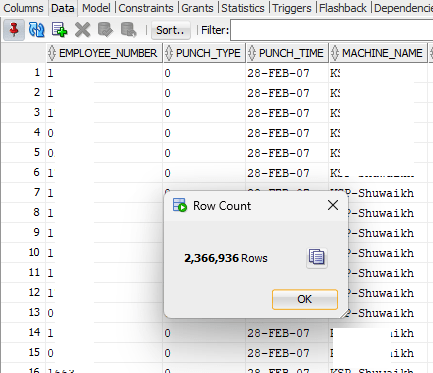
We’ve bio-metric devices that are used for attendances purposes. These devices offload the data to a Microsoft SQL database instance and using transactional SQL, we register them with our Oracle database. The technical part of it. The table that stores the fingerprints has 2.3 Million rows as on date and I used the same table to understand how the indexing works.

There was one Index on this table (Yes, I created it), that I dropped before experimenting as the Index was never used! The logic behind the query is:

I should get the first punch in time for the employee, identified by type “0” and last punch out for the employee, identified by type “1”, the machine name on which the employee has registered in and out punches. Each employee might use the bio-metric devices at different locations for door accesses or other purposes like a proof of visiting another office. Without the Index on this table, let us see how Oracle plans the execution.

This table has just few columns and sought data is usually the punch time against the employee.

Regardless, the cost for the execution didn’t look appealing. So, I created an Index that has all the four columns referred in the main and inline queries.

This time the cost looked far better, however, I could see that the base table still being used when there were no additional columns from the base table referred.

Here comes the thumb rule for indexes (I think). Indexes are not used unless a condition is used against one of the indexed columns! Let us see, whether this makes any sense.

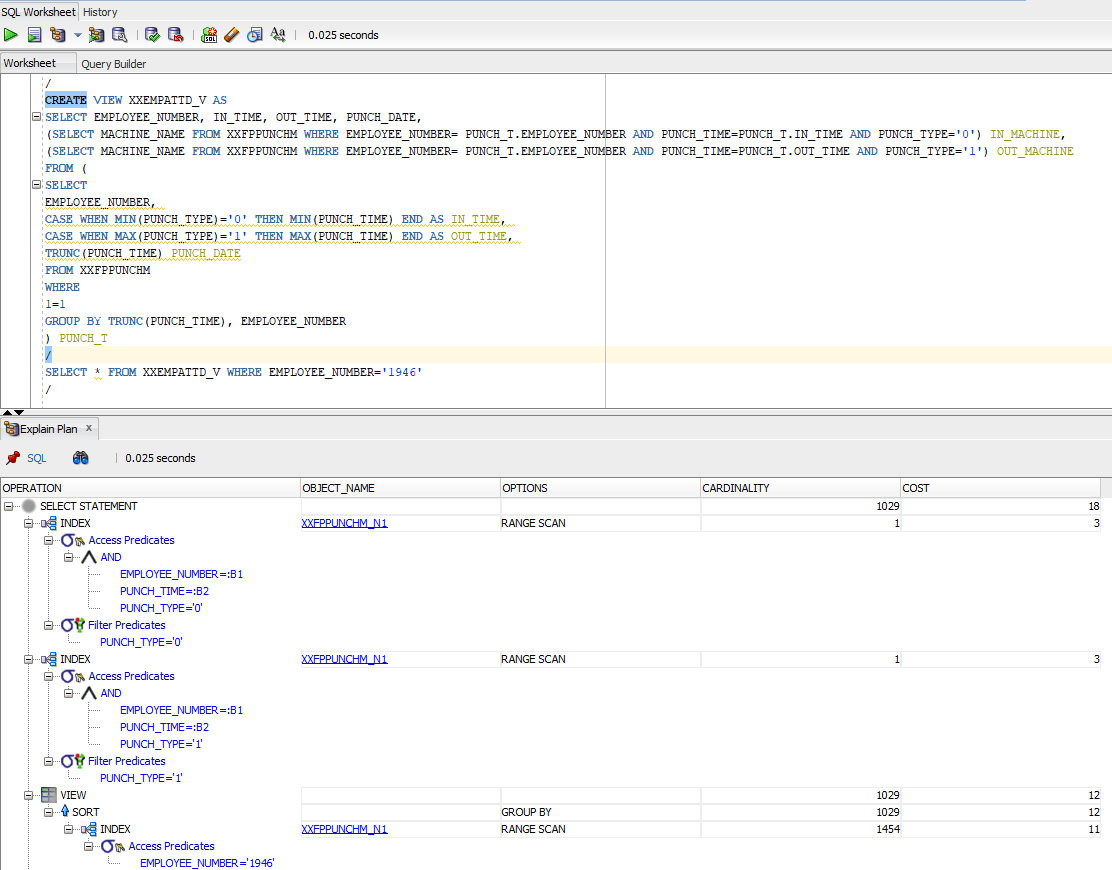
I created a view against the above query to be more certain.

After creating the view, I did a simple select * against the view and the execution plan brought me the same results discussed above. Wherever the predicates were used, query used the existing Index and for the rest, did the base table scan.

So I went ahead against my “understanding” and added a condition to Select * from query and did another Explain plan.

This time, the cardinality, ie the total number of rows fetched came down to just a four digit number, base table was not referred and the cost was dirt cheap compared to the earlier situations.

Let’s summarize everything now.

  1. Indexes are mostly effective about large tables
  2. Oracle will use indexes only when one of the columns used in the index is used against a predicate. Said, I created a view against our dear Scott.Emp table and “Select * from emp;” used that index. I don’t know why and I don’t care!
  3. Add up IS NOT NULL against all your index columns in your query to make sure that your Index is used instead of base table.

Now, I needed to understand further. Hence, I went back to the HR sample schema and chose the table “Employees” this time for my continued experiments. As I said Scott.Emp, the results were the same.

HR.EMPLOYEES tables have many Indexes defined.

For the first query as seen with the image below, I didn’t include a predicate. Regardless, Oracle used the Index for the column

Then I tried another query with multiple columns and without predicate. Oracle used the Index this time as well.

Apparently, this gives me an idea like, for larger tables the Indexes are opted when predicates are available against indexed columns and for tables like HR.EMPLOYEES which has only 107 rows, if there is an index exist against the queried column exist, it is used by Oracle.

Cheers friends, it was fun learning something, once again my own way. Hope this helps few others out there who were breaking their heads to understand this horrible thing. Merry Christmas and a very Happy New Year to everyone out there.

Windows | “ORA-12640-Authentication adapter initialization failed.”

Recently at a gathering I was asked about my job. I told a group of young chaps that I work with Oracle EBS and my primary role is developing extensions using Oracle Forms & Reports. Interestingly, none of them knew anything about Oracle Forms & Reports.

Couple of days back I installed Oracle 11G R2 database once “again” as I had to open our legacy software for some historical data access. Then I had to develop a report and to my utter surprise, found Oracle 10g report developer will not connect to 11G database, generating the following errors:

REP-0501: Unable to connect to the specified database.
ORA-12640: Authentication adapter initialization failed

I hurried to check the database sqlnet.ora file and found the authentication set as NTS (Windows default for Oracle products) & interestingly Developer 6i products were connecting to the database without any issues. This helped me to confirm that issues were from Developer 10g side & I changed the sqlnet.ora settings for the Developer 10g Suite.

from NTS to NONE did the trick.

I don’t know how my people are ever going to land on this page! Trust me, I haven’t seen an interesting question about Oracle Forms/Reports in any of the Oracle support forums from last many years. I will be pretty sad to see such a wonderful product that was built for developing Business applications on the go being ignored for some crappy browser based gimmicks.

Happy Diwali guys 🙏

Connecting Oracle Developer 10g to 11G database takes long time

We migrated to 11G R2 (11.2.0.4) for our Oracle Applications R12 few years back, yes few years back (2017) & lived with one of the worst experiences…

Connecting Oracle Developer 10g (Forms/Reports) suite to 11G database.

I have scavenged through community articles for long time before giving up. I hardly came across a single fix for the connection time that used to hang up the Developer suite at times…

Today, I decided to find a solution for the nagging SSH connection issues from Windows 11 to our LINUX application servers and realized that we didn’t update the DNS settings for them once after we decommissioned a domain controller. Once the SSH issues were rectified and addressed, my next attempt was to find a solution for “frmcmp_batch” taking long time to start compiling modules & I landed on the below post.

Credit: Oracle Applications DBA: Form Compilation Against a 11g Database Hangs or Takes a Very Long Time [ID 880660.1] (appsjagan.blogspot.com)

As we are already on 11G R2 11.2.0.4, patching was not required. All I needed was to alter the hidden parameter “_FIX_CONTROL” as mentioned in the article.

SQL> ALTER SYSTEM SET "_FIX_CONTROL"='8560951:ON';

(Use scope=spfile to make this change permanent. This will require you to restart the database.)

I opted to go without spfile for testing & as soon as applied, the “frmcmp_batch” started compiling the modules instantly, against the usual delay that ran into many minutes other times.

Out of curiosity, I tried to connect to the database from Developer 10g & the connection was instant! within a fraction of a second.

So DNS being one of the most important elements establishing successful connections, patches and fixes also play crucial role in providing stable connections. Were you stuck with the same issue? give the solution a try and let us know whether it helped you also.

Oracle SQL Developer 19.x.x & ORA-20001: Oracle error -6502: ORA-06502: PL/SQL: numeric or value error: character string buffer too small has been detected in fnd_global.set_nls

Hi guys

Okay, so you switched to Oracle SQL Developer for the main reason that the suite is from Oracle & it is absolutely free and putting loads of efforts to get accustomed with certain “JAVA” platform limitations (as per developers).

Everything is fine until you start getting “ORA-20001: Oracle error -6502: ORA-06502: PL/SQL: numeric or value error: character string buffer too small has been detected in fnd_global.set_nls” or errors those WERE never happening while you were trying to execute years old PL/SQL blocks which were always completing successfully using Quest TOAD or at SQL prompt itself.

Before scavenging through your archives to find the Toad Installer for a re-installation, give the following exercise a try.

Applicable to Windows ONLY!

Go to user specific “AppData\Roaming” folder, eg: C:\Users\rajesh\AppData\Roaming

and delete both the folders, “SQL Developer” & “sqldeveloper”

Usually whenever you download and start the latest version of SQL Developer, the new version checks for the older versions under Roaming profile & if found, prompts the user asking whether the existing preferences should be copied (that includes already saved connections and other setting you may have made), which may cause errors like the ONE I have had once after migrating 19.2.x to 19.4.x

Regardless whether you were using previous versions or NOT, deleting all folders for “SQL Developer” under the roaming profile will force the latest version of Oracle SQL Developer to start afresh & most probably will take care of unreliable error messages (Confirmed by running the PL/SQL blocks without outputting the same errors using Quest TOAD)

Thank me later ;)

rajesh