Oracle Inventory | Item update API | EGO_ITEM_PUB.ITEM_TBL_TYPE

Kuwait commerce department is making it mandatory to include Arabic in the item descriptions and we also started working on this requirement. Our Oracle EBS R12 environment is set for both English and Arabic, hence the only task was to update the Arabic description for the items. We’ve considerably large items database and updating such a huge repository definitely required an API interface. We selected a small set of items for the first attempt and everything worked as expected, however started getting multiple errors when we tried to execute the same API for 10k items. One of the errors as seen below (The question marks should be SQL Developer’s bug) and I was able to pick the words “MTL_ITEM_BULKLOAD_RECS_N2” and “APPS_TS_INTERFACE” from the error message.

EGO_ITEM_PVT Process_Items: ORA-01654: INV.MTL_ITEM_BULKLOAD_RECS_N2 APPS_TS_INTERFACE
Initialized applications context: 1353 50599 401
Error Messages :
??? ??? ??? ????? ?? ????? EGO_ITEM_PVT ?????? Process_Items: ORA-01654: ?? ???? ?? ???? INV.MTL_ITEM_BULKLOAD_RECS_N2 ?????? 16  ?????? ?????? APPS_TS_INTERFACE
 ???? ??????? ?????? ?????? ?? ?????? ????? ?????

Searched Oracle support documents and couldn’t find anything relevant until I noticed the term “APPS_TS_INTERFACE” & as I handle the Oracle EBS R12 12.2 database myself, immediately assumed the same to be another APPS related tablespace. I was not wrong, the seeded tablespace comes with 2 data files and both were almost full with just few kilobytes left. All I needed was to add new data file with a size of 4GB (didn’t want to take another risk). We’ve been using the application for last 13 years and the tablespace size until the new file was merely 3GBs, hence the new data file should hold the fort for another many years ahead.

We were updating the Arabic description part of the master items and the sample API as given below.

SET DEFINE OFF;
SET SERVEROUTPUT ON SIZE UNLIMITED;

DECLARE
        x_item_tbl		     EGO_ITEM_PUB.ITEM_TBL_TYPE;     
        x_message_list     Error_Handler.Error_Tbl_Type;
        x_return_status		 VARCHAR2(2);
        x_msg_count		     NUMBER := 0;
    
        l_user_id		      NUMBER := -1;
        l_resp_id		      NUMBER := -1;
        l_application_id	NUMBER := -1;
        
        l_rowcnt		      NUMBER := 1;
        l_api_version		   NUMBER := 1.0; 
        l_init_msg_list		 VARCHAR2(2) := FND_API.G_TRUE; 
        l_commit	      	 VARCHAR2(2) := FND_API.G_FALSE; 
        l_item_tbl		     EGO_ITEM_PUB.ITEM_TBL_TYPE; 
        l_role_grant_tbl	 EGO_ITEM_PUB.ROLE_GRANT_TBL_TYPE; 
        l_user_name		VARCHAR2(30) := 'USERNAME';
        l_resp_name		VARCHAR2(30) := 'XYZ INV Super User';    
        
        l_item_catalog_group_id NUMBER := 0;
		
		--CREATE a staging table with the column names as given in the below select statement.
		--If your staging table has different column names, adjust the below select statement.
        
        CURSOR item_list IS
        SELECT ORG_ID,INVENTORY_ITEM_ID,ITEM_CODE, DESC_AR FROM XX_AR_DESCRIPTIONS
        WHERE NVL(STATUS,'E')='E'; -- for retry purposes.


BEGIN
         -- Get the user_id
          SELECT user_id
          INTO l_user_id
          FROM fnd_user
          WHERE user_name = l_user_name;
        
          -- Get the application_id and responsibility_id
          SELECT application_id, responsibility_id
          INTO l_application_id, l_resp_id
          FROM fnd_responsibility_vl
          WHERE responsibility_name = l_resp_name;
        
          FND_GLOBAL.APPS_INITIALIZE(l_user_id, l_resp_id, l_application_id);  

--Set the language context, here we are updating the item master with Arabic language

--Sample few other languages
--FND_GLOBAL.SET_NLS_CONTEXT(P_NLS_LANGUAGE => 'PORTUGUESE');
--FND_GLOBAL.SET_NLS_CONTEXT(P_NLS_LANGUAGE => 'AMERICAN');
--FND_GLOBAL.SET_NLS_CONTEXT(P_NLS_LANGUAGE => 'JAPANESE');
--Is It Possible to Update Item Description in Local Language in MTL_SYSTEM_ITEMS_TL Using Public API ? (Doc ID 2542546.1)

  
  FND_GLOBAL.SET_NLS_CONTEXT(P_NLS_LANGUAGE => 'ARABIC');
          dbms_output.put_line('Initialized applications context: '|| l_user_id || ' '|| l_resp_id ||' '|| l_application_id );

        
        FOR i in item_list loop
            l_item_tbl(l_rowcnt).Transaction_Type := 'UPDATE';
            l_item_tbl(l_rowcnt).inventory_item_id := i.inventory_item_id;
            l_item_tbl(l_rowcnt).organization_id := i.org_id;--Should be your master inventory organization id.
            --l_item_tbl(l_rowcnt).ATTRIBUTE6 := i.movement;
            l_item_tbl(l_rowcnt).Description := i.DESC_AR;

          -- call API to load Items
         EGO_ITEM_PUB.PROCESS_ITEMS( 
                                   p_api_version            => l_api_version
                                   ,p_init_msg_list         => l_init_msg_list
                                   ,p_commit                => l_commit
                                   ,p_item_tbl              => l_item_tbl
                                   ,p_role_grant_tbl        => l_role_grant_tbl
                                   ,x_item_tbl              => x_item_tbl
                                   ,x_return_status         => x_return_status
                                   ,x_msg_count             => x_msg_count);
                                    

--How To Clean Or Avoid Error Data In Interface Tables Using EGO_ITEM_PUB.Process_Item (Doc ID 1548555.1)

        IF (x_return_status <> FND_API.G_RET_STS_SUCCESS) THEN
          DBMS_OUTPUT.PUT_LINE('Error Messages :');
          Error_Handler.GET_MESSAGE_LIST(x_message_list=>x_message_list);
          FOR i IN 1..x_message_list.COUNT LOOP
            DBMS_OUTPUT.PUT_LINE(x_message_list(i).message_text);
          END LOOP;
          DBMS_OUTPUT.PUT_LINE( i.item_code||' Failed Update'); --comment, only for correction purposes.
--We willl update the staging table with failed status
          UPDATE XX_AR_DESCRIPTIONS SET STATUS='E' WHERE INVENTORY_ITEM_ID=i.INVENTORY_ITEM_ID;
          ELSE
--Update the staging table with success status
          UPDATE XX_AR_DESCRIPTIONS SET STATUS='S' WHERE INVENTORY_ITEM_ID=i.INVENTORY_ITEM_ID;
       END IF;
END loop;
commit;

EXCEPTION
WHEN OTHERS THEN
DBMS_OUTPUT.PUT_LINE('Exception Occurred :');
DBMS_OUTPUT.PUT_LINE(SQLCODE ||':'||SQLERRM);
DBMS_OUTPUT.PUT_LINE('=====================================');
ROLLBACK;
RETURN;
        
END;


The following documents were referred during the attempts, which you may not experience.

  • Is It Possible to Update Item Description in Local Language in MTL_SYSTEM_ITEMS_TL Using Public API ? (Doc ID 2542546.1)
  • How To Clean Or Avoid Error Data In Interface Tables Using EGO_ITEM_PUB.Process_Item (Doc ID 1548555.1)

Oracle EBS R12 | Monitoring tablespace | Sending email using utl_smtp package

Today we will checkout a PL/SQL procedure that will keep monitoring Oracle EBS application specific Tablespaces and send emails to concerned parties whenever the free storage falls below a certain percentage. The below stored procedure checks the free spaces of all Tablespaces that have a name starting with “APPS”.

create or replace procedure XXTBLSPCE_MAIL( errbuf  OUT    VARCHAR2, retcode   OUT    VARCHAR2) AS
cursor c1 is
SELECT F.TABLESPACE_NAME,
(T.TOTAL_SPACE -  F.FREE_SPACE) "USED_MB",
(F.FREE_SPACE) "FREE_MB",
(T.TOTAL_SPACE) "TOTAL_MB",
(ROUND ((F.FREE_SPACE/T.TOTAL_SPACE)*100)) PER_FREE
 FROM   (
 SELECT       TABLESPACE_NAME,
 ROUND (SUM (BLOCKS*(SELECT VALUE/1024
 FROM V$PARAMETER
 WHERE NAME = 'db_block_size')/1024)
 ) FREE_SPACE
 FROM DBA_FREE_SPACE
 WHERE TABLESPACE_NAME LIKE 'APPS%'
 GROUP BY TABLESPACE_NAME
 ) F,
 (
 SELECT TABLESPACE_NAME,
 ROUND (SUM (BYTES/1048576)) TOTAL_SPACE
 FROM DBA_DATA_FILES
 GROUP BY TABLESPACE_NAME
 ) T
 WHERE F.TABLESPACE_NAME = T.TABLESPACE_NAME
 AND (ROUND ((F.FREE_SPACE/T.TOTAL_SPACE)*100)) < 10;
 
 /* Mail specific variables*/

mailhost VARCHAR2 (30) := 'smtp.yourmaildomain.com';
mail_conn utl_smtp.connection;
crlf VARCHAR2(2) := CHR (13) || CHR (10);
message_1 CLOB;
v_email varchar2(16000);
v_sub varchar2(10000);
vcount NUMBER := 0;

name_array     DBMS_SQL.varchar2_table;

CC_parties     VARCHAR2 (2000) := NULL;

Cursor ec1 is
(select 'rec1.it@yourmaildomain.com'  user_email from dual
union all
select 'rec2.it@yourmaildomain.com'  user_email from dual
);


 v_Mail_Exception Exception;
 
 --15/10/2020
 
   l_host_name varchar2(240);
   l_db_name varchar2(240);
 
 BEGIN
 
  BEGIN
        select sys_context ( 'USERENV', 'DB_NAME' ) db_name,
        sys_context ( 'USERENV', 'SERVER_HOST' ) db_host into l_db_name, l_host_name
        from dual;
        EXCEPTION 
        WHEN NO_DATA_FOUND THEN
        l_host_name := 'NO HOST';
        l_db_name := 'NO DBNAME';
        
        END;
        

mail_conn := utl_smtp.open_connection (mailhost, 25);
utl_smtp.helo (mail_conn, mailhost);
utl_smtp.mail (mail_conn, 'sender@yourmaildomain.com');

FOR m IN ec1
   LOOP
      vcount := vcount + 1;
      name_array (VCOUNT) := m.user_email;
   END LOOP;


 FOR n IN name_array.FIRST .. name_array.LAST
   LOOP
      CC_parties := CC_parties || ';' || name_array (n);
      UTL_SMTP.Rcpt (mail_conn, name_array (n));
   END LOOP;

if CC_parties is NULL then
RAISE v_Mail_Exception;
end if;

for ts in c1 loop
if (ts.FREE_MB < 1024) then
if (trim(message_1) is not null) then
message_1 := message_1||ts.tablespace_name ||' is running out of storage space. Current free space is '||ts.FREE_MB||' MB. ';
else
message_1 := ts.tablespace_name ||' is running out of storage space. Current free space is '||ts.FREE_MB||' MB. ';
end if;
end if;
end loop;

if (trim(message_1) is not null) then
message_1 := message_1||' ( Note: add datafiles with size nothing less than 2GB for APPS_TS tablespaces.) '; 

v_sub := 'Subject: '||'Table Space(s) running out of space! Urgent(Instance: '||l_host_name||', Database: '||l_db_name||' )';
 message_1 :=  'From: Oracle Database sender  < sender@yourmaildomain.com >' ||crlf||v_sub||crlf||'To:'||CC_parties||crlf||crlf||crlf||message_1;
 
 utl_smtp.data(mail_conn, 'MIME-Version: 1.0' ||CHR(13)||
 CHR(10)||'Content-type: text/html' || CHR(13)||CHR(10)||message_1);
 utl_smtp.quit (mail_conn);
 
 end if;
 

EXCEPTION
WHEN v_Mail_Exception Then
   null;
WHEN OTHERS THEN

--err_code := SQLCODE;
--err_msg := SUBSTR(SQLERRM, 1, 200);
message_1 := 'Failed to send email, error explanation:  '||SQLCODE||'  '||SQLERRM;

v_sub := 'Subject: '||'Table Space(s) running out of space! Urgent';
message_1 := 'From: Oracle Database sender  < sender@yourmaildomain.com >' ||crlf||v_sub||crlf||crlf||message_1;

 utl_smtp.data(mail_conn, 'MIME-Version: 1.0' ||CHR(13)||
 CHR(10)||'Content-type: text/html' || CHR(13)||CHR(10)||message_1);
 utl_smtp.quit (mail_conn);
 

 End;

Create a concurrent program and submit as a scheduled, setting up frequencies based on your specific requirements. The above program works perfectly under the below conditions.

Oracle EBS R12 12.2.10, 19c multi-tenant database, Local SMTP server.

Internal error [ph2exp:case]

We’re using Oracle EBS release 12 for our business and we are stuck with Oracle Developer 10g as we have many inhouse developed applications, especially for Order Management requiring frequent development and maintenance.

Once in a while, after Windows updates, Oracle’s obsolete development suite starts acting weird (Windows wouldn’t maximize, sporadic internal errors…) & ironically, restarting fixes most of them.

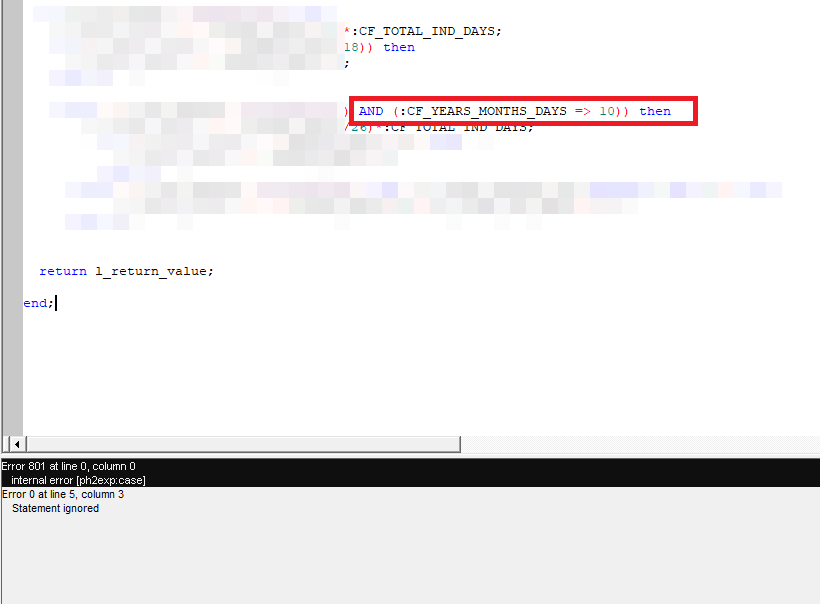
Recently, I had some issues with Report developer 10g. The error message was “internal error [ph2exp:case]”. As an “experienced” PL/SQL developer, I was sure that my code was great and these errors WERE another set of issues produced by Oracle’s obsolete stack. Well, I was wrong.

The error was due to constructing the operators wrongly. Instead of “Greater than or equal to” I set up “Equal to or greater than” causing the compiler to raise the error. Oracle document 1093084.1 should give you more information.

Hence, if you ever run into this compiler error, please don’t blame Oracle. Just correct the positions of the operators.

Oracle Indexes | the way of my understanding

To be quite frank, when it comes to Oracle Indexes and Joins I am as good as with Oracle Analytical functions. Much fly above my head & every time I have to go back to my notes to “learn” for the tasks in hand!

Recently, I took some interests in understanding the “index usage” once after reading about V$OBJECT_USAGE & realized to my shock that more than 50% of my indexes were never used! I wanted to know why & I kept reading for days without finding much that felt like a true answer.

Hence I made a decision to understand how the indexes work by example. Our Oracle EBS environment has more than half dozen custom applications integrated and few of them are with millions of rows, sufficing “large” table requirements to test the effectiveness of indexing. From the layman perspectives, please note, I am not an Indexing expert, I can’t explain why your Indexes are not being used “even after following everything step by step”. For me, what I did work, giving me an understanding about how should I plan my next Indexes. So let us see how I came to my understandings

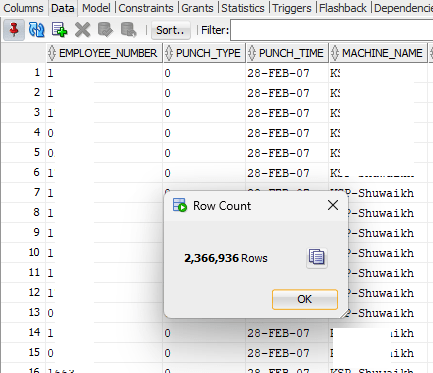
We’ve bio-metric devices that are used for attendances purposes. These devices offload the data to a Microsoft SQL database instance and using transactional SQL, we register them with our Oracle database. The technical part of it. The table that stores the fingerprints has 2.3 Million rows as on date and I used the same table to understand how the indexing works.

There was one Index on this table (Yes, I created it), that I dropped before experimenting as the Index was never used! The logic behind the query is:

I should get the first punch in time for the employee, identified by type “0” and last punch out for the employee, identified by type “1”, the machine name on which the employee has registered in and out punches. Each employee might use the bio-metric devices at different locations for door accesses or other purposes like a proof of visiting another office. Without the Index on this table, let us see how Oracle plans the execution.

This table has just few columns and sought data is usually the punch time against the employee.

Regardless, the cost for the execution didn’t look appealing. So, I created an Index that has all the four columns referred in the main and inline queries.

This time the cost looked far better, however, I could see that the base table still being used when there were no additional columns from the base table referred.

Here comes the thumb rule for indexes (I think). Indexes are not used unless a condition is used against one of the indexed columns! Let us see, whether this makes any sense.

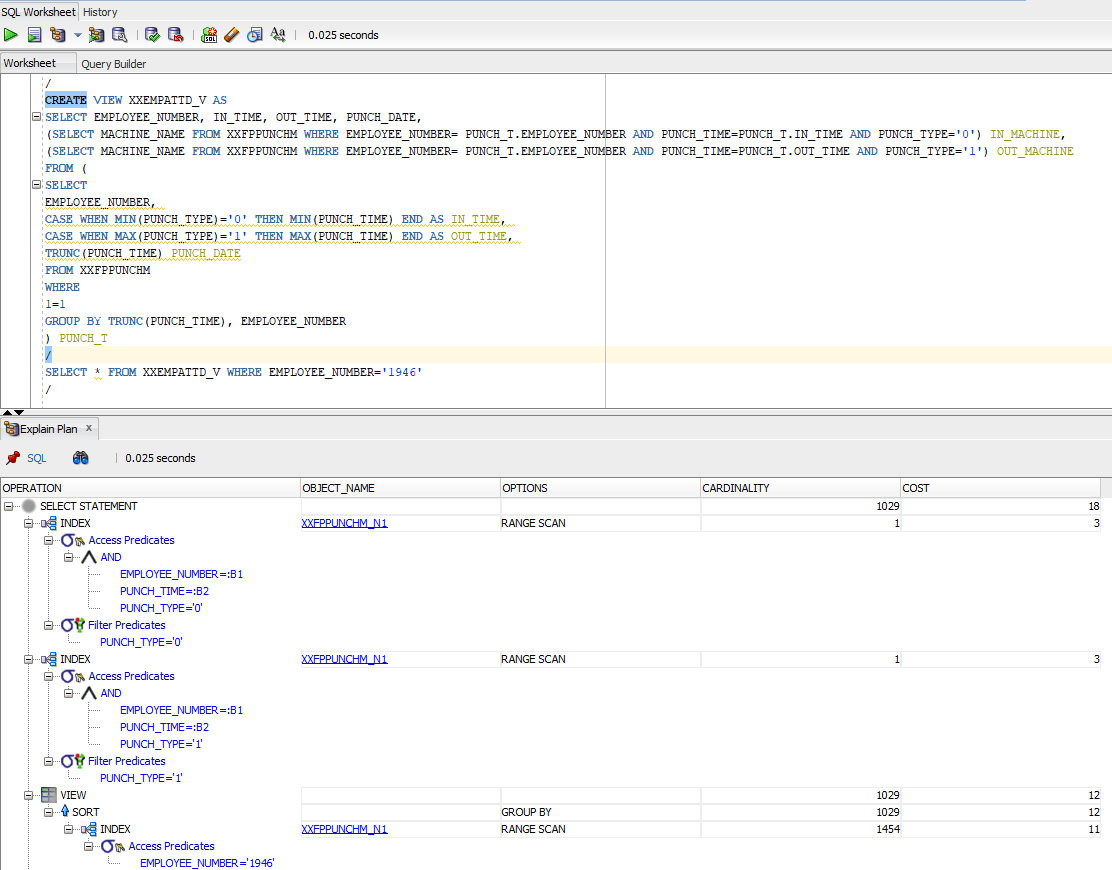
I created a view against the above query to be more certain.

After creating the view, I did a simple select * against the view and the execution plan brought me the same results discussed above. Wherever the predicates were used, query used the existing Index and for the rest, did the base table scan.

So I went ahead against my “understanding” and added a condition to Select * from query and did another Explain plan.

This time, the cardinality, ie the total number of rows fetched came down to just a four digit number, base table was not referred and the cost was dirt cheap compared to the earlier situations.

Let’s summarize everything now.

  1. Indexes are mostly effective about large tables
  2. Oracle will use indexes only when one of the columns used in the index is used against a predicate. Said, I created a view against our dear Scott.Emp table and “Select * from emp;” used that index. I don’t know why and I don’t care!
  3. Add up IS NOT NULL against all your index columns in your query to make sure that your Index is used instead of base table.

Now, I needed to understand further. Hence, I went back to the HR sample schema and chose the table “Employees” this time for my continued experiments. As I said Scott.Emp, the results were the same.

HR.EMPLOYEES tables have many Indexes defined.

For the first query as seen with the image below, I didn’t include a predicate. Regardless, Oracle used the Index for the column

Then I tried another query with multiple columns and without predicate. Oracle used the Index this time as well.

Apparently, this gives me an idea like, for larger tables the Indexes are opted when predicates are available against indexed columns and for tables like HR.EMPLOYEES which has only 107 rows, if there is an index exist against the queried column exist, it is used by Oracle.

Cheers friends, it was fun learning something, once again my own way. Hope this helps few others out there who were breaking their heads to understand this horrible thing. Merry Christmas and a very Happy New Year to everyone out there.

Oracle PL/SQL | Exiting without executing rest of the code block

One of the major confusions for a PL/SQL programming beginners is how to exit a code block when a specific exception happens. Today we will see how we can handle these situation using user defined exceptions.

A developer can define as many exceptions for the code block and raise them as and when needed, than the default exception block for a BEGIN..END; block

Here I am trying to explain how a PL/SQL developer could exit the execution as soon as the first exception happens.

SET SERVEROUTPUT ON;

DECLARE
    l_number NUMBER := 11;
    myexp EXCEPTION;
BEGIN
    BEGIN
        IF l_number = 10 THEN
            RAISE myexp;
        END IF;
    EXCEPTION
        WHEN myexp THEN
            dbms_output.put_line('Okay, let us exit');
            RETURN;
    END;

    BEGIN
        dbms_output.put_line('Looks like there were no exceptions, let us show this!');
    END;
END;

The above example is trying to demonstrate how the exceptions are handled by dividing the code into multiple BEGIN..END blocks. So here I am doing a check whether the “l_number” is 10 and to raise an user defined exception and by merely calling RETURN exit the complete PL/SQL block! As simple as it looks here.

Give it a try by change the l_number value to 10 at the declaration level and see yourself. Happy coding!