Oracle Inventory | Item update API | EGO_ITEM_PUB.ITEM_TBL_TYPE

Kuwait commerce department is making it mandatory to include Arabic in the item descriptions and we also started working on this requirement. Our Oracle EBS R12 environment is set for both English and Arabic, hence the only task was to update the Arabic description for the items. We’ve considerably large items database and updating such a huge repository definitely required an API interface. We selected a small set of items for the first attempt and everything worked as expected, however started getting multiple errors when we tried to execute the same API for 10k items. One of the errors as seen below (The question marks should be SQL Developer’s bug) and I was able to pick the words “MTL_ITEM_BULKLOAD_RECS_N2” and “APPS_TS_INTERFACE” from the error message.

EGO_ITEM_PVT Process_Items: ORA-01654: INV.MTL_ITEM_BULKLOAD_RECS_N2 APPS_TS_INTERFACE
Initialized applications context: 1353 50599 401
Error Messages :
??? ??? ??? ????? ?? ????? EGO_ITEM_PVT ?????? Process_Items: ORA-01654: ?? ???? ?? ???? INV.MTL_ITEM_BULKLOAD_RECS_N2 ?????? 16  ?????? ?????? APPS_TS_INTERFACE
 ???? ??????? ?????? ?????? ?? ?????? ????? ?????

Searched Oracle support documents and couldn’t find anything relevant until I noticed the term “APPS_TS_INTERFACE” & as I handle the Oracle EBS R12 12.2 database myself, immediately assumed the same to be another APPS related tablespace. I was not wrong, the seeded tablespace comes with 2 data files and both were almost full with just few kilobytes left. All I needed was to add new data file with a size of 4GB (didn’t want to take another risk). We’ve been using the application for last 13 years and the tablespace size until the new file was merely 3GBs, hence the new data file should hold the fort for another many years ahead.

We were updating the Arabic description part of the master items and the sample API as given below.

SET DEFINE OFF;
SET SERVEROUTPUT ON SIZE UNLIMITED;

DECLARE
        x_item_tbl		     EGO_ITEM_PUB.ITEM_TBL_TYPE;     
        x_message_list     Error_Handler.Error_Tbl_Type;
        x_return_status		 VARCHAR2(2);
        x_msg_count		     NUMBER := 0;
    
        l_user_id		      NUMBER := -1;
        l_resp_id		      NUMBER := -1;
        l_application_id	NUMBER := -1;
        
        l_rowcnt		      NUMBER := 1;
        l_api_version		   NUMBER := 1.0; 
        l_init_msg_list		 VARCHAR2(2) := FND_API.G_TRUE; 
        l_commit	      	 VARCHAR2(2) := FND_API.G_FALSE; 
        l_item_tbl		     EGO_ITEM_PUB.ITEM_TBL_TYPE; 
        l_role_grant_tbl	 EGO_ITEM_PUB.ROLE_GRANT_TBL_TYPE; 
        l_user_name		VARCHAR2(30) := 'USERNAME';
        l_resp_name		VARCHAR2(30) := 'XYZ INV Super User';    
        
        l_item_catalog_group_id NUMBER := 0;
		
		--CREATE a staging table with the column names as given in the below select statement.
		--If your staging table has different column names, adjust the below select statement.
        
        CURSOR item_list IS
        SELECT ORG_ID,INVENTORY_ITEM_ID,ITEM_CODE, DESC_AR FROM XX_AR_DESCRIPTIONS
        WHERE NVL(STATUS,'E')='E'; -- for retry purposes.


BEGIN
         -- Get the user_id
          SELECT user_id
          INTO l_user_id
          FROM fnd_user
          WHERE user_name = l_user_name;
        
          -- Get the application_id and responsibility_id
          SELECT application_id, responsibility_id
          INTO l_application_id, l_resp_id
          FROM fnd_responsibility_vl
          WHERE responsibility_name = l_resp_name;
        
          FND_GLOBAL.APPS_INITIALIZE(l_user_id, l_resp_id, l_application_id);  

--Set the language context, here we are updating the item master with Arabic language

--Sample few other languages
--FND_GLOBAL.SET_NLS_CONTEXT(P_NLS_LANGUAGE => 'PORTUGUESE');
--FND_GLOBAL.SET_NLS_CONTEXT(P_NLS_LANGUAGE => 'AMERICAN');
--FND_GLOBAL.SET_NLS_CONTEXT(P_NLS_LANGUAGE => 'JAPANESE');
--Is It Possible to Update Item Description in Local Language in MTL_SYSTEM_ITEMS_TL Using Public API ? (Doc ID 2542546.1)

  
  FND_GLOBAL.SET_NLS_CONTEXT(P_NLS_LANGUAGE => 'ARABIC');
          dbms_output.put_line('Initialized applications context: '|| l_user_id || ' '|| l_resp_id ||' '|| l_application_id );

        
        FOR i in item_list loop
            l_item_tbl(l_rowcnt).Transaction_Type := 'UPDATE';
            l_item_tbl(l_rowcnt).inventory_item_id := i.inventory_item_id;
            l_item_tbl(l_rowcnt).organization_id := i.org_id;--Should be your master inventory organization id.
            --l_item_tbl(l_rowcnt).ATTRIBUTE6 := i.movement;
            l_item_tbl(l_rowcnt).Description := i.DESC_AR;

          -- call API to load Items
         EGO_ITEM_PUB.PROCESS_ITEMS( 
                                   p_api_version            => l_api_version
                                   ,p_init_msg_list         => l_init_msg_list
                                   ,p_commit                => l_commit
                                   ,p_item_tbl              => l_item_tbl
                                   ,p_role_grant_tbl        => l_role_grant_tbl
                                   ,x_item_tbl              => x_item_tbl
                                   ,x_return_status         => x_return_status
                                   ,x_msg_count             => x_msg_count);
                                    

--How To Clean Or Avoid Error Data In Interface Tables Using EGO_ITEM_PUB.Process_Item (Doc ID 1548555.1)
        IF (x_return_status <> FND_API.G_RET_STS_SUCCESS) THEN
          DBMS_OUTPUT.PUT_LINE('Error Messages :');
          Error_Handler.GET_MESSAGE_LIST(x_message_list=>x_message_list);
          FOR i IN 1..x_message_list.COUNT LOOP
            DBMS_OUTPUT.PUT_LINE(x_message_list(i).message_text);
          END LOOP;
          DBMS_OUTPUT.PUT_LINE( i.item_code||' Failed Update'); --comment, only for correction purposes.
--We willl update the staging table with failed status
          UPDATE XX_AR_DESCRIPTIONS SET STATUS='E' WHERE INVENTORY_ITEM_ID=i.INVENTORY_ITEM_ID;
          ELSE
--Update the staging table with success status
          UPDATE XX_AR_DESCRIPTIONS SET STATUS='S' WHERE INVENTORY_ITEM_ID=i.INVENTORY_ITEM_ID;
       END IF;
END loop;
commit;

EXCEPTION
WHEN OTHERS THEN
DBMS_OUTPUT.PUT_LINE('Exception Occurred :');
DBMS_OUTPUT.PUT_LINE(SQLCODE ||':'||SQLERRM);
DBMS_OUTPUT.PUT_LINE('=====================================');
ROLLBACK;
RETURN;
        
END;


The following documents were referred during the attempts, which you may not experience.

  • Is It Possible to Update Item Description in Local Language in MTL_SYSTEM_ITEMS_TL Using Public API ? (Doc ID 2542546.1)
  • How To Clean Or Avoid Error Data In Interface Tables Using EGO_ITEM_PUB.Process_Item (Doc ID 1548555.1)
Oracle Inventory | Cost manager not picking up transactions for a new organization

Quite recently we defined one new inventory organization while extending our retailing. After the setup, noticed that none of the transactions were getting costed and there were no error or messages in the lines.

After some dwelling we realized that initial settings for the organization sets the cost cutoff date for the organization to a date that looks somewhere closer to the application installation date. All we needed was to empty the column and relaunch the cost manager.

Navigation. INV Super User -> Setup -> Organization -> Parameters -> Costing tab & reset the cost cutoff date.

Hope this helps few out there! Merry Christmas & Happy New Year 2024 to everyone!

Oracle EBS R12 stock aging report

Quite often auditors could come with some strange requirements (especially when they do not understand the business) & we had to formalize on foot couple of years back. From those days, I always wanted to put together few things and post this, which is happening today.

Our requirements were to list the receipts in 7 buckets, ie, within last 120 days, between 121-180 days, beween 181-1 year, between 1-2 Years, between 2-3 Years and 3-5 Years and 5 Years+ (and still in stock!)

Please note, I am using a custom function “omsconcorgqty_f (code provided below, that concatenates the subinventory quantities into a single column. This function could raise an exception when the column length exceeds 4000 characters.

Minimum requirements: Your EBS instance must be using Oracle database 11gR2 to use “LISTAGG” that is used with the custom function. In addition to, I am using PIVOT, that is supported from 11g.

The below example considers a situation where business has a WMS enabled organization. You can pass NULL to :P_WAREHOUSE_ID when not applicable.

If your organization uses multiple UOM for items, you must adjust the below query accordingly, especially for the cost part.

The average cost for the item is picked using the following logic.

If the :P_ORG_ID has item quantities, then the cost for the item will be picked from the same organization. If the :P_ORG_ID organization doesn’t have quantities and warehouse has, then the cost from :P_WAREHOUSE_ID organization will be picked. So there could be inventory value differences and you shouldn’t use the inventory values derived from this exercises if the above said conditions apply.

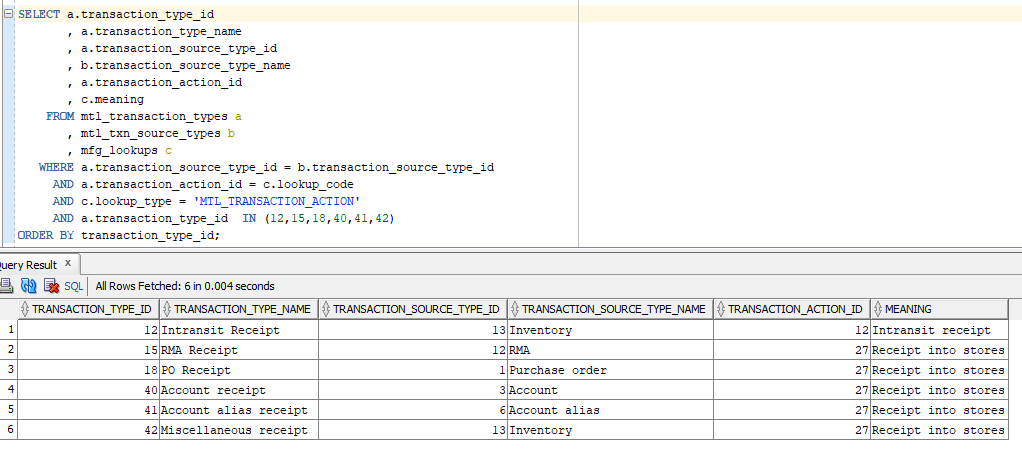
One of the challenges you are going to face is to identifying the transaction types those should be considered as a receipt. For example, we receive materials in stock through the following transactions.

SELECT a.transaction_type_id
       , a.transaction_type_name
       , a.transaction_source_type_id
       , b.transaction_source_type_name
       , a.transaction_action_id
       , c.meaning
    FROM mtl_transaction_types a
       , mtl_txn_source_types b
       , mfg_lookups c
   WHERE a.transaction_source_type_id = b.transaction_source_type_id
     AND a.transaction_action_id = c.lookup_code
     AND c.lookup_type = 'MTL_TRANSACTION_ACTION'
     AND a.transaction_type_id  IN (12,15,18,40,41,42)
ORDER BY transaction_type_id;

If your organization uses additional transaction types for receiving stock to the stores, please include them to the solution. Here the solution is about scanning the entire MTL_MATERIAL_TRANSACTIONS table & based on the volume of data/hardware resources, it could be a very painful ordeal. My suggestion is to run the query when there are least numbers of “issues” are expected.

I will try to explain the approach step by step, for better understanding.

At the first level we will pick all items for the organization(s) from the MTL_ONHAND_QUANTITIES & use this list for picking up items from the MTL_MATERIAL_TRANSACTIONS.

with ohqty_data as (
select inventory_item_id, sum(transaction_quantity) oh_qty from 
mtl_onhand_quantities 
where 
organization_id in (:p_org_id,:p_warehouse_id)
group by inventory_item_id
)

The above code portion will pick all the items from quantities table that has on-hand quantities.

inv_data as (
select inventory_item_id, qty, age_in_days,
sum(qty) over (partition by inventory_item_id order by age_in_days) running_balance,
sum(qty) over (partition by inventory_item_id order by age_in_days)-qty previous_balance
from (
select inventory_item_id, sum(transaction_quantity) qty, 
age_in_days from (
select inventory_item_id, transaction_quantity,
case 
when (trunc (sysdate) - trunc (mmt.transaction_date)) <= 120 then 1
when (trunc (sysdate) - trunc (mmt.transaction_date)) between 121 and 180 then 2
when (trunc (sysdate) - trunc (mmt.transaction_date)) between 181 and 365 then 3
when (trunc (sysdate) - trunc (mmt.transaction_date)) between 366 and 730 then 4
when (trunc (sysdate) - trunc (mmt.transaction_date)) between 731 and 1095 then 5
when (trunc (sysdate) - trunc (mmt.transaction_date)) between 1096 and 1825 then 6
when (trunc (sysdate) - trunc (mmt.transaction_date)) > 1825 then 7
end age_in_days
from mtl_material_transactions mmt
where 
1=1
and inventory_item_id in (select distinct inventory_item_id from ohqty_data)
and organization_id in (:p_org_id,:p_warehouse_id)
and transaction_type_id in (12,15,18,40,41,42)
)
group by inventory_item_id, age_in_days
)
)

This code portion groups data into multiple age buckets, based on business requirements. We will be using few Analytical functions to determine balance in individual age buckets. The final SQL block will look like below.

with ohqty_data as (
select inventory_item_id, sum(transaction_quantity) oh_qty from 
mtl_onhand_quantities 
where 
organization_id in (:p_org_id,:p_warehouse_id)
group by inventory_item_id
),
inv_data as (
select inventory_item_id, qty, age_in_days,
sum(qty) over (partition by inventory_item_id order by age_in_days) running_balance,
sum(qty) over (partition by inventory_item_id order by age_in_days)-qty previous_balance
from (
select inventory_item_id, sum(transaction_quantity) qty, 
age_in_days from (
select inventory_item_id, transaction_quantity,
case 
when (trunc (sysdate) - trunc (mmt.transaction_date)) <= 120 then 1
when (trunc (sysdate) - trunc (mmt.transaction_date)) between 121 and 180 then 2
when (trunc (sysdate) - trunc (mmt.transaction_date)) between 181 and 365 then 3
when (trunc (sysdate) - trunc (mmt.transaction_date)) between 366 and 730 then 4
when (trunc (sysdate) - trunc (mmt.transaction_date)) between 731 and 1095 then 5
when (trunc (sysdate) - trunc (mmt.transaction_date)) between 1096 and 1825 then 6
when (trunc (sysdate) - trunc (mmt.transaction_date)) > 1825 then 7
end age_in_days
from mtl_material_transactions mmt
where 
1=1
and inventory_item_id in (select distinct inventory_item_id from ohqty_data)
and organization_id in (:p_org_id,:p_warehouse_id)
and transaction_type_id in (12,15,18,40,41,42)
)
group by inventory_item_id, age_in_days
)
)
select inventory_item_id, age_in_days, age_bucket_balance from (
select inventory_item_id, age_in_days,
case when (running_balance <= oh_qty) then qty
else nvl(oh_qty - previous_balance, oh_qty)
end age_bucket_balance from( 
select a.*, b.oh_qty from inv_data a
inner join ohqty_data b on b.inventory_item_id = a.inventory_item_id
order by a.inventory_item_id, a.age_in_days
))
where age_bucket_balance > 0;

Problem & The solution.

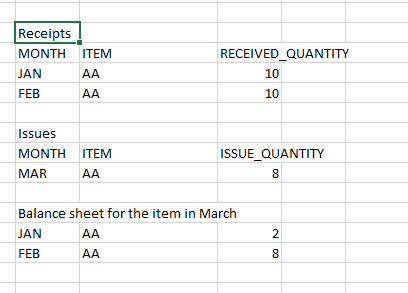
Oracle inventory issues the quantities following FIFO method. Say you received 10 pieces of a material in January 2021 and additional 10 pieces of the same item on February 2021. Think of a transaction that issues 8 quantities in March 2021. The balance sheet for the item after the transaction will look like below

The given code block does this calculation! I will find some time in near future for step by step explanation for the logic & solution. I’ve many people to thank for this solution, especially my colleague Sherin Thomas Mathew, Iudith Menzel and our sales team that stood with me through a month long experiments and wrong outputs.

Now let us go to the final solution.

Create a table

 CREATE TABLE OMSINVSTAGE 
   (	INVENTORY_ITEM_ID NUMBER, 
	AGE_IN_DAYS NUMBER, 
	CLOSE_BALANCE NUMBER
   )  ;

Let us minutely change the code block with an insert

INSERT INTO OMSINVSTAGE(INVENTORY_ITEM_ID, AGE_IN_DAYS, CLOSE_BALANCE)
with ohqty_data as (
select inventory_item_id, sum(transaction_quantity) oh_qty from 
mtl_onhand_quantities 
where 
organization_id in (:p_org_id,:p_warehouse_id)
group by inventory_item_id
),
inv_data as (
select inventory_item_id, qty, age_in_days,
sum(qty) over (partition by inventory_item_id order by age_in_days) running_balance,
sum(qty) over (partition by inventory_item_id order by age_in_days)-qty previous_balance
from (
select inventory_item_id, sum(transaction_quantity) qty, 
age_in_days from (
select inventory_item_id, transaction_quantity,
case 
when (trunc (sysdate) - trunc (mmt.transaction_date)) <= 120 then 1
when (trunc (sysdate) - trunc (mmt.transaction_date)) between 121 and 180 then 2
when (trunc (sysdate) - trunc (mmt.transaction_date)) between 181 and 365 then 3
when (trunc (sysdate) - trunc (mmt.transaction_date)) between 366 and 730 then 4
when (trunc (sysdate) - trunc (mmt.transaction_date)) between 731 and 1095 then 5
when (trunc (sysdate) - trunc (mmt.transaction_date)) between 1096 and 1825 then 6
when (trunc (sysdate) - trunc (mmt.transaction_date)) > 1825 then 7
end age_in_days
from mtl_material_transactions mmt
where 
1=1
and inventory_item_id in (select distinct inventory_item_id from ohqty_data)
and organization_id in (:p_org_id,:p_warehouse_id)
and transaction_type_id in (12,15,18,40,41,42)
)
group by inventory_item_id, age_in_days
)
)
select inventory_item_id, age_in_days, age_bucket_balance from (
select inventory_item_id, age_in_days,
case when (running_balance <= oh_qty) then qty
else nvl(oh_qty - previous_balance, oh_qty)
end age_bucket_balance from( 
select a.*, b.oh_qty from inv_data a
inner join ohqty_data b on b.inventory_item_id = a.inventory_item_id
order by a.inventory_item_id, a.age_in_days
))
where age_bucket_balance > 0;

Commit & don’t forget to delete rows before NEXT run. Use a global temporary table for best results.

Once the rows are populated to our table, we can execute the final code block to generate the Ageing report.

WITH DATASET AS(
Select pivot_data.* from (
select 
inv_data.INVENTORY_ITEM_ID,
inv_data.close_balance TYPE_QTY,
inv_data.AGE_IN_DAYS from OMSINVSTAGE inv_data
where 
1=1
--inv_data.inventory_item_id = 27626
and inv_data.close_balance > 0
)
PIVOT (sum(type_qty) FOR AGE_IN_DAYS IN (1 as "120 Days",2 "121-180 Days",3 "181-365 Days",4 "1Yr-2Yr",5 "2Yr-3Yr",6 "3Yr-5Yrs",7 "5Yrs+")) pivot_data)
SELECT msi.concatenated_segments,  msi.description,msi.primary_uom_code,
CASE WHEN nvl((Select sum(transaction_quantity) from mtl_onhand_quantities moq where moq.inventory_item_id = msi.inventory_item_id and moq.organization_id=:P_ORG_ID
group by moq.inventory_item_id,moq.organization_id),0) > 0 then (
Select item_cost from cst_item_costs cic 
where cic.inventory_item_id = msi.inventory_item_id and cic.organization_id = msi.organization_id and cic.cost_type_id = 2)
ELSE
(Select item_cost from cst_item_costs cic 
where cic.inventory_item_id = msi.inventory_item_id and cic.organization_id = :P_WAREHOUSE_ID and cic.cost_type_id = 2)
END item_cost,
dataset.*,
OMSCONCORGQTY_f(:P_ORG_ID, :P_WAREHOUSE_ID, dataset.inventory_item_id, msi.primary_uom_code) org_quantity FROM DATASET
INNER JOIN mtl_system_items_kfv MSI ON MSI.INVENTORY_ITEM_ID = DATASET.INVENTORY_ITEM_ID AND MSI.ORGANIZATION_ID=:P_ORG_ID
ORDER BY  msi.concatenated_segments;

omsconcorgqty_f function

This function adds (W) before the subinventories from :P_WAREHOUSE_ID organization for easier identification.

CREATE OR REPLACE FUNCTION omsconcorgqty_f (
    p_org_id        IN  NUMBER,
    p_warehouse_id  IN  NUMBER,
    p_item_id       IN  NUMBER,
    p_uom           IN  VARCHAR2
) RETURN VARCHAR2 IS
    l_qty_string VARCHAR2(4000);
BEGIN
    SELECT
        LISTAGG(subqty, ',') WITHIN GROUP(
            ORDER BY
                subqty
        )
    INTO l_qty_string
    FROM
        (
            SELECT
                inventory_item_id,
                CASE
                    WHEN organization_id = p_warehouse_id THEN
                        '(W)'
                        || subinventory_code
                        || '('
                        || to_char(SUM(transaction_quantity))
                        || ')'
                    ELSE
                        subinventory_code
                        || '('
                        || to_char(SUM(transaction_quantity))
                        || ')'
                END subqty
            FROM
                mtl_onhand_quantities_detail moq
            WHERE
                    moq.inventory_item_id = p_item_id
                AND moq.transaction_uom_code = p_uom
                AND organization_id IN ( p_org_id, p_warehouse_id )
            GROUP BY
                inventory_item_id,
                subinventory_code,
                organization_id
        )
    GROUP BY
        inventory_item_id;

    RETURN l_qty_string;
END;

Hope this helps

Oracle EBS R12 | Inventory | Receipts stuck in pending status

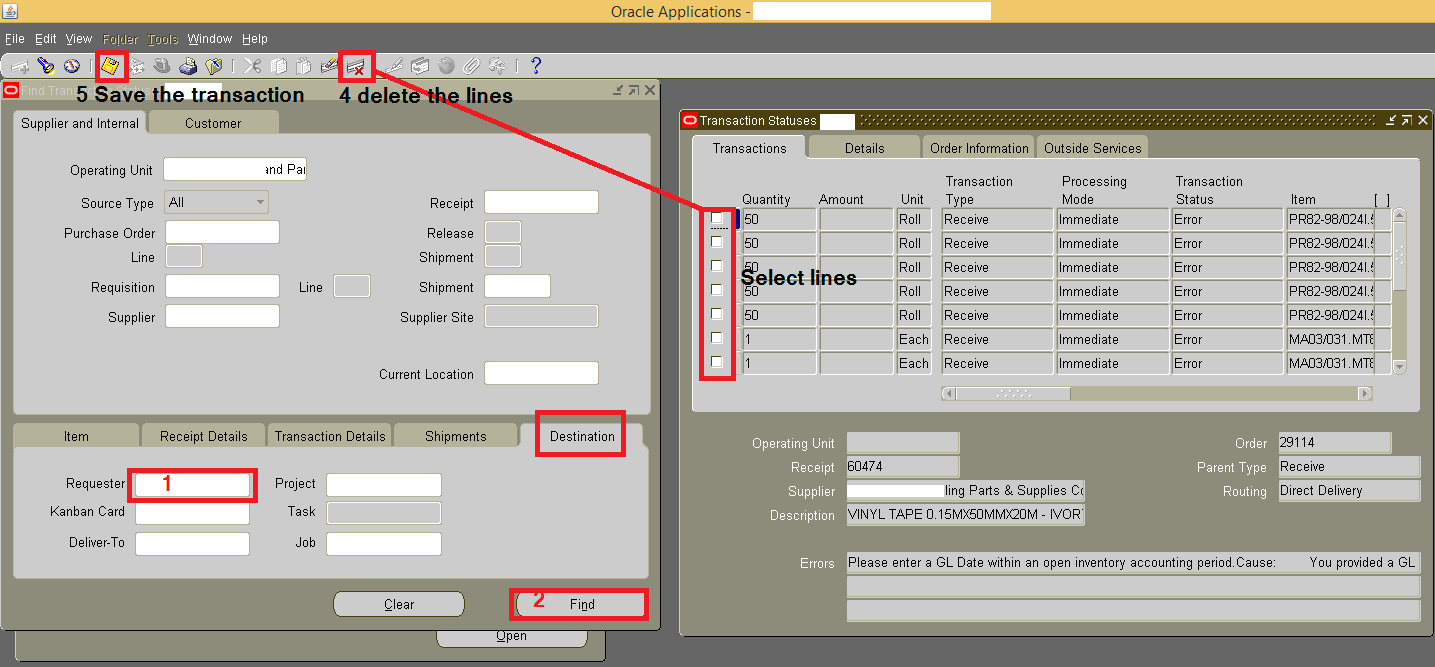
Sometimes the receipts against internal requests could get into trouble with the status pending. While the requester tries to receive the transaction, receipts get created with zero quantities and the internal sales order yet in open status and the quantities are seen in staging location. Please follow the below to delete such pending lines to receive the quantities once again to the targeted sub-inventory

As inventory super user

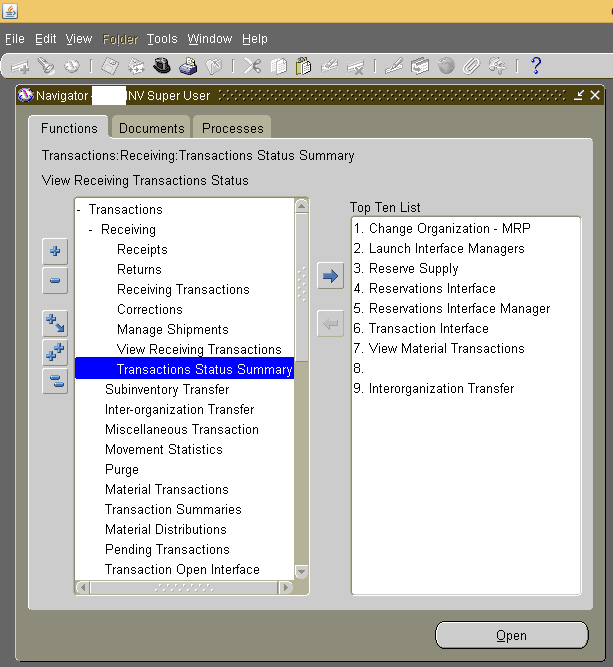
Transactions -> Receiving -> Transactions Status Summary

1

Under the tab “Supplier and Internal”

Select the “Destination” tab

Enter the name of the requester name (the name of the user who has created the internal material request to limit the lines fetched) & find the transactions

Delete the lines matching the transaction & save

2

Go back to receipts and enter the request number once again to receive the materials

regards,

for Windows7bugs

rajesh