Oracle APEX Master Details forms using Tables without Primary Keys (mostly)

Oracle clearly mandates primary keys for all the tables that are to be used with APEX and they are absolutely right to demand it, to meet the simplicity of the APEX low code application development. Primary keys, constraints, table triggers and all such could make the front end development easier as the database will do the validations and checksums against the data.

Today we will see how to create a Master Details APEX form using the master table that has a primary key column and the details table having only a foreign key reference to the master table. If you refer the Oracle Whitepaper for APEX integration with R12 12.2.x, you will get an idea to circumvent the primary key issues to a certain extend, which is not the topic that I am discussing today.

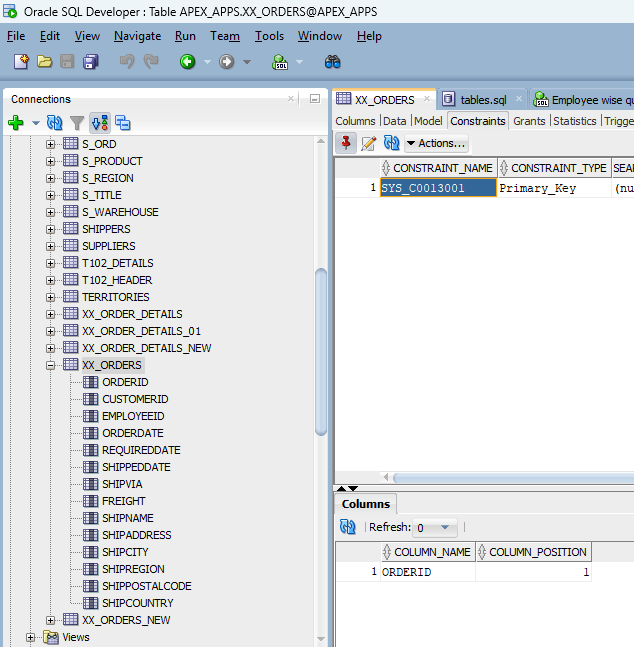
For this demonstration purpose, I will be using 2 tables that I copied from Northwind Microsoft SQL database which was migrated to Oracle. I dropped all the constraints from these tables and created primary key constraint for the Master table and foreign key for the details table.

I thought of making a video this time as explaining it here looked too hectic.

If you would like to see a text version of the same, do let me know through comments and I will try to update this thread.

APEX Integration with Oracle EBS R12 12.2

Updated on 3rd February 2025 (Added additional information about running apex_ebs_setup.sql)

Updated on 29th January 2025

If you are using Oracle EBS R12 12.2.14 already, you may refer this document. It has much straight forward approaches documented.

Today we will see how to integrate Oracle APEX with an existing Oracle EBS R12 12.2.10 instance that is on top of Oracle database 19c. Recently I’ve posted a thread about how to install Apex on Linux and specified that it was done against EBS database. You can use the same thread for installing APEX, ORDS and Apache Tomcat for hosting.

Oracle provides a document that was last reviewed in 2019 with cryptic instructions to setup a custom schema for the APEX integration & gravely misses environments like ours where multitenant database is used! As usual I am not making any claims that this is the “certificated*” way of setting up APEX for EBS. This is just another attempt to connect the dots and do stuffs the right way after multiple attempts.

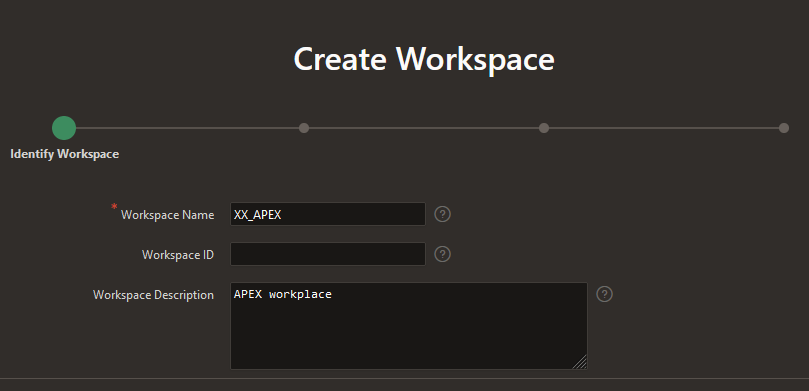
Oracle documentation instructs to create a new schema XX_APEX as part of setting up new workplace. This process creates a separate tablespace for the schema and this instruction contradicts with the instruction to setup the same as a custom application. EBS R12 12.2 “AD Splice” doesn’t respect custom tablespace definitions and defaults the tablespaces to APPS_TS_TX_DATA and APPS_TS_TX_IDX for custom schemas. So how do we circumvent this issue? Simple answer. Create a custom application using “AD Splice” bearing the name XX_APEX to meet the documentation preferences & use it with APEX workplace later. One of the best detailed instructions for creating a custom application using “AD Splice” could be found here

For additional references you may refer the below also.

I followed RishOraDev’s instructions and the custom application “XX_APEX” was created without any issues.

Once the custom application creation is over, we can proceed with creating a new workspace for APEX applications.

Logon to your APEX portal as Admin and proceed with create workspace.

Next step, choose Yes for “Re-use existing schema” and pick XX_APEX that you have created earlier.

Provide a meaningful username for Administrator. I am using Admin & this shouldn’t be confused with the APEX admin account. Select an existing Schema will grant additional rights to the schema that are essential for APEX.

You will have to change the password during the initial login. So use a temporary password and reserve your highly secret password for your permanent password :)

That’s it. A new workspace for APEX has been created!

You can execute apex_ebs_setup.sql and other supplementary scripts now to setup the example scenarios described in the white paper. If you try to execute apex_ebs_setup.sql prior setting up the schema for the workspace, the last statement will fail as the custom schema will not have CREATE VIEW rights. Grant the right to schema for such cases.

Now you can proceed with login as XX_APEX workspace admin and continue with defining developers accounts so that your team could start building applications. Please refer the whitepaper for understanding what you should and shouldn’t do with APEX while it is integrated with EBS.

There are few scripts offered by Oracle for APEX environment and one might feel tempted to try them, I cannot blame that urge. However, please note the whitepaper was never meant for a multitenant database and the instructions were clearly for 11G. If your EBS is already migrated to a multitenant setup, please make sure that you will be running the scripts as APPS user. Switch to APPLMGR, source the environment. Sample as below

[applmgr@erp-test ebs_apex_scripts]$ sqlplus apps/apps @apex_ebs_setup.sql

SQL*Plus: Release 10.1.0.5.0 - Production on Mon Feb 3 18:22:19 2025

Copyright (c) 1982, 2005, Oracle.  All rights reserved.


Connected to:
Oracle Database 19c Enterprise Edition Release 19.0.0.0.0 - Production

.  ____   ____           ____        ____
. /    \ |    \   /\    /     |     /
.|      ||    /  /  \  |      |    |
.|      ||---    ----  |      |    |--
.|      ||   \  /    \ |      |    |
. \____/ |    \/      \ \____ |____ \____
.
.
. Application Express E*Business Suite Integration Example Setup.
.................................................................
.

FOO3
--------------------------------------
apex_ebs_setup_2025-02-03_18-22-19.log

.
.  << Enter Criteria >>
.
.   Version of EBS [12.2]:
.   EBS APPS Username [APPS]:
.   Password for EBS APPS Username:
.   APEX Schema Name [XX_APEX]:
.   Password for APEX Schema:
.
.
... Ebnable editions in APEX Schema
.

PL/SQL procedure successfully completed.

.
... Conect to the APPS Schema
.
Connected.
.
... Create views for use in APEX Applications
.

View created.


Grant succeeded.


Grant succeeded.

.
... Create Sample APIs to be called from APEX applications
.

Package created.


Package body created.

No errors.

Grant succeeded.

.
... Create APEX Global package for use with EBS Responsibilities
.

Package created.


Package body created.

No errors.

Grant succeeded.

.
... Conect to the XX_APEX Schema
.
Connected.
.
... Create APEX View referencing the APPS View
.

View created.

Disconnected from Oracle Database 19c Enterprise Edition Release 19.0.0.0.0 - Production

Forget about the hacks to connect to PDB as sys in order to run the scripts :)

Have questions? let me know through comments.

*Certificated is a term that I made to name and shame people who always defend their ignorance by claiming whatever they cannot do or answer as not certified.

Oracle Weblogic Admin Server startup | schema validation failure

While I was trying to setup Oracle Forms & Reports 14.1.2, the first attempt REPO creation didn’t report any connection issues & I was slapped with JAVA errors, especially “Schema validation failure” multiple times throughout Admin server startup. Not just the errors, the startup gave up after many errors associated and I came across a work around to start the Admin Server. It was by using one of the JAVA options.

set JAVA_OPTIONS=-Dweblogic.configuration.schemaValidationEnabled=false

After setting up this option, startWeblogic.cmd starts the Admin Server, however still throwing multiple JAVA exceptions. As we have Oracle support, two days I tried to figure out the exact reasons and gave up as there are hardly many 14.1.2 cases discussed else anywhere.

Being a Virgo has multiple caveats, one of them is doing stuffs the right way. My new VirtualBox VM will not activate Windows, that was annoying me because I couldn’t configure my desktop with icons! So I copied back my Windows 10 VM, upgraded it to Windows 11 23H2 and had to reinstall Oracle 19c database. Btw, this time I applied the latest Windows bundle patch for 19c, bringing the database to 19.25!

The first issue I noticed was while setting up the repository for Weblogic classic domain. The connection to “PDB” failed & I realized that I couldn’t do a tnsping against the PDB! Excuse me, I am not a “Certified DBA” here and I always used hacks to get stuffs done. Until the last time, once after Installing the Oracle database 19c with a PDB, I always did the following few

  • alter pluggable database all open read write services=all;
  • alter pluggable database all save state;
  • Set password reuse and password life to unlimited for the DEFAULT profile on all containers

This time I opened the pluggable database and saved the state. Didn’t use services=all part and as I am not a certified DBA, cannot confirm whether it was the reason the RCU failed to connect ;)

Anyway, as I just said above, usually I am lucky with hacks and realized that the connection issues are due to missing service entries, proceeded with creating service and database entries for the PDB using net manager.

Bounced database, restarted the listener services and REPO creation proceeded without further connection related issues.

The bonus was Weblogic Admin Server startup stopped throwing “Schema Validation Failure” JAVA exceptions and it was a really wonderful experience.

Oracle EBS R12 | Monitoring tablespace | Sending email using utl_smtp package

Today we will checkout a PL/SQL procedure that will keep monitoring Oracle EBS application specific Tablespaces and send emails to concerned parties whenever the free storage falls below a certain percentage. The below stored procedure checks the free spaces of all Tablespaces that have a name starting with “APPS”.

create or replace procedure XXTBLSPCE_MAIL( errbuf  OUT    VARCHAR2, retcode   OUT    VARCHAR2) AS
cursor c1 is
SELECT F.TABLESPACE_NAME,
(T.TOTAL_SPACE -  F.FREE_SPACE) "USED_MB",
(F.FREE_SPACE) "FREE_MB",
(T.TOTAL_SPACE) "TOTAL_MB",
(ROUND ((F.FREE_SPACE/T.TOTAL_SPACE)*100)) PER_FREE
 FROM   (
 SELECT       TABLESPACE_NAME,
 ROUND (SUM (BLOCKS*(SELECT VALUE/1024
 FROM V$PARAMETER
 WHERE NAME = 'db_block_size')/1024)
 ) FREE_SPACE
 FROM DBA_FREE_SPACE
 WHERE TABLESPACE_NAME LIKE 'APPS%'
 GROUP BY TABLESPACE_NAME
 ) F,
 (
 SELECT TABLESPACE_NAME,
 ROUND (SUM (BYTES/1048576)) TOTAL_SPACE
 FROM DBA_DATA_FILES
 GROUP BY TABLESPACE_NAME
 ) T
 WHERE F.TABLESPACE_NAME = T.TABLESPACE_NAME
 AND (ROUND ((F.FREE_SPACE/T.TOTAL_SPACE)*100)) < 10;
 
 /* Mail specific variables*/

mailhost VARCHAR2 (30) := 'smtp.yourmaildomain.com';
mail_conn utl_smtp.connection;
crlf VARCHAR2(2) := CHR (13) || CHR (10);
message_1 CLOB;
v_email varchar2(16000);
v_sub varchar2(10000);
vcount NUMBER := 0;

name_array     DBMS_SQL.varchar2_table;

CC_parties     VARCHAR2 (2000) := NULL;

Cursor ec1 is
(select 'rec1.it@yourmaildomain.com'  user_email from dual
union all
select 'rec2.it@yourmaildomain.com'  user_email from dual
);


 v_Mail_Exception Exception;
 
 --15/10/2020
 
   l_host_name varchar2(240);
   l_db_name varchar2(240);
 
 BEGIN
 
  BEGIN
        select sys_context ( 'USERENV', 'DB_NAME' ) db_name,
        sys_context ( 'USERENV', 'SERVER_HOST' ) db_host into l_db_name, l_host_name
        from dual;
        EXCEPTION 
        WHEN NO_DATA_FOUND THEN
        l_host_name := 'NO HOST';
        l_db_name := 'NO DBNAME';
        
        END;
        

mail_conn := utl_smtp.open_connection (mailhost, 25);
utl_smtp.helo (mail_conn, mailhost);
utl_smtp.mail (mail_conn, 'sender@yourmaildomain.com');

FOR m IN ec1
   LOOP
      vcount := vcount + 1;
      name_array (VCOUNT) := m.user_email;
   END LOOP;


 FOR n IN name_array.FIRST .. name_array.LAST
   LOOP
      CC_parties := CC_parties || ';' || name_array (n);
      UTL_SMTP.Rcpt (mail_conn, name_array (n));
   END LOOP;

if CC_parties is NULL then
RAISE v_Mail_Exception;
end if;

for ts in c1 loop
if (ts.FREE_MB < 1024) then
if (trim(message_1) is not null) then
message_1 := message_1||ts.tablespace_name ||' is running out of storage space. Current free space is '||ts.FREE_MB||' MB. ';
else
message_1 := ts.tablespace_name ||' is running out of storage space. Current free space is '||ts.FREE_MB||' MB. ';
end if;
end if;
end loop;

if (trim(message_1) is not null) then
message_1 := message_1||' ( Note: add datafiles with size nothing less than 2GB for APPS_TS tablespaces.) '; 

v_sub := 'Subject: '||'Table Space(s) running out of space! Urgent(Instance: '||l_host_name||', Database: '||l_db_name||' )';
 message_1 :=  'From: Oracle Database sender  < sender@yourmaildomain.com >' ||crlf||v_sub||crlf||'To:'||CC_parties||crlf||crlf||crlf||message_1;
 
 utl_smtp.data(mail_conn, 'MIME-Version: 1.0' ||CHR(13)||
 CHR(10)||'Content-type: text/html' || CHR(13)||CHR(10)||message_1);
 utl_smtp.quit (mail_conn);
 
 end if;
 

EXCEPTION
WHEN v_Mail_Exception Then
   null;
WHEN OTHERS THEN

--err_code := SQLCODE;
--err_msg := SUBSTR(SQLERRM, 1, 200);
message_1 := 'Failed to send email, error explanation:  '||SQLCODE||'  '||SQLERRM;

v_sub := 'Subject: '||'Table Space(s) running out of space! Urgent';
message_1 := 'From: Oracle Database sender  < sender@yourmaildomain.com >' ||crlf||v_sub||crlf||crlf||message_1;

 utl_smtp.data(mail_conn, 'MIME-Version: 1.0' ||CHR(13)||
 CHR(10)||'Content-type: text/html' || CHR(13)||CHR(10)||message_1);
 utl_smtp.quit (mail_conn);
 

 End;

Create a concurrent program and submit as a scheduled, setting up frequencies based on your specific requirements. The above program works perfectly under the below conditions.

Oracle EBS R12 12.2.10, 19c multi-tenant database, Local SMTP server.

Oracle EBS R12 12.2 database cloning

I am not a certified Database/APPS DBA. I wanted to develop a shell/bash script or set of scripts that could duplicate the Oracle EBS PRODUCTION database on demand on a test instance. I thought of doing it as a single script, step by step and later decided to go with multiple scripts to narrow down the damages/or better error correction. Please note, you cannot just copy and start using these scripts at your environment already! You may have to modify many of the parameters & kindly be reminded that, these scripts were developed for an environment that was being cloned repeatedly. Remember to run the main script as “root”

Environment: OS: Oracle Linux 7, Oracle EBS R12 12.2.10, Oracle database 19c, multi-tenant. Approximate size 700GB

Let us create a parameter file for the duplication of EBS database on the TEST instance. The hostname and few other details will be automatically picked up by the shell scripts, however, few other details are provided by the parameter file. This approach gives me greater flexibility to utilize the scripts with different hostnames and contexts. I call this parameter file as “restoreparam.txt”. If you are planning to change the name, you have to replace it in each and every other bash script that is used within the main script.

#Oracle base
s_target_base=/u01/test/
# Source CDB sid
s_source_cdbSid=PRODCDB
# Target CDB sid
s_target_cdbSid=DEVPCDB
# Source EBS database sid (PDB)
s_source_dbSid=PROD
# Target EBS database sid (PDB)
s_target_dbSid=DEVP
# We have database files for both CBD and EBS kept in different paths
# Defining these paths and modifying the RMAN run instructions are crucial for successful restoration and cloning.
s_source_data_path_1=/u01/prod/oradata/PRODCDB/
s_source_data_path_2=/u01/prod/PROD/db/apps_st/data/
# Target data paths
s_data_path_1=/u01/test/oradata/DEVPCDB/
s_data_path_2=/u01/test/DEVP/db/apps_st/data/
# Target PDB Service requires it's own listener information
s_listener_port=1526
# Oracle and Appl manager OS level users
s_db_user=oracle
s_appl_manager=applmgr
# EBS user, by default it is "apps"
s_apps_user=apps
s_apps_pass=********
# Oracle database system account password
s_system_pass=*******
# Path where RMAN backup chunks are kept
s_rman_path=/u04/RMAN/DAILYBKP
# Path where this file be created.
s_rman_param_path=/u04/RMAN/RESTORE
# Target system Oracle inventory path
s_ora_invenoty_path=/u01/test/oraInventory
# Oracle inventory entry identifier for the database. Using this string, entry for the database will be
# deleted from the inventory file. So don't make mistakes
s_ora_inv_dbString=DEVP_DB__u01_test_DEVP_db_tech_st_19_0_0

You can’t make mistakes with the above parameter file. Now we will create the main shell script “doclone.sh”

#!/bin/sh

: <<'END'
This script & associated must be executed as root
This script is meant for single instances.
This script expects both ORACLE, APPLMGR users bash profiles sourcing environment files.
This script was last tested against Oracle EBS R12 12.2.10/19c
Last modified on: 21st October 2024
Author: Rajesh Thampi
License: Public
END

me=$(basename "$0")
parameter_file="/u04/RMAN/RESTORE/restoreparam.txt"
ORACLE_USER=`grep 's_db_user' $parameter_file | cut -d "=" -f2`
APPS_USER=`grep 's_appl_manager' $parameter_file | cut -d "=" -f2`
db_path_1=`grep 's_data_path_1' $parameter_file | cut -d "=" -f2`
db_path_2=`grep 's_data_path_2' $parameter_file | cut -d "=" -f2`
rman_path=`grep 's_rman_path' $parameter_file | cut -d "=" -f2`

ORACLE_HOME=$(su - ${ORACLE_USER} -c 'echo "$ORACLE_HOME"')
ORACLE_SID=$(su - ${ORACLE_USER} -c 'echo "$ORACLE_SID"')
ORACLE_CONTEXT=$(su - ${APPS_USER} -c 'echo "$CONTEXT_NAME"')
APPS_SCRIPTS_HOME=$(su - ${APPS_USER} -c 'echo "$RUN_BASE/inst/apps/$CONTEXT_NAME/admin/scripts"')
DB_SCRIPTS_HOME=$(su - ${ORACLE_USER} -c 'echo "$ORACLE_HOME"')/appsutil/scripts/$ORACLE_CONTEXT


# We'll stop the application and database instances now.
echo "We'll shutdown the EBS instace now"

sh startstopebsr12.sh stop
if [ $? -eq 0 ]; then
echo "We'll shutdown the EBS instace now"
sleep 60
else
echo "There was an error shutting down the instance."
exit 1
fi

# As we are cloning the instance, we can kill all ORACLE & APPLMGR processes immediately
pkill -9 -u ${APPS_USER}
pkill -9 -u ${ORACLE_USER}
echo "All services for ORACLE, APPLMGR are terminated now"

# remove the datafiles from data tops now
rm -rf ${db_path_1}*
rm -rf ${db_path_2}*
echo "All data files are removed from the data tops now"

#change of the ownership of the rman chunks now
chown -R ${ORACLE_USER}:oinstall ${rman_path}

sleep 10

# Start the database as not mounted

sh startdbnomount.sh
if [ $? -eq 0 ]; then
    echo "Database started nomount"
else
    echo "There were some errors starting the database in the nomount status"
    exit 1
fi

# Start RMAN Restore

sleep 10
echo "Starting RMAN restore processes now, this could take many hours based on the current size of the database"
sh dormanrestore.sh

if [ $? -eq 0 ]; then
    echo "RMAN restore completed"
else
    echo "There were some errors starting the database in the nomount status"
    exit 1
fi
sleep 10

# Startup the database and disable archive logging

sh startdbmount.sh
if [ $? -eq 0 ]; then
    echo "Starting database and disabling archivelog. Sleep 15 seconds"
else
    exit 1
fi
sleep 15
# We will create a backup for the oracle inventory file and remove the database entry before running the adcfgclone
sh dofirstclone.sh
if [ $? -eq 0 ]; then
    echo "Initial Cloning completed. Sleep 15 seconds"
else
    exit 1
fi
sleep 15

# Setup the PDB and related services now
sh dodbsetup.sh
if [ $? -eq 0 ]; then
    echo "PDB recreated and all services are restarted, will sleep 15 seconds"
else
    exit 1
fi
sleep 15

# We will setup the UTL files and run the adcfgclone
sh doutlfile.sh
if [ $? -eq 0 ]; then
    echo "UTL directories set, final cloning completed. Will sleep 15 seconds"
else
    exit 1
fi
sleep 15

# Finally we will run the autoconfig on database and both application file systems
sh doautoconfig.sh
if [ $? -eq 0 ]; then
    echo "All done. You can try to restart the applicatio now. Sleeping 10"
else
    exit 1
fi

Now we will create other shells scripts that are called from the main script and I will try to explain them briefly as much of them will be pretty familiar for a seasoned DBA. Script “startstopebsr12.sh” accepts one input value, either “start” or “stop”. This script is used to stop the instance from the main script and not parameterized because I use it for multiple contexts.

#!/bin/sh

: <<'END'
This script is meant for single instances.
This script expects both ORACLE, APPLMGR users bash profiles sourcing environment files.
This script was last tested against Oracle EBS R12 12.2.10/19c
Last modified on: 2nd October 2024
Author: Rajesh Thampi
License: Public
END


# I will not be using the clone parameter file as this script is multiple places in different contexts.
# If you want to use it exclusively for the cloning purpose, please refer it here.

me=$(basename "$0")
ORACLE_SID=$(su - oracle -c 'echo "$ORACLE_SID"')
APPS_ORACLE_CONTEXT=$(su - applmgr -c 'echo "$CONTEXT_NAME"')
APPS_SCRIPTS_HOME=$(su - applmgr -c 'echo "$RUN_BASE/inst/apps/$CONTEXT_NAME/admin/scripts"')
DB_SCRIPTS_HOME=$(su - oracle -c 'echo "$ORACLE_HOME"')/appsutil/scripts/$APPS_ORACLE_CONTEXT

if [[ -z $1 ]]; then
    echo "No parameter was passed"
    exit 1
else
    if [[ "$1" == "start" ]]; then
        echo "All Oracle EBS R12 Services will be started now."
        su - oracle -c "sh $DB_SCRIPTS_HOME/adcdbctl.sh start;"
        if [ $? -ne 0 ]; then
            echo "Couldn't start the database services successfully. Aborting"
            exit 1
        else
            su - oracle -c "sh $DB_SCRIPTS_HOME/adcdblnctl.sh start $ORACLE_SID;"
        fi
        if [ $? -ne 0 ]; then
            echo "Couldn't start the listener services successfully. Aborting"
            exit 1
        else
            su - applmgr -c "cd $APPS_SCRIPTS_HOME;{ echo apps; echo apps; echo welcome123; } | adstrtal.sh;"
        fi
        if [ $? -ne 0 ]; then
            echo "Couldn't start the Application services successfully. Check log files for errors and try again"
        else
            echo "All EBS Services were successfully started."
        fi

    elif [[ "$1" == "stop" ]]; then
        echo "All Oracle EBS R12 Services will be stopped now."
        su - applmgr -c "cd $APPS_SCRIPTS_HOME;{ echo apps; echo apps; echo welcome123; } | adstpall.sh;"
        if [ $? -ne 0 ]; then
            echo "Couldn't stop the application services successfully. Aborting"
            exit 1
        else
            su - oracle -c "sh $DB_SCRIPTS_HOME/adcdblnctl.sh stop $ORACLE_SID;"
        fi
        if [ $? -ne 0 ]; then
            echo "Couldn't stop the Listener services successfully. Aborting"
            exit 1
        else
            su - oracle -c "sh $DB_SCRIPTS_HOME/adcdbctl.sh stop immediate;"
        fi
        if [ $? -ne 0 ]; then
            echo "Couldn't stop the Database services successfully. Check log files for errors and try again."
            exit 1
        else
            echo "All EBS Services were successfully stopped."
        fi
    else
        echo "Syntax: sh $me start/stop"

    fi
fi

The main script will continue once after both application and database instances are stopped. data files from the data paths will be deleted & ownership of the RMAN files will be set for Oracle user. Oracle services will restarted and the database will not be mounted using the script “startdbnomount.sh”. I didn’t feel parameterization was necessary for this script ;)

#!/bin/sh
su - oracle -c "sqlplus / as sysdba <<EOF
startup nomount;
quit;
EOF"

Now, the main script will call “dormanrestore.sh” script, which is one of the most critical scripts, duplicating the PRODUCTION database. You have to carefully adjust the below to ensure that your database is duplicated successfully. Please give special attentions to comments provided inside the script.

#!/bin/sh

parameter_file="/u04/RMAN/RESTORE/restoreparam.txt"
rman_param_path=$(grep 's_rman_param_path' $parameter_file | cut -d "=" -f2)
target_cdbsid=$(grep 's_target_cdbSid' $parameter_file | cut -d "=" -f2)
rman_path=$(grep 's_rman_path' $parameter_file | cut -d "=" -f2)
s_data_path_1=$(grep 's_source_data_path_1' $parameter_file | cut -d "=" -f2)
s_data_path_2=$(grep 's_source_data_path_2' $parameter_file | cut -d "=" -f2)
t_data_path_1=$(grep 's_data_path_1' $parameter_file | cut -d "=" -f2)
t_data_path_2=$(grep 's_data_path_2' $parameter_file | cut -d "=" -f2)

LOGFILE=${rman_param_path}"/full_restore_`date +%d%b%y_%H%M%S`.log"

# Make sure that db_file_name_convert & number of channels are adjusted based on your specific environments.
# Keeping multiple channels open could directly affect the restoration and overall performance of the process.
# Adjust the number of redo log files, size & path based on your specific requirements.
echo "RMAN restore will start now"

su - oracle <<EOF
rman auxiliary / log='$LOGFILE' <<RMN
run
{
ALLOCATE AUXILIARY CHANNEL c1 DEVICE TYPE disk;
ALLOCATE AUXILIARY CHANNEL c2 DEVICE TYPE disk;
ALLOCATE AUXILIARY CHANNEL c3 DEVICE TYPE disk;
ALLOCATE AUXILIARY CHANNEL c4 DEVICE TYPE disk;
duplicate database to "${target_cdbsid}" backup location '${rman_path}' nofilenamecheck
db_file_name_convert=('${s_data_path_1}','${t_data_path_1}','${s_data_path_2}','${t_data_path_2}')
LOGFILE
GROUP 1 (
'${t_data_path_1}redo01a.log',
'${t_data_path_1}redo01b.log'
) SIZE 1200M ,
GROUP 2 (
'${t_data_path_1}redo02a.log',
'${t_data_path_1}redo02b.log'
) SIZE 1200M ,
GROUP 3 (
'${t_data_path_1}redo03a.log',
'${t_data_path_1}redo03b.log'
) SIZE 1200M ,
GROUP 4 (
'${t_data_path_1}redo04a.log',
'${t_data_path_1}redo04b.log'
) SIZE 1200M ;
}
RMN
EOF

RMAN duplication could take hours based on multiple factors. Size of the database, channels and hardware efficiency. The log file will bear the data and time stamp, keep monitoring it for the progress. Once RMAN successfully completes, main script will call the script “startdbmount.sh”. This script will start the database and mount it, without opening it. The archive logging will be disabled during this stop for the duplicated database.

#!/bin/sh

su - oracle -c "sqlplus / as sysdba <<EOF
shutdown immediate;
startup mount;
alter database noarchivelog;
shutdown immediate;
quit;
EOF"

Now the main script will call “dofirstclone.sh”, that will do the initial clone of the database. A number of parameters are referenced from the parameter file, hence make sure that your parameter is constructed with utmost attention.

#!/bin/sh

parameter_file="/u04/RMAN/RESTORE/restoreparam.txt"
rman_param_path=$(grep 's_rman_param_path' $parameter_file | cut -d "=" -f2)
ora_inventory_path=$(grep 's_ora_invenoty_path' $parameter_file | cut -d "=" -f2)
ora_inv_dbString=$(grep 's_ora_inv_dbString' $parameter_file | cut -d "=" -f2)
ORACLE_USER=$(grep 's_db_user' $parameter_file | cut -d "=" -f2)
APPS_USER=$(grep 's_appl_manager' $parameter_file | cut -d "=" -f2)

ORACLE_HOME=$(su - ${ORACLE_USER} -c 'echo "$ORACLE_HOME"')
ORACLE_SID=$(su - ${ORACLE_USER} -c 'echo "$ORACLE_SID"')
ORACLE_CONTEXT=$(su - ${APPS_USER} -c 'echo "$CONTEXT_NAME"')
APPS_SCRIPTS_HOME=$(su - ${APPS_USER} -c 'echo "$RUN_BASE/inst/apps/$CONTEXT_NAME/admin/scripts"')
DB_SCRIPTS_HOME=$(su - ${ORACLE_USER} -c 'echo "$ORACLE_HOME"')/appsutil/scripts/$ORACLE_CONTEXT

# Application user password

APPS_PASSWD=$(grep 's_apps_pass' $parameter_file | cut -d "=" -f2)

su - ${ORACLE_USER} <<EOF
cd ${ora_inventory_path}/ContentsXML
cp -f inventory.xml inventory_backup.xml
awk '!/'${ora_inv_dbString}'/' inventory.xml  > tmpfile.xml && mv tmpfile.xml inventory.xml
EOF

su - ${ORACLE_USER} <<EOF
cd $ORACLE_HOME/appsutil/clone/bin
{ echo $APPS_PASSWD; } | perl adcfgclone.pl dbTechStack $ORACLE_HOME/appsutil/${ORACLE_CONTEXT}.xml
EOF

echo "Cloning successfully completed, will sleep 10 seconds"
sleep 10

su - ${ORACLE_USER} <<EOF
cd $ORACLE_HOME/appsutil/install/$ORACLE_CONTEXT
sqlplus / as sysdba;
startup;
@adupdlib.sql so;
shutdown immediate;
EOF
echo "Database shutdown completed. Sleep 15 seconds"
sleep 15

su - ${ORACLE_USER} <<EOF
sqlplus / as sysdba;
startup;
quit;
EOF
echo "Database restart completed."

Initial cloning should happen without throwing errors. Once the initial cloning done, next script “dodbsetup.sh” setup will drop the PDB from PRODUCTION and recreate the TEST PDB instance, rename the services, reconfigure the local listener for PDB etc.

#!/bin/sh
ORACLE_SID=$(su - oracle -c 'echo "$ORACLE_SID"')
ORACLE_HOME=$(su - oracle -c 'echo "$ORACLE_HOME"')
parameter_file="/u04/RMAN/RESTORE/restoreparam.txt"
SOURCE_SID=`grep 's_source_dbSid' $parameter_file | cut -d "=" -f2`
TARGET_SID=`grep 's_target_dbSid' $parameter_file | cut -d "=" -f2`
ORACLE_BASE=`grep 's_target_base' $parameter_file | cut -d "=" -f2`
ORACLE_USER=`grep 's_db_user' $parameter_file | cut -d "=" -f2`
LISTENER_PORT=`grep 's_listener_port' $parameter_file | cut -d "=" -f2`
TARGET_LISTNER=$HOSTNAME:$LISTENER_PORT

source_ebs_patch=$SOURCE_SID"_ebs_patch"
target_ebs_patch=$TARGET_SID"_ebs_patch"

su - ${ORACLE_USER} <<EOF
sqlplus / as sysdba
alter pluggable database ${SOURCE_SID} unplug into '${ORACLE_HOME}/dbs/${SOURCE_SID}.xml';
drop pluggable database ${SOURCE_SID};
create pluggable database ${TARGET_SID} using '${ORACLE_HOME}/dbs/${SOURCE_SID}.xml' NOCOPY SERVICE_NAME_CONVERT=('ebs_${SOURCE_SID}','ebs_${TARGET_SID}','${SOURCE_SID}_ebs_patch', '${TARGET_SID}_ebs_patch');
alter pluggable database all open read write services=all;
alter pluggable database all save state;
alter session set container=${TARGET_SID};
alter system set local_listener='${TARGET_LISTNER}' scope=spfile;
shutdown immediate;
startup;
exit;
EOF

echo "Finished setting up PDB. Sleep 15 seconds after shutdown"
sleep 15

Creation of the PDB and rest shouldn’t take too much time. Now it is time for the final cloning, that will setup the UTL directories and more. Let us see the “doutlfile.sh” now. Please note, prior executing the below script, you must create a copy of PDBNAME_utlfiledir.txt that is available in $ORACLE_HOME/dbs/ path to PDBNAME_utlfiledir.txt.backup (example: DEVP_utlfiledir.txt to DEVP_utlfiledir.txt.backup). This backup will be used for replacing the UTL file directory paths setup within this cycle.

#!/bin/sh

parameter_file="/u04/RMAN/RESTORE/restoreparam.txt"
target_dbsid=$(grep 's_target_dbSid' $parameter_file | cut -d "=" -f2)

ORACLE_USER=`grep 's_db_user' $parameter_file | cut -d "=" -f2`
APPS_USER=`grep 's_appl_manager' $parameter_file | cut -d "=" -f2`
echo ${ORACLE_USER}

APPS_PASSWD=`grep 's_apps_pass' $parameter_file | cut -d "=" -f2`
EBS_USER=`grep 's_apps_user' $parameter_file | cut -d "=" -f2`
SYSTEM_PASSWD=`grep 's_system_pass' $parameter_file | cut -d "=" -f2`

ORACLE_HOME=$(su - ${ORACLE_USER} -c 'echo "$ORACLE_HOME"')
ORACLE_SID=$(su - ${ORACLE_USER} -c 'echo "$ORACLE_SID"')
ORACLE_CONTEXT=$(su - ${APPS_USER} -c 'echo "$CONTEXT_NAME"')
APPS_SCRIPTS_HOME=$(su - ${APPS_USER} -c 'echo "$RUN_BASE/inst/apps/$CONTEXT_NAME/admin/scripts"')
DB_SCRIPTS_HOME=$(su - ${ORACLE_USER} -c 'echo "$ORACLE_HOME"')/appsutil/scripts/$ORACLE_CONTEXT


# We will use a copy of the utilfile for repeated cloning.

su - ${ORACLE_USER} <<EOF
cd ${ORACLE_HOME}
source ${ORACLE_CONTEXT}.env
sh $DB_SCRIPTS_HOME/adcdblnctl.sh start ${ORACLE_SID}


{ echo $APPS_PASSWD; } | perl ${ORACLE_HOME}/appsutil/bin/txkCfgUtlfileDir.pl -contextfile=${ORACLE_HOME}/appsutil/${ORACLE_CONTEXT}.xml -oraclehome=${ORACLE_HOME} -outdir=${ORACLE_HOME}/appsutil/log -mode=getUtlFileDir
cp -f ${ORACLE_HOME}/dbs/${target_dbsid}_utlfiledir.txt.backup ${ORACLE_HOME}/dbs/${target_dbsid}_utlfiledir.txt
{ echo $APPS_PASSWD; echo $SYSTEM_PASSWD; } | perl ${ORACLE_HOME}/appsutil/bin/txkCfgUtlfileDir.pl -contextfile=${ORACLE_HOME}/appsutil/${ORACLE_CONTEXT}.xml -oraclehome=${ORACLE_HOME} -outdir=${ORACLE_HOME}/appsutil/log -mode=setUtlFileDir -servicetype=onpremise
{ echo $APPS_PASSWD; } | perl ${ORACLE_HOME}/appsutil/bin/txkCfgUtlfileDir.pl -contextfile=${ORACLE_HOME}/appsutil/${ORACLE_CONTEXT}.xml -oraclehome=${ORACLE_HOME} -outdir=${ORACLE_HOME}/appsutil/log -mode=syncUtlFileDir -skipautoconfig=yes
cd ${ORACLE_HOME}/appsutil/clone/bin
{ echo $APPS_PASSWD; } | perl adcfgclone.pl dbconfig ${ORACLE_HOME}/appsutil/${ORACLE_CONTEXT}.xml


su - ${APPS_USER} -c "sqlplus ${EBS_USER}/${APPS_PASSWD}@${target_dbsid} <<EOF
EXEC FND_CONC_CLONE.SETUP_CLEAN;
Commit;
quit;
EOF"

Now we will do the autoconfiguration on both database and application tiers using the script “doautoconfig.sh”. I’m leaving the application env file path hardcoded as I missed parameterizing it in the file. Add a new value to the parameter file if you want to refer it from the it. Please note, both my Oracle and Applmgr users bash profiles are modified to call the respective environment files. Missing them in the bash profiles could be one of the reasons for the scripts failing.

#!/bin/sh

parameter_file="/u04/RMAN/RESTORE/restoreparam.txt"
ORACLE_USER=`grep 's_db_user' $parameter_file | cut -d "=" -f2`
APPS_USER=`grep 's_appl_manager' $parameter_file | cut -d "=" -f2`
APPS_PASSWD=`grep 's_apps_pass' $parameter_file | cut -d "=" -f2`
SYSTEM_PASSWD=`grep 's_system_pass' $parameter_file | cut -d "=" -f2`

ORACLE_SID=$(su - ${ORACLE_USER} -c 'echo "$ORACLE_SID"')
ORACLE_HOME=$(su - ${ORACLE_USER} -c 'echo "$ORACLE_HOME"')
ORACLE_CONTEXT=$(su - ${APPS_USER} -c 'echo "$CONTEXT_NAME"')
DB_SCRIPTS_HOME=$(su - ${ORACLE_USER} -c 'echo "$ORACLE_HOME"')/appsutil/scripts/$ORACLE_CONTEXT

su - ${ORACLE_USER} <<EOF
cd $DB_SCRIPTS_HOME
{ echo $APPS_PASSWD; } | sh adautocfg.sh
EOF


su - ${APPS_USER} <<EOF
{ echo $APPS_PASSWD; } | adautocfg.sh;
sqlplus system/${SYSTEM_PASSWD};
alter trigger ebs_logon disable;
quit;
EOF

su - ${APPS_USER} <<EOF
source /u02/oracle/apps/EBSapps.env patch;
{ echo $APPS_PASSWD; } | adautocfg.sh;
sqlplus system/${SYSTEM_PASSWD};
alter trigger ebs_logon enable;
quit;
EOF

su - ${APPS_USER} <<EOF
source /u02/oracle/apps/EBSapps.env run;
EOF

That’s all. If there were no errors, it is okay to start the test instance now. If you are coming across issues that I have overlooked, do let me through comments.

Oracle APEX Summit sample application

Recently, after setting up APEX for the nth time, I wanted to give the stack a try. I’ve been developing around Oracle technologies for more than 20 years and I felt it was the time. After some serious searches, I came across an Oracle blog that was discussing about migrating from Oracle Forms & APEX, which I was looking for.

[Forms to APEX] Creating a Migration Project (oracle.com)

By the end of the article, author had given a link to the sample application “Summit” that was directly migrated from Oracle Forms. Currently, APEX doesn’t support direct migrations from anymore. Regardless, the example project was truly informative. I suggest you to create a document using the explanations provide with the blog, which could help you with many details later.

As on 28th November 2024, against the feedback, Oracle APEX team has updated the download section with a latest export & it works without any issues once after imported. Hence, majority of the bashing has been removed from this post ;)

Although you can import the application database objects to an existing schema, it is better to be on a schema dedicated for the application so that you don’t have to scavenge through dozens of objects to identify the app specific ones.

CREATE USER SUMMIT IDENTIFIED BY SUMMIT
DEFAULT TABLESPACE EXAMPLE
TEMPORARY TABLESPACE TEMP
/
GRANT DBA TO SUMMIT
/
GRANT CONNECT TO SUMMIT
/
GRANT RESOURCE TO SUMMIT
/

Newly created “Summit” schema prior the demo application installation.

Once you created the schema, add it to your APEX workspace and import the APEX sample application that you downloaded. It is a pretty straight forward thing and when the installer asks you to install the additional components, proceed.

Do not forget to change the Parsing Schema in case if your workspace is associated with multiple schemas.

Proceed with the installation. It takes just few seconds and must install the supporting Objects (that are tables, procedures, sequences, functions etc).

Run the application and you should be welcomed with a beautiful dashboard!

ORA-12518, TNS:listener could not hand off client connection

I recently had to reinstall the 19c database and chose not to configure a new listener since I already had an 11g listener set up. Everything was fine until I attempted to set up APEX again. The APEX installation went well, but when I tried to set up ORDS, I began encountering the following errors..

Connecting to database user: system url: jdbc:oracle:thin:@//localhost:1521/orcl
Failed to connect to user: system url: jdbc:oracle:thin:@//localhost:1521/orcl
Listener refused the connection with the following error:
ORA-12518, TNS:listener could not hand off client connection
  (CONNECTION_ID=GUdr3KiAROGLcH8vxlpaMg==)
java.sql.SQLException: Listener refused the connection with the following error:
ORA-12518, TNS:listener could not hand off client connection
  (CONNECTION_ID=GUdr3KiAROGLcH8vxlpaMg==)

The situation seemed dire. Oracle support articles primarily addressed process deficiencies and the reconfiguration of 11g listeners for 19c database services, but these methods were ineffective for me this time. After some research, I stumbled upon a post detailing Oracle Net Services versions 9.2.0.5 to 10.2.0.1, notorious for ORA-12518 errors.

Consequently, I eliminated all 19c references from the 11g listener services and established a new 19c listener service. That turned out to be the solution. It appears that the jdbc thin clients utilized by the latest ORDS versions are incompatible with 11g net services, according to my tests. If this resolves your issue, please inform us in the comments!

(This post was rewritten using #Microsoft #Copilot preview)

Oracle 19c | Install sample schemas

Updated on 3rd June 2025

After a fresh installation of Oracle 19c and patch update to 25, I couldn’t get the mksample.sql to work as explained below. The 12th parameter for connect string “localhost:1521/SCT” started throwing many errors like listed below:

SQL*Loader: Release 19.0.0.0.0 - Production on Tue Jun 3 13:47:18 2025
Version 19.25.0.0.0

Copyright (c) 1982, 2024, Oracle and/or its affiliates.  All rights reserved.

SQL*Loader-704: Internal error: ulconnect: OCIServerAttach [0]
ORA-12154: TNS:could not resolve the connect identifier specified

I checked tnsnames.ora and listener.ora files to ensure that the necessary entries were available for the PDB so that I can connect to the PDB directly from .Net applications. I couldn’t figure out what was going wrong, and decided to give it a try by connecting to the the PDB directly and executing the mksample.sql script. This also didn’t work as the script failed to connect to the connection string.

For a curiosity purpose, I decided to enter only the connect string name during the next attempt and the script executed without any troubles. If you are facing the same issue, make sure that the current CMD is completely closed and you will execute the script from a new command window. Let us see how it work.

SCT is my PDB and I am connecting to it as sys & executing the script mksample.sql

That’s it!

End of update 3rd June 2025

Oracle 19c comes with a single sample schema HR. For other sample schemas, we have to download the installation media from github repositories. Today we will see how to install the sample schemas on a pluggable database. We’ll be installing Oracle 19.2 sample schemas and please remember, there are possibilities that the sample schema scripts differ for different releases. you can download the 19.2 sample scripts from here

Now comes the difficult part. Once you extract the archive, it creates a folder “db-sample-schemas-19.2”, unless you modified the extract location. I’ve discussed about this on my other post about the Windows software that I made for replacing strings recursively

Basically, Oracle scripts for sample schemas refer to a path, that has to be changed within all the nested SQL and DAT files being referred by the installer script. This is not going to be an easy task for anyone if manually attempted, prompting me to develop the above discussed small utility. Another approach is to write a batch or Powershell script. I opted the latter. Save the below as PowerShell script. Make sure that you configured the environment to run remote signed scripts.

<# run once for *.sql and again for *.dat #>

$count = 0;
Get-ChildItem 'D:\db-sample-schemas-19.2\*.sql' -Recurse | ForEach {
$count = (get-content $_ | select-string -pattern '__SUB__CWD__').length
if ($count -gt 0) {
Write-Host $_ " has $count matches & a backup file $_.bak will be created."
Copy-Item -Path $_ -Destination $_".bak"
(Get-Content $_ | ForEach { $_ -replace '__SUB__CWD__', 'D:/db-sample-schemas-19.2' }) | Set-Content $_
}
}

The above script should be run twice, to iterate through two different types of files. First time for “.sql” and second time for “.dat”

Once the scripts are modified with the correct path, we can proceed with setting up sample schemas. We will use the script “mksample.sql”. Start sqlplus from the script root, eg: D:\db-sample-schemas-19.2. Don’t forget to alter session to your PDB prior executing the script! Please ensure that you have created a new a tablespace “EXAMPLE” if it doesn’t exist (You can use another existing tablespace for the purpose, however not recommended)

Usually the script completes generating few errors. You can check the log files for detailed information about what went wrong, that are insignificant as long as you are only looking at tables/views and indexes.

Hope this helps!

winreplace | command line utility for string replacement recursively

Few days back I posted couple of articles related to Oracle APEX & realized that my test database doesn’t have sample schemas other than HR. So, I decided to download and setup them. Once after extracting the archives from github for 19c, the installation thrown many errors about SQL files not being found in the path “__SUB__CWD__

So I opened couple of the files and found entries like this

CONNECT system/&&password_system@&&connect_string

SET SHOWMODE OFF

@__SUB__CWD__/human_resources/hr_main.sql &&password_hr &&default_ts &&temp_ts &&password_sys &&logfile_dir &&connect_string

CONNECT system/&&password_system@&&connect_string
SET SHOWMODE OFF

@__SUB__CWD__/order_entry/oe_main.sql &&password_oe &&default_ts &&temp_ts &&password_hr &&password_sys __SUB__CWD__/order_entry/ &&logfile_dir &vrs &&connect_string

CONNECT system/&&password_system@&&connect_string

SET SHOWMODE OFF

@__SUB__CWD__/product_media/pm_main.sql &&password_pm &&default_ts &&temp_ts &&password_oe &&password_sys __SUB__CWD__/product_media/ &&logfile_dir __SUB__CWD__/product_media/ &&connect_string

A quick search landed me on oracle-base article about installing samples schemas. This article explains how to replace “__SUB__CHD__” string with the present working directory (pwd) value. Unfortunately, Windows doesn’t have a built-in tool for such & I decided to make one for myself. “winreplace” is a Windows executable developed using C# (C Sharp). I’ve used Visual Studio 2019 community edition for developing this application. You may use later versions and higher .Net framework versions as it suits your requirements. This utility can iterate through files and sub-folders within a directory and replace strings. I avoided command line arguments as maintaining the position and spaces could be challenging at times. All arguments expected by the application are accepted through individual prompts and they must be entered without quotes. Below code was last modified on 6th January 2024. The latest build insures that ONLY the files modified.

using System;

using System.Collections.Generic;
using System.IO;
using System.Text.RegularExpressions;

namespace winreplace
{
class Program
{
static void Main(string[] args)
{
//Console.WriteLine("Hello World!");
//https://learn.microsoft.com/en-us/dotnet/api/system.io.directory.enumeratefiles?view=net-8.0&redirectedfrom=MSDN#overloads
//https://stackoverflow.com/questions/59734757/save-with-different-name-in-c-sharp-form-application

string sourceDirectory = string.Empty;
string fileType = string.Empty;
string searchString = string.Empty;
string replaceString = string.Empty;
string backupFiles = string.Empty;

//Accept user inputs
//We'll not do extensive validations for this release. User have to insure the validity of information passed as inputs
Console.WriteLine(@"winreplace by simpleoracle.com, Version 1.0, December 31, 2023");
Console.WriteLine(@"This utility could be used for replacing specific strings recursively within a given file path. This utility creates a "".bak"" file for each file it iterates through regardless whether a match found or not. Fix expected.");
Console.WriteLine(@"This utility is provided as it is and you are adviced to use the same with caution. Although the software creates a backup for every file it accesses, making additional backups for important files is totally user's responsibility. Simpleoracle.com will not able to fix/repair or recover your files under any circumstances once after they are modified.");
Console.WriteLine("\n");

Console.Write(@"Files Path(eg: D:\My Text Files are here): ");
sourceDirectory = Console.ReadLine();

Console.Write(@"File type(eg: *.txt): ");
fileType = Console.ReadLine();

Console.Write(@"String to search for(eg: domain name): ");
searchString = Console.ReadLine();

Console.Write(@"String to replace with(eg: simpleoracle.com): ");
replaceString = Console.ReadLine();

try
{
var txtFiles = Directory.EnumerateFiles(sourceDirectory, fileType, SearchOption.AllDirectories);
foreach (string currentFile in txtFiles)
{
string fileName = currentFile.Substring(sourceDirectory.Length + 1);
//Directory.Move(currentFile, Path.Combine(archiveDirectory, fileName));
//Comment the below line if you don't want to create backup files.
ReplaceInFile(currentFile, searchString, replaceString);
//Console.WriteLine(fileName);
}
}
catch (Exception e)
{
Console.WriteLine(e.Message);
}
}

static public void ReplaceInFile(string filePath, string searchText, string replaceText)
{
//We will get the content from the plain text type file.
StreamReader reader = new StreamReader(filePath);
string content = reader.ReadToEnd();
reader.Close();
//Now we will check whether the content read from the file
//has matches for the string that we are searching for.
MatchCollection matches = Regex.Matches(content, searchText);
int count = matches.Count;
//We will attempt to replace the strings only if matches exist
//Each file that is modified will be backed up with an extension ".bak"
if (count > 0)
{
try
{
Console.WriteLine("{0} has {1} Matches. File will be backed up", filePath, count);
File.Copy(filePath, filePath + ".bak", true);
content = Regex.Replace(content, searchText, replaceText);
StreamWriter writer = new StreamWriter(filePath);
writer.Write(content);
writer.Close();
}
catch (Exception e)
{
Console.WriteLine("There was an error. Please check whether the file is read only.");
}
}
}
}
}


You can download a published version from this link. Extract the contents to a single folder, eg: D:\winreplace. This application can work ONLY with plain text files like .txt, .sql, .log and files of same nature. This software cannot be used for Microsoft documents/PDF or documents of such complex architecture. Read more about Microsoft documents/PDF here

Now add this path to PATH environment variable, that will help you to access the executable from any command prompt.

You can call the executable as demonstrated in the image below.

I was pretty happy, being able to fix the sql, dat files as mentioned in the oracle-base article using “my own” utility.

Please note, there are hardly any error handling included with the application. Please ensure to make backups for your important files prior using this utility. I’ve added a no liability clause with the software (not visible with the images above as it was added later)

You must run the executable each time for different types of files. If the application fails, default error messages will be displayed, giving you a hint about what went wrong.

That’s all folks.

Oracle APEX on Apache Tomcat

Referred documents

https://oracle-base.com/articles/misc/oracle-rest-data-services-ords-installation-on-tomcat-windows

Oracle keeps releasing new versions of both APEX and ORDS once in couple of months, if not weeks. Posting a fresh article for each and every other version looks pretty hectic and I have decided to maintain a single post with specific instructions for versions that I tested at lab. Please refer “Install APEX on Windows” for details about installing APEX on Windows.

Assuming the APEX with ORDS installation all good, we will see how to setup ORDS using Apache Tomcat now. Please note, Apache Tomcat 9.x is the latest version supported by ORDS. You can read about the differences between Tomcat 9 and Tomcat 10 here (As on 23rd Dec 2023, Tomcat10 doesn’t work with ORDS)

I suggest going with the Zip package. You can opt for the Windows Service installer, if you are setting APEX for regular development or PRODUCTION usage. Please refer the following link for detailed information about setting up Apache Tomcat on Windows. https://phoenixnap.com/kb/install-tomcat-window

Let’s setup Apache Tomcat for ORDS now, assuming Apache Windows Service is not installed.

I have the Tomcat 9 software extracted to the folder to D:\apache-tomcat. Please make sure that you will setup the server.xml with ports that are freely available on your system prior attempting to start the web server.

The following are the areas you must thoroughly confirm within the server.xml file that is available in “conf” folder.

Let’s quickly make some minor change to web.xml, allowing directory browsing. We’ll change the listing parameter value from “false” to “true”

There are many other changes we must make for a PRODUCTION instance. For the current purpose, this is enough to start with.

Now, we will quickly copy the ORDS and APEX images to Tomcat apps section so that they could be mapped.

  1. Copy “ords.war” from the ORDS installation source to webapps
  2. Copy the “images” folder from APEX installation source & rename it to “i”
  3. Refer the below image for details.

From an elevated command prompt, switch to Apache Tomcat BIN folder. We need to setup some environment variables prior starting Tomcat server.

D:\apache-tomcat\bin>set JAVA_HOME=C:\Java\jdk-17 --JDK path

D:\apache-tomcat\bin>set ORDS_CONFIG=D:\ORDS\config --location that was selected for configuring ORDS, this location has all details for database connection and more.

D:\apache-tomcat\bin>set JAVA_OPTS="-Dconfig.url=%ORDS_CONFIG%" -Xms1024M -Xmx2G --Dconfig.url is the place where Tomcat server looks for ORDS configurations. Finaly Xms and Xmx are the JAVA min and max memory settings. For PRODUCTION, these parameters should be configured precisely to avoid performance bottlenecks.

D:\apache-tomcat\bin>startup --will start the web server.

Let us try to access ORDS now. The below is the landing page, from which you can start SQL Developer Web APEX and ORDS authentication.

You can use “shutdown.bat” to stop the Tomcat server.

If set is expected to be used for longer intervals, we can install Tomcat as Windows Service. Please note the forward slashes “/”. Oracle allows both forward and backward slashes for these kind of settings.

Note the service name “Tomcat9”. You should use the same name, so that the service configuration executable(tomcat9w.exe) can be used for setting up ORDS specifics at post service installation.

Once the service installed, let us quickly move to Tomcat bin folder. Open “tomcat9w.exe”

let’s configure the JAVA options section with the “-Dconfig.url”, pointing to the ORDS config path.

Start the “Apache Tomcat 9.0 tomcat9” Windows service now. Set the service to start manually or automatic based on your requirements. Remember, ORDS will not start if the database instance is not open.