winreplace | command line utility for string replacement recursively

Few days back I posted couple of articles related to Oracle APEX & realized that my test database doesn’t have sample schemas other than HR. So, I decided to download and setup them. Once after extracting the archives from github for 19c, the installation thrown many errors about SQL files not being found in the path “__SUB__CWD__

So I opened couple of the files and found entries like this

CONNECT system/&&password_system@&&connect_string

SET SHOWMODE OFF

@__SUB__CWD__/human_resources/hr_main.sql &&password_hr &&default_ts &&temp_ts &&password_sys &&logfile_dir &&connect_string

CONNECT system/&&password_system@&&connect_string
SET SHOWMODE OFF

@__SUB__CWD__/order_entry/oe_main.sql &&password_oe &&default_ts &&temp_ts &&password_hr &&password_sys __SUB__CWD__/order_entry/ &&logfile_dir &vrs &&connect_string

CONNECT system/&&password_system@&&connect_string

SET SHOWMODE OFF

@__SUB__CWD__/product_media/pm_main.sql &&password_pm &&default_ts &&temp_ts &&password_oe &&password_sys __SUB__CWD__/product_media/ &&logfile_dir __SUB__CWD__/product_media/ &&connect_string

A quick search landed me on oracle-base article about installing samples schemas. This article explains how to replace “__SUB__CHD__” string with the present working directory (pwd) value. Unfortunately, Windows doesn’t have a built-in tool for such & I decided to make one for myself. “winreplace” is a Windows executable developed using C# (C Sharp). I’ve used Visual Studio 2019 community edition for developing this application. You may use later versions and higher .Net framework versions as it suits your requirements. This utility can iterate through files and sub-folders within a directory and replace strings. I avoided command line arguments as maintaining the position and spaces could be challenging at times. All arguments expected by the application are accepted through individual prompts and they must be entered without quotes. Below code was last modified on 6th January 2024. The latest build insures that ONLY the files modified.

using System;

using System.Collections.Generic;
using System.IO;
using System.Text.RegularExpressions;

namespace winreplace
{
class Program
{
static void Main(string[] args)
{
//Console.WriteLine("Hello World!");
//https://learn.microsoft.com/en-us/dotnet/api/system.io.directory.enumeratefiles?view=net-8.0&redirectedfrom=MSDN#overloads
//https://stackoverflow.com/questions/59734757/save-with-different-name-in-c-sharp-form-application

string sourceDirectory = string.Empty;
string fileType = string.Empty;
string searchString = string.Empty;
string replaceString = string.Empty;
string backupFiles = string.Empty;

//Accept user inputs
//We'll not do extensive validations for this release. User have to insure the validity of information passed as inputs
Console.WriteLine(@"winreplace by simpleoracle.com, Version 1.0, December 31, 2023");
Console.WriteLine(@"This utility could be used for replacing specific strings recursively within a given file path. This utility creates a "".bak"" file for each file it iterates through regardless whether a match found or not. Fix expected.");
Console.WriteLine(@"This utility is provided as it is and you are adviced to use the same with caution. Although the software creates a backup for every file it accesses, making additional backups for important files is totally user's responsibility. Simpleoracle.com will not able to fix/repair or recover your files under any circumstances once after they are modified.");
Console.WriteLine("\n");

Console.Write(@"Files Path(eg: D:\My Text Files are here): ");
sourceDirectory = Console.ReadLine();

Console.Write(@"File type(eg: *.txt): ");
fileType = Console.ReadLine();

Console.Write(@"String to search for(eg: domain name): ");
searchString = Console.ReadLine();

Console.Write(@"String to replace with(eg: simpleoracle.com): ");
replaceString = Console.ReadLine();

try
{
var txtFiles = Directory.EnumerateFiles(sourceDirectory, fileType, SearchOption.AllDirectories);
foreach (string currentFile in txtFiles)
{
string fileName = currentFile.Substring(sourceDirectory.Length + 1);
//Directory.Move(currentFile, Path.Combine(archiveDirectory, fileName));
//Comment the below line if you don't want to create backup files.
ReplaceInFile(currentFile, searchString, replaceString);
//Console.WriteLine(fileName);
}
}
catch (Exception e)
{
Console.WriteLine(e.Message);
}
}

static public void ReplaceInFile(string filePath, string searchText, string replaceText)
{
//We will get the content from the plain text type file.
StreamReader reader = new StreamReader(filePath);
string content = reader.ReadToEnd();
reader.Close();
//Now we will check whether the content read from the file
//has matches for the string that we are searching for.
MatchCollection matches = Regex.Matches(content, searchText);
int count = matches.Count;
//We will attempt to replace the strings only if matches exist
//Each file that is modified will be backed up with an extension ".bak"
if (count > 0)
{
try
{
Console.WriteLine("{0} has {1} Matches. File will be backed up", filePath, count);
File.Copy(filePath, filePath + ".bak", true);
content = Regex.Replace(content, searchText, replaceText);
StreamWriter writer = new StreamWriter(filePath);
writer.Write(content);
writer.Close();
}
catch (Exception e)
{
Console.WriteLine("There was an error. Please check whether the file is read only.");
}
}
}
}
}


You can download a published version from this link. Extract the contents to a single folder, eg: D:\winreplace. This application can work ONLY with plain text files like .txt, .sql, .log and files of same nature. This software cannot be used for Microsoft documents/PDF or documents of such complex architecture. Read more about Microsoft documents/PDF here

Now add this path to PATH environment variable, that will help you to access the executable from any command prompt.

You can call the executable as demonstrated in the image below.

I was pretty happy, being able to fix the sql, dat files as mentioned in the oracle-base article using “my own” utility.

Please note, there are hardly any error handling included with the application. Please ensure to make backups for your important files prior using this utility. I’ve added a no liability clause with the software (not visible with the images above as it was added later)

You must run the executable each time for different types of files. If the application fails, default error messages will be displayed, giving you a hint about what went wrong.

That’s all folks.

Oracle APEX on Apache Tomcat

Referred documents

https://oracle-base.com/articles/misc/oracle-rest-data-services-ords-installation-on-tomcat-windows

Oracle keeps releasing new versions of both APEX and ORDS once in couple of months, if not weeks. Posting a fresh article for each and every other version looks pretty hectic and I have decided to maintain a single post with specific instructions for versions that I tested at lab. Please refer “Install APEX on Windows” for details about installing APEX on Windows.
Assuming the APEX with ORDS installation all good, we will see how to setup ORDS using Apache Tomcat now. Please note, Apache Tomcat 9.x is the latest version supported by ORDS. You can read about the differences between Tomcat 9 and Tomcat 10 here (As on 23rd Dec 2023, Tomcat10 doesn’t work with ORDS)

I suggest going with the Zip package. You can opt for the Windows Service installer, if you are setting APEX for regular development or PRODUCTION usage. Please refer the following link for detailed information about setting up Apache Tomcat on Windows. https://phoenixnap.com/kb/install-tomcat-window

Let’s setup Apache Tomcat for ORDS now, assuming Apache Windows Service is not installed.

I have the Tomcat 9 software extracted to the folder to D:\apache-tomcat. Please make sure that you will setup the server.xml with ports that are freely available on your system prior attempting to start the web server.

The following are the areas you must thoroughly confirm within the server.xml file that is available in “conf” folder.

Let’s quickly make some minor change to web.xml, allowing directory browsing. We’ll change the listing parameter value from “false” to “true”

There are many other changes we must make for a PRODUCTION instance. For the current purpose, this is enough to start with.

Now, we will quickly copy the ORDS and APEX images to Tomcat apps section so that they could be mapped.

  1. Copy “ords.war” from the ORDS installation source to webapps
  2. Copy the “images” folder from APEX installation source & rename it to “i”
  3. Refer the below image for details.

From an elevated command prompt, switch to Apache Tomcat BIN folder. We need to setup some environment variables prior starting Tomcat server.

D:\apache-tomcat\bin>set JAVA_HOME=C:\Java\jdk-17 --JDK path

D:\apache-tomcat\bin>set ORDS_CONFIG=D:\ORDS\config --location that was selected for configuring ORDS, this location has all details for database connection and more.

D:\apache-tomcat\bin>set JAVA_OPTS="-Dconfig.url=%ORDS_CONFIG%" -Xms1024M -Xmx2G --Dconfig.url is the place where Tomcat server looks for ORDS configurations. Finaly Xms and Xmx are the JAVA min and max memory settings. For PRODUCTION, these parameters should be configured precisely to avoid performance bottlenecks.

D:\apache-tomcat\bin>startup --will start the web server.

Let us try to access ORDS now. The below is the landing page, from which you can start SQL Developer Web APEX and ORDS authentication.

You can use “shutdown.bat” to stop the Tomcat server.

If set is expected to be used for longer intervals, we can install Tomcat as Windows Service. Please note the forward slashes “/”. Oracle allows both forward and backward slashes for these kind of settings.

Note the service name “Tomcat9”. You should use the same name, so that the service configuration executable(tomcat9w.exe) can be used for setting up ORDS specifics at post service installation.

Once the service installed, let us quickly move to Tomcat bin folder. Open “tomcat9w.exe”

let’s configure the JAVA options section with the “-Dconfig.url”, pointing to the ORDS config path.

Start the “Apache Tomcat 9.0 tomcat9” Windows service now. Set the service to start manually or automatic based on your requirements. Remember, ORDS will not start if the database instance is not open.

Windows | OPatch failed with error code = 73

Few times I mentioned in my posts that I have many Oracle products installed on my laptop/PCs. Such setup could cause unexpected hurdles while trying to deal with specific requirements & I had such one last time while trying to apply a bundle patch on Oracle database 19c.

D:\Oracle_Installers\Patch21\p35681552_190000_MSWIN-x86-64\35681552>d:\oracle19c\OPatch\opatch.bat apply
Oracle Interim Patch Installer version 12.2.0.1.40
Copyright (c) 2023, Oracle Corporation. All rights reserved.


Oracle Home : d:\Oracle19c
Central Inventory : C:\Program Files (x86)\Oracle\Inventory
from :
OPatch version : 12.2.0.1.40
OUI version : 12.2.0.7.0
Log file location : d:\Oracle19c\cfgtoollogs\opatch\opatch2023-12-19_09-49-12AM_1.log

List of Homes on this system:

Home name= OracleWorkFlow, Location= "D:\OracleWorflow_1"
Home name= DevSuiteHome1, Location= "D:\DevSuiteHome_1"
Home name= OracleHome1, Location= "D:\Weblogic\Middleware\Oracle_Home"
Home name= OraClient19Home1_32bit, Location= "D:\oracle\product\19.0.0\client_1"
OPatchSession cannot load inventory for the given Oracle Home d:\Oracle19c. Possible causes are:
No read or write permission to ORACLE_HOME/.patch_storage
Central Inventory is locked by another OUI instance
No read permission to Central Inventory
The lock file exists in ORACLE_HOME/.patch_storage
The Oracle Home does not exist in Central Inventory

UtilSession failed: RawInventory gets null OracleHomeInfo
Log file location: d:\Oracle19c\cfgtoollogs\opatch\opatch2023-12-19_09-49-12AM_1.log

OPatch failed with error code = 73

As I have many Oracle products installed, I adjust the PATH environment variable based on the current requirement usually without setting up ORACLE_HOME or ORACLE_SID. Most of the times this setup works, few other times I must restart the laptop/PC to achieve the desired results.

I rushed to check the inventory entry for the Oracle database home & some unknown reasons, I couldn’t find an entry, leaving me with no options other than recreating it.

<?xml version="1.0" standalone="yes" ?>
<!-- Copyright (c) 1999, 2023, Oracle and/or its affiliates.
All rights reserved. -->
<!-- Do not modify the contents of this file by hand. -->
<INVENTORY>
<VERSION_INFO>
<SAVED_WITH>12.2.0.7.0</SAVED_WITH>
<MINIMUM_VER>2.1.0.6.0</MINIMUM_VER>
</VERSION_INFO>
<HOME_LIST>
<HOME NAME="OracleWorkFlow" LOC="D:\OracleWorflow_1" TYPE="O" IDX="3"/>
<HOME NAME="DevSuiteHome1" LOC="D:\DevSuiteHome_1" TYPE="O" IDX="1"/>
<HOME NAME="OracleHome1" LOC="D:\Weblogic\Middleware\Oracle_Home" TYPE="O" IDX="4"/>
<HOME NAME="OraClient19Home1_32bit" LOC="D:\oracle\product\19.0.0\client_1" TYPE="O" IDX="5"/>
<HOME NAME="oracleas1" LOC="D:\OraHome_1" TYPE="O" IDX="2" REMOVED="T"/>
</HOME_LIST>
<COMPOSITEHOME_LIST>
</COMPOSITEHOME_LIST>
</INVENTORY>

To recreate the inventory entry, we need to know both ORACLE_HOME and ORACLE_HOME_NAME entry values. On Windows, it is pretty easy to get them from the Windows registry.

With these details in hand, we can see how to recreate the entry for database using the suggested methods. I will not mind a manual entry in the file for another round experiments though ;)

Move to $ORACLE_HOME\oui\bin folder from an elevated command prompt and execute the following. (Make sure you change the ORACLE_HOME and ORACLE_HOME_NAME based on your setup!)

setup.exe -silent -attachHome ORACLE_HOME=D:\Oracle19c ORACLE_HOME_NAME=OraDB19Home1

This should create a new entry in the inventory file & one could continue with the patching or other intended activity that involves the inventory from here onward.

Debug an “EXE” file using Visual Studio

Recently, while dealing with some nasty issues related Widows 11 Snipping Tool recording, an interesting visitor said something like “while debugging snipping tool” & it caught my attention! So I did a quick research and realized that I can use VS(Visual Studio) to open an EXE file and do the “debugging”! So let us see how this “debugging” works. Please note, this is not as in you are going to fix anything yourself, instead the whole process gives you an idea about what is going wrong.

We will use “Snipping Tool” for this exercise. Start Snipping Tool and keep it minimized. From the Task manager, let us see where is the physical location for the executable.

Use the “Copy as path” for getting the whole path for the executable.

Open up Visual Studio, I am using Visual Studio 2019 Community edition.

Once the file opened, you will see a screen like below

Now, we need to attach this opened EXE with a running process. Click on the “Attach…” button now, that will open up a window with currently running processes.

Now go back to your application. In our case, “Snipping Tool” and try to do a screen recording.

My current setup doesn’t work for Snipping Tool screen recording and the above error display doesn’t tell the user what went wrong. Windows Event Viewer is not much help either in this case of Snipping Tool. So, let us go back to Visual Studio and see whether we can get more information about the exception.

Now, we know what went wrong, right? Interested to fix it? Well, I think we are at the mercy of Microsoft to fix such issues with their application. According to the visitor, the failing call is due to the intel driver and he has created a Microsoft Feedback entry already listing them.

So, this is one of the most inexpensive ways to understand why a particular EXE is failing & as as I stated in the beginning of the article, not truly “debugging” as in debugging. Hope, you enjoyed this article!

Firefox “Check Spelling” not working

We are using Firefox ESR for Oracle Applications (EBS) & after experiencing stuttering and sluggishness on Microsoft Edge Chrome, decided to switch to Firefox, hoping better experiences. Not just the experience was horrible, to my utter surprise I realized Firefox was not doing spell checking as I was typing. To my further disappointment, found the right click context menu within the text columns didn’t show me the language options either.

So, I knew that there was something drastically wrong. I checked Mozilla Firefox forums and the accepted answers were about installing Dictionary for the targeted language thatI never did in the past! However, I noticed something interesting that Instead of English US, Firefox had only English GB as available under the language section and “Check Your spelling as you type” was enabled by default. Teh noly isseu I aws heving wsa FryerFlox wll nto od tath!

After “some” time reading and failed experiments, I decided to download the “English US” as additional language mainly for the reason that my OS uses it as the base language.

After downloading English (US), automatically it become the default language for Firefox & reloading the editor page started showing language options!

I don’t have any technical details for why English (GB) was not doing spell checking or missing language settings within the Context menu. One of these days I am going to check with Firefox forums for a better answer. Until then!

Oracle Indexes | the way of my understanding

To be quite frank, when it comes to Oracle Indexes and Joins I am as good as with Oracle Analytical functions. Much fly above my head & every time I have to go back to my notes to “learn” for the tasks in hand!

Recently, I took some interests in understanding the “index usage” once after reading about V$OBJECT_USAGE & realized to my shock that more than 50% of my indexes were never used! I wanted to know why & I kept reading for days without finding much that felt like a true answer.

Hence I made a decision to understand how the indexes work by example. Our Oracle EBS environment has more than half dozen custom applications integrated and few of them are with millions of rows, sufficing “large” table requirements to test the effectiveness of indexing. From the layman perspectives, please note, I am not an Indexing expert, I can’t explain why your Indexes are not being used “even after following everything step by step”. For me, what I did work, giving me an understanding about how should I plan my next Indexes. So let us see how I came to my understandings

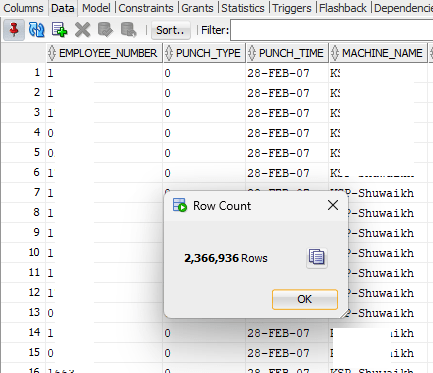
We’ve bio-metric devices that are used for attendances purposes. These devices offload the data to a Microsoft SQL database instance and using transactional SQL, we register them with our Oracle database. The technical part of it. The table that stores the fingerprints has 2.3 Million rows as on date and I used the same table to understand how the indexing works.

There was one Index on this table (Yes, I created it), that I dropped before experimenting as the Index was never used! The logic behind the query is:

I should get the first punch in time for the employee, identified by type “0” and last punch out for the employee, identified by type “1”, the machine name on which the employee has registered in and out punches. Each employee might use the bio-metric devices at different locations for door accesses or other purposes like a proof of visiting another office. Without the Index on this table, let us see how Oracle plans the execution.

This table has just few columns and sought data is usually the punch time against the employee.

Regardless, the cost for the execution didn’t look appealing. So, I created an Index that has all the four columns referred in the main and inline queries.

This time the cost looked far better, however, I could see that the base table still being used when there were no additional columns from the base table referred.

Here comes the thumb rule for indexes (I think). Indexes are not used unless a condition is used against one of the indexed columns! Let us see, whether this makes any sense.

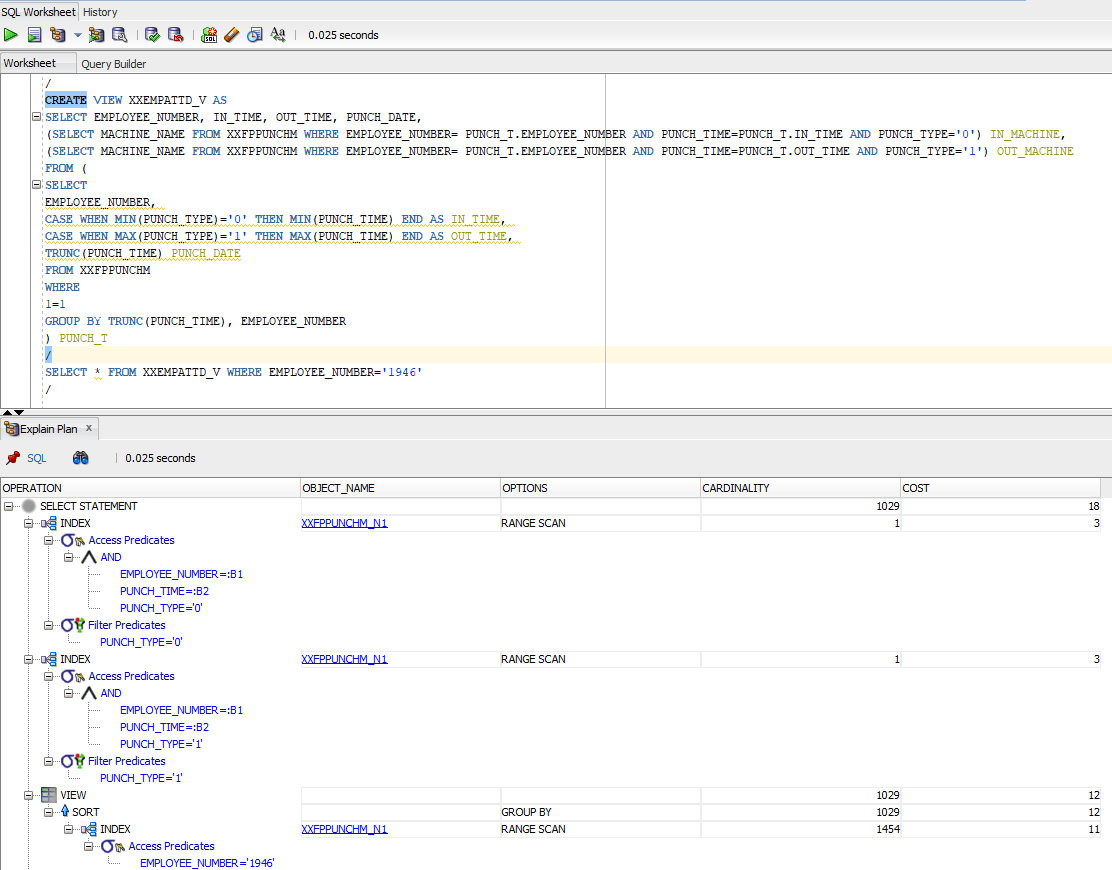
I created a view against the above query to be more certain.

After creating the view, I did a simple select * against the view and the execution plan brought me the same results discussed above. Wherever the predicates were used, query used the existing Index and for the rest, did the base table scan.

So I went ahead against my “understanding” and added a condition to Select * from query and did another Explain plan.

This time, the cardinality, ie the total number of rows fetched came down to just a four digit number, base table was not referred and the cost was dirt cheap compared to the earlier situations.

Let’s summarize everything now.

  1. Indexes are mostly effective about large tables
  2. Oracle will use indexes only when one of the columns used in the index is used against a predicate. Said, I created a view against our dear Scott.Emp table and “Select * from emp;” used that index. I don’t know why and I don’t care!
  3. Add up IS NOT NULL against all your index columns in your query to make sure that your Index is used instead of base table.

Now, I needed to understand further. Hence, I went back to the HR sample schema and chose the table “Employees” this time for my continued experiments. As I said Scott.Emp, the results were the same.

HR.EMPLOYEES tables have many Indexes defined.

For the first query as seen with the image below, I didn’t include a predicate. Regardless, Oracle used the Index for the column

Then I tried another query with multiple columns and without predicate. Oracle used the Index this time as well.

Apparently, this gives me an idea like, for larger tables the Indexes are opted when predicates are available against indexed columns and for tables like HR.EMPLOYEES which has only 107 rows, if there is an index exist against the queried column exist, it is used by Oracle.

Cheers friends, it was fun learning something, once again my own way. Hope this helps few others out there who were breaking their heads to understand this horrible thing. Merry Christmas and a very Happy New Year to everyone out there.

Oracle Inventory | Cost manager not picking up transactions for a new organization

Quite recently we defined one new inventory organization while extending our retailing. After the setup, noticed that none of the transactions were getting costed and there were no error or messages in the lines.

After some dwelling we realized that initial settings for the organization sets the cost cutoff date for the organization to a date that looks somewhere closer to the application installation date. All we needed was to empty the column and relaunch the cost manager.

Navigation. INV Super User -> Setup -> Organization -> Parameters -> Costing tab & reset the cost cutoff date.

Hope this helps few out there! Merry Christmas & Happy New Year 2024 to everyone!