How to Properly Deregister Custom Tops in Oracle EBS manually

I’ve created a custom top for APEX integration with Oracle EBS R12 12.2.10 recently & by mistake choose 5001 instead of 50000+ for application id. Then I wanted to do it correct and proceeded with the documented procedures.

perl adDeregisterCustomProd.pl

This script errored out as the application id was less than 20000 (unfortunately, I didn’t copy the exact error messages). So, started a session with gemini3, that I recently subscribed. Well, although the AI helped to a great extend, finally I had to refer a blog that helped me to resolve the related issues & finally come up with a clean context file.

Lets’ see how it works. Shutdown the application instance & start deleting the custom top specific entries from related tables. As user “apps”

DELETE FROM fnd_product_installations WHERE application_id = 5001
/
DELETE FROM fnd_application_tl WHERE application_id = 5001
/
DELETE FROM fnd_application WHERE application_id = 5001
/
DELETE FROM fnd_oracle_userid WHERE oracle_id = 5001
/
commit
/

Now, delete the entry for your custom application from fnd_oam_context_custom, a step that shouldn’t be missed. Use the select statement to find out specific information about your custom application

DELETE FROM fnd_oam_context_custom WHERE upper(oa_var) LIKE '%XXAPEX%'
/
COMMIT
/

Now, as Oracle user “system” you need to drop the custom schema. I wanted to drop the custom schema “XXAPEX”

SELECT editions_enabled FROM dba_users WHERE username = 'XXAPEX'
/
DROP USER XXAPEX CASCADE
/

Now, remove the physical path for the custom application

rm -rf $XXAPEX_TOP

Usually, one should proceed with auto config and do an adop fs_clone to replicate the changes while using dual file systems. For me, after auto config, I was still seeing the custom top entry within the context file & no questions will help the AI to pinpoint my issue. Suggestions after suggestion auto config recreated the entry for the custom top inside the context file.

I gave the AI some rest time & started scavenging through blogs & came across the below one

Here the blogger is dealing with a situation that was raised while using “adDeregisterCustomProd.pl”. Fortunately, the blogger has copied the entire log of the activities and I found a very interesting entry

XXAR entry in topfile.txt is removed succesfully ..!

Well, that was it! I hurried to AI once again and asked for the physical location for the topfile.txt & removed the custom top entry from the list. Manually deleted the line from context file & ran auto config once again on “run” environment. Once the config completed, there were no more entries for the custom application to be found.

As we are using SSL for the EBS instance, restarted the application and proceeded with fs_clone. I am noting the fs_clone issues while using SSL to avoid another post. If you initiate the fs_clone without the application server being up using SSL, you are prone to hit the error

[user: applmgr] [VirtualHost: main] (13)Permission denied:  make_sock: could not bind to address [::]:443

The solution is simple, start the application server if it was shutdown & try fs_clone once again.
WordPress | Cannot create new posts or pages error

After some thoughts, I’ve decided to retire Google Ads from my blog as these auto ads started messing up with the content by overlapping. Years back, I opted to go for a hosted blog, hoping the ad revenue could be channeled for supporting education. Well, I think I have to find alternative means to support my cause :))

Back to the subject. Yesterday (12th Nov, 2025) I disabled Auto Ads on my Google Adsense and few minutes later, started a new post. Unfortunately I was presented with an error “TypeError: Class constructors cannot be invoked without ‘new’ at gt

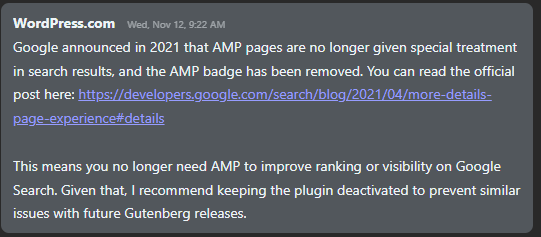
As the error was too generic, I rushed to raise a support ticket with WordPress & the issue was resolved by a “Human Agent” by disabling AMP plug-in that has a conflict with their Gutenberg plug-in!

The agent said, as Google has decided not to give AMP pages special treatments & the AMP plug-in was the culprit!

So if you are also clueless what went wrong all of a sudden, a good start will be by disabling the AMP plug-in. Hope this helps few out there! Happy blogging.

2025-10 Cumulative Update for Windows 11, version 25H2 for x64-based Systems (KB5066835) (26200.6899) | error

KB5066835 update fails to install. It just keeps on failing to install after multiple attempts. One of the most efficient methods to resolve this problem quickly is to rename the Windows\SoftwareDistribution folder & run the Windows update once again.

Steps

  • Stop the Windows Update Service from Windows Services
  • Stop BITS
  • Go to Windows folder, rename SoftwareDistribution folder to softwaredistribution.old or softwaredistribution.littlejoe (up to you). You may asked for Administrative confirmations.
  • Restart Windows
  • Check for updates or click the retry button and everything should be fine now.

Applies on both Windows 10 and Windows 11 distributions while the update with issues is specific to Windows 11.

Oracle EBS R12 AP invoice batches entry WHEN-VALIDATE-ITEM error

Even Oracle’s developers could miss few details and end up with nasty bugs at customers’ end. Would they fix them against customer reports? Not always…This leaves few of the bugs open for years.

The perfect example is Oracle Accounts Payable Invoice batches entry form. If the Supplier site doesn’t have a valid payment method set, the form will show you a WHEN-VALIDATE-ITEM error message by the status line and will not let you proceed further.

Simple, efficient and system generated! Nothing else to be done. Well, if you are stuck, open the supplier details and check whether the party has a default payment method set, if yes, go to the supplier site record for the organization where the error happens set up the payment method. For other errors, Oracle might have some other error messages ;)

Oracle EBS R12 receivables | SQL Query for customer invoices and payments

This is our 13th year with Oracle EBS R12 and we hardly use any standard reports. Recently, after implementing Tax for our Bahrain operations, I was asked to modify the Customer SOA accommodating the tax requirements.

I opened up the view, that the implementation partner made, and found that the view had unnecessary joins and grouping using names for transactions and other. I changed the base query with the below.

Select 
a.org_id, a.payment_schedule_id,
a.amount_due_original, a.amount_due_remaining, a.class, a.invoice_currency_code, a.customer_id, a.customer_trx_id,
a.amount_line_items_original, a.amount_line_items_remaining
,a.tax_original, a.tax_remaining, a.discount_original, a.discount_remaining
,a.trx_number,a.trx_date, b.purchase_order, b.interface_header_attribute1 order_number, interface_header_attribute2 order_type,interface_header_attribute6 order_line_id
,c.header_id order_header_id
,sum(a.amount_due_remaining) over (order by a.payment_schedule_id asc) running_total
from AR_PAYMENT_SCHEDULES_ALL a 
left outer join RA_CUSTOMER_TRX_ALL b on a.CUSTOMER_TRX_ID = b.CUSTOMER_TRX_ID
left outer join oe_order_lines_all c on b.interface_header_attribute6=c.line_id
where
1=1
and a.org_id = 285
and a.customer_id=(select customer_id from ar_customers where customer_number='227634')
--and a.amount_due_remaining > 0 --uncomment for unmatched invoices only listing
order by a.payment_schedule_id
/

Later a new view was created like following:

CREATE OR REPLACE VIEW OMSCUSTSOA_V
AS
Select 
a.org_id, a.payment_schedule_id,
a.amount_due_original, a.amount_due_remaining, a.class, a.invoice_currency_code, a.customer_id, a.customer_trx_id,
a.amount_line_items_original, a.amount_line_items_remaining
,a.tax_original, a.tax_remaining, a.discount_original, a.discount_remaining
,a.trx_number,a.trx_date, b.purchase_order, b.interface_header_attribute1 order_number, interface_header_attribute2 order_type,interface_header_attribute6 order_line_id
,c.header_id order_header_id
from AR_PAYMENT_SCHEDULES_ALL a 
left outer join RA_CUSTOMER_TRX_ALL b on a.CUSTOMER_TRX_ID = b.CUSTOMER_TRX_ID
left outer join oe_order_lines_all c on b.interface_header_attribute6=c.line_id
where
1=1
/

Subsequently, for any customer, the view is referred in the final query.

Select a.*, sum(amount_due_original) over(order by payment_schedule_id asc) running_total
from OMSCUSTSOA_V a
where 
1=1
and a.org_id=285 
--and a.amount_due_remaining > 0 --this condition will fetch open invoices that are yet to be matched
and a.customer_id=(select customer_id from ar_customers where customer_number='227634')
order by payment_schedule_id
/

Hope this helps few out there!

Oracle Inventory | Item update API | EGO_ITEM_PUB.ITEM_TBL_TYPE

Kuwait commerce department is making it mandatory to include Arabic in the item descriptions and we also started working on this requirement. Our Oracle EBS R12 environment is set for both English and Arabic, hence the only task was to update the Arabic description for the items. We’ve considerably large items database and updating such a huge repository definitely required an API interface. We selected a small set of items for the first attempt and everything worked as expected, however started getting multiple errors when we tried to execute the same API for 10k items. One of the errors as seen below (The question marks should be SQL Developer’s bug) and I was able to pick the words “MTL_ITEM_BULKLOAD_RECS_N2” and “APPS_TS_INTERFACE” from the error message.

EGO_ITEM_PVT Process_Items: ORA-01654: INV.MTL_ITEM_BULKLOAD_RECS_N2 APPS_TS_INTERFACE
Initialized applications context: 1353 50599 401
Error Messages :
??? ??? ??? ????? ?? ????? EGO_ITEM_PVT ?????? Process_Items: ORA-01654: ?? ???? ?? ???? INV.MTL_ITEM_BULKLOAD_RECS_N2 ?????? 16  ?????? ?????? APPS_TS_INTERFACE
 ???? ??????? ?????? ?????? ?? ?????? ????? ?????

Searched Oracle support documents and couldn’t find anything relevant until I noticed the term “APPS_TS_INTERFACE” & as I handle the Oracle EBS R12 12.2 database myself, immediately assumed the same to be another APPS related tablespace. I was not wrong, the seeded tablespace comes with 2 data files and both were almost full with just few kilobytes left. All I needed was to add new data file with a size of 4GB (didn’t want to take another risk). We’ve been using the application for last 13 years and the tablespace size until the new file was merely 3GBs, hence the new data file should hold the fort for another many years ahead.

We were updating the Arabic description part of the master items and the sample API as given below.

SET DEFINE OFF;
SET SERVEROUTPUT ON SIZE UNLIMITED;

DECLARE
        x_item_tbl		     EGO_ITEM_PUB.ITEM_TBL_TYPE;     
        x_message_list     Error_Handler.Error_Tbl_Type;
        x_return_status		 VARCHAR2(2);
        x_msg_count		     NUMBER := 0;
    
        l_user_id		      NUMBER := -1;
        l_resp_id		      NUMBER := -1;
        l_application_id	NUMBER := -1;
        
        l_rowcnt		      NUMBER := 1;
        l_api_version		   NUMBER := 1.0; 
        l_init_msg_list		 VARCHAR2(2) := FND_API.G_TRUE; 
        l_commit	      	 VARCHAR2(2) := FND_API.G_FALSE; 
        l_item_tbl		     EGO_ITEM_PUB.ITEM_TBL_TYPE; 
        l_role_grant_tbl	 EGO_ITEM_PUB.ROLE_GRANT_TBL_TYPE; 
        l_user_name		VARCHAR2(30) := 'USERNAME';
        l_resp_name		VARCHAR2(30) := 'XYZ INV Super User';    
        
        l_item_catalog_group_id NUMBER := 0;
		
		--CREATE a staging table with the column names as given in the below select statement.
		--If your staging table has different column names, adjust the below select statement.
        
        CURSOR item_list IS
        SELECT ORG_ID,INVENTORY_ITEM_ID,ITEM_CODE, DESC_AR FROM XX_AR_DESCRIPTIONS
        WHERE NVL(STATUS,'E')='E'; -- for retry purposes.


BEGIN
         -- Get the user_id
          SELECT user_id
          INTO l_user_id
          FROM fnd_user
          WHERE user_name = l_user_name;
        
          -- Get the application_id and responsibility_id
          SELECT application_id, responsibility_id
          INTO l_application_id, l_resp_id
          FROM fnd_responsibility_vl
          WHERE responsibility_name = l_resp_name;
        
          FND_GLOBAL.APPS_INITIALIZE(l_user_id, l_resp_id, l_application_id);  

--Set the language context, here we are updating the item master with Arabic language

--Sample few other languages
--FND_GLOBAL.SET_NLS_CONTEXT(P_NLS_LANGUAGE => 'PORTUGUESE');
--FND_GLOBAL.SET_NLS_CONTEXT(P_NLS_LANGUAGE => 'AMERICAN');
--FND_GLOBAL.SET_NLS_CONTEXT(P_NLS_LANGUAGE => 'JAPANESE');
--Is It Possible to Update Item Description in Local Language in MTL_SYSTEM_ITEMS_TL Using Public API ? (Doc ID 2542546.1)

  
  FND_GLOBAL.SET_NLS_CONTEXT(P_NLS_LANGUAGE => 'ARABIC');
          dbms_output.put_line('Initialized applications context: '|| l_user_id || ' '|| l_resp_id ||' '|| l_application_id );

        
        FOR i in item_list loop
            l_item_tbl(l_rowcnt).Transaction_Type := 'UPDATE';
            l_item_tbl(l_rowcnt).inventory_item_id := i.inventory_item_id;
            l_item_tbl(l_rowcnt).organization_id := i.org_id;--Should be your master inventory organization id.
            --l_item_tbl(l_rowcnt).ATTRIBUTE6 := i.movement;
            l_item_tbl(l_rowcnt).Description := i.DESC_AR;

          -- call API to load Items
         EGO_ITEM_PUB.PROCESS_ITEMS( 
                                   p_api_version            => l_api_version
                                   ,p_init_msg_list         => l_init_msg_list
                                   ,p_commit                => l_commit
                                   ,p_item_tbl              => l_item_tbl
                                   ,p_role_grant_tbl        => l_role_grant_tbl
                                   ,x_item_tbl              => x_item_tbl
                                   ,x_return_status         => x_return_status
                                   ,x_msg_count             => x_msg_count);
                                    

--How To Clean Or Avoid Error Data In Interface Tables Using EGO_ITEM_PUB.Process_Item (Doc ID 1548555.1)

        IF (x_return_status <> FND_API.G_RET_STS_SUCCESS) THEN
          DBMS_OUTPUT.PUT_LINE('Error Messages :');
          Error_Handler.GET_MESSAGE_LIST(x_message_list=>x_message_list);
          FOR i IN 1..x_message_list.COUNT LOOP
            DBMS_OUTPUT.PUT_LINE(x_message_list(i).message_text);
          END LOOP;
          DBMS_OUTPUT.PUT_LINE( i.item_code||' Failed Update'); --comment, only for correction purposes.
--We willl update the staging table with failed status
          UPDATE XX_AR_DESCRIPTIONS SET STATUS='E' WHERE INVENTORY_ITEM_ID=i.INVENTORY_ITEM_ID;
          ELSE
--Update the staging table with success status
          UPDATE XX_AR_DESCRIPTIONS SET STATUS='S' WHERE INVENTORY_ITEM_ID=i.INVENTORY_ITEM_ID;
       END IF;
END loop;
commit;

EXCEPTION
WHEN OTHERS THEN
DBMS_OUTPUT.PUT_LINE('Exception Occurred :');
DBMS_OUTPUT.PUT_LINE(SQLCODE ||':'||SQLERRM);
DBMS_OUTPUT.PUT_LINE('=====================================');
ROLLBACK;
RETURN;
        
END;


The following documents were referred during the attempts, which you may not experience.

  • Is It Possible to Update Item Description in Local Language in MTL_SYSTEM_ITEMS_TL Using Public API ? (Doc ID 2542546.1)
  • How To Clean Or Avoid Error Data In Interface Tables Using EGO_ITEM_PUB.Process_Item (Doc ID 1548555.1)

Windows robocopy | Using volume ids instead of a drive letter.

You connect a removable disk to your Windows box, immediately the drive is assigned a letter. If you have multiple partitions on the disk, each partition will get a drive letter, and it’s how Windows work. This could cause some kind of annoyance when these disks are constantly disconnected for others and reconnected. One tricky solution to this is, assigning a drive letter like W,X,Y as Windows assigns the first free drive letter to the newly connected disk which is in the alphabetical order. Lack of functionality to reserve a drive letter for a particular device could add more troubles when batch files or PowerShell scripts totally depend upon drive letters for a successful execution, example a backup.

Today we will see how to use volume ids instead of drive letters for Windows robocopy, one of the best free backup tools that you could ever find.

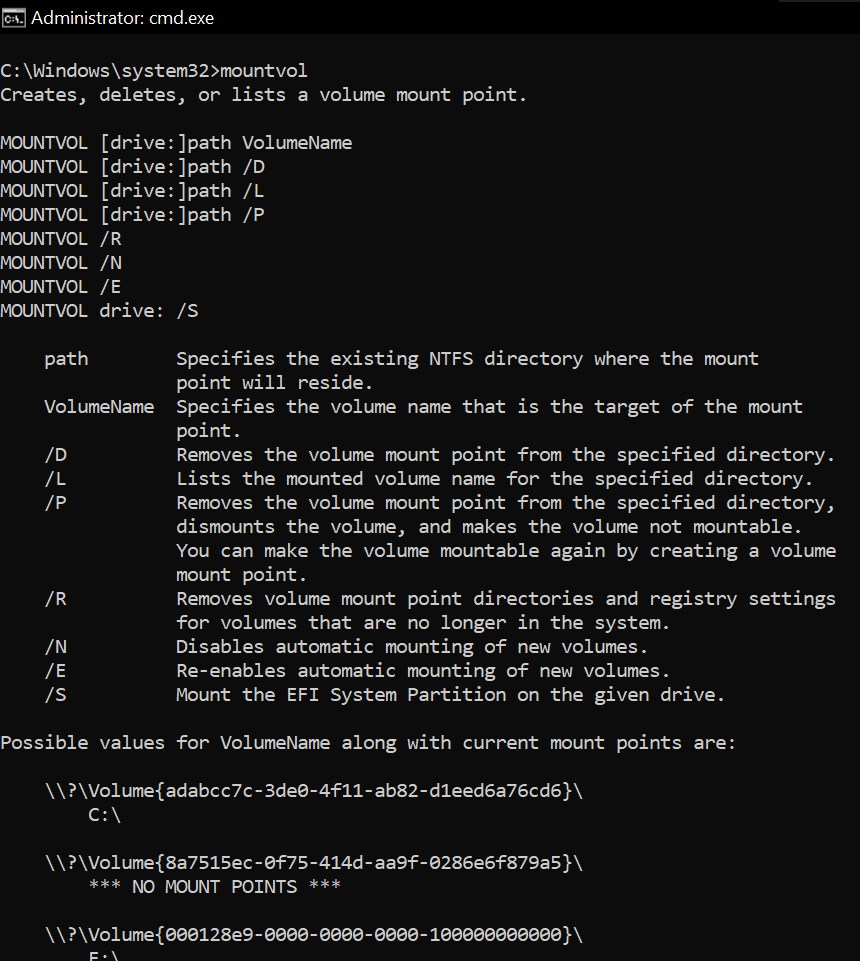
Open command prompt as administrator and execute the command “mountvol”. Immediately after few help text, the output will show the ids for all the volumes currently present.

Copy the Volume Id for the drive letter which is your target/source. Modify the backup.ps1 as given below example!

#Author: Rajesh Thampi
#Date: Few years back
#Last modified on: 14th June 2025
#Partner-in-crime: Microsoft Copilot

<#
Hint
Use "mountvol" command at prompt to get the currently connected disks and their volume ids, drive letters
Get the volume id for the drive letter, replace below.
Volume Id will change when you format the disc next time.
The escape character is ` not ' after the variable $DriveLetter
#>

$VolumeID = "Volume{d2540346-9901-49e9-9f57-413d95f52744}"  # Replace with actual Volume ID
$DriveLetter = Get-Partition | Where-Object { $_.AccessPaths -match $VolumeID } | Select-Object -ExpandProperty DriveLetter

if ($DriveLetter) {
    Write-Output "Drive Letter: $DriveLetter`:\KeepACopy"
} else {
    Write-Output "No matching drive letter found for Volume ID: $VolumeID"
}


$DestinationPath="E:\ERP-Inhouse Developments"
$SourcePath="$DriveLetter`:\ERP-Inhouse Developments"
$logfile = "C:\Scripts\logs\Inhouse_Developments_$(Get-Date -Format 'yyyy-MM-dd_HH-mm-ss').log"

robocopy $SourcePath $DestinationPath /MIR /ZB /R:5 /W:10 /LOG:$logfile


$DestinationPath="E:\MyProjects"
$SourcePath="$DriveLetter`:\MyProjects"
$logfile = "C:\Scripts\logs\MyProjects_$(Get-Date -Format 'yyyy-MM-dd_HH-mm-ss').log"

robocopy $SourcePath $DestinationPath /MIR /ZB /R:5 /W:10 /LOG:$logfile


$DestinationPath="E:\KeepACopy"
$SourcePath="$DriveLetter`:\KeepACopy"
$logfile = "C:\Scripts\logs\KeepACopy_$(Get-Date -Format 'yyyy-MM-dd_HH-mm-ss').log"

robocopy $SourcePath $DestinationPath /MIR /ZB /R:5 /W:10 /LOG:$logfile

#Finally cleanup the log directory, deleting all files that are more than 5 days old.
#This is useful incase if you are regularly using the script with a scheduled job.
Get-ChildItem 'C:\Scripts\logs' -Filter '*.log' | Where-Object { $_.LastWriteTime -lt (Get-Date).AddDays(-5) } | Remove-Item

Adjust your scripts based on your requirements. Now, you don’t have to worry about the drive letter changes anymore. Just plug your removable disk, execute the PowerShell script as administrator and you are all good.

Just make sure that you have set the PowerShell Execution Policy properly before trying to run scripts.

That’s all folks.

Linux Backup | Using Labels for removable media

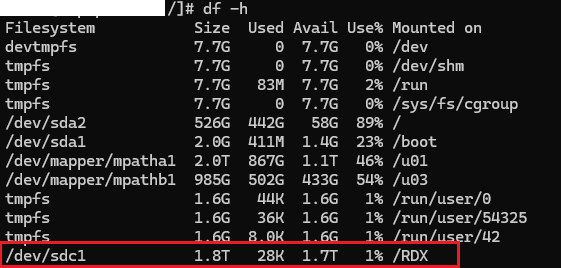
We use Tandberg RDX 2TB data cartridges for “EXTRA” backups on a daily basis. One of the major concerns while designing the homegrown solution was how to make the OS to mount the newly inserted cartridge to the same mount point every time, where the bash script would rsync the files. Please note, you can use the same with your other types of removable media also.

After some googling, consultations we decided to use Linux’s volume labeling for this requirement. I will do a walkthrough of all the processes involved. This should be useful for techies those do not use Linux on daily, however forced to at times.

Once after inserting a fresh cartridge, fdisk shows the above information against the cartridge. Identifying the device could take some practice for a Linux beginner, I am sorry about that. Making sure that you identified the correct device is the success key. Making blunders could land you up in unrecoverable mess. So be careful with rest of the instructions.

Remove the existing HPFS/NTFS/exFAT first

[root@hostname /]# fdisk /dev/sdc
Welcome to fdisk (util-linux 2.23.2).

Changes will remain in memory only, until you decide to write them.
Be careful before using the write command.


Command (m for help): m
Command action
   a   toggle a bootable flag
   b   edit bsd disklabel
   c   toggle the dos compatibility flag
   d   delete a partition
   g   create a new empty GPT partition table
   G   create an IRIX (SGI) partition table
   l   list known partition types
   m   print this menu
   n   add a new partition
   o   create a new empty DOS partition table
   p   print the partition table
   q   quit without saving changes
   s   create a new empty Sun disklabel
   t   change a partition's system id
   u   change display/entry units
   v   verify the partition table
   w   write table to disk and exit
   x   extra functionality (experts only)

List existing partitions, in our case RDX cartridge has single partition from the factory.

Command (m for help): p

Disk /dev/sdc: 2000.4 GB, 2000394739712 bytes, 3907020976 sectors
Units = sectors of 1 * 512 = 512 bytes
Sector size (logical/physical): 512 bytes / 512 bytes
I/O size (minimum/optimal): 512 bytes / 512 bytes
Disk label type: dos
Disk identifier: 0x00000000

   Device Boot      Start         End      Blocks   Id  System
/dev/sdc1            2048  3907020799  1953509376    7  HPFS/NTFS/exFAT

We will proceed with deleting the existing partition using the command “d”

Command (m for help): d
Selected partition 1
Partition 1 is deleted

Command (m for help): w
The partition table has been altered!

Calling ioctl() to re-read partition table.
Syncing disks.

We will create a new partition

Command (m for help): p

Disk /dev/sdc: 2000.4 GB, 2000394739712 bytes, 3907020976 sectors
Units = sectors of 1 * 512 = 512 bytes
Sector size (logical/physical): 512 bytes / 512 bytes
I/O size (minimum/optimal): 512 bytes / 512 bytes
Disk label type: dos
Disk identifier: 0x00000000

   Device Boot      Start         End      Blocks   Id  System

Command (m for help): n
Partition type:
   p   primary (0 primary, 0 extended, 4 free)
   e   extended
Select (default p): p
Partition number (1-4, default 1):
First sector (2048-3907020975, default 2048):
Using default value 2048
Last sector, +sectors or +size{K,M,G} (2048-3907020975, default 3907020975):
Using default value 3907020975
Partition 1 of type Linux and of size 1.8 TiB is set

Command (m for help): w
The partition table has been altered!

Calling ioctl() to re-read partition table.
Syncing disks.

Confirm the changes

Command (m for help): p

Disk /dev/sdc: 2000.4 GB, 2000394739712 bytes, 3907020976 sectors
Units = sectors of 1 * 512 = 512 bytes
Sector size (logical/physical): 512 bytes / 512 bytes
I/O size (minimum/optimal): 512 bytes / 512 bytes
Disk label type: dos
Disk identifier: 0x00000000

   Device Boot      Start         End      Blocks   Id  System
/dev/sdc1            2048  3907020975  1953509464   83  Linux

Command (m for help): q

Now we will proceed to format the file system for ext4. There are newer file systems, however our requirement is to have ext4 for standardization across the attached devices.

[root@hostname /]# mkfs.ext4 /dev/sdc1
mke2fs 1.45.4 (23-Sep-2019)
/dev/sdc1 contains a ntfs file system labelled 'QuikStor 2.0TB'
Proceed anyway? (y,N) y
Creating filesystem with 488377366 4k blocks and 122101760 inodes
Filesystem UUID: 056c2a9d-2482-4637-a823-9ef1e2ae9d30
Superblock backups stored on blocks:
        32768, 98304, 163840, 229376, 294912, 819200, 884736, 1605632, 2654208,
        4096000, 7962624, 11239424, 20480000, 23887872, 71663616, 78675968,
        102400000, 214990848

Allocating group tables: done
Writing inode tables: done
Creating journal (262144 blocks):
done
Writing superblocks and filesystem accounting information: done

Finally, the most import part of the entire exercise. Labeling the partition. You may need additional software downloads for e2label.

[root@hostname /]# e2label /dev/sdc1 RDXTAPE

Finally modifying the fstab to mount the device automatically

#
# /etc/fstab
# Created by anaconda on Wed Sep 16 11:06:12 2020
#
# Accessible filesystems, by reference, are maintained under '/dev/disk'
# See man pages fstab(5), findfs(8), mount(8) and/or blkid(8) for more info
#
LABEL=RDXTAPE     /RDX    ext4   defaults 0 0

Issue the command mount to immediately mount this partition to a mount point.

[root@hostname /]# mount -a

That’s all folks!

Visual Studio 2022 | net::ERR_CERT_INVALID

One of the teething issues a developer will face while using Visual Studio 2022 is related to IIS Express SSL certificate. My primary role as an Oracle developer, developing .Net applications was always a side kick, that complemented the inhouse extensions for Oracle EBS. This time I was trying to upgrade such a project once after getting a new development laptop at work. This project was framed using Visual Studio 2019 community edition years back, however I chose Visual Studio 2022 community edition this time. After the mandatory upgrades, testing failed throwing the error “net::ERR_CERT_INVALID” using Microsoft Chrome browser. This was not the first time I came across this error and somehow, I forgot to document the steps that resolved this issue for me last time.

Few of my Google searches were not landing me on a proper solution, hence I tried Microsoft Copilot this time.

Obviously, my issues were resolved by the steps 1 and 2. Just make sure that Visual Studio is closed while attempting these steps.

Once the repair is over, open “Developer Command Prompt for VS 2022” as administrator. You can do this by pressing the CTRL key while clicking “Developer Command Prompt for VS 2022”

Now, run the first command

Accept the prompt.

Now, run the second command

You should accept to install the certificate. Open Visual Studio now and continue with the debugging that should work as expected this time.

I don’t remember experiencing SSL related issues with Visual Studio 2019, that I used for years.